


What is API integration? It is the process of connecting different software systems through APIs so they can exchange data, trigger actions, and work together automatically. API integration helps businesses streamline workflows such as payments, CRM automation, cloud applications and AI model deployment. In this guide, learn how API integration works and how FPT AI Factory helps teams use API-based services such as Serverless Inference to bring AI models into real applications.
Key Takeaways:
- API integration connects two or more software systems through APIs so they can exchange data and automate workflows automatically
- Common types include internal, partner, third-party, cloud/SaaS, and AI/ML integration
- Core components: requests/responses, endpoints, authentication, data mapping, and real-time synchronization
- Main benefits: workflow automation, real-time data exchange, better customer experience, and scalable infrastructure
- For AI applications, API integration connects models to chatbots, agents, and business systems via inference endpoints
1. What Is API Integration?
API integration means using an application programming interface, or API, to connect two or more software systems so they can communicate with each other. Instead of manually copying data between applications, APIs allow systems to send requests, receive responses, and exchange information in a structured way. API integration as the connection of applications and systems through APIs so they can exchange data and automate workflows.
API integration plays a central role in modern digital systems. It helps cloud applications, SaaS platforms, mobile apps, enterprise software, AI systems and automation workflows connect and exchange data seamlessly. As businesses use more tools and data sources, API integration reduces manual work, improves data consistency and supports scalable operations. This makes it an essential foundation for connected customer experiences, automated business processes and AI-powered applications.
For example, when a customer places an online order, an e-commerce website may use API integration to send payment details to a payment gateway, update inventory in a warehouse system, and push customer information into a CRM. The customer only sees one smooth checkout experience, but several systems are working together behind the scenes.
2. How Does API Integration Work?
API integration works by allowing one application to send a request to another application through an API. The receiving system processes the request and returns a response, usually in a structured format such as JSON. This process can happen in real time, on a schedule or when a specific event triggers the connection.
In business workflows, API integration usually includes several components: requests and responses, endpoints, authentication, data mapping, and synchronization. Each part helps ensure that systems exchange the right data securely and consistently.

API integration allows applications to communicate securely by sending requests, using endpoints, verifying access, mapping data and synchronizing responses.
2.1. API requests and responses
An API request is the message one system sends to another system. It may ask for data, submit new information or trigger an action. For example, a website may send a request to a payment provider to confirm whether a transaction has been approved.
An API response is the message returned by the receiving system. It may include the requested data, a confirmation message or an error code. For example, the payment provider may return a response saying the payment was successful, declined or requires additional verification.
In AI workflows, the same request-response pattern can connect applications to an OpenAI-compatible inference API so a chatbot, agent or internal tool send prompts and receive model outputs in real time.
2.2. API endpoints
An API endpoint is a specific URL or access point where a system can send API requests. Each endpoint usually supports a specific function. For example, one endpoint may retrieve customer information, while another endpoint may create a new order.
Clear endpoint structure helps developers understand how to connect systems correctly. It also makes API documentation easier to use, which is important when teams need to build, test, and maintain integrations across different applications.
2.3. Authentication and API keys
Authentication helps verify that the application sending the request is allowed to access the API. Common methods include API keys, access tokens, and OAuth. These methods protect systems from unauthorized access and help control which applications can access which data.
For example, when an application uses an API key, the key acts like a secure identifier. The API checks the key before processing the request to confirm that the application is allowed to access the endpoint. If the key is missing, invalid or expired, the system may reject the request.to prevent unauthorized access.
This security step is important because, without proper authentication, unapproved systems could access the API, sensitive data could be exposed and AI endpoints could be misused. For example, an unauthorized application might send excessive requests to an AI model endpoint, access restricted data or increase infrastructure costs without permission.
For this reason, production API systems usually include multiple security controls. These may include access control to define which users or applications can use each endpoint, rate limits to prevent request abuse, token expiration to reduce long-term credential risks, system monitoring to detect abnormal activity, and audit logs to support security review, troubleshooting and traceability.
2.4. Data mapping and transformation
Data mapping ensures that information from one system matches the structure required by another system. For example, one application may store a customer’s phone number as “phone,” while another system may require the field name “mobile_number.” API integration needs to map these fields correctly.
Data transformation goes one step further by converting data into the right format before it is sent to another system. This may include changing date formats, converting currencies, standardizing naming conventions or restructuring data fields. For example, a date may need to be converted from “DD/MM/YYYY” to “YYYY-MM-DD,” or a price may need to be converted from one currency to another before being processed by a finance system.
Without proper mapping and transformation, API integration may produce duplicate records, synchronization errors, and inconsistent reporting. Data transformation is needed to convert information into the right format before it moves between systems, such as date formats, currencies, naming conventions, and data structures. For example, if one system records dates as “DD/MM/YYYY” while another requires “YYYY-MM-DD,” or if customer names and product codes follow different naming rules, the integration may fail to sync data correctly. Over time, this can lead to inaccurate customer records, mismatched financial data, and unreliable business
2.5. Real-time data synchronization
Real-time data synchronization means systems update information immediately or near instantly after an event happens. For example, when a customer buys the last item in stock, the inventory system can update the e-commerce website immediately to avoid overselling.
This is especially important for customer-facing applications, financial transactions, logistics tracking, and AI-powered systems. Real-time synchronization helps businesses reduce manual work, avoid outdated data, and improve user experience.

API integration uses requests, endpoints, authentication, data transformation and real-time synchronization to exchange data between systems.
3. Types of API Integration
API integration can take different forms depending on who owns the systems, how data is exchanged, and what business goal the integration supports. Some integrations connect internal tools, while others connect external platforms, SaaS applications or AI services.
3.1. Internal API integration
Internal API integration connects systems inside the same organization. For example, a company may connect its HR system with payroll software so employee information can be updated automatically. This reduces manual data entry and keeps internal records consistent.
Internal API integration is useful when teams want to automate repetitive workflows across departments. It can connect finance, sales, HR, operations, and customer support systems into a more unified digital workflow.
3.2. Partner API integration
Partner API integration connects a company’s system with a trusted business partner’s system. For example, a retailer may connect its order management system with a logistics partner so shipping status can be updated automatically.
This type of API integration is common in supply chain, banking, insurance, travel and e-commerce. It allows companies to collaborate more efficiently without giving partners full access to internal systems.
3.3. Third-party API integration
Third-party API integration connects a business application with an external service provider. Examples include payment gateways, email marketing tools, social login providers, map services and analytics platforms.
For example, an online store may integrate with Stripe or PayPal for payments, Google Maps for delivery location, and an email platform for automated order confirmations. MuleSoft notes that API integration helps businesses automate processes, synchronize data, and improve efficiency across applications.
3.4. Cloud and SaaS integration
Cloud and SaaS integration connects cloud-based tools such as CRM, ERP, marketing automation, data warehouses, and collaboration platforms. This helps teams move data between cloud applications without relying on manual exports and imports.
For example, when a new lead is created in a CRM, API integration can automatically send that information to a marketing automation platform, assign the lead to a sales representative, and update a reporting dashboard.
3.5. AI and machine learning integration
AI and machine learning integration connects AI models with real applications through APIs. For example, a company may use an API to send customer questions to an AI model and receive chatbot responses in real time. Another company may send images to a computer vision model for classification or quality inspection.
In production AI environments, APIs often connect more than just the model itself. They may link AI applications with orchestration frameworks, vector databases, inference endpoints, workflow tools and external business systems such as CRM, ERP or customer support platforms. For example, an AI assistant may retrieve relevant documents from a vector database, send the context to an inference endpoint, call a workflow tool to create a ticket and update the result in a CRM. This makes API integration essential for turning AI models into practical, connected business applications.
For AI teams, API integration is important because a trained model only creates business value when it can be used in real workflows. FPT AI Factory’s Serverless Inference is a relevant example because it allows teams to integrate AI models into agents and applications via API, with flexible deployment options for model serving
For a broader view of the production step, AI model deployment explains how trained models move from development into real applications, APIs and scalable operations
3.6 API Integration by Protocol Type
- REST: The most common API type, using JSON over HTTP. Lightweight, scalable, and easy to implement — the default choice for most modern web and AI integrations.
- SOAP: A more rigid, XML-based protocol with strict security standards. Common in banking, healthcare, and other highly regulated industries.
- GraphQL: Lets the requesting system specify exactly what data it needs, reducing over-fetching. Useful for apps with complex or limited-bandwidth data needs.
- Webhook: Pushes data automatically when a specific event occurs, instead of requiring the receiving system to repeatedly check for updates. Common for real-time notifications and event-driven workflows.
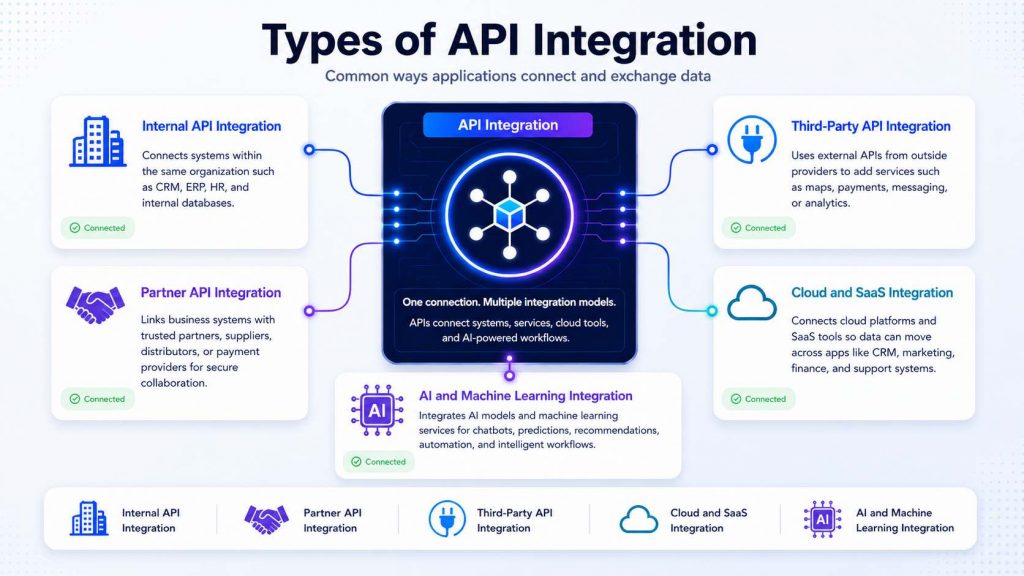
Types of API integration show how businesses connect internal systems, partners, third-party services, cloud platforms, and AI tools through secure data exchange.
4. Common API Integration Examples
API integration is already part of many digital experiences that users interact with every day. From online payment to AI model deployment, APIs help different systems exchange data and complete tasks automatically.
4.1. Payment gateway integration
Payment gateway integration connects an online store, app or booking platform with a payment provider. When a customer enters payment information, the website sends a secure API request to the payment gateway. The gateway verifies the transaction and returns a response to confirm whether the payment is approved.
For example, a fashion e-commerce store can integrate Stripe into its checkout page to accept card payments and digital wallets. When a customer clicks “Pay now,” the website sends payment details to Stripe through an API, and Stripe returns the payment result to the store. If the payment succeeds, the order status is automatically updated to “paid,” and the customer receives an order confirmation. Stripe documentation shows that businesses can build payment flows using Stripe Checkout, Payment Element and Stripe API libraries.
4.2. CRM and marketing automation integration
CRM and marketing automation integration connects customer data with email campaigns, sales workflows, and lead nurturing systems. When a new lead fills out a form, the information can be sent automatically to the CRM and added to the right marketing list.
For example, a B2B software company can connect its website form with HubSpot CRM. When a visitor registers for a webinar, the form submission is sent to HubSpot, where a new contact record is created or updated. The system can then add the lead to a marketing list, trigger a follow-up email and notify the sales team when the lead becomes qualified. HubSpot notes that CRM data can support segmentation, workflow automation, smart content, and lead scoring
4.3. E-commerce and inventory integration
E-commerce and inventory integration connects online storefronts with warehouse or inventory systems. When a customer places an order, the integration can reduce stock quantity, update order status, and send fulfillment details to the warehouse.
For example, a Shopify store can connect its online storefront with warehouse inventory. When a customer buys a product, the system automatically reduces the available stock for that product variant. If the item is fulfilled from a different location, the inventory can be adjusted accordingly. Shopify documentation explains that when a tracked product variant is included in an order, Shopify decrements inventory for that variant
4.4. Social login integration
Social login integration allows users to sign in with existing accounts such as Google, Facebook, Apple or LinkedIn. Instead of creating a new username and password, users authorize the website or app to verify their identity through the social platform’s API.
For example, an online learning platform can allow students to sign in with Google instead of creating a new account. When a student clicks “Sign in with Google,” Google verifies the user’s identity and returns basic profile information such as the user’s Google ID, name and email address. This helps the platform simplify registration and reduce friction during login. Google’s documentation states that after a user signs in with Google using default scopes, the application can access the user’s Google ID, name, profile URL and email address
4.5. Analytics and reporting integration
Analytics and reporting integration connects business systems with dashboards, data platforms or reporting tools. Instead of downloading spreadsheets manually, APIs can send updated data to reporting systems automatically.
For example, a marketing team can connect Google Analytics, Google Ads, and Google Sheets to Looker Studio to build a real-time performance dashboard. Instead of exporting reports manually, the dashboard can automatically display website traffic, conversions, ad performance, and campaign results in one place. Looker Studio connectors link underlying data to data sources, including Google Analytics, Google Ads, BigQuery, and Google Sheets.
4.6. AI model integration
AI model integration connects a trained AI model with an application, workflow or agent. For example, a customer support platform can integrate an AI model into its chatbot through an inference API. When a customer asks a question, the chatbot sends the request to the AI model, receives a generated response and displays it to the user in real time. FPT AI Factory’s Serverless Inference supports OpenAI-compatible APIs and multiple AI models, making it suitable for integrating models into chatbots, agents, and business applications.
5. Benefits of API Integration
API integration helps businesses connect systems, automate workflows, and use data more effectively. Instead of building every function from scratch, companies can connect existing applications and services through APIs.
Key benefits include:
- Workflow automation: API integration reduces manual tasks by allowing systems to trigger actions automatically.
- Real-time data exchange: Teams can access updated information across systems without waiting for manual reports.
- Better customer experience: Users can enjoy smoother payments, faster support, personalized recommendations, and connected services.
- Higher operational efficiency: Businesses can reduce duplicate work, data entry errors, and disconnected processes.
- Faster product development: Developers can connect to external services instead of rebuilding common functions from the beginning.
- Scalable digital infrastructure: APIs make it easier to add new applications, partners or AI services as business needs grow.
For AI and cloud teams, API integration also helps turn models, data, and infrastructure into usable applications. This is why API-first design is becoming important for chatbots, AI agents, SaaS platforms, and enterprise automation workflows.
API integration also depends on reliable data pipelines because AI systems need fresh, consistent data flowing from business systems into analytics, training, and inference workflows.
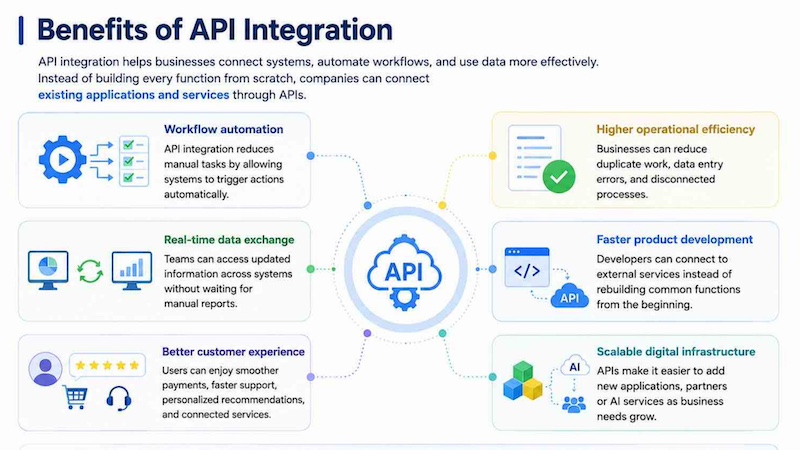
API integration helps businesses automate workflows, exchange real-time data, improve customer experience, boost efficiency, speed up development
6. What is the difference between API and API integration?
An API and API integration are related, but they are not the same. An API is the interface that allows systems to communicate. API integration is the process of using that interface to connect systems and create a working workflow.
| Criteria | API | API Integration |
| Definition | A set of rules that allows software systems to communicate | The process of connecting systems through APIs |
| Main purpose | Provide access to data, functions or services | Make systems work together automatically |
| Scope | Usually one interface or service connection point | A full connection between two or more applications |
| Key function | Sends and receives requests and responses | Moves data, triggers actions, and synchronizes workflows |
| How it works | Exposes endpoints that other systems can call | Uses API endpoints, authentication, mapping, and logic |
| Who uses it | Developers, platforms, and software providers | Developers, IT teams, business operations, and product teams |
| Example | A payment API that confirms transactions | An online store using that payment API during checkout |
A simple way to understand the difference is this: an API is like a menu that shows what a system can do, while API integration is the working process of ordering from that menu and receiving the result inside another application.
7. API Integration Challenges
API integration brings many benefits, but it also requires careful planning. Poorly managed integrations can create security risks, performance issues, and data inconsistencies. Businesses should treat API integration as part of system architecture, not just a quick technical connection.
7.1. Authentication and authorization risks
APIs often provide access to important business data. If API keys, tokens or permissions are not managed properly, unauthorized users may gain access to sensitive systems. This can create security and compliance risks.
To reduce this risk, teams should use secure authentication methods, rotate API keys regularly, apply least-privilege access, and monitor unusual API activity. Security controls are especially important for payment, customer data, and AI systems.
7.2. Data privacy and compliance
API integration may involve personal data, financial information or confidential business records. When data moves between systems, companies need to ensure that it is protected and handled according to relevant privacy regulations.
For example, an integration between a CRM and marketing platform should respect user consent, data retention rules ,and unsubscribe preferences. Without proper governance, API integration can create compliance problems even if the technical connection works.
7.3. API rate limits and performance bottlenecks
Many APIs have rate limits, which restrict how many requests can be sent within a certain time period. If an application sends too many requests, the API may slow down or reject requests. This can affect user experience and business operations.
Performance bottlenecks can also happen when data volume grows. Teams should design integrations with caching, retries, batching, and monitoring to handle traffic spikes and reduce unnecessary API calls.
7.4. Versioning and compatibility issues
APIs can change over time. A provider may update an endpoint, modify response formats, or remove older features. If the integration is not maintained, these changes can break workflows.
To avoid compatibility issues, teams should monitor API version updates, follow provider documentation, and test integrations regularly. Versioning is especially important when multiple applications depend on the same API connection.
8. API Integration for AI and Cloud Applications
API integration is becoming more important as businesses adopt AI and cloud applications. In cloud environments, APIs connect SaaS tools, data platforms, infrastructure services and business applications. In AI workflows, APIs connect models with chatbots, agents, analytics tools and production systems.
For example, Morgan Stanley’s AI Debrief shows how AI and API-connected systems can support business workflows. The tool generates meeting notes, surfaces action items, summarizes key points, drafts an email for an advisor to edit and send, and saves a note into Salesforce after a client meeting. This is how AI applications can connect with CRM systems and workflow tools to turn unstructured meeting data into structured business records and follow-up actions.
In AI and cloud applications, these workflows often combine several connected layers: LLM inference APIs, retrieval systems, workflow orchestration, and integrations with enterprise software. For example, an AI assistant may receive a user request, retrieve relevant context from internal documents, send the context to a large language model, trigger a workflow action, and update the result in a CRM, ERP or customer support system.
As AI workloads grow, API orchestration becomes more important. It helps teams manage latency, coordinate tools and services, route requests between different models, automate workflow steps and scale infrastructure operations more efficiently. Instead of treating each AI service as a separate component, API orchestration allows businesses to connect models, data, tools and applications into one reliable production workflow.
9. When Should Businesses Use API Integration?
Businesses should use API integration when they need different systems to exchange data, automate tasks or work together in real time. This is especially useful when manual processes become slow, repetitive or difficult to scale. With API integration, companies can connect business applications, improve data accuracy, and build more efficient digital workflows.
9.1. Connecting multiple business applications
API integration is useful when a business uses many applications for sales, finance, marketing, customer service or operations. For example, a company can connect its CRM, ERP, accounting software, and support platform so teams can access consistent information across departments. This helps reduce duplicated data entry and keeps business processes more connected.
9.2. Automating repetitive workflows
Businesses should also use API integration when teams spend too much time on repetitive tasks. For example, when a customer submits an online form, an API can automatically create a CRM record, send a confirmation email, and notify the sales team. This saves time, reduces human error, and allows employees to focus on higher-value work.
9.3. Syncing customer, sales, or operational data
API integration is important when customer, sales or operational data needs to stay updated across systems. For example, an e-commerce business can sync order status, inventory levels, and customer profiles between its website, warehouse system, and CRM. Real-time data synchronization helps teams make faster decisions and avoid outdated information.
9.4. Building AI-powered applications
API integration is essential for businesses that want to build AI-powered applications such as chatbots, virtual assistants, recommendation systems or document processing tools. Through APIs, an application can send user inputs to an AI model and receive responses, predictions or extracted data.
Businesses building AI-powered applications can also compare Agentic AI vs Generative AI to understand when simple content generation is enough and when workflows require planning, tools, and API-based actions
9.5. Scaling cloud and AI infrastructure
Businesses should use API integration when they need to scale cloud or AI infrastructure without manually managing every process. APIs can connect applications with cloud services, data platforms, monitoring tools, and AI inference endpoints. This makes it easier to support growing workloads, automate infrastructure operations and deliver more reliable digital services.
When cloud and AI workloads grow, an AI cloud platform can help teams combine GPU infrastructure, notebooks, inference services, and deployment tooling in one operating environment
10. FAQs
10.1. Is ChatGPT an API?
ChatGPT is an AI application, not simply an API. However, OpenAI provides APIs that developers can use to integrate AI model capabilities into their own applications. In general, an AI chatbot can be used through a user interface, while an API allows developers to connect the model to software systems and workflows.
10.2. Why is API integration important?
API integration is important because it allows different systems to share data and automate workflows. It helps businesses reduce manual work, improve data accuracy, create smoother user experiences, and connect cloud, SaaS, and AI applications more efficiently.
10.3. What tools are used for API integration?
Common API integration tools include API gateways, iPaaS platforms, workflow automation tools, developer SDKs, API testing tools, and monitoring platforms. Developers may also use documentation, authentication tools, and logging systems to build, secure, and maintain integrations.
API integration is the foundation of connected digital workflows, helping applications exchange data, automate tasks, and operate in real time. From payments and CRM automation to e-commerce, analytics, and AI model integration, APIs make business systems more scalable and efficient. For AI and cloud applications, API integration turns models and infrastructure into practical tools that support real business use cases.
FPT AI Factory supports this process through GPU infrastructure, AI Studio tools, and FPT AI Inference services. For customized AI solutions, large-scale deployment, or expert consultation, businesses can contact FPT AI Factory through the official contact form.
Contact Information:
- Hotline: 1900 638 399
- Email: support@fptcloud.com
Explore more articles
What Is Open API? How It Works, Benefits and Examples
What Is an API? Types, Real-World Examples & Use Cases
What Is Edge AI? Examples, Benefits & Future Trends
Single Agent vs Multi Agent: Which AI System Is Better?
This article is compiled and referenced from reputable sources in the AI and cloud infrastructure industry, and reviewed by FPT AI Factory’s technical specialists before publishing to ensure accuracy and reliability.
Sources referenced: IBM, Postman, Stripe Docs, HubSpot, Shopify Help Center, Google Identity Docs, MuleSoft
Last updated: Jul 20th 2027


