


What is an API? An API is a set of rules that allows software applications to communicate, exchange data, and trigger actions automatically. APIs power many everyday digital experiences, from online payments and map directions to social login and AI model integration. In this guide, FPT AI Factory explains common API use cases and how teams can connect AI services into real applications through API-based workflows, making it easier to move from AI experimentation to production.
1. What Is an API?
API stands for Application Programming Interface. It is a set of rules, methods and access points that allows software applications to communicate with each other. Instead of exposing the full internal logic of a system, an API gives developers a controlled way to request data, send information or use a specific service.
For example, when you book a hotel room through a travel app, the app use APIs to check room availability, calculate the price, process the payment, and send the booking confirmation. You only see one simple interface, but several systems are exchanging data behind the scenes.
In AI workflows, APIs also make trained models usable inside products and business systems. A model can be powerful in development, but it creates real value only when it can be deployed and accessed by applications. This is why AI model deployment often includes API development, serving infrastructure, and monitoring so the model can respond reliably in production.
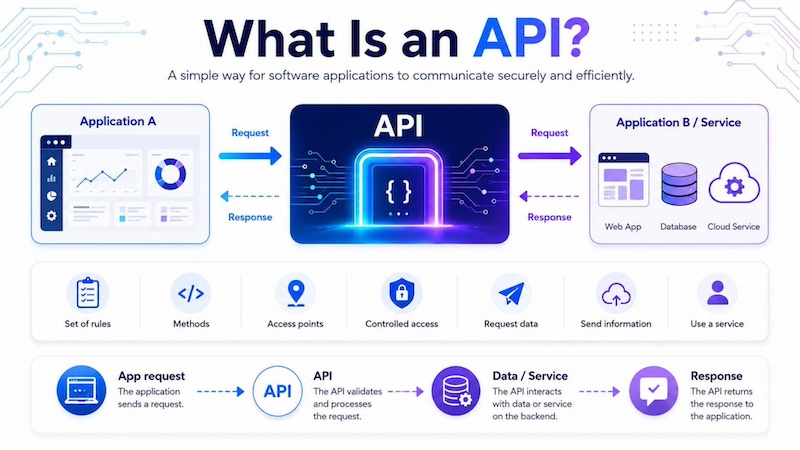
An API acts as a secure bridge that allows applications to request data, exchange information and use services without exposing a system’s internal logic.
2. How Does an API Work?
An API works by allowing an application to send a request to another system and receive a response. The requesting application is often called the API client, while the system that processes the request is often the server or API provider. The response is usually returned in a structured format such as JSON or XML.
A typical API workflow includes the client, request, endpoint, authentication and response. Each part helps make communication between systems more structured, secure, and predictable
2.1. API client
The API client is the application, website, mobile app or service that sends a request to an API. For example, a food delivery app may act as a client when it asks a map API to calculate the distance between a restaurant and a customer.
In AI-powered products, the client may be a chatbot, document processing tool or internal dashboard that sends a user input to an AI model through an API. This pattern is common in AI development platforms, where teams need to connect applications with model development, testing and inference services.
2.2. API request and Response Example
An API request usually includes an endpoint, method, headers and body data. The endpoint tells the system where to send the request. The method defines the action, such as retrieving data or creating a new record. Headers often contain authentication details, while the body includes the data that the application wants to send.
For example, an AI chatbot application may send a customer question to an AI model through an API request:
{
“method”: “POST”,
“endpoint”: “https://api.example.com/v1/chat”,
“headers”: {
“Authorization”: “Bearer API_KEY”,
“Content-Type”: “application/json”
},
“body”: {
“user_id”: “CUST_1025”,
“message”: “Where is my order?”
}
}
After receiving the request, the API processes the input and returns a response. The response may include a status code, generated result and additional metadata. For example:
{
“status”: 200,
“response”: {
“answer”: “Your order is currently in transit and is expected to arrive tomorrow.”,
“intent”: “order_tracking”,
“confidence”: 0.94
}
}
In this example, the application sends a customer message to the API, and the system returns a structured response that the chatbot can display to the user. This request-response flow is the foundation of API integration because it allows different systems to exchange data and trigger actions automatically.
2.3. API endpoint
An API endpoint is a specific URL or access point where requests are sent. Each endpoint usually supports a specific function, such as retrieving a user profile, creating a payment, uploading a document or generating a model response.
For production AI systems, endpoints are especially important because applications need a stable place to send inference requests. FPT AI Factory’s guide on OpenAI-compatible inference API shows how developers can connect applications and agent workflows to FPT AI Inference using familiar API patterns
2.4. API response
An API response is the result returned by the API provider. It may contain requested data, a success confirmation, a generated output or an error message. For example, a payment API may return whether a transaction has been approved or declined.
A good API response should be structured, predictable and easy for the client application to interpret. This helps developers handle success, errors and retry logic more reliably
2.5. Authentication and API keys
Authentication verifies that the client application is allowed to access the API. Common methods include API keys, access tokens and OAuth. These methods help protect data and prevent unauthorized use of the system.
For example, when an app uses an API key, the key works like a secure identifier. The API checks the key before processing the request. If the key is invalid, expired or missing, the request may be rejected.
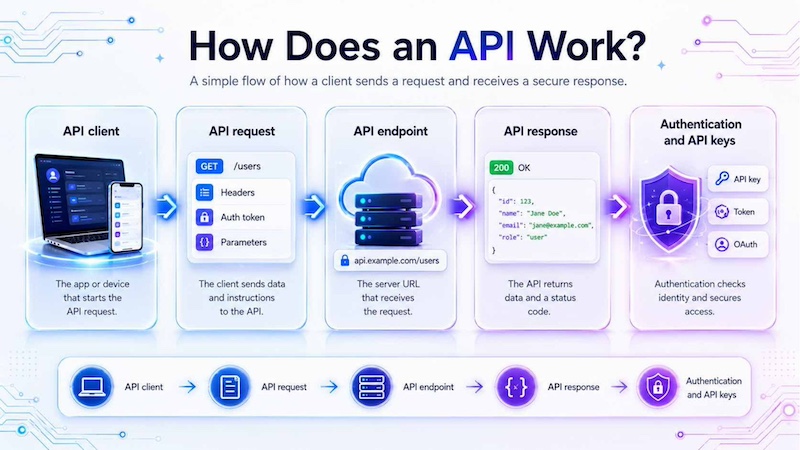
An API workflow connects a client application, request, endpoint, authentication process, and response
3. Common Types of APIs
APIs can be classified based on who can access them and how they are used. In most business and software environments, the three common types are public APIs, private APIs and partner APIs. Each type serves a different purpose, from opening a platform to external developers to connecting internal systems or sharing data with selected business partners.
3.1. Public APIs
Public APIs, also called open APIs, are available for external developers, businesses or third-party applications to use. Companies often provide public APIs to expand their platform ecosystem, encourage innovation and allow other services to connect with their products. These APIs usually come with public documentation, usage rules, authentication methods and sometimes pricing limits.
For example, a map provider may offer a public API that allows ride-hailing apps, delivery platforms or travel websites to embed maps, calculate routes and show location search results. Instead of building a mapping system from scratch, developers can connect to the map provider’s API and add location-based features to their own applications
3.2. Private APIs
Private APIs are used only inside an organization. They are not open to external developers or the public. Businesses use private APIs to connect internal systems, automate workflows and improve data exchange between departments. Because they are used internally, private APIs give companies more control over security, access permissions and system design.
For example, a company may use a private API to connect its HR system with payroll software. When an employee’s salary, working hours or bank information is updated in the HR system, the payroll system can receive the updated data automatically
3.3. Partner APIs
Partner APIs are shared with selected external partners, such as suppliers, distributors, logistics providers, financial institutions or enterprise clients. They are more restricted than public APIs because only approved partners can access them. However, they are broader than private APIs because they are designed to support collaboration between different organizations.
For example, a retailer may give a logistics partner API access to order and shipment data. When an order is ready for delivery, the logistics partner can receive the shipping details automatically, update delivery status, and send tracking information back to the retailer’s system. This helps both companies coordinate faster while keeping access limited to authorized business partners.
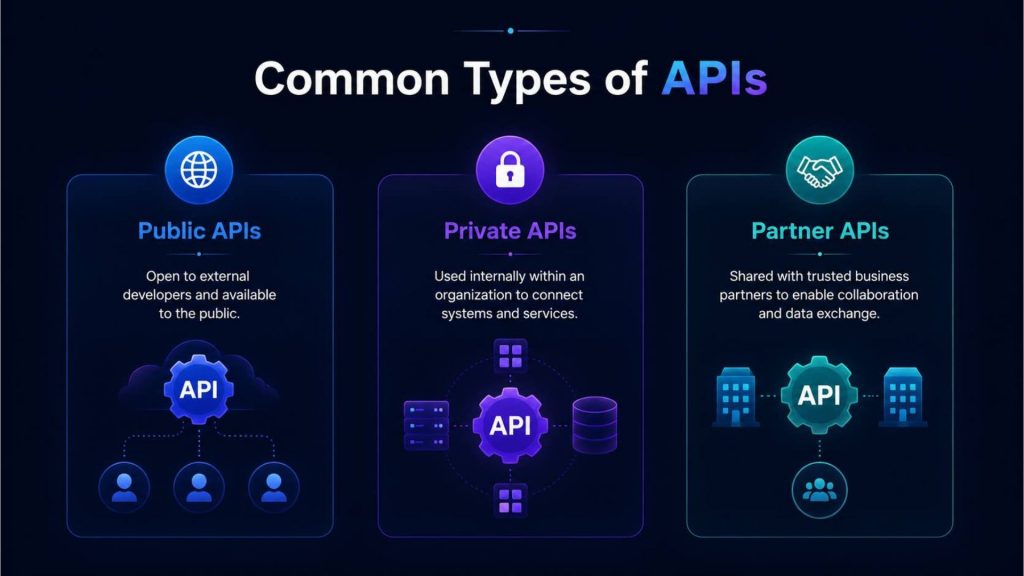
Public, private and partner APIs, each support different access needs, from open developer use to internal system integration and trusted business collaboration.
4. Common API Architectures
API architecture refers to the design style that defines how an API is structured, how requests are sent, and how data is returned between systems. Different API architectures are suitable for different technical needs. The most common architectures include REST, SOAP and GraphQL. Each one has different strengths depending on the use case, system complexity, and development requirements.
4.1. REST APIs
REST APIs are one of the most widely used API architectures today. They are popular because they are flexible, lightweight, and easy to integrate with web, mobile, and cloud applications. REST APIs usually use standard HTTP methods such as GET to retrieve data, POST to create new data, PUT to update existing data, and DELETE to remove data.
For example, an e-commerce application may use a REST API to get product information, create a new order, update customer details or check payment status. When a user opens a product page, the app can send a GET request to the product API and receive product data such as name, price, image, and stock availability. This makes REST APIs practical for applications that need simple, fast, and scalable data exchange.
4.2. SOAP APIs
SOAP APIs use a more formal and structured protocol for exchanging data between systems. They usually rely on XML-based messages and follow strict communication rules. Because of this, SOAP APIs are often used in enterprise environments where security, reliability, transaction control, and standardized communication are important.
For example, banking, insurance, healthcare or government systems may use SOAP APIs for sensitive transactions. A banking system may use a SOAP API to process a fund transfer, verify account details or exchange transaction information with another financial institution. Although SOAP can be more complex than REST, it is still useful when systems require strict contracts, detailed error handling and strong reliability.
4.3. GraphQL APIs
GraphQL APIs allow the client to request exactly the data it needs from the server. Instead of receiving a full data package, the application can define specific fields in the request. This helps reduce unnecessary data transfer and can make applications faster and more efficient, especially when front-end teams need flexible data access.
For example, a mobile shopping app may only need a customer’s name, profile photo, and recent orders. With GraphQL, the app can request only those fields instead of downloading the full customer profile, payment history, address book, and account settings. This makes GraphQL useful for mobile apps, dashboards, and complex applications where different screens need different combinations of data.
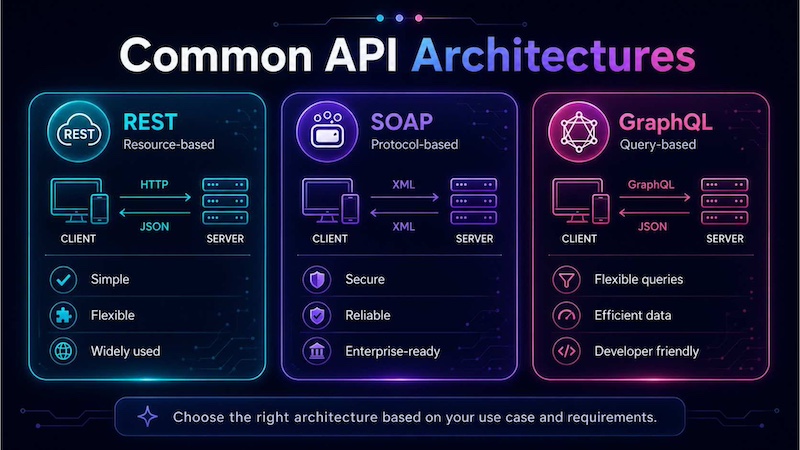
Common API architectures such as REST, SOAP, and GraphQL offer different ways to connect clients and servers
4.4. gRPC APIs
gRPC APIs are designed for high-performance communication between systems, especially in microservices, cloud applications and real-time services. Unlike REST APIs, which often use JSON over HTTP, gRPC commonly uses Protocol Buffers to define data structures and service methods. This makes data exchange more compact, faster and strongly typed.
gRPC is useful when applications need low latency, efficient communication and reliable service-to-service interaction. For example, a cloud-native application may use gRPC to let internal services communicate with each other, such as an order service calling a payment service, inventory service or recommendation service. In AI systems, gRPC can also support fast communication between model serving components, inference services and backend applications when performance is a priority.
4.5 API Security Best Practices
API security is essential because APIs often connect sensitive data, business systems, cloud services and AI endpoints. If APIs are not properly protected, unauthorized users may access private information, overload infrastructure or misuse connected services. A secure API implementation should combine authentication, authorization, request control, token management and continuous monitoring.
Authentication
Authentication verifies the identity of the application, user or service sending the API request. Common methods include API keys, access tokens, OAuth and identity providers. In production systems, authentication should be required before the API processes any request, especially when the endpoint can access customer data, financial records, internal systems or AI models.
For example, an application calling an AI inference endpoint should include a valid access token or API key. If the credential is missing, invalid or expired, the API should reject the request before returning any data or generating any output.
Authorization
Authorization defines what an authenticated user or application is allowed to do. While authentication answers “who is calling the API?”, authorization answers “what can this caller access or perform?”. This helps prevent users from accessing data, endpoints or functions outside their permission level.
For example, a customer support tool may allow agents to view order status but not modify payment records. Similarly, an internal AI assistant may be allowed to retrieve policy documents but restricted from accessing confidential HR or financial data.
Rate Limiting
Rate limiting controls how many requests a user, application or service can send within a specific period. This helps protect APIs from abuse, traffic spikes and accidental overload. It is especially important for AI endpoints because excessive requests can increase infrastructure cost and reduce service availability for other users.
For example, an API may allow 100 requests per minute for a standard user and a higher limit for trusted enterprise applications. If the limit is exceeded, the API can temporarily block or slow down additional requests.
Token Expiration
Token expiration reduces the risk of long-term credential misuse. Instead of allowing access tokens to remain valid forever, production systems usually set expiration times and require token refresh. This helps limit damage if a token is leaked or compromised.
For example, an access token may expire after one hour, while a refresh token can be used to request a new one. This approach keeps API access more secure while still allowing authorized applications to continue working smoothly.
Monitoring and Audit Logging
Monitoring helps teams detect abnormal activity, performance issues and possible security threats. Audit logging records important API events, such as who accessed an endpoint, when the request was made, what action was performed and whether the request succeeded or failed.
For example, if an AI API suddenly receives thousands of requests from an unknown source, monitoring can alert the operations team. Audit logs can then help trace the request history, investigate suspicious activity and support compliance requirements.
Together, these practices help make API integration more secure, reliable and production-ready. Authentication and authorization protect access, rate limiting reduces abuse, token expiration limits credential risks, and monitoring with audit logging improves visibility across the API environment.
5. Real-World API Examples
APIs are used across many digital products and business workflows. They allow companies to add important features such as online payments, maps, weather updates, social login, and AI capabilities without building every function from scratch. By connecting to existing services through APIs, businesses develops applications faster, automate data exchange, and improve user experience.
5.1. Payment APIs
Payment APIs connect websites, mobile apps or booking platforms with payment processors. When a customer enters payment information, the application sends a secure API request to the payment provider. The provider then verifies the transaction, checks whether the payment is approved, and returns the payment status to the application.
For example, an online store can use a payment API to accept credit cards, digital wallets or bank transfers. After the customer clicks “Pay now,” the payment provider processes the transaction and sends the result back to the store. If the payment is successful, the order status can automatically change to “paid,” the inventory can be updated, and the customer can receive a confirmation email.
5.2. Map and location APIs
Map and location APIs provide features such as maps, directions, geocoding, route planning, distance calculation and location search. These APIs are commonly used by ride-hailing apps, delivery platforms, travel websites, real estate platforms and logistics systems.
For example, a logistics platform can use a map API to calculate the fastest delivery route for a driver. The system can also track the driver’s location in real time and show estimated arrival time to customers. This improves delivery visibility, helps businesses optimize operations, and gives users a better experience.
5.3. Weather APIs
Weather APIs provide weather-related data such as current conditions, forecasts, severe weather alerts, temperature, rainfall, wind speed, and climate data. They are useful for industries where weather can affect planning, safety or operations, such as travel, agriculture, logistics, aviation, and outdoor events.
For example, an airline can use a weather API to monitor storms, wind conditions or heavy rain that may affect flight schedules. An outdoor event platform can also use weather data to alert users about forecast changes and help organizers adjust event plans in advance.
5.4. Social login APIs
Social login APIs allow users to sign in to an application using existing accounts such as Google, Apple, Facebook or LinkedIn. Instead of creating a new username and password, users can verify their identity through a trusted third-party account. This helps reduce login friction and can improve user registration rates.
For example, an online learning platform can allow students to sign in with Google. When a student selects this option, the API verifies the user’s identity and returns basic profile information, such as name and email address. The platform can then create a new account or match the user with an existing account automatically.
5.5. AI model & generative AI APIs
AI model and generative AI APIs allow applications to send inputs to trained models and receive outputs such as text, code, summaries, classifications, audio, images or extracted information. Instead of building the full model serving layer from scratch, businesses can use APIs to connect AI capabilities directly into products, workflows and internal systems.
For AI chatbots, APIs help applications send user questions to a language model and return answers in real time. For example, a customer support platform can use an API to send a customer’s question, retrieve relevant context and generate a suggested response inside the chat interface. This allows support teams to handle common questions faster while keeping human agents involved for complex cases.
For AI agents, APIs connect models with tools, databases and business systems. An AI agent may use one API to call a language model, another API to retrieve customer data from a CRM and another API to create a support ticket or update a workflow. This makes API integration essential for agentic AI systems that need to plan, use tools and complete multi-step tasks.
For RAG systems, APIs are used to connect the application with embedding models, vector databases, ranking models, and generation models. For example, when a user asks a question, the system can search a knowledge base, retrieve the most relevant documents, send that context to a language model, and generate a grounded answer. This helps businesses build AI assistants that can answer based on internal documents instead of relying only on the model’s general knowledge.
For document processing, APIs can connect business applications with extraction, classification and summarization models. For example, an accounting system can send invoices, contracts or receipts to an AI model through an API and receive structured fields such as invoice number, supplier name, date, total amount or contract terms. This is closely related to intelligent document processing, where unstructured documents are converted into structured data for review, automation and reporting.
Businesses can use Serverless Inference to integrate model inference into applications through OpenAI-compatible APIs without manually managing the full infrastructure layer. This is useful for teams building AI chatbots, AI agents, RAG applications, and document-heavy workflows that need scalable model access, fast response times, and easier production deployment.
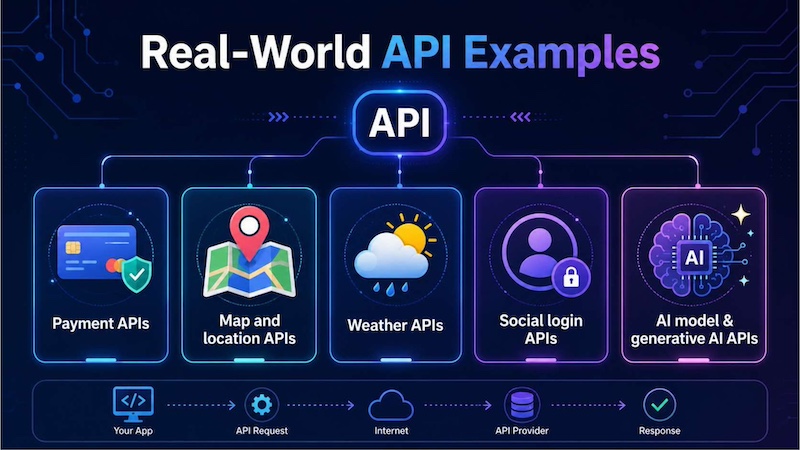
Real-world APIs connect applications to external services such as payments, maps, weather, social login, generative AI, enabling faster , and smoother user experiences.
6. Benefits of APIs
APIs help businesses connect applications, reduce development time and build more scalable digital products. They are especially useful when teams need to reuse existing services instead of rebuilding common functions from the beginning.
- Faster software integration: APIs make it easier to connect applications, platforms, and services.
- Better automation between systems: APIs can trigger actions automatically when specific events happen.
- Easier data sharing: APIs allow systems to exchange data in a structured and controlled way.
- Improved developer productivity: Developers can use existing services instead of building everything from scratch.
- Stronger product ecosystem: APIs allow partners and developers to build around a platform.
- Faster AI application development: AI teams can connect models, data systems and applications through APIs.
For data-driven companies, APIs are also useful because they connect source systems with analytics and AI workflows. When combined with a data pipeline, APIs help move data from applications to storage, processing, and model-serving environments more reliably.
7. API vs API Integration
An API and API integration are related, but they are not the same. An API is the interface that allows applications to communicate. API integration is the process of using that interface to connect systems and create a working workflow.
| Criteria | API | API Integration |
| Definition | A set of rules that allows software systems to communicate | The process of connecting systems through APIs |
| Main purpose | Provide access to data, functions or services | Make systems work together automatically |
| Scope | Usually one interface or access point | A full connection between two or more applications |
| Key function | Sends and receives requests and responses | Moves data, triggers actions and synchronizes workflows |
| How it works | Exposes endpoints that other systems can call | Uses endpoints, authentication, mapping and business logic |
| Who uses it | Developers, platforms and software providers | Developers, IT teams, operations teams and product teams |
| Example | A weather API that returns forecast data | A travel app using that weather API to show alerts to users |
A simple way to understand the difference is this: an API is like a menu that shows what a system can offer, while API integration is the process of using that menu inside a real application or workflow.
8. When Should Businesses Use APIs?
Businesses should use APIs when they need systems to communicate, automate processes, share data or add new capabilities quickly. APIs are especially important for companies that want to build connected software products, cloud-native applications and AI-powered services.
8.1. When connecting multiple software systems
Businesses should use APIs when they need several software systems to work together. For example, a company may use separate tools for CRM, ERP, accounting, customer support and marketing automation. Without APIs, teams may need to copy data manually between these systems, which can lead to delays and errors.
With APIs, these systems can exchange information automatically. When a customer profile is updated in the CRM, the same information can also be reflected in the billing system or support platform. This helps every department work with more accurate and up-to-date data.
8.2. When automating business workflows
APIs are useful when businesses want to reduce repetitive manual work. For example, when a lead fills out a form on a website, an API can automatically create a CRM record, send a confirmation email, and notify the sales team. This saves time and helps teams respond faster.
As automation becomes more complex, businesses also need reliable infrastructure to process data and run workloads smoothly. This is where AI infrastructure becomes important, especially for companies using automation together with AI models, data pipelines or real-time decision systems.
8.3. When building mobile or web applications
Most mobile and web applications depend on APIs to retrieve data, display content , and connect with external services. APIs allow applications to access user accounts, product catalogs, payment systems, maps, notifications, and many other features.
For example, a food delivery app may use APIs for user login, restaurant menus, order placement, payment processing, delivery tracking, and customer notifications. Each feature may come from a different system, but APIs help them work together inside one smooth user experience.
8.4. When enabling partner or third-party access
Businesses should use APIs when they want partners, suppliers or third-party developers to access selected data or services without exposing the full internal system. This is common in logistics, finance, e-commerce, travel, and SaaS platforms.
For example, a logistics company may provide a partner API so retailers can check shipment status in real time. The retailer does not need direct access to the logistics company’s internal system. Instead, the API provides only the necessary data, such as tracking number, delivery status, and estimated arrival time.
8.5. When adding AI capabilities to applications
APIs are essential when businesses want to add AI capabilities to existing applications. These capabilities may include chatbots, summarization, translation, image analysis, document extraction, recommendations or voice processing. Through an API, the application sends input to an AI model and receives an output that can be shown to users or used in a workflow.
This is where AI model deployment becomes important. Once a model is ready, teams need endpoints, monitoring, scaling and a reliable serving layer so the model can be used by real applications. For teams that do not want to manage GPU servers directly, serverless GPU and inference APIs can help reduce infrastructure overhead while making AI features easier to integrate into production systems.
8.6. When building cloud-native and microservices applications
APIs are also important for cloud-native and microservices applications. In this architecture, a large application is divided into smaller services, and each service performs a specific function. These services communicate with each other through APIs.
For example, an e-commerce platform may have separate services for user accounts, product search, payments, inventory, delivery, and recommendations. APIs allow each service to exchange data while remaining independent. This makes the system easier to scale, update, and maintain.
For AI teams, this connects closely with the role of an AI cloud platform, which combines compute resources, development tools, data management services and deployment capabilities into a shared environment for building and running AI applications.
9. FAQs
9.1 What is the difference between API and API integration?
An API is the interface that allows software systems to communicate. API integration is the process of using that API to connect systems and make them work together in a real workflow. For example, a payment API provides transaction functions, while payment API integration connects that API to an online store checkout process.
9.2 Is an API the same as a server?
No. A server is a system that stores data, runs applications or processes requests. An API is the interface that allows other applications to communicate with that server or service. An API may run on a server, but it is not the same thing as the server itself.
9.3 Why are APIs important for modern software?
APIs are important because they allow software systems to connect, share data and reuse existing services. They help developers build applications faster, enable automation and support modern digital ecosystems such as SaaS platforms, cloud services, mobile apps and AI-powered products.
9.4. Are APIs secure?
APIs can be secure when they are designed and managed properly. Common security practices include authentication, API keys, access tokens, rate limits, encryption, logging, and permission controls. Poorly managed APIs can create security risks, so businesses should treat API security as part of system architecture.
APIs are the foundation of connected software. They allow applications to communicate, exchange data, and use external services in a structured way. From payments and maps to social login and AI model APIs, they help businesses build faster, automate workflows, and scale digital products more efficiently.
For AI and cloud applications, APIs are especially important because they turn models and infrastructure into practical business tools. FPT AI Factory supports this process through GPU infrastructure, AI Studio tools, and FPT AI Inference services. FPT offers a $100 free trial credit program for users to explore the platform. For businesses or organizations that need customized AI solutions, large-scale deployment or expert consultation, contact FPT AI Factory through the official contact form.
Contact Information:
- Hotline: 1900 638 399
- Email: support@fptcloud.com
Explore more articles
Single Agent vs Multi Agent: Which AI System Is Better?


