


Single agent vs multi agent is an important topic for teams building AI systems that can reason, use tools, and complete workflows. A single-agent system is often simpler, faster, and easier to control, while a multi-agent system can divide complex tasks across specialized agents. In this article, FPT AI Factory explains the key differences, use cases, and operational considerations to help teams choose the right approach for lightweight agent workflows or more advanced AI application deployment.
Key Takeaways:
- Single-agent systems use one AI agent to handle a task end-to-end, simpler, faster, cheaper, and easier to monitor
- Multi-agent systems divide work across specialized agents (planner, researcher, executor, reviewer), better for complex, multi-step, or cross-tool workflows
- Multi-agent systems cost more and add latency due to coordination between agents, but scale better for research, software development, and enterprise automation
- Best practice: start with a single agent, and move to multi-agent only when the task clearly needs role specialization or parallel execution
1. What is a Single-Agent System?
AI agents are AI systems that can understand a user goal, reason through a task, use tools, and take actions across a workflow. A single-agent system uses one AI agent to handle a task or workflow from start to finish. The agent may call tools, search information, retrieve data or generate an output, but the overall decision-making flow remains centralized in one agent.
A single-agent system is best suited for tasks with a clear goal, narrow scope and mostly linear logic. It is easier to design, monitor and debug because there is only one main agent making decisions. For example, a customer support assistant that answers common questions from a knowledge base can often work well as a single-agent system because the task is predictable and the workflow is easy to control.
2. What Is a Multi-Agent System?
A multi-agent system uses multiple AI agents that work together to complete a larger or more complex workflow. Instead of asking one agent to do everything, the system divides the work into roles. One agent may plan the task, another may research information, another may call tools, and another may review the final output.
This design is useful when the task requires many steps, several tools or different types of reasoning. In enterprise environments, multi-agent systems can support workflows such as research, software development, business analysis, procurement automation or IT operations.
3. Single Agent vs Multi Agent: Key Differences
The main difference between single-agent and multi-agent systems is how work is organized. A single-agent system centralizes the workflow in one AI agent, while a multi-agent system coordinates several agents with different roles. The right choice depends on task complexity, cost, latency, control requirements, and how much autonomy the system needs.
| Criteria | Single-Agent System | Multi-Agent System |
| Definition | One AI agent handles a task or workflow from start to finish. | Multiple AI agents collaborate to complete a complex workflow. |
| Architecture | Simple architecture with one main decision-maker. | More complex architecture with orchestrator, specialized agents, shared memory or tool layers. |
| Autonomy | Moderate autonomy, usually within a defined task boundary. | Higher autonomy across planning, delegation, and multi-step execution. |
| Collaboration | Limited collaboration because one agent owns the workflow. | Agents collaborate by sharing context, outputs and tool results. |
| Task complexity | Best for simple, narrow, and predictable tasks. | Best for complex, ambiguous or multi-domain tasks. |
| Scalability | Scales more easily for repeated single-purpose workflows. | Scales by adding specialized agents, but orchestration becomes harder. |
| Latency | Usually lower because fewer coordination steps are needed. | Can be higher because agents need to communicate and validate outputs. |
| Cost | Usually, lower inference and development cost. | Usually, higher cost due to multiple model calls and monitoring needs. |
| Control and observability | Easier to observe, debug, and audit. | Requires stronger logging, tracing, governance, and failure handling. |
| Best use case | Chatbots, summarization, search, simple automation. | Research, planning, software workflows, and cross-tool enterprise automation. |
A helpful way to decide is to start with the simplest system that can solve the problem. If one agent can complete the task reliably, a single-agent design may be enough. If the workflow requires planning, tool selection, parallel research and review, a multi-agent design may be more effective. This is similar to the broader distinction between agentic AI vs generative AI, where the focus moves from generating outputs to completing goals across a workflow.
4. How Single-Agent and Multi-Agent Systems Work
Both single-agent and multi-agent systems usually combine a model, prompts, tools, memory, and output validation. The difference is how these components are coordinated. A single-agent workflow is direct, while a multi-agent workflow adds orchestration between specialized agents.
4.1. Single-agent workflow
In a single-agent workflow, the user sends a request to one agent. The agent interprets the goal, decides what tool or model call is needed, executes the step and returns the output. If the task requires only one or two actions, this structure is efficient and easy to monitor.
This workflow is usually easier to design, monitor and control because there are fewer moving parts. It works well for tasks with a clear objective, limited complexity and a predictable process. For example, a customer support chatbot can receive a user question, search the company’s FAQ or knowledge base, and return a suitable answer in one conversation flow.
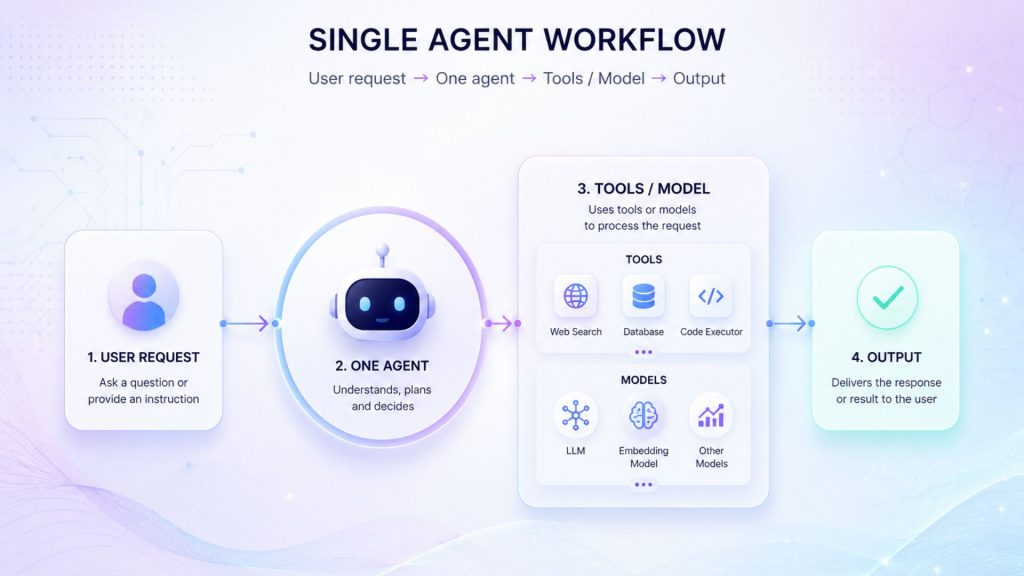
Single agent workflow shows how one AI agent receives a user request and returns the final output
4.2. Multi-agent workflow
In a multi-agent workflow, the user request is usually sent to an orchestrator or planner. The orchestrator breaks the task into smaller steps and routes each step to a specialized agent. One agent may research, another may execute a tool call, another may check accuracy, and another may prepare the final output.
For example, a market research workflow may use a planner agent to define the research steps, a researcher agent to collect sources, an analyst agent to compare insights and a reviewer agent to check the final summary. This structure can improve quality for complex tasks, but it also increases cost, latency and monitoring requirements.
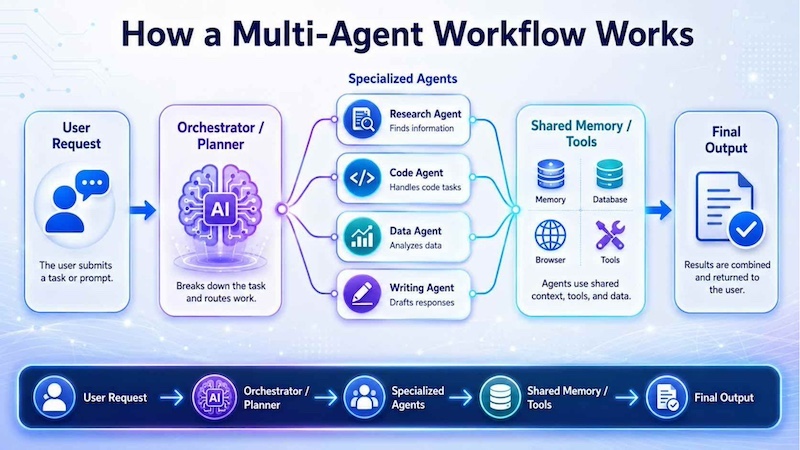
A multi-agent workflow uses an orchestrator to assign tasks to specialized agents, coordinate tools and memory, and combine results into one final output.
4.3. Role of tools and memory
Tools and memory are important parts of AI agent systems because they allow agents to do more than generate text. Tools help agents perform actions such as searching documents, calling APIs, checking databases, writing code or updating business systems. Memory helps agents keep useful context, such as previous user requests, task history, shared instructions or information collected during the workflow.
In a single-agent system, tools and memory are usually easier to manage because one agent controls the full workflow. For example, a customer support agent may retrieve order details, search a knowledge base and remember the current conversation context before giving a response. Since only one agent is involved, the process is simpler to monitor and troubleshoot.
In a multi-agent system, tools and memory become more complex because several agents may need to share information and coordinate actions. One agent may research the topic, another may call an API, while another reviews the final output.
4.4. Workflow Orchestration in Agent Systems
Single-agent orchestration: In a single-agent system, orchestration is usually simple. The agent receives the request, selects the right tool or model call, completes the task, and returns the output. This makes the system easier to deploy, but it can be less effective when tasks require parallel reasoning or specialized roles.
Multi-agent orchestration: In a multi-agent system, orchestration is more important because several agents need to coordinate. Common multi-agent orchestration patterns include planner-executor, researcher-writer-reviewer, manager-worker and tool-specialist patterns. These patterns help divide complex work, but they also require stronger monitoring, evaluation, and fallback logic.
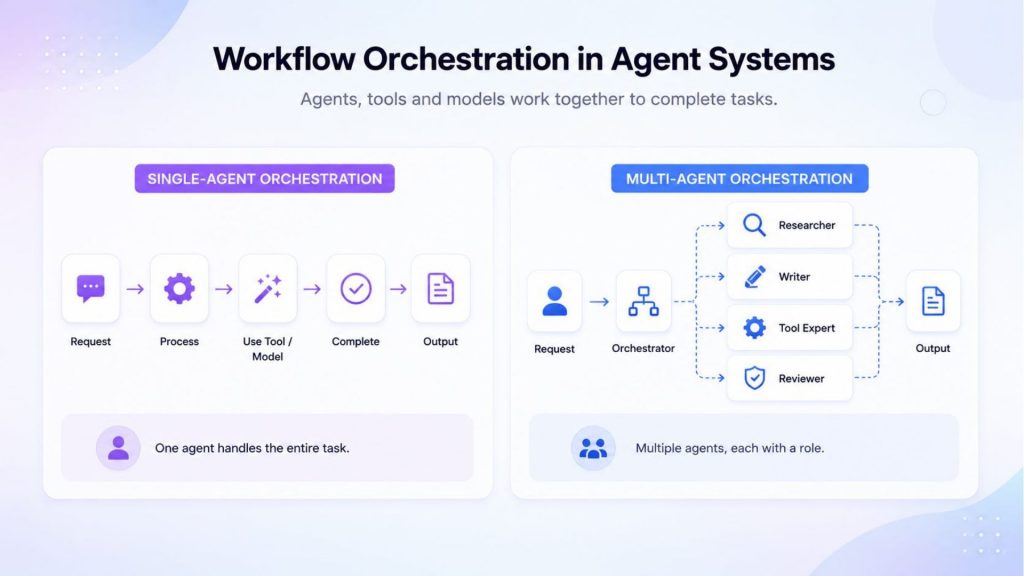
Workflow orchestration defines how tasks move through single-agent and multi-agent systems, from user request to processing and final output.
4.5. Single-Agent vs Multi-Agent Systems: Advantages and Disadvantages
Single-agent and multi-agent systems each offer different advantages and limitations. A single-agent architecture is often easier to build and control, while a multi-agent architecture is more suitable for complex workflows that require specialized roles and coordination. The right choice depends on task complexity, latency requirements, operating cost, tool usage and the level of monitoring needed.
Single-agent systems are simpler because one agent manages the task from request to final output. This usually means faster responses, lower inference cost and easier monitoring. They are suitable for focused tasks such as summarization, content generation, internal knowledge search or basic customer support. However, a single agent may become less effective when a workflow requires multiple tools, parallel work, specialized expertise or independent review.
Multi-agent systems divide work across several specialized agents, such as a planner, researcher, executor or reviewer. This can improve task organization and support more complex workflows, including research, enterprise automation and software development. However, multi-agent systems often require more model calls, stronger orchestration, shared memory management and closer monitoring, which can increase latency, cost and operational complexity.
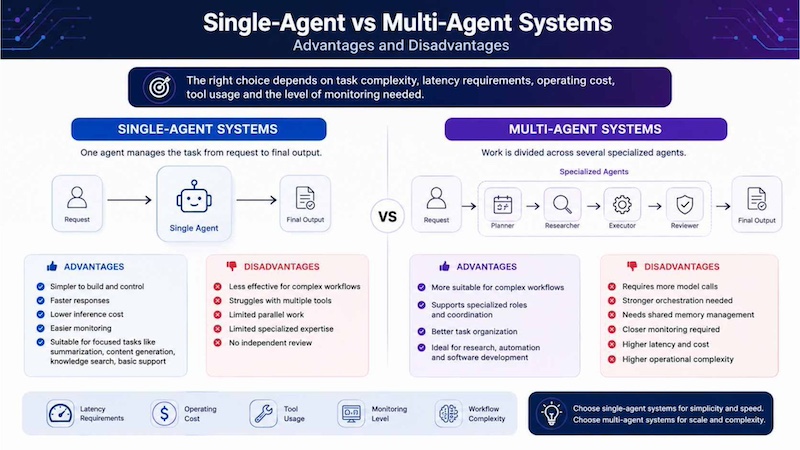
Single-agent systems offer simplicity, speed and lower cost, while multi-agent systems support more complex workflows
5. When Should You Use a Single-Agent System?
Use a single-agent system when the task is clear, repetitive, and limited in scope. Single-agent workflows are easier to build and control, so they are a good starting point for many business use cases.
5.1. Simple task automation
A single-agent system is a good choice for simple task automation when the workflow has a clear goal, a limited number of steps, and a predictable output. In this setup, one agent can receive the user request, understand the task, call the right tool if needed, and return the final result. Because only one agent is involved, the workflow is easier to monitor, cheaper to operate and simpler to control.
For example: Morgan Stanley’s AI @ Morgan Stanley Debrief is a strong example of simple AI task automation. With client consent, the tool can generate meeting notes, surface action items, summarize key points, draft a follow-up email for an advisor to edit and send, and save notes into Salesforce after a client meeting. This shows how a focused AI workflow can automate routine documentation and follow-up tasks while keeping humans involved in final review.
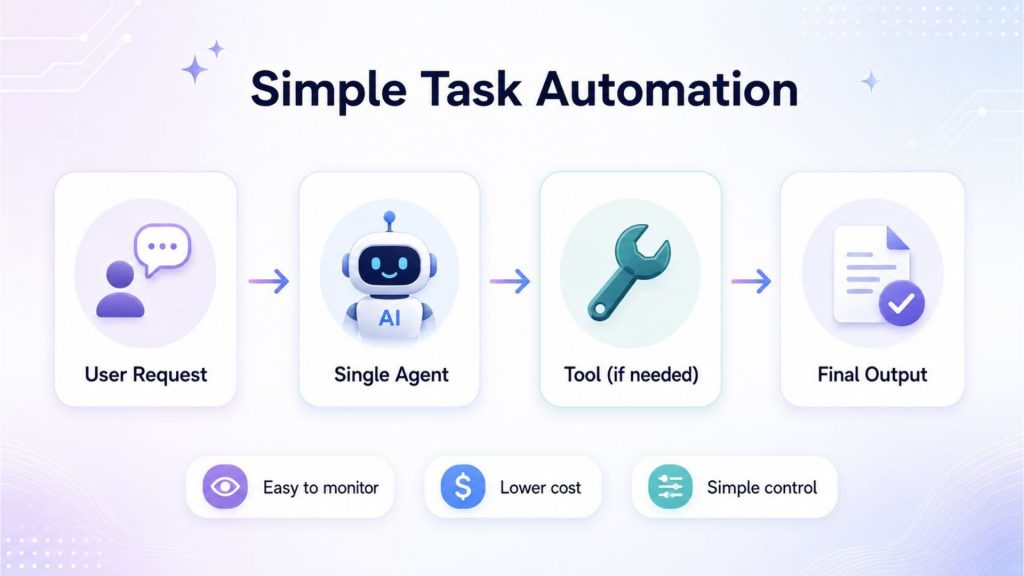
A single-agent workflow is best for tasks where one agent can understand the request, use a tool if needed and deliver the result with lower cost and easier control.
5.2. Customer support chatbots
A single-agent system can work well for customer support chatbots when the questions are common, the workflow is predictable, and the answer can be generated from a clear knowledge base or customer record. In this setup, one AI agent can receive the customer’s question, understand the intent, retrieve relevant information and provide a response. It is easier to monitor than a multi-agent system because the logic is simpler and there are fewer coordination steps.
For example: Klarna’s AI assistant is a strong example of AI used in customer service. Klarna reported that its AI assistant handled 2.3 million conversations in its first month, covering two-thirds of customer service chats and doing work equivalent to 700 full-time agents. The company also reported a 25% drop in repeat inquiries and faster average resolution time, from 11 minutes to under 2 minutes. This shows how an AI support agent can handle high-volume, repetitive customer questions while allowing human teams to focus on more complex cases.
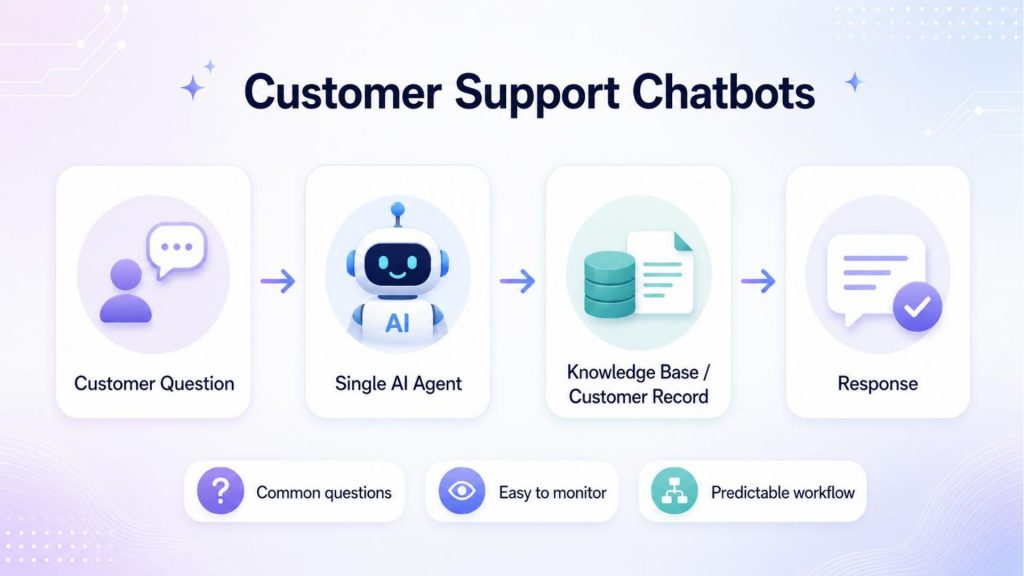
Customer support chatbots use a single AI agent to understand questions, retrieve information from a knowledge base or customer record, and return a clear response.
5.3. Content generation and summarization
A single-agent system is suitable for content generation and summarization when the task has a clear input and a direct output. One AI agent can receive a prompt, document, transcript or brief, then generate a draft, summarize key points or rewrite the content in a different tone. This workflow is useful for marketing teams, sales teams, customer support teams and internal knowledge workers who need faster first drafts or shorter summaries.
For example: Canva’s Magic Studio is a strong example of generative AI used for content creation and repurposing. OpenAI explains that Canva’s Magic Design combines OpenAI’s API with Canva’s design engine and template library, allowing users to generate presentations, social media posts, and videos from a prompt. Canva’s Magic Switch can also convert one design into different formats, such as emails or presentations, making it useful for teams that need to create and adapt content quickly.
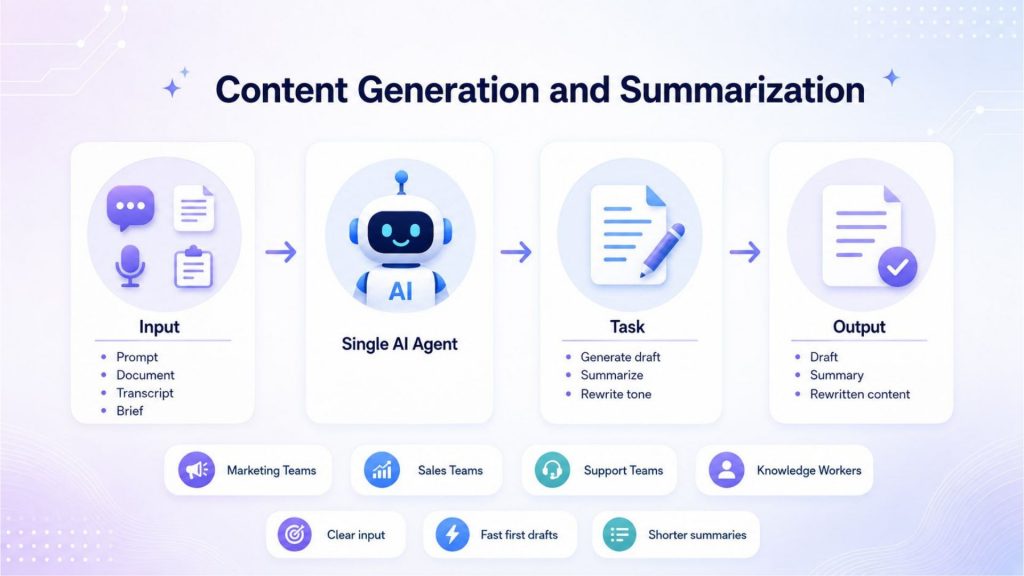
Content generation and summarization use a single AI agent to turn prompts, documents or transcripts into drafts, summaries, and rewritten content quickly.
5.4. Internal knowledge search
A single-agent system is useful for internal knowledge search when employees need fast answers from company documents, policies, reports or knowledge bases. Instead of asking users to search across many folders, portals or PDFs, one AI agent can receive the question, retrieve relevant information and return a concise answer with supporting context. This works best when the task is focused: find information, summarize it and help the user understand the answer.
For example: McKinsey’s generative AI platform, Lilli, is a strong example of internal knowledge search. McKinsey describes Lilli as a platform powered by the firm’s knowledge and built to shorten the time to insights for its teams. It brings together McKinsey’s knowledge sources and capabilities so employees can access relevant information more efficiently when serving clients. This shows how a focused AI assistant can help organizations turn internal knowledge into faster, more actionable answers.
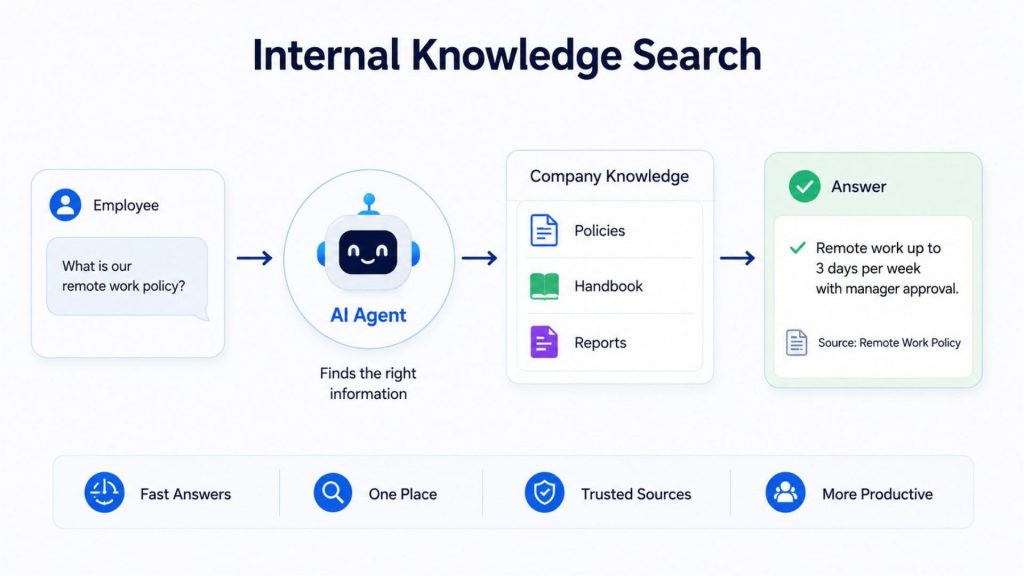
Internal knowledge search uses one AI agent to find relevant company information and return a clear answer with trusted sources.
6. When Should You Use a Multi-Agent System?
Use a multi-agent system when a workflow is too complex for one agent to handle reliably. Multi-agent systems are useful when tasks require planning, parallel work, specialized knowledge, tool coordination or multiple review steps.
6.1. Complex multi-step workflows
A multi-agent system is useful when a task requires several steps, different skills and coordination between tools. Instead of asking one agent to handle everything, the workflow can be divided across specialized agents. For example, one agent may plan the task, another may collect information, another may execute actions, and another may review the result before the final output is delivered.
This approach is helpful for workflows that involve research, decision-making, data retrieval, tool usage and follow-up actions. A single agent may struggle with this level of complexity because it has to manage too many responsibilities at once. A multi-agent system can make the process more structured by assigning each part of the workflow to the agent best suited for that role.
For example: Salesforce Agentforce is a relevant example of agentic AI being used for complex business workflows. Salesforce describes Agentforce as a platform that allows businesses to build autonomous AI agents for service, sales, marketing and commerce workflows. In customer service, an agentic workflow may understand a customer request, retrieve CRM data, check policies, suggest a resolution and escalate the case when needed. This shows how multi-step AI systems can coordinate data, tools, and decisions across business applications, rather than only generating a simple response.
6.2. Research, planning, and analysis tasks
A multi-agent system is useful for research, planning and analysis tasks because these workflows often require several capabilities at the same time. One agent may search for information, another may read documents, another may analyze data and another may organize the final answer. This makes the workflow more structured than asking one agent to handle every step alone.
For example: Microsoft’s Magentic-One is a strong example of a multi-agent system designed for complex research and analysis workflows. Microsoft Research describes Magentic-One as using an Orchestrator agent to plan, track progress and re-plan when errors occur, while directing specialized agents to browse the web, navigate files, write code and execute Python. This architecture is useful for tasks that require collecting information, analyzing files, performing calculations and producing a final answer across multiple steps.
6.3. Software development and code review workflows
A multi-agent system can be useful for software development and code review because these workflows often involve several different tasks: understanding requirements, writing code, running tests, checking security risks, reviewing style and preparing deployment notes. Instead of relying on one agent to handle everything, a multi-agent setup can assign different roles to specialized agents. For example, one agent may act as a planner, one as a coding agent, one as a test agent and another as a reviewer.
This structure is helpful when the workflow requires both execution and verification. The coding agent can generate or modify code, while the review agent checks whether the output follows internal standards, passes tests, and avoids obvious vulnerabilities. This can reduce manual review effort, but human engineers should still approve final changes before production deployment.
For example: Rakuten uses OpenAI Codex to support software delivery and operations. OpenAI reports that Rakuten engineers use Codex for incident response, CI/CD improvements, automated code review, and vulnerability checks. Rakuten estimates that this approach has helped reduce mean time to recovery by about 50%, showing how AI coding agents can support faster debugging, safer code review, and more efficient development workflows.
6.4. Enterprise automation across multiple tools
A multi-agent system is useful for enterprise automation when a workflow needs to connect several business tools, data sources, and approval steps. In this setup, different agents can take different roles: one agent may understand the request, another may retrieve CRM or ERP data, another may check policies, and another may prepare the final action for human approval. This is more suitable than a single-agent system when the task depends on multiple systems and requires coordination across departments.
For example: Wiley’s use of Salesforce Agentforce shows how AI agents can support enterprise automation across customer service workflows. Salesforce reports that Agentforce helped Wiley improve self-service and efficiency by over 40%, outperforming its previous chatbot, while its Service Cloud implementation achieved a 213% ROI. This example shows how agentic AI can connect customer data, service workflows and AI-powered recommendations to improve enterprise operations at scale.
6.5. AI workloads that need scalable compute
A multi-agent system may need scalable computing when several agents run at the same time, call different tools, process large contexts, or handle many user requests in parallel. Unlike a simple single-agent workflow, multi-agent systems can include planners, researchers, code agents, reviewers, and tool-calling agents. Each agent may generate requests, access models or run workloads independently, so the infrastructure must support flexible scaling and stable performance.
For teams building this type of system, GPU Container can be useful because it supports containerized AI workloads that need to run, scale and manage multiple services more efficiently. FPT AI Factory’s GPU Container offers flexible GPU resources from 1x to 8x GPU with H100 and H200 options, which is suitable for teams that need scalable compute for AI experiments, model workloads or agent services.
For example: A production multi-agent coding assistant may use one agent to plan the task, another to search documentation, another to write code and another to review or test the result. Anyscale’s Ray Serve guide describes how AI agents can move from single-agent to multi-agent architecture, with LLMs, tools and agents scaling independently. This shows why scalable compute matters: different parts of the agent system may need to scale separately depending on workload demand.
7. Operational Challenges of Agent Systems
Agent systems improve productivity, but they also introduce operational challenges. Teams need to manage reliability, tool permissions, evaluation, cost, and user expectations. These challenges differ depending on whether the system uses one agent or multiple agents.
7.1 Challenges of Single-Agent Systems
Single-agent systems are easier to control, but they can become overloaded if the task is too broad. A single agent may struggle with long workflows, ambiguous goals or tasks that require multiple areas of expertise. It may also produce errors if it lacks the right tools, memory or validation process.
To reduce this risk, teams should define a clear task scope, connect the agent only to necessary tools, and monitor outputs with relevant evaluation metrics in machine learning. If a single agent repeatedly fails because the workflow is too complex, the task may need to be redesigned or split into multiple agents.
7.2 Challenges of Multi-Agent Systems
Multi-agent systems are more powerful but harder to operate. They can create higher latency, more model calls, more tool permissions and more failure points. If agents disagree, repeat work or pass incomplete context to each other, the final output may become inconsistent.
Teams should use orchestration logs, agent-level monitoring, permission controls, fallback rules and human approval points for sensitive actions. Strong AI infrastructure is also important because production agent workflows need reliable compute, inference endpoints, data access, and monitoring.
8. Cost, Complexity, and Operational Considerations
Single-agent and multi-agent systems have different cost and operational profiles. A single-agent system may be cheaper and easier to launch, while a multi-agent system may provide better performance for complex tasks but require more engineering and monitoring.
| Criteria | Single-Agent System | Multi-Agent System |
| Development cost | Lower because the architecture is simpler. | Higher because orchestration, roles and communication need to be designed. |
| Inference cost | Usually lower because there are fewer model calls. | Usually higher because several agents may call models and tools. |
| Latency | Often faster for simple tasks. | Can be slower due to coordination between agents. |
| Tool-calling complexity | Limited tool routing and easier permission control. | More complex tool routing, shared context and access control. |
| Monitoring effort | Easier to track one agent and one workflow path. | Requires logs, traces and evaluation across multiple agents. |
| Failure handling | Simpler fallback logic. | Needs recovery plans when one agent fails or returns weak output. |
| Security and access control | Easier to restrict permissions. | More complicated because different agents may need different tool access. |
| Maintenance effort | Lower maintenance for stable use cases. | Higher maintenance as agents, tools and prompts evolve. |
A practical approach is to begin with a single-agent design, test whether it meets quality and reliability requirements, then move to a multi-agent system only when the task clearly needs role specialization or parallel execution. For teams deploying AI systems into production, AI model deployment planning becomes important because models and agents need endpoints, monitoring, scaling and evaluation before they can support real users.
9. FAQs
9.1 Is ChatGPT a single-agent or multi-agent system?
ChatGPT is mainly experienced by users as one conversational assistant. However, whether a system is single-agent or multi-agent depends on how it is designed behind the interface. A simple chatbot may behave like a single-agent system, while a more advanced workflow with planners, tool agents and reviewers can behave like a multi-agent system.
9.2 Are multi-agent systems more expensive?
Multi-agent systems are often more expensive because they require more model calls, more tool calls, more orchestration logic, and more monitoring. They can be worth the cost when the workflow is complex enough to benefit from specialized roles, but they may be unnecessary for simple automation tasks.
9.3 Can single-agent and multi-agent systems work together?
Yes. Many organizations use both approaches. A simple single-agent assistant may handle routine user requests, while a multi-agent system may be triggered for complex tasks that need planning, research or cross-tool execution. This hybrid approach helps teams balance cost, performance, and control.
9.4 When should you move from a single-agent to a multi-agent architecture?
Move to a multi-agent architecture when tasks require specialized roles, multiple tools, parallel work or review steps that one agent cannot manage efficiently. However, this approach should be used only when its benefits justify higher complexity, latency and cost.
9.5 How do you know when to use a multi-agent system instead of a single agent?
Use a multi-agent system when a task needs multiple specialized skills, parallel execution, or several review steps that a single agent cannot reliably manage — for example research, software development, or workflows spanning multiple business tools.
Choosing between single-agent and multi-agent systems depends on task complexity, cost, latency, and operational control. A single-agent system is a strong choice for clear, narrow, and repeatable workflows, while a multi-agent system is better for complex tasks that require planning, collaboration, and specialized roles.
FPT AI Factory supports teams across the AI lifecycle with GPU infrastructure, AI Studio tools and inference services. FPT offers a $100 free trial credit program for users to explore the platform. For businesses or organizations that need customized AI solutions, large-scale deployment or expert consultation, contact FPT AI Factory through the official contact form.
Contact Information:
- Hotline: 1900 638 399
- Email: support@fptcloud.com
Explore more articles
Agentic AI vs AI agents: Key differences and how to choose
AI Development Platforms: Key Features and How to Choose
Top 5 AI Chatbot Examples From Real Use Cases 2026


