
Vector database comparison helps organizations identify the right platform for semantic search, Retrieval-Augmented Generation (RAG), AI assistants, and other AI-powered applications. As enterprises increasingly adopt large language models (LLMs), choosing an appropriate vector database has become a critical architectural decision. At FPT AI Factory, businesses can build end-to-end AI solutions that integrate vector databases with model development, deployment, and enterprise AI workflows.
|
Key Takeaways Choosing the right vector database depends on your AI use case, scalability needs, and deployment preferences. Each platform offers different strengths for semantic search, RAG, AI assistants, and enterprise knowledge search.
|
Accelerate enterprise AI development with FPT AI Factory. Connect vector databases to foundation models, validate workflows, and deploy scalable RAG and AI assistant solutions using a unified AI platform. Reach out to our team for customized implementation guidance through contact form.
1. What is a vector database?
1.1. Definition
A vector database is a specialized data system designed to store, index, and retrieve high-dimensional vector embeddings generated by AI models such as large language models (LLMs) and multimodal systems. It enables similarity-based retrieval by representing data as numerical vectors, allowing systems to understand meaning and context rather than relying on exact keyword matches.
These systems support semantic search across unstructured data like text, images, audio, and video by operating in a continuous vector space. To ensure efficient large-scale retrieval, they use Approximate Nearest Neighbor (ANN) methods such as HNSW, IVF, and product quantization.
1.2. Traditional Database vs. Vector Database Comparison
Although both technologies store data, they are designed for different purposes. Traditional databases excel at managing structured business data and executing exact-match queries, while vector databases are optimized for semantic retrieval and AI-powered similarity search.
| Feature | Traditional Database | Vector Database |
| Primary use case | Transaction processing, reporting, and business applications | Semantic search, RAG, AI assistants, and recommendation systems |
| Data format | Structured and semi-structured data | High-dimensional vector embeddings |
| Query method | Exact-match queries using SQL or NoSQL | Approximate Nearest Neighbor (ANN) search based on vector similarity |
| Indexing | B-tree and Hash indexes | ANN indexes such as HNSW and IVF |
| Scalability | Supports vertical and distributed scaling for transactional workloads | Designed for horizontal scaling and large-scale vector search |
| Best for | CRM, ERP, finance, and inventory systems | LLMs, enterprise search, and AI-powered applications |
A practical example about traditional search and vector-based semantic retrieval can be seen in Walmart’s e-commerce search system, where the company combines keyword-based retrieval with embedding-based semantic search to improve results for complex customer queries. Unlike traditional search, which relies on exact keyword matching, vector-based retrieval understands the meaning behind user intent. For example, a customer searching for “Shoes that are comfortable for long working hours” may receive different results depending on the retrieval approach.
A simplified product catalog may contain the following items:
| Product | Description |
| Work Safety Shoes | Protective shoes designed for workplace environments and industrial use. |
| Running Shoes | Lightweight shoes with advanced cushioning technology for long-distance comfort. |
| Office Sneakers | Casual sneakers designed for everyday comfort and extended wear. |
| Hiking Boots | Durable boots designed for outdoor activities and rough terrain. |
The search results differ based on how the database understands the query:
| Retrieval Approach | Retrieved Results | How the System Understands the Query |
| Traditional database search | Work Safety Shoes | Searches for exact keyword matches such as “work” or related terms. Products describing similar concepts using different words may not be ranked highly or retrieved. |
| Vector database search | Work Safety Shoes, Office Sneakers, Running Shoes | Converts the query and product descriptions into vector embeddings. The system understands relationships between concepts such as “comfortable,” “cushioning,” “extended wear,” and “long working hours” even when the exact words are different. |
This comparison highlights the key difference between the two retrieval methods. Traditional databases excel at structured queries and exact matching but may struggle with natural language searches. Vector databases overcome this limitation by using semantic similarity to understand user intent and retrieve more relevant information. In Walmart’s production search system, this capability is achieved through a hybrid retrieval architecture that combines keyword-based and neural embedding-based retrieval, improving search relevance while maintaining production-scale performance.
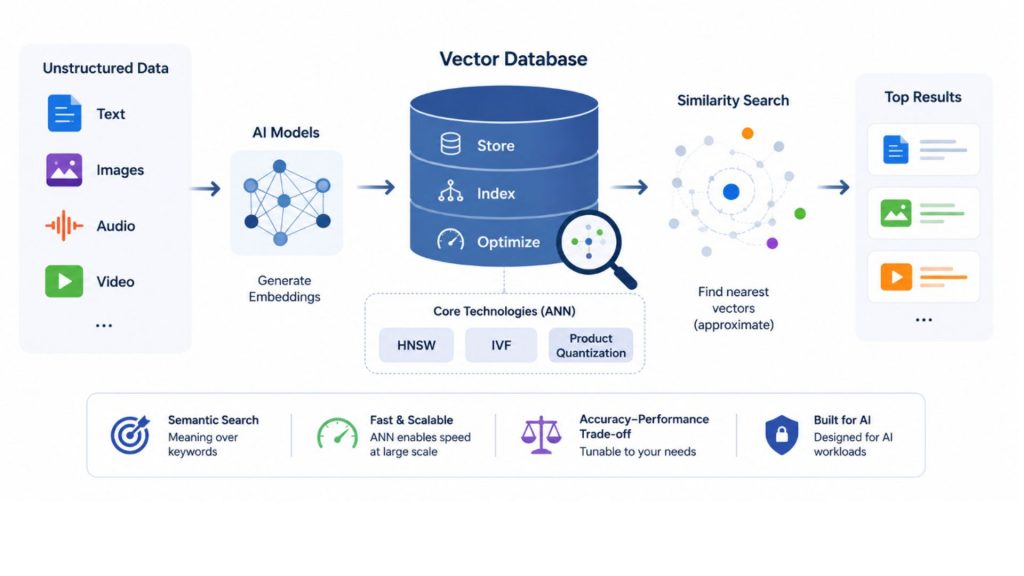
Vector databases enable similarity search by retrieving data based on meaning instead of keywords
2. Why vector databases matter for AI Application
As generative AI becomes more widely adopted, organizations need reliable ways to retrieve relevant information from massive collections of documents and unstructured data. Vector databases enable this capability by supporting semantic search and efficient similarity retrieval, making them indispensable for enterprise AI systems.
2.1. Semantic search
Semantic search is one of the most common and foundational use cases of vector databases. Instead of relying on keyword matching, data is transformed into high-dimensional embeddings, allowing systems to retrieve results based on meaning and context.
This approach is particularly valuable in production environments where:
- Users issue natural, imprecise, or conversational queries
- The same intent can be expressed in multiple ways
- Search systems must work across large and diverse datasets
In real-world e-commerce systems, semantic search improves product discovery by shifting from keyword matching to intent-based retrieval using dense vector representations. Instead of relying on exact terms in product titles, the system matches queries and items in a shared embedding space. For example, a query like “comfortable shoes for walking all day” can retrieve semantically related products such as cushioned sneakers or orthopedic footwear, even without direct keyword overlap, thereby improving relevance in large and diverse product catalogs.
2.2. RAG applications
Retrieval-Augmented Generation systems extend large language models by grounding responses in external knowledge sources. In this architecture, vector databases function as the retrieval engine that connects user queries to relevant contextual data.
A typical RAG workflow includes:
- Converting documents and queries into embeddings
- Performing similarity search over indexed knowledge bases
- Returning top-ranked context to the language model for generation
This design ensures that model outputs are not solely dependent on parametric memory but are supported by retrieved, verifiable information.
In production RAG systems, vector databases such as Pinecone and Weaviate are used to retrieve relevant context from enterprise knowledge bases before passing it to large language models. For example, in a customer support chatbot, a query like “What is the refund policy for international orders?” is converted into an embedding and matched against indexed policy documents. The most relevant information is then retrieved and used to generate a grounded response. This approach is widely applied in enterprise AI assistants to ensure accuracy and low-latency responses.
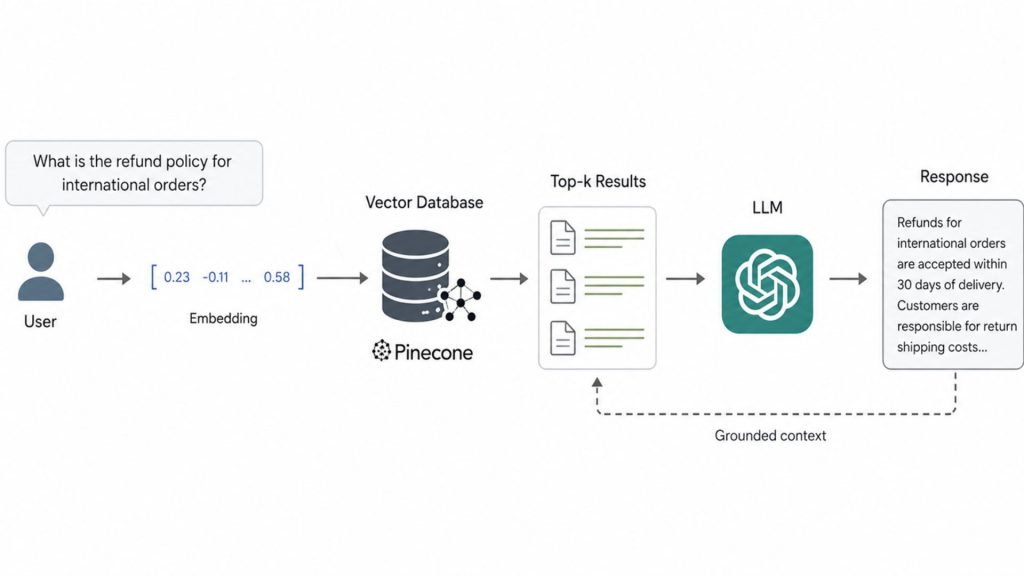
RAG improves response accuracy through external knowledge retrieval
2.3. AI assistants
AI assistants extend the principles of retrieval beyond single queries by incorporating session-level and historical context retrieval. Instead of treating each request independently, these systems leverage vector databases to maintain contextual continuity across interactions.
Key capabilities enabled by this approach include:
- Retrieval of relevant prior conversations based on semantic similarity
- Context-aware response generation across multi-turn interactions
- Dynamic aggregation of information from multiple sources during inference
In real-world applications, AI assistants such as Microsoft Copilot and Notion AI use vector databases to retrieve relevant context from past conversations and enterprise data. For example, when handling follow-up questions, the system recalls semantically similar prior interactions or documents to maintain continuity without requiring users to repeat information. This enables context-aware responses while supporting real-time performance in high-concurrency environments.
2.4 Enterprise knowledge search
At the enterprise level, vector databases function as the backbone of organization-wide knowledge retrieval systems. Corporate data is typically distributed across documents, emails, internal wikis, tickets, and collaboration platforms, making traditional keyword-based search insufficient for capturing semantic relationships across systems.
Enterprise knowledge search systems built on vector databases are designed to handle:
- High-concurrency query loads across large user bases
- Millions to billions of vector embeddings
- Hybrid retrieval combining semantic similarity and keyword precision
- Continuous ingestion of evolving data streams
- Fine-grained access control through metadata filtering and permissions
In this context, vector databases are not just a search layer but part of a broader information retrieval architecture that supports governance, scalability, and performance requirements.
In real-world enterprise environments, Microsoft Azure AI Search is widely used as a retrieval layer for RAG systems, enabling semantic search across distributed organizational data such as SharePoint documents, emails, and internal knowledge bases. For example, when a user asks a question like “Q4 hiring policy for remote teams,” the system retrieves relevant content from multiple enterprise sources even if the exact keywords do not match. This is achieved through vector-based semantic retrieval combined with hybrid search, allowing organizations to unify and query large-scale knowledge bases effectively.
As AI adoption expands beyond digital assistants and enterprise search, organizations are also exploring Physical AI, where intelligent systems interact with and respond to the physical world. Understanding both technologies helps businesses evaluate how AI can support a broader range of enterprise use cases.

Enterprise knowledge search architecture using Azure AI Search for semantic retrieval
3. How vector databases work
Vector databases transform raw data into numerical representations that AI models can understand and compare. Instead of searching for exact keywords, they identify content with similar meaning by measuring the distance between vector embeddings. This process typically consists of three key stages: data embedding, vector storage, and similarity search.
3.1 Data embedding
The first step in a vector database pipeline is converting raw, unstructured data into vector embeddings. An embedding is a dense numerical representation that captures the semantic meaning of content such as text, images, audio, or documents. Unlike structured database records, unstructured data lacks a fixed schema, making it difficult for traditional systems to process efficiently. Embeddings address this by representing content in a mathematical form that AI models can compare based on semantic similarity rather than exact keywords.
These semantic representations are generated by neural network-based machine learning models that learn contextual relationships from large volumes of training data. The quality of these embeddings depends not only on the model architecture but also on the quality of the training data. As a result, data annotation plays a critical role in improving embedding accuracy, enabling more reliable vector search and AI retrieval.
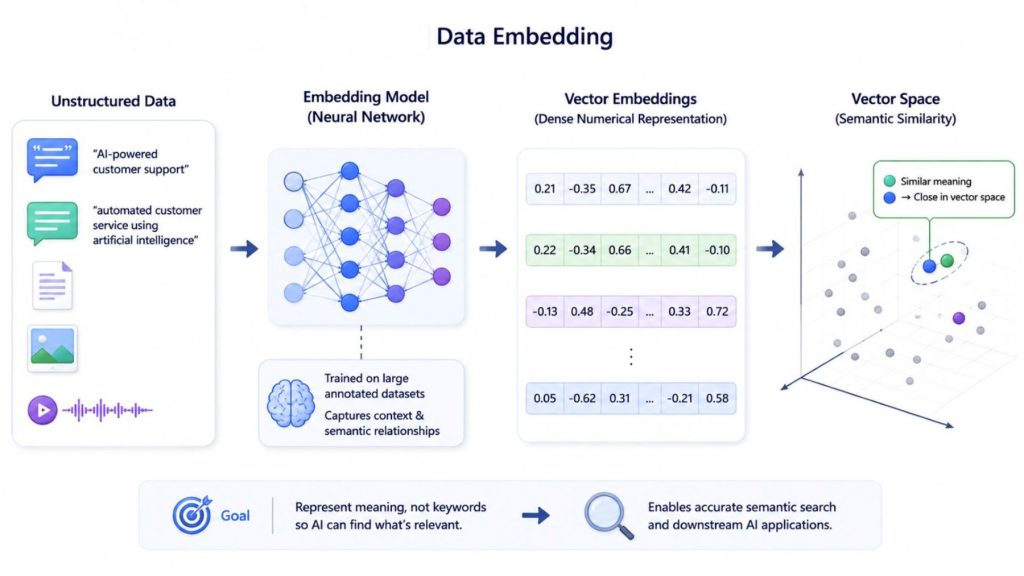
Data embedding transforms unstructured data into semantic vector representations for AI search
3.2 Vector storage
After embeddings are generated, they are stored in a vector database along with metadata such as identifiers, timestamps, categories, or access control attributes.
Because vector data is high-dimensional, direct search across all embeddings would be computationally expensive. To solve this, vector databases rely on Approximate Nearest Neighbor (ANN) algorithms that structure data into optimized indexes for fast retrieval. Common approaches include graph-based methods, hashing techniques, and quantization-based compression.
These indexing methods create a balance between speed and accuracy, allowing systems to retrieve highly relevant results without scanning the entire dataset.
A typical vector database pipeline includes three stages:
- Indexing: embeddings are organized into specialized data structures using methods such as HNSW, LSH, or PQ to enable efficient search
- Querying: the system converts a user query into a vector and searches the indexed structure to identify nearest neighbors based on similarity metrics
- Post-processing: retrieved candidates may be re-ranked or refined using additional scoring methods to improve final result quality
This multi-stage design ensures that vector databases can deliver both scalable performance and acceptable accuracy in production environments.
3.3 Similarity search
When a query is submitted, it is first converted into a vector embedding using the same embedding model applied during indexing. The system then compares this query vector with stored embeddings to find the most similar results based on distance or similarity in vector space.
Unlike traditional keyword-based search, which relies on exact matches, this approach focuses on semantic closeness. As a result, systems can retrieve relevant information even when there is no direct overlap in wording.
Most vector databases use a combination of similarity metrics, including cosine similarity, which measures directional alignment between vectors, Euclidean distance, which evaluates geometric distance, and dot product, which is commonly used in ranking and recommendation systems.
This similarity-driven retrieval process forms the foundation of modern AI applications such as semantic search and Retrieval-Augmented Generation (RAG). It enables systems to surface contextually relevant information before passing it to a language model, improving both accuracy and relevance of generated responses.
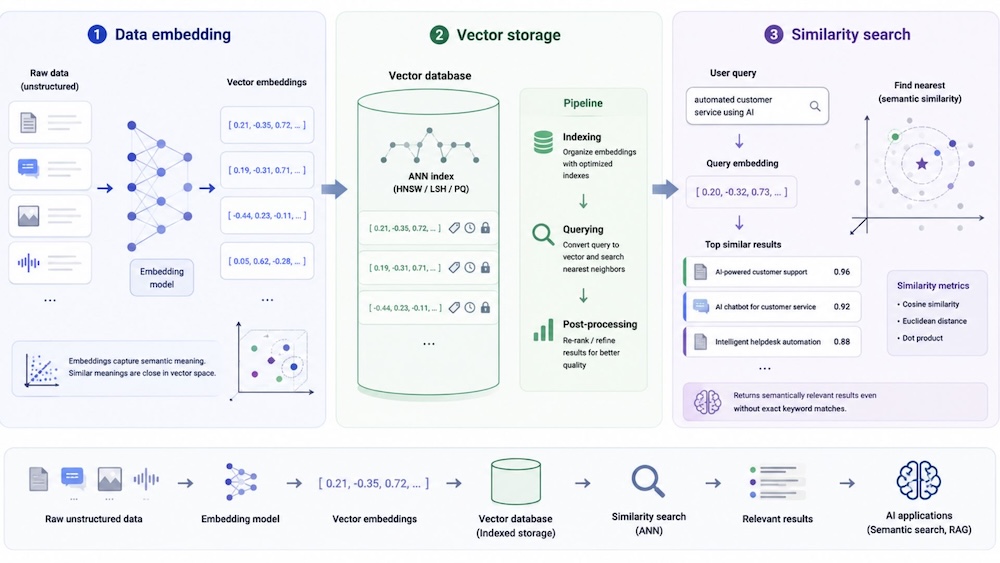
From data embedding to vector storage and similarity-based search in modern AI systems
4. Top 6 Databases For Most Use Cases
The growing adoption of generative AI has led to the emergence of many vector database platforms, each optimized for different workloads and deployment models. Some prioritize managed cloud services, while others focus on open-source flexibility or integration with existing data platforms. The following comparison highlights six popular vector databases and their ideal use cases.
| Database | Deployment Model | Open Source | Key Strength | Best For |
| Pinecone | Fully managed cloud (Serverless & BYOC) | No | Fully managed infrastructure, high scalability, low-latency vector search | Production RAG, enterprise AI, semantic search |
| Milvus | Self-hosted or managed cloud | Yes | High-performance distributed vector search for billions of vectors | Large-scale AI platforms, recommendation systems, image and video search |
| Weaviate | Self-hosted or managed cloud | Yes | AI-native architecture combining vector and structured data | Knowledge bases, enterprise search, semantic AI applications |
| Qdrant | Self-hosted or managed cloud | Yes | Fast similarity search with advanced metadata filtering | AI assistants, personalized search, recommendation engines |
| pgvector + pgvectorscale | PostgreSQL extension | Yes | Adds vector search directly into PostgreSQL | PostgreSQL applications, mixed relational and vector workloads |
| Elasticsearch | Self-hosted or Elastic Cloud | Source-available | Hybrid keyword and semantic search with rich filtering | Enterprise search, observability, log analytics, hybrid search |
4.1. Pinecone
Pinecone is a fully managed vector database service designed for production AI applications. It handles infrastructure management, indexing, scaling, and high availability, allowing development teams to focus on building AI solutions instead of maintaining backend systems.
Key features:
- Fully managed serverless architecture that removes infrastructure setup, scaling, and maintenance overhead
- Scales to billions of vectors while maintaining predictable low-latency performance for production workloads
- Supports real-time data ingestion with continuous indexing for dynamic and fast-changing datasets
- Provides advanced search capabilities including hybrid search combining dense and sparse vectors along with metadata filtering
- Enterprise-ready with seamless integrations for AI frameworks such as LangChain, LlamaIndex, and Hugging Face, plus Bring Your Own Cloud (BYOC) deployment and built-in embedding and reranking via Pinecone Inference
Best for: production-ready RAG systems, semantic search applications, and large-scale AI workloads that require a fully managed solution.
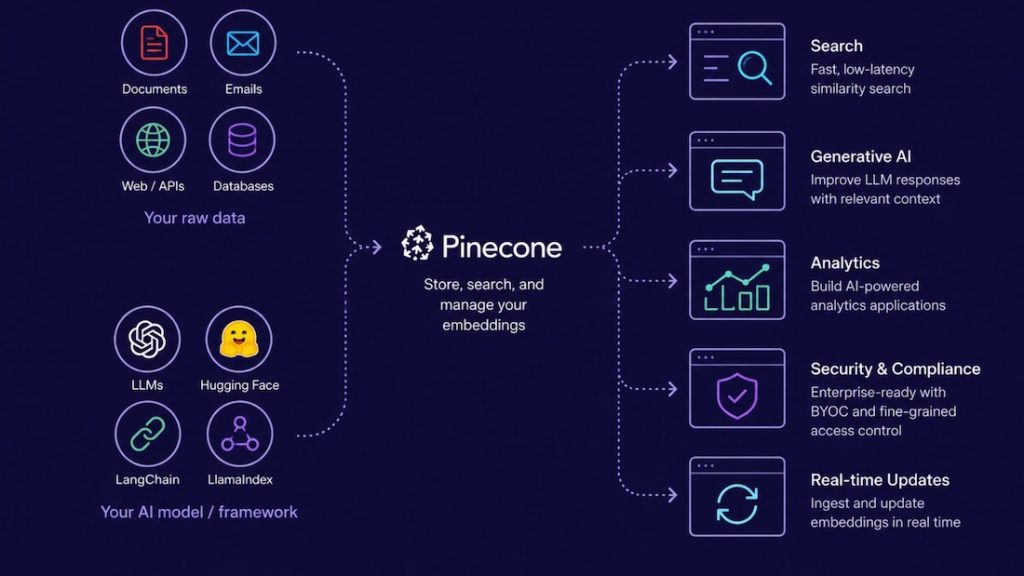
Pinecone connects enterprise data with AI applications through scalable vector search
4.2. Milvus
Milvus is an open-source vector database that has gained strong adoption thanks to its scalability, reliability, and high-performance design. It is built specifically for similarity search and AI-driven applications, enabling efficient storage and querying of massive embedding vectors generated by deep learning models.
Key features:
- Open-source vector database with strong community support and continuous development
- Designed to store and manage embedding vectors generated by deep learning models at scale
- Distributed architecture capable of handling billions of vectors with high reliability
- Optimized for fast similarity search with low-latency query performance in production workloads
- Flexible deployment options including Kubernetes, Docker, and cloud-native environments, suitable for large-scale AI systems
Best for: large-scale recommendation systems, video and image analysis, enterprise AI platforms, and personalized search applications requiring massive scalability.
4.3. Weaviate
Weaviate is an open-source, AI-native vector database designed to unify semantic search, vector embeddings, and structured data into a single scalable system. It enables developers to store data objects alongside embeddings from machine learning models and scale efficiently from small prototypes to billions of records in production environments.
Key features:
- Delivers fast nearest-neighbor search across millions to billions of vectorized objects with low-latency performance
- Supports flexible data ingestion by allowing users to either generate embeddings during import or bring their own, with integrations for models from OpenAI, Cohere, Hugging Face, and more
- Built for production scalability with strong support for replication, horizontal scaling, and security controls
- Extends beyond search by enabling use cases such as recommendations, summarization, and neural search-powered applications through its modular framework
Best for: semantic search systems, knowledge-driven AI applications, enterprise search, and scalable AI solutions that combine embeddings with structured data.
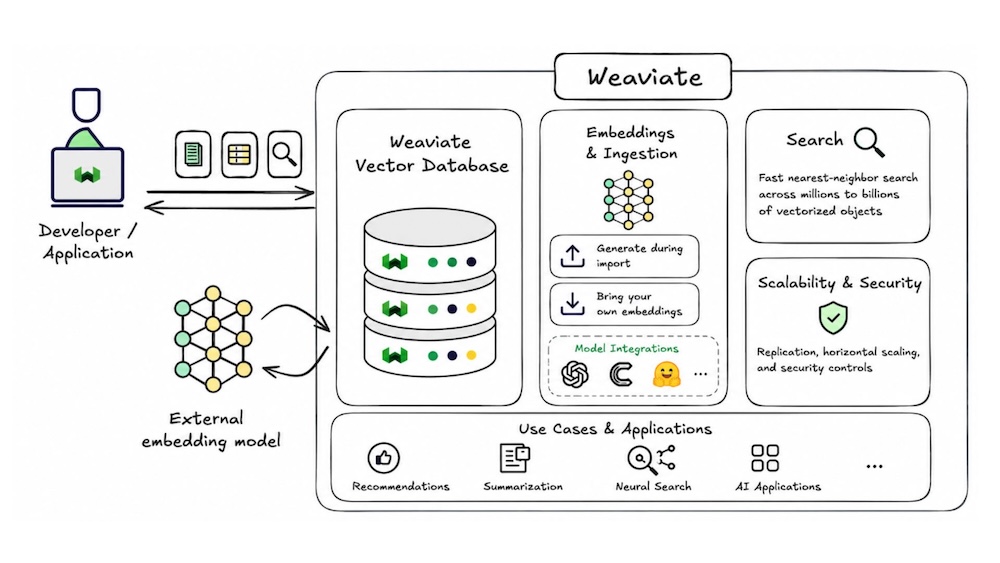
Weaviate architecture for AI-native vector search and scalable data management
4.4. Qdrant
Qdrant is an open-source vector database and API-based service designed for efficient vector similarity search. It enables developers to turn embeddings and neural network outputs into full-scale applications for matching, search, recommendations, and other AI-driven use cases.
Key features:
- API-first design with OpenAPI v3 specification and official client libraries for multiple programming languages
- HNSW-based indexing for fast and accurate vector similarity search performance
- Advanced payload filtering that enables refining results using metadata constraints
- Supports complex query conditions including text matching, numeric ranges, and geolocation filtering
- Cloud-native architecture built for horizontal scaling, efficient resource usage, and distributed deployment
Best for: recommendation systems, personalized search, AI assistants, and applications that require high-performance similarity search combined with flexible metadata filtering.
4.5. pgvector + pgvectorscale
Pgvector is an extension for PostgreSQL that introduces vector data types and similarity search capabilities directly into a traditional relational database. It allows teams to add vector search functionality without leaving the PostgreSQL ecosystem they are already familiar with. When combined with pgvectorscale, it further enhances performance and scalability for larger workloads.
Key features:
- Integrates vector similarity search directly into PostgreSQL, eliminating the need for a separate vector database
- Seamlessly works with existing PostgreSQL tools, SQL workflows, and relational database systems
- Supports Approximate Nearest Neighbor (ANN) search for efficient retrieval of high-dimensional embeddings
- Enables unified storage of structured relational data and vector embeddings within a single database system
- Scales to larger, production-grade workloads when extended with pgvectorscale for improved performance and capacity
Best for: smaller to medium-scale vector search use cases, PostgreSQL-based systems, and teams that prefer a unified database for both relational and vector workloads.

Pgvector adds vector similarity search to PostgreSQL, enabling ANN-based retrieval of embeddings within a single SQL database
4.6. Elasticsearch
Elasticsearch (by Elastic) is a mature distributed search engine originally designed for full-text search, log analytics, and metrics processing. With the addition of vector capabilities, it now supports embedding-based retrieval, enabling hybrid search that combines traditional keyword matching with semantic similarity.
Key features:
Combines BM25 keyword search with vector-based similarity search, and can further improve ranking using neural re-ranking models such as ELSER
- Supports advanced filtering and querying through Query DSL, including numeric ranges, geospatial filters, term queries, and aggregations alongside vector search
- Built on a distributed architecture that scales horizontally using sharding, with built-in replication and fault tolerance for production environments
- Integrates with the broader Elastic ecosystem, including Kibana for visualization, Elastic APM, SIEM, and various data ingestion connectors
- Supports multiple vector similarity metrics such as cosine similarity, dot product, and L2 distance using Lucene-based approximate k-NN search for efficiency
Best for: enterprise search systems, log and observability platforms, hybrid keyword + semantic search, and organizations already using the Elastic Stack.
5. How to choose the right vector database?
Selecting the right vector database depends on your AI use case, infrastructure strategy, and long-term business goals. While search accuracy and query performance are important, organizations should also evaluate deployment flexibility, scalability, and how well the database integrates with their overall AI development workflow. Considering these factors early can help reduce implementation complexity and support future growth.
5.1. Performance requirements
Different AI workloads require different performance trade-offs. Customer-facing applications such as AI assistants prioritize ultra-low latency, while enterprise search or recommendation systems focus on large-scale retrieval across millions or billions of vectors.
Instead of relying on benchmark results alone, organizations should evaluate real-world performance based on their own workload patterns, including query latency (p95/p99), indexing throughput, update frequency, and support for Approximate Nearest Neighbor (ANN) search.
The key decision is not selecting the fastest system in isolation, but finding the right balance between speed, accuracy, and workload complexity

Optimizing vector search for diverse AI application requirements
5.2. Deployment model
Deployment preferences vary across organizations depending on security, compliance, and operational requirements. Some businesses prefer fully managed cloud services that minimize infrastructure management, while others require self-managed or on-premises deployments to maintain greater control over sensitive enterprise data.
Before selecting a vector database, consider whether your organization needs cloud-native scalability, hybrid infrastructure, or on-premises deployment. Choosing a platform that aligns with your IT environment can simplify operations and reduce long-term maintenance costs. If you’re evaluating different deployment options, our guide to Virtual Private Servers explains how VPS provides dedicated resources, greater control, and a flexible hosting environment for enterprise applications.
5.3. Scalability
As AI applications grow, the volume of embeddings and user queries increases significantly. A vector database should be able to scale efficiently without compromising retrieval speed or availability.
Look for features such as distributed storage, horizontal scaling, GPU acceleration, and high availability. These capabilities enable organizations to support growing datasets, increasing numbers of concurrent users, and more complex AI workloads while maintaining consistent performance. As AI deployments expand from centralized cloud environments to edge devices, understanding Edge AI can help organizations design scalable architectures that balance performance, latency, and resource utilization.
5.4. AI workflow integration
Although choosing the right vector database is important, it is only one part of building enterprise AI applications. Organizations also need an AI development environment that simplifies model integration, data processing, deployment, and ongoing management throughout the AI lifecycle.
As AI projects move from proof of concept to production, development teams often encounter several challenges:
- Connecting large language models (LLMs) with enterprise data stored across multiple systems.
- Building and maintaining Retrieval-Augmented Generation (RAG) pipelines that combine embedding models, vector databases, and LLMs.
- Managing embeddings, prompts, model versions, and inference endpoints across different environments.
- Deploying AI applications securely while maintaining scalability, governance, and performance.
Addressing these challenges often requires more than selecting a vector database. An integrated AI platform can streamline development by bringing together the tools needed to build, deploy, and manage AI applications in a unified workflow.
Rather than managing these components separately, organizations can benefit from an integrated AI development platform. FPT AI Factory provides a comprehensive ecosystem that supports the entire AI lifecycle, helping development teams accelerate AI adoption while reducing operational complexity. For example, AI Studio offers services that simplify AI development and deployment, including:
- AI Notebook for collaborative model development and experimentation.
- Model Serving to deploy trained AI models through scalable inference endpoints.
- Model Playground for testing and evaluating foundation models before deployment.
- AI Gateway for managing and integrating multiple LLM providers through a unified interface.
Combined with infrastructure services such as GPU Container and GPU Virtual Machine, organizations can develop, test, fine-tune, and deploy enterprise AI applications within a single ecosystem instead of integrating multiple disconnected tools.
By combining vector databases with an end-to-end AI platform, businesses can accelerate the development of semantic search, RAG systems, AI assistants, and enterprise knowledge search applications while improving scalability, governance, and operational efficiency.
Choosing the right vector database is an important first step, but long-term success depends on building an AI architecture that supports the complete development lifecycle. The next section answers some of the most frequently asked questions about vector databases and enterprise AI deployments.
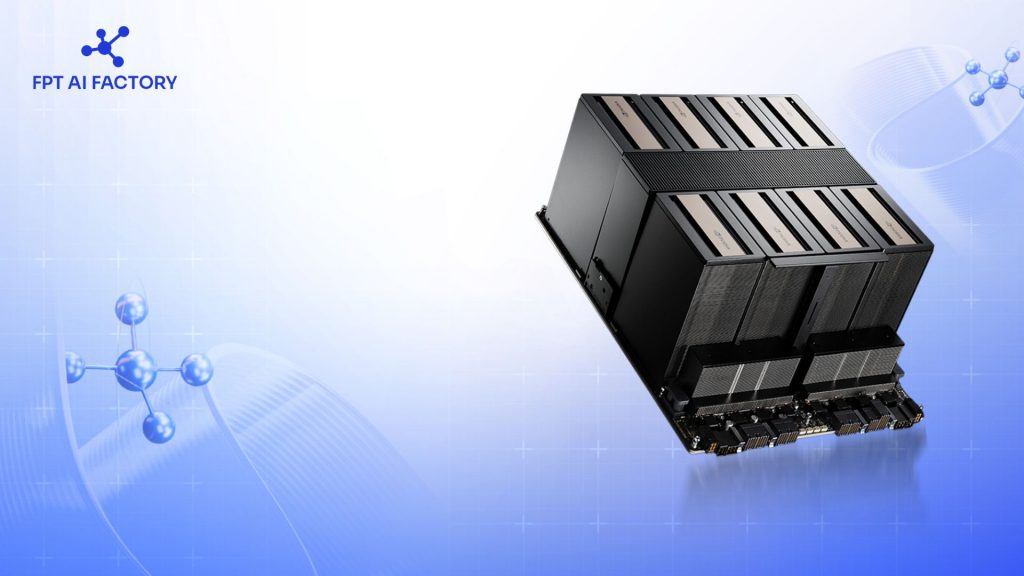
GPU Virtual Machine provides scalable GPU resources for AI training and deployment in the cloud
6. FAQs
6.1. What is the best vector database for RAG?
There is no single best vector database for every Retrieval-Augmented Generation (RAG) application. The right choice depends on factors such as dataset size, latency requirements, deployment preferences, and existing infrastructure. Managed solutions like Pinecone simplify deployment, while open-source platforms such as Milvus, Weaviate, and Qdrant offer greater flexibility and customization. Organizations should select the platform that best aligns with their technical requirements and AI development strategy.
6.2. Which vector database should enterprises choose?
Enterprises should not focus on a single “best” vector database, but choose based on their scale, infrastructure, and architecture needs. Managed solutions suit faster deployment, while open-source options offer more control and flexibility. In many cases, integrating vector capabilities into existing systems can also be effective. Beyond the database, enterprises should ensure they have an end-to-end AI platform to support data, models, deployment, and monitoring for production-scale AI applications.
6.3. Can vector databases work with LLMs?
Yes. Vector databases are commonly used alongside large language models (LLMs) to build AI applications such as semantic search, AI assistants, and Retrieval-Augmented Generation (RAG) systems. Instead of relying solely on pretrained knowledge, LLMs retrieve relevant information from a vector database before generating responses, helping improve accuracy, reduce hallucinations, and incorporate the latest enterprise data without retraining the model.
A comprehensive vector database comparison helps organizations select the right solution based on AI use case, deployment preferences, performance requirements, and scalability goals. By evaluating the strengths of different platforms, businesses can choose a vector database that effectively supports semantic search, Retrieval-Augmented Generation (RAG), AI assistants, and enterprise knowledge search.
FPT AI Factory provides an end-to-end AI ecosystem that goes beyond vector databases, enabling organizations to build, deploy, and scale AI applications with integrated tools for model development, GPU infrastructure, and AI deployment. For customized or large-scale AI projects, FPT AI Factory also offers tailored consultation and deployment support.
Contact information:
- Hotline: 1900 638 399
- Email: support@fptcloud.com
Explore related articles: