はじめに
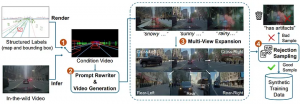
Cosmos-Drive-Dreams パイプラインの概要[1]
Cosmos-Drive-Dreams は、自動運転車の開発に向けて、高精度かつ難易度の高い運転シナリオを生成するために設計された、スケーラブルな合成データ生成(SDG)パイプラインです。特に、現実世界データの取得コストの高さやカバレッジの限界、そして希少なエッジケースの不足といった課題を解決することを目的としています。
本パイプラインは、NVIDIA Cosmos-1 を基盤として運転領域向けに最適化されたワールドモデル群 Cosmos-Drive によって動作します。これにより、制御可能で、時空間的に一貫性のあるマルチビュー動画生成が可能となり、3D パーセプションや走行ポリシー学習といった下流タスクの性能向上に貢献します。
本チュートリアルでは、まず FPT GPU Cloud を用いた環境構築手順について説明します。FPT GPU Cloud は、簡便なインストール体験と高性能 GPU リソースを提供し、Cosmos を用いた大規模かつ効率的な動画生成を実現します。
前提条件
本チュートリアルでは、 [2] に記載されているインストール手順に従ってセットアップを行います。
Cosmos-Drive-Dreams のソースコードをダウンロード
git clone https://github.com/nv-tlabs/Cosmos-Drive-Dreams.git
cd Cosmos-Drive-Dreams
git submodule update --init –recursive
Note: The last command is used to update the Cosmos Transfer submodule. If it is not updated, the following command can be used to update it directly.
# Remove the submodule folder
rm -r cosmos-transfer1
# Add it manually
git submodule add --force https://github.com/nvidia-cosmos/cosmos-transfer1.git cosmos-transfer1
# Current version of Cosmos Drive Dreams works with commit b25a3ac
git checkout b25a3ac
cd ..
2. Conda 環境のセットアップ
# Create the cosmos-transfer1 conda environment.
conda env create --file environment.yaml
# Activate the cosmos-transfer1 conda environment.
conda activate cosmos-drive-dreams
# Install the dependencies.
pip install -r requirements.txt
# Install vllm
pip install https://download.pytorch.org/whl/cu128/flashinfer/flashinfer_python-0.2.5%2Bcu128torch2.7-cp38-abi3-linux_x86_64.whl
export VLLM_ATTENTION_BACKEND=FLASHINFER
pip install vllm==0.9.0
# Patch Transformer engine linking issues in conda environments.
ln -sf $CONDA_PREFIX/lib/python3.12/site-packages/nvidia/*/include/* $CONDA_PREFIX/include/
ln -sf $CONDA_PREFIX/lib/python3.12/site-packages/nvidia/*/include/* $CONDA_PREFIX/include/python3.12
# Install Transformer engine.
pip install transformer-engine[pytorch]==2.4.0
3. モデルのダウンロード(Models Downloading)
以下の手順に従い、Hugging Face からモデルをダウンロードします。
- Hugging Face のアクセストークンを生成
アクセストークンを作成し、権限は 「Read」 に設定してください
(デフォルトは 「Fine-grained」 となっています)。 - アクセストークンを使用して Hugging Face にログイン
huggingface-cli login
Llama-Guard-3–8B、Cosmos-Tokenize1-CV8x8x8–720p、および Cosmos-Guardrail1 の利用規約に同意してください。
その後、以下の手順に従って Hugging Face から Cosmos モデルの重みをダウンロードします。
huggingface-cli loginLlama-Guard-3–8B、Cosmos-Tokenize1-CV8x8x8–720p、および Cosmos-Guardrail1 の利用規約に同意してください。
その後、以下の手順に従って Hugging Face から Cosmos モデルの重みをダウンロードします。
cd cosmos-transfer1
PYTHONPATH=$(pwd) python scripts/download_checkpoints.py --output_dir checkpoints/ --model 7b_av
cd ..注記: 本作業には 約 300GB の空きストレージ容量が必要となる点にご注意ください。
以下は、各モデルの概要です。
- Cosmos-Guardrail1(モデルサイズ:6.7 GB)
安全性制約を適用し、コンテンツの安全性を確保するために設計されたコンテンツセーフティモデルです。
- Cosmos-Transfer1–7B-Sample-AV(モデルサイズ:66 GB)
テキスト記述および HD マップ/LiDAR 動画を入力として受け取り、解像度 704×1280 にて 121 フレームの動画を生成します。
- Cosmos-Transfer1–7B-Sample-AV-Single2MultiView(モデルサイズ:68 GB)
Cosmos のワールド基盤モデルをベースにファインチューニングされたモデルです。
テキストおよび/または動画を入力として、解像度 576×1024、57 フレームのワールドビュー動画を生成します。
- Cosmos-Tokenize1-CV8x8x8–720p(モデルサイズ:1.8 GB)
C は Continuous、V は Video を意味するトークナイザーモデルです。
時間方向 8×、空間方向 8×8 の圧縮に対応し、720p 以上をサポート、121 フレームのコンテキストウィンドウを提供します。
4. HD マップデータの作成
Cosmos Drive Dreams モデルを使用する前に、モデルが利用可能な形式(例:動画データ)でデータを事前に準備する必要があります。
以下のコマンドを実行し、RDS-HQ データを HD マップ動画形式へ変換してください。
python render_from_rds_hq.py -i ../assets/example -o ../outputs -d rds_hq --skip lidar --skip world_scenario出力結果は outputs/hdmap ディレクトリに保存されます。
└── ftheta_camera_front_wide_120fov
├── 2d23a1f4-c269-46aa-8e7d-1bb595d1e421_2445376400000_2445396400000_0.mp4
└── 2d23a1f4-c269-46aa-8e7d-1bb595d1e421_2445376400000_2445396400000_1.mp4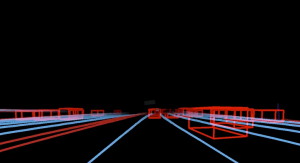
HD マップ(High-Definition Map)は、車線、標識、信号などの道路構造の詳細を高精度に記述したデジタルマップです。自動運転車が道路環境を正確に理解し、安全かつ的確に走行・ナビゲーションするために用いられます。
複数視点(マルチビュー)を生成したい場合は、以下のコマンドを実行してください。
python render_from_rds_hq.py -i ../assets/example -o ../outputs -d rds_hq_mv --skip lidar --skip world_scenarioスクリプトは 1 分以内に完了し、outputs/hdmap に新しいディレクトリが生成されます。
outputs/
└── hdmap/
├── ftheta_camera_cross_left_120fov
│   └── 2d23a1f4-c269-46aa-8e7d-1bb595d1e421_2445376400000_2445396400000_0.mp4
├── ftheta_camera_cross_right_120fov
│   └── 2d23a1f4-c269-46aa-8e7d-1bb595d1e421_2445376400000_2445396400000_0.mp4
├── ftheta_camera_front_wide_120fov
│   └── 2d23a1f4-c269-46aa-8e7d-1bb595d1e421_2445376400000_2445396400000_0.mp4
├── ftheta_camera_rear_left_120fov
└── 2d23a1f4-c269-46aa-8e7d-1bb595d1e421_2445376400000_2445396400000_0.mp4
...
5. キャプションの書き換え
生成される動画の環境を変更するために、入力キャプションを大規模言語モデル(例:Qwen3–14B)を用いて書き換えることができます。
以下のコマンドは、入力動画のキャプションを書き換えるために使用します。
python scripts/rewrite_caption.py -i assets/example/captions -o outputs/captions補足として、現在の動画のキャプションは以下のとおりです。
The video shows a highway scene during twilight or early evening, with a clear sky transitioning from blue to darker shades. Several cars are visible on the road, some moving forward while others appear stationary, indicating moderate traffic. The road is flanked by trees and a concrete barrier on one side, with utility poles and wires running parallel to the highway. A billboard is visible in the distance, and the overall atmosphere suggests a calm urban or suburban setting. The lighting indicates that it is either dusk or dawn, with the sky showing signs of fading light.システムプロンプトの設定
You are a prompt optimization specialist. Your task is to rewrite user-provided input prompts into high-quality English descriptions by modifying specific temporal or environmental details, while preserving the core content and actions of the original scene. \n
There are two types of rewrites: \n
1. Time of Day: Change the time setting in the caption, including Golden hour (with long shadows), Morning, and Night. \n
2. Environment/Weather: Change the weather condition in the caption, including Rainy, Snowy, Sunny, Foggy. \n
Requirements:
- Keep the scene and actions the same (e.g., a car driving down a highway should still be a car driving down a highway).
- Change only the details related to time or environment as instructed.
- Ensure the rewrite matches the new condition (e.g., no mention of sun glare in a foggy or snowy version).
「Morning」用のユーザープロンプト
(※ その他の条件例:ゴールデンアワー、夜間、雨天、降雪、晴天、霧など)
Rewrite the following caption to include specific environmental or temporal details. \n
Original Caption: The video shows a highway scene during twilight or early evening, with a clear sky transitioning from blue to darker shades. Several cars are visible on the road, some moving forward while others appear stationary, indicating moderate traffic. The road is flanked by trees and a concrete barrier on one side, with utility poles and wires running parallel to the highway. A billboard is visible in the distance, and the overall atmosphere suggests a calm urban or suburban setting. The lighting indicates that it is either dusk or dawn, with the sky showing signs of fading light. \n
Rewrite Type: Morning \n
Please provide a detailed and high-quality rewrite that maintains the core content of the scene. Format your response by having the rewritten caption following 'New caption:' /no_think\n
書き換えられたキャプションは outputs/captions ディレクトリに保存されます。
6. シングルビュー動画の生成
それでは、HD マップ動画と書き換えたプロンプトを組み合わせ、以下のコマンドを使用してフロントビュー動画を生成します。
PYTHONPATH="cosmos-transfer1" python scripts/generate_video_single_view.py --caption_path outputs/captions --input_path outputs --video_save_folder outputs/single_view --checkpoint_dir checkpoints/ --is_av_sample --controlnet_specs assets/sample_av_hdmap_spec.json
注記:
本コマンドは複数のシングルビュー動画を生成するため、比較的処理時間が長く、H200 GPU を 1 基使用した場合、動画1 本(121 フレーム)あたり約 5 分を要します。
複数の動画を並列生成することで、処理時間を短縮することが可能です。
#!/usr/bin/env bash
# Use multiple gpus
export CUDA_VISIBLE_DEVICES="${CUDA_VISIBLE_DEVICES:=0,1,2,3}"
export NUM_GPU="${NUM_GPU:=4}"
# Make sure PYTHONPATH is set correctly
export PYTHONPATH="cosmos-transfer1:${PYTHONPATH:-}"
torchrun --nproc_per_node=$NUM_GPU --nnodes=1 --node_rank=0 scripts/generate_video_single_view.py \
--caption_path outputs/captions \
--input_path outputs \
--video_save_folder outputs/single_view \
--checkpoint_dir checkpoints/ \
--is_av_sample \
--controlnet_specs assets/sample_av_hdmap_spec.json \
--num_gpus $NUM_GPU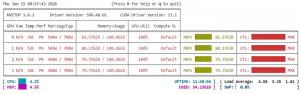
シングルビュー動画生成時の GPU 使用状況
出力された動画は outputs/single_view ディレクトリに保存されます。
outputs/single_view/
├── 2d23a1f4-c269-46aa-8e7d-1bb595d1e421_2445376400000_2445396400000_Golden hour.mp4
├── 2d23a1f4-c269-46aa-8e7d-1bb595d1e421_2445376400000_2445396400000_Golden hour.txt
├── 2d23a1f4-c269-46aa-8e7d-1bb595d1e421_2445376400000_2445396400000_Original.mp4
└── 2d23a1f4-c269-46aa-8e7d-1bb595d1e421_2445376400000_2445396400000_Original.txt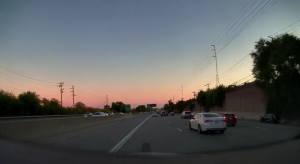
書き換えたプロンプトに基づいて生成されたシングルビュー(フロントビュー)の出力結果
7. マルチビュー動画の生
マルチビュー動画を生成するには、まずすべての視点に対応した HD マップを生成する必要があります。 以下のコマンドを実行してください。
PYTHONPATH="cosmos-transfer1" python scripts/generate_video_multi_view.py --caption_path outputs/captions --input_path outputs --input_view_path outputs/single_view --video_save_folder outputs/multi_view --checkpoint_dir checkpoints --is_av_sample --controlnet_specs assets/sample_av_hdmap_multiview_spec.json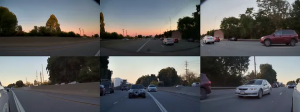
複数視点の出力結果:フロント、フロント左、フロント右、リア、リア左、リア右
同様に、以下は複数 GPU 上で実行するためのスクリプトです。
#!/usr/bin/env bash
# Expose 4 GPUs
export CUDA_VISIBLE_DEVICES="${CUDA_VISIBLE_DEVICES:-0,1,2,3}"
# Number of GPUs
export NUM_GPU="${NUM_GPU:-4}"
# Python path
export PYTHONPATH="cosmos-transfer1:${PYTHONPATH:-}"
# Multi-GPU distributed run
torchrun \
--nproc_per_node=$NUM_GPU \
--nnodes=1 \
--node_rank=0 \
scripts/generate_video_multi_view.py \
--caption_path outputs/captions \
--input_path outputs \
--input_view_path outputs/single_view \
--video_save_folder outputs/multi_view \
--checkpoint_dir checkpoints \
--is_av_sample \
--controlnet_specs assets/sample_av_hdmap_multiview_spec.json \
--num_gpus $NUM_GPU
マルチ GPU スケーリング性能(Multi-GPU Scaling Performance)
シングルビューおよびマルチビューの各シナリオにおいて、GPU 数を 1・4・8 基とした構成で実行時間を比較し、計算効率を評価しました。
本分析を通じて、ハードウェアのスケーリング性能を明らかにするとともに、複雑なマルチビュー処理に内在する計算オーバーヘッドが、GPU リソースの追加によってどのように緩和されるかを示します。
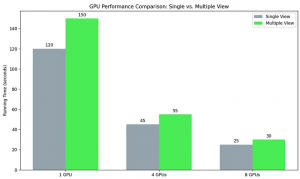
単一視点および複数視点生成における処理効率に対するマルチGPUスケーリングの影響を示す計算速度向上の分析。性能は FPT Cloud の H200 GPU[3]を用いて測定されている。
参考文献(References)
[1] Cosmos-Drive-Dreams: Scalable Synthetic Driving Data Generation with World Foundation Models https://arxiv.org/abs/2506.09042
[2] Cosmos Drive Dream install: https://github.com/nv-tlabs/Cosmos-Drive-Dreams/blob/main/INSTALL.md
[3] FPT AI Factory: https://factory.fpt.ai/ja/
*出典::A tutorial on using Cosmos Drive Dreams | by Tran Linh | Jan, 2026 | Usee