

Modern AI development often involves multiple users, large GPU clusters, and compute-intensive workloads running simultaneously. Efficient workload scheduling is essential for maximizing infrastructure utilization and ensuring fair access to shared computing resources. In this article, FPT AI Factory helps you answer the question, “What is Slurm?”, explore how it works, and understand why it has become one of the most widely used workload schedulers for AI and high-performance computing.
|
Key takeaways: Slurm helps organizations efficiently manage shared AI infrastructure by automating workload scheduling and resource allocation. Here are the key points to remember.
|
FPT AI Factory helps organizations build, test, and deploy AI models with an integrated development platform. Supported by GPU infrastructure, AI Notebook, Model Testing, and Serverless Inference, teams can accelerate AI development while improving model quality and deployment efficiency. For custom AI projects or enterprise-scale infrastructure, contact FPT AI Factory for tailored solutions.
1. What Is Slurm?
Slurm (Simple Linux Utility for Resource Management) is an open-source workload manager and job scheduler designed for Linux clusters. It automatically allocates computing resources, schedules jobs, and manages workloads across multiple servers, making it a core component of many high-performance computing (HPC) and AI environments.
By optimizing how CPU, GPU, memory, and other resources are assigned, Slurm improves cluster utilization and reduces idle compute capacity. As AI models continue to grow in size and complexity, organizations increasingly rely on Slurm to efficiently manage training, inference, and other large-scale computational workloads. To learn more about GPU architecture and AI computing performance, you can also read our guide on GPU vs. CPU: Key Differences and Which One to Choose for AI.
2. Why Slurm Matters for AI Infrastructure
As AI workloads become larger and more computationally intensive, efficiently managing shared computing resources becomes increasingly important. Here are the key reasons why Slurm plays a critical role in modern AI infrastructure:
2.1. Multi-user environments
AI infrastructure is often shared by multiple researchers, engineers, and development teams working on different projects simultaneously. Slurm organizes submitted jobs into queues and schedules them based on available resources and predefined policies, preventing conflicts between users. This centralized workload management helps ensure that shared compute resources are used efficiently without requiring manual coordination.
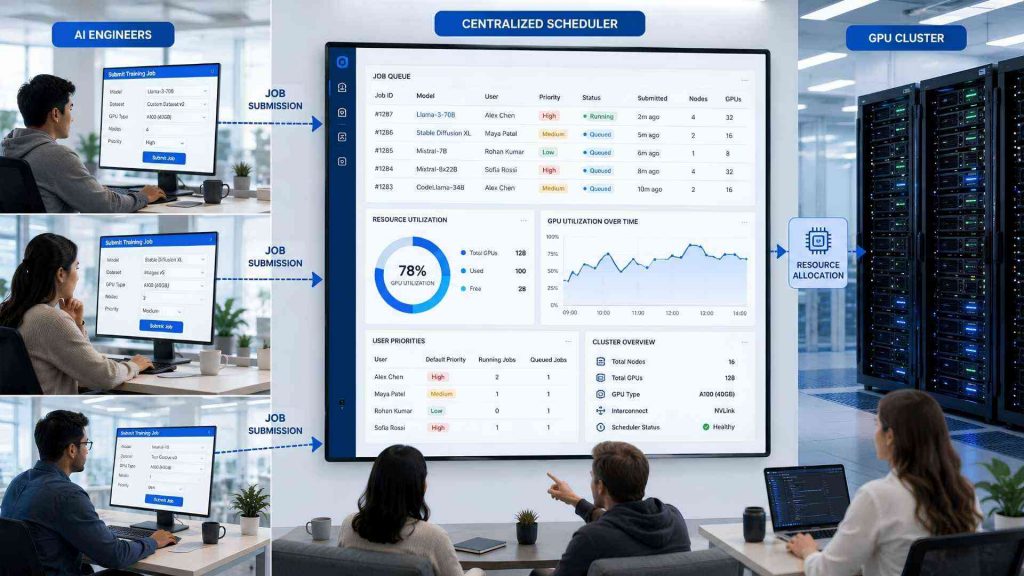
Slurm enables multiple users to share AI computing resources efficiently
2.2. GPU resource management
Training and serving AI models require efficient allocation of GPU resources, particularly in environments where GPUs are shared across multiple workloads. Slurm automatically assigns available GPUs based on workload requirements, helping reduce resource contention and idle hardware. It also supports GPU reservations, resource tracking, and workload isolation to improve scheduling efficiency.
2.3. Distributed AI training
Many modern AI models require distributed training across multiple GPUs or multiple compute nodes to reduce training time and handle larger datasets. Slurm coordinates resource allocation for distributed workloads, ensuring all required nodes are available before execution begins. It also simplifies launching distributed frameworks such as PyTorch Distributed or MPI-based training jobs across a cluster. If you’d like to see how this works in practice, explore our guide on Distributed LLM Training on Slurm GPU Clusters Explained.
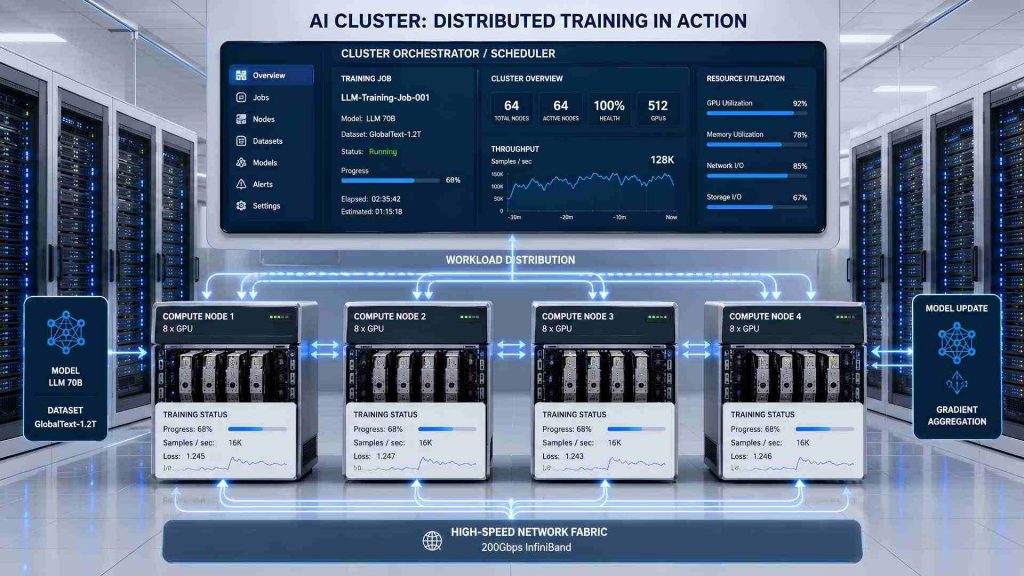
Slurm coordinates distributed AI training across multiple GPU nodes
2.4. Fair resource sharing
In shared computing environments, ensuring fair access to resources is essential for maintaining productivity across teams. Slurm supports scheduling policies such as priorities, quotas, and fair-share algorithms that distribute computing resources based on organizational rules. These policies prevent individual users from monopolizing GPUs or compute nodes while ensuring high-priority workloads receive appropriate resources.
3. How Slurm Works
After understanding why Slurm is important for AI infrastructure, the next step is exploring how it manages workloads from submission to execution. The following workflow illustrates how Slurm coordinates AI workloads across a computing cluster:
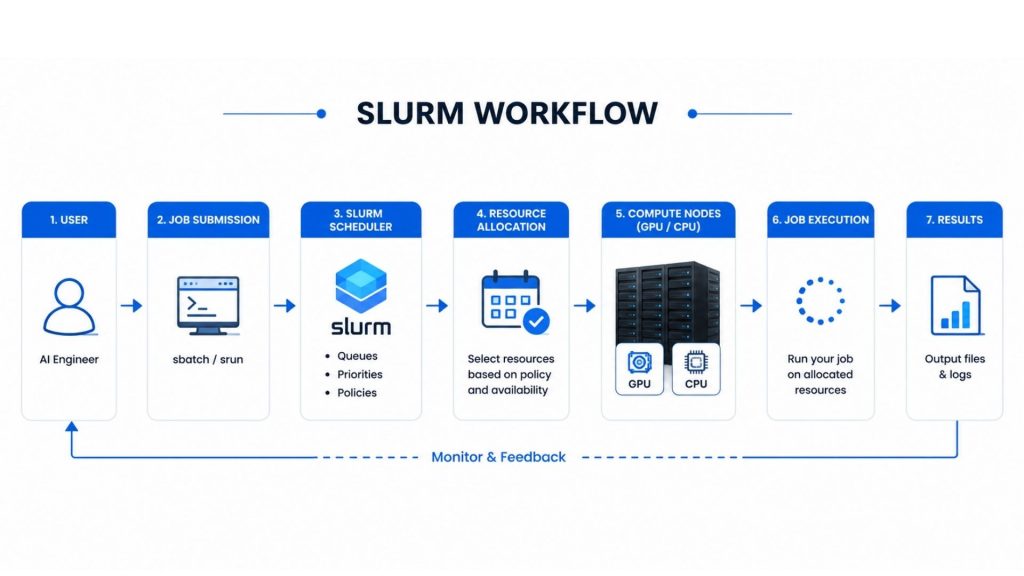
Slurm automates AI workload scheduling from job submission to cluster execution
3.1 Job submission
Every workload begins when a user submits a job to the Slurm scheduler, typically through command-line tools or batch scripts. The job description specifies requirements such as the number of GPUs, CPUs, memory, runtime, and software environment needed for execution. Slurm records these requirements and places the workload into the appropriate queue.
3.2 Resource allocation
Once a job enters the queue, Slurm identifies available computing resources that satisfy its requirements. It allocates GPUs, CPUs, memory, and compute nodes while preventing conflicts with other running workloads. Resource allocation is performed automatically according to cluster availability and scheduling policies. This approach helps maximize hardware utilization while reducing idle resources.
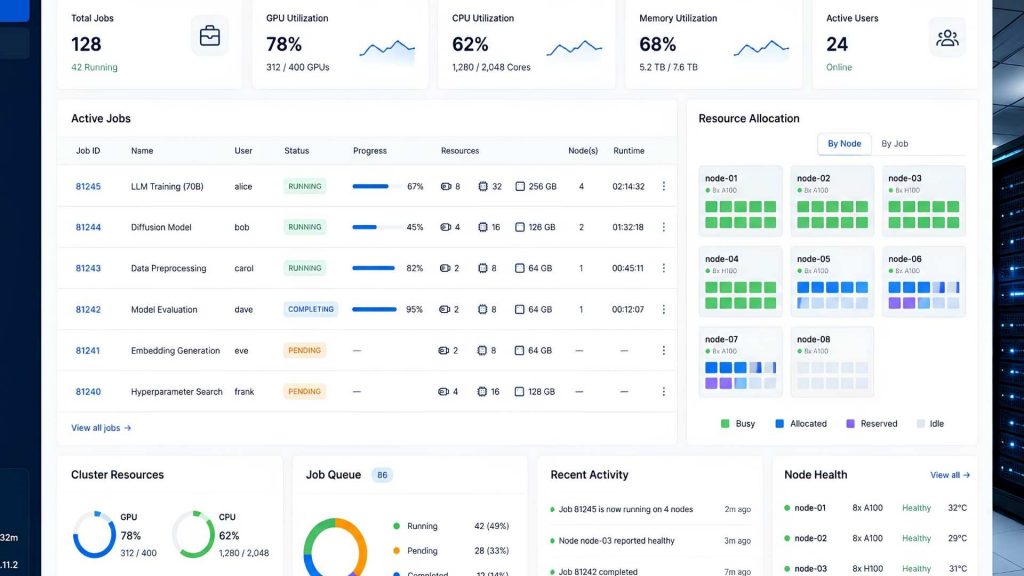
Slurm automatically allocates computing resources before job execution
3.3 Job scheduling
After resources become available, Slurm determines the optimal execution order for queued jobs. Scheduling decisions consider factors such as job priority, resource availability, queue policies, and fair-share rules. This ensures that high-priority workloads receive resources when needed while maintaining balanced cluster utilization.
3.4 Cluster management
Beyond scheduling individual jobs, Slurm continuously manages the overall health and utilization of the computing cluster. It monitors active workloads, tracks resource usage, detects node availability, and maintains stable cluster operations. Administrators can use this information to optimize resource planning and improve workload efficiency over time.

Slurm provides centralized management for AI computing clusters
4. Slurm Architecture
The Slurm architecture consists of several key components, including Users, Login Nodes, Controller, Scheduler, Compute Nodes, and GPU Resources. These components work together to manage the complete lifecycle of a job, from submission to execution.
- User: Users submit computational jobs to the Slurm cluster by creating job scripts and specifying required resources, such as CPU, memory, GPU, and execution time.
- Login Node: The Login Node provides the access point for users to connect to the cluster, prepare job scripts, upload data, and submit workloads. It is not used for running intensive computations.
- Controller: The Controller acts as the central management component of Slurm. It monitors cluster status, manages available resources, tracks job states, and coordinates communication between different components.
- Scheduler: The Scheduler determines when and where jobs should run based on resource availability, job priority, and scheduling policies. It assigns suitable Compute Nodes to execute submitted workloads.
- Compute Nodes: Compute Nodes are the servers where actual workloads are executed. They provide computational resources, including CPU, memory, storage, and GPU accelerators, to run user applications.
- GPU Resources: GPUs are managed as specialized resources within Slurm using the Generic Resource (GRES) mechanism. Slurm allocates GPUs to workloads based on job requirements, enabling efficient execution of AI and HPC applications.
The interaction between these components enables Slurm to efficiently manage large-scale computing workloads, optimize resource utilization, and support complex applications such as AI training, scientific simulations, and data-intensive processing. The following diagram illustrates the overall workflow and interaction between different components in a Slurm-based computing cluster.
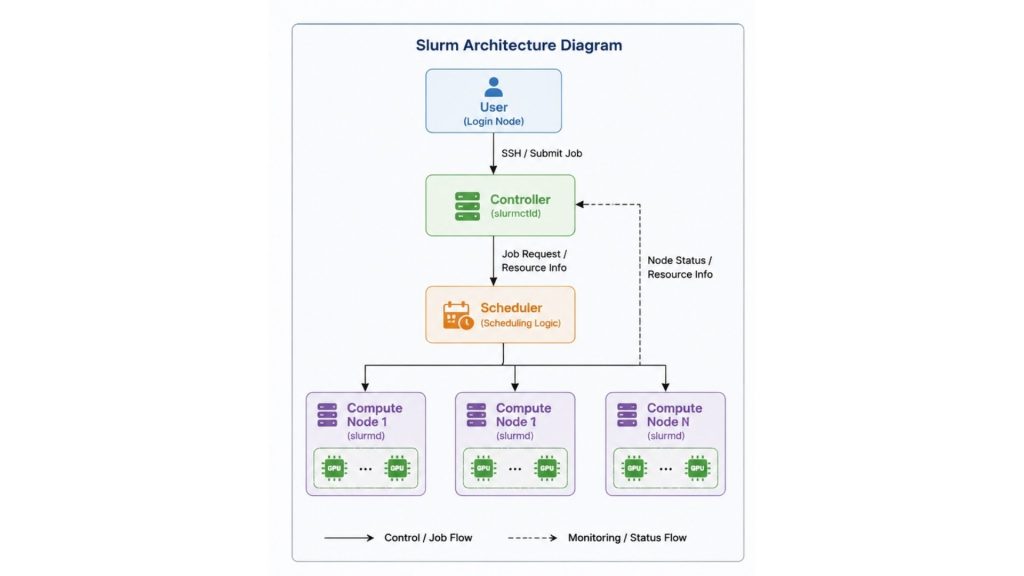
Interaction between Slurm components in an HPC cluster environment
5. Comparison of Slurm vs. Kubernetes for AI and ML
Slurm and Kubernetes are both widely used for managing compute resources, but they are designed for different types of workloads. Slurm focuses on scheduling high-performance computing (HPC) and AI training jobs, while Kubernetes is optimized for managing containerized applications and cloud-native services. Here is a table comparing Slurm and Kubernetes for AI and ML.
| Feature | Slurm | Kubernetes |
| Workload type | HPC, AI training, scientific computing | Containerized applications, microservices, AI services |
| Execution model | Batch jobs and scheduled workloads | Long-running containers and services |
| Scheduling focus | Efficient allocation of CPUs, GPUs, memory, and cluster resources | Container orchestration, scaling, and service availability |
| User experience | Command-line tools, batch scripts, HPC workflows | Kubernetes APIs, YAML manifests, DevOps tooling |
| Best use cases | Large-scale AI model training, LLM pre-training, scientific simulations, climate modeling, drug discovery, and research computing | Cloud-native applications, web services, machine learning inference platforms, microservices, and scalable production deployments |
6. Slurm Primary Functions
Slurm provides a complete workload management system that helps organizations efficiently schedule AI jobs, allocate computing resources, and optimize cluster utilization. Here are the primary functions that make Slurm one of the most widely adopted workload schedulers for AI and HPC environments.
6.1. Schedules jobs and queues
Slurm automatically places submitted workloads into job queues and determines when each job should run based on scheduling policies and available resources. This eliminates the need for manual workload coordination while improving cluster efficiency. Job queues also help organizations prioritize critical AI workloads and manage multiple requests simultaneously.
6.2. Resource allocation
Slurm dynamically allocates CPUs, GPUs, memory, and compute nodes according to each workload’s requirements. Automated allocation reduces idle hardware while preventing resource conflicts between concurrent jobs. This enables organizations to maximize infrastructure utilization without manual resource management.
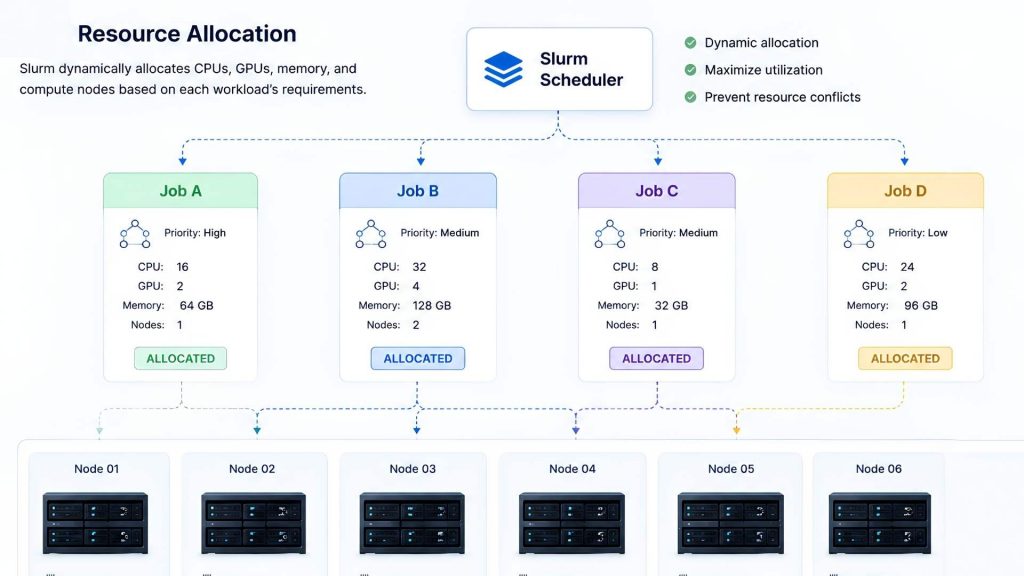
Slurm dynamically allocates computing resources for AI workloads
6.3. Enforces fair-share policies
Slurm supports fair-share scheduling policies that balance resource usage among users and teams. Administrators can configure priorities, quotas, and usage limits to ensure shared infrastructure is utilized fairly. These policies improve collaboration while preventing individual workloads from monopolizing cluster resources.
6.4. Scales to any environment and workload
Slurm is designed to support environments ranging from small research clusters to enterprise-scale AI infrastructure with thousands of compute nodes. As organizations operate larger numbers of AI workloads, efficient job scheduling becomes increasingly important for maximizing hardware utilization and maintaining system performance.
AI infrastructure platforms such as FPT AI Factory help organizations build scalable computing environments for different AI workloads. GPU Virtual Machine provides flexible compute resources for AI development and experimentation, GPU Container delivers optimized environments for model training and fine-tuning. Meanwhile, GPU Cluster supports large-scale distributed AI training and inference across multiple GPUs.
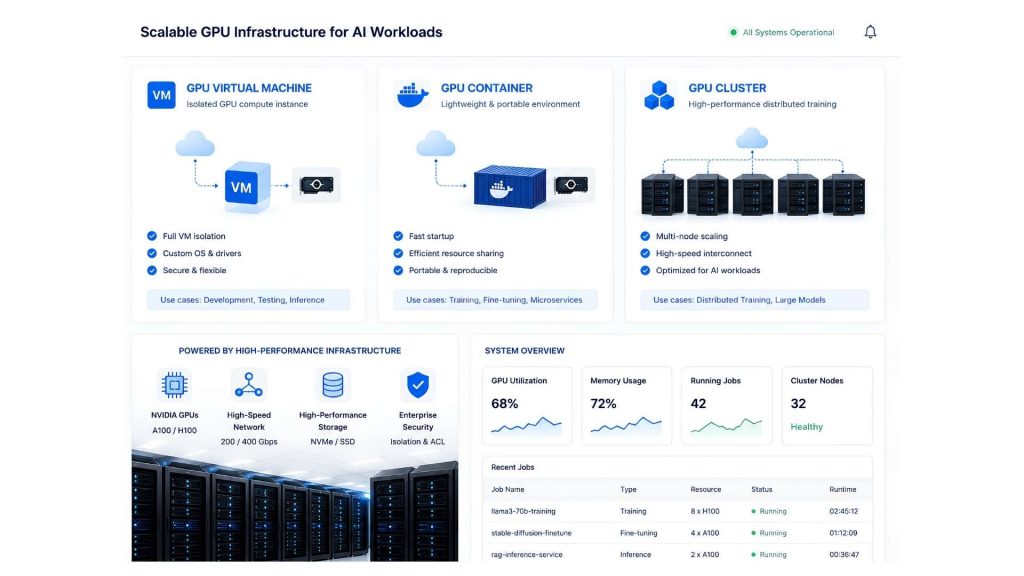
Scalable AI infrastructure supports different stages of AI development and deployment
6.5. Job Monitoring
Slurm provides comprehensive job monitoring capabilities that allow users and administrators to track workload status, resource usage, and execution performance. Users can monitor running jobs, queued workloads, and completed tasks through Slurm commands and monitoring tools. Job monitoring helps identify performance bottlenecks, detect resource inefficiencies, and optimize future workloads.
6.6. Job Dependencies
Slurm supports job dependency management, allowing users to define relationships between multiple workloads and control their execution order. A job can be configured to start only after another job has successfully completed. This feature is particularly useful for complex AI and HPC workflows that consist of multiple processing stages.
6.7. Fault Recovery
Slurm provides fault recovery mechanisms to maintain workload reliability in large-scale computing environments. When failures occur, such as node errors or interrupted jobs, Slurm can detect issues, update resource availability, and reschedule workloads when appropriate. This capability is essential for large AI and HPC clusters where thousands of jobs may run simultaneously.
7. Common Slurm Commands
After exploring the primary functions of Slurm, the next section introduces Common Slurm Commands that users frequently use to interact with the workload management system. The following table provides an overview of the most commonly used Slurm commands and their primary purposes:
| Command | Purpose | Main Usage | When to Use |
| sbatch | Submit batch jobs to the Slurm scheduler | Submit job scripts for scheduled execution | Used for long-running workloads such as AI training, simulations, and data processing jobs |
| srun | Launch parallel jobs or interactive tasks | Execute commands directly on allocated resources | Used for interactive testing, debugging, or running parallel applications across multiple nodes |
| squeue | View job queue and status | Monitor submitted, running, and pending jobs | Used to check job progress, queue position, and resource allocation status |
| sinfo | Display cluster and node information | View available partitions, nodes, and resource states | Used to check cluster availability and identify available computing resources |
| scancel | Cancel running or queued jobs | Terminate submitted workloads | Used when a job needs to be stopped due to errors, incorrect configurations, or resource changes |
These Slurm commands provide users with essential tools to interact with HPC clusters and manage workloads efficiently. By using the appropriate command for each stage of the job lifecycle, users can submit computational tasks, monitor execution status, inspect available resources, and control running workloads.
8. Typical Use Cases of Slurm
After examining the key functions of Slurm, this section highlights its typical use cases in AI, scientific computing, research, and other high-performance computing environments. The following section discusses the typical use cases of Slurm across different domains.
8.1. Artificial Intelligence
Slurm is widely used in AI and machine learning infrastructure to manage GPU-intensive workloads, including model training, experimentation, and distributed computing. AI workloads often require large numbers of GPUs running across multiple compute nodes, making efficient resource scheduling essential.
For instance, NERSC (National Energy Research Scientific Computing Center) uses Slurm to manage HPC systems that support AI and scientific machine learning workloads. Their supercomputer systems provide large-scale GPU resources for researchers running AI-based applications.
8.2. Large Language Model (LLM) Training
The development of Large Language Models (LLMs) requires massive computational resources, often involving hundreds or thousands of GPUs. Slurm is commonly used to schedule distributed training workloads and efficiently manage GPU clusters.
For example, Meta AI’s LLaMA development used large-scale GPU clusters for training foundation models. HPC workload managers such as Slurm are commonly used in large research computing environments to coordinate distributed training workloads across many GPUs.
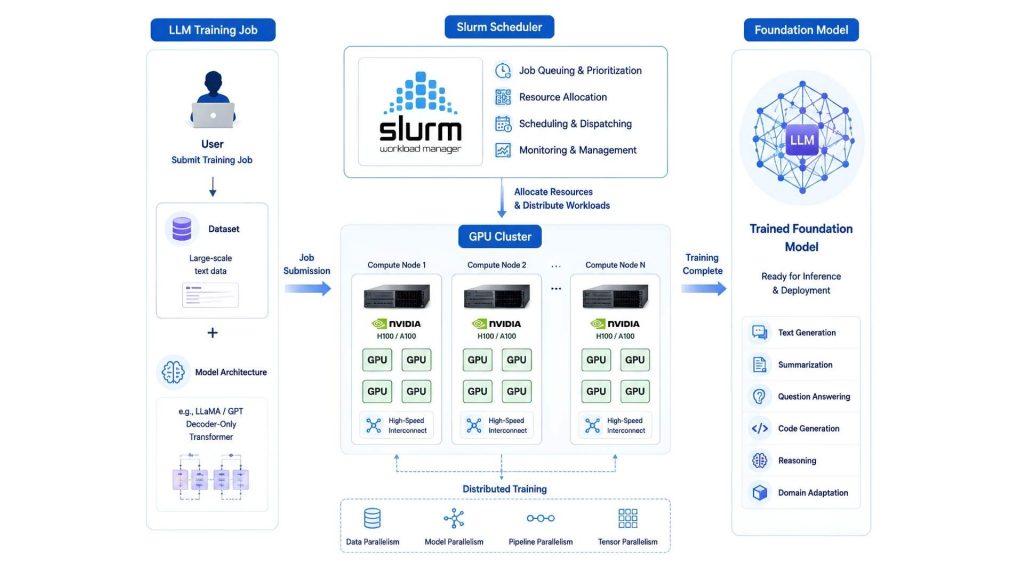
Slurm enables large-scale LLM training by scheduling distributed workloads across multi-GPU computing clusters
8.3. Scientific Computing
Scientific computing is one of the oldest and most common application areas of Slurm. Researchers use Slurm-based HPC clusters to execute large-scale simulations that require significant computational power.
For example, Oak Ridge National Laboratory (ORNL) uses Slurm to manage some of the world’s largest supercomputing environments, including systems used for scientific simulations, energy research, and large-scale computational experiments.
8.4. Drug Discovery and Computational Biology
Drug discovery increasingly relies on computational methods to analyze biological data and simulate molecular interactions. These workloads require significant computing resources because researchers may need to evaluate millions of compounds or perform complex molecular simulations.
For instance, the National Institutes of Health (NIH) uses HPC resources for biomedical research, including computational biology workflows that require large-scale data processing and simulations.
8.5. Universities and Academic Research
Universities are among the largest users of Slurm because they often operate shared HPC clusters for multiple departments and research groups. Slurm helps academic institutions provide fair and efficient access to computing resources by managing research computing workloads, student projects or AI experiments.
For example, Stanford University Research Computing Facility provides HPC resources for researchers across different fields, including AI, engineering, and scientific computing. Slurm is used as the workload management system for submitting and scheduling computational jobs.
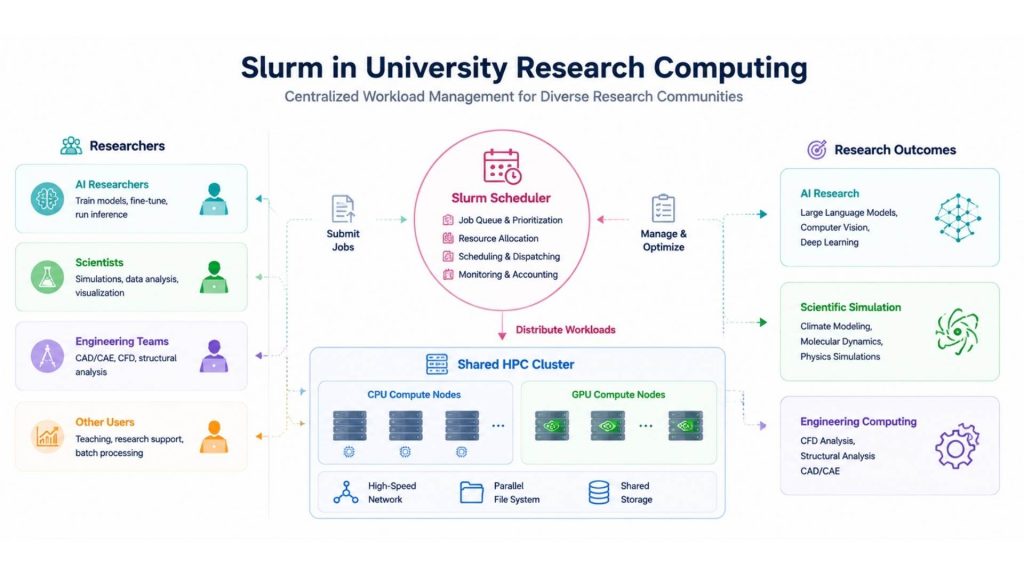
Slurm helps universities efficiently share HPC resources by managing research workloads across multiple users and computing projects
8.6. Weather Forecasting and Climate Modeling
Weather forecasting requires processing massive datasets and running complex numerical models within strict time limits. HPC clusters managed by Slurm are widely used for weather prediction and climate simulations, ensuring forecasting models can run efficiently and deliver predictions on time.
For instance, European Centre for Medium-Range Weather Forecasts (ECMWF) operates one of the world’s largest weather forecasting HPC infrastructures. Their systems use advanced workload management techniques to execute large-scale numerical weather prediction models.
9. FAQs
9.1. Can multiple Slurm systems be run in parallel for testing purposes?
Yes, multiple Slurm environments can run independently for development, testing, or staging. This allows administrators to validate new configurations without affecting production clusters. Separate environments also reduce operational risk during upgrades.
9.2. Can Slurm emulate a larger cluster?
Yes, Slurm provides simulation and testing capabilities that allow administrators to evaluate scheduling behavior without deploying a full production cluster. Although simulated environments cannot fully reproduce real workloads, they are useful for testing scheduling policies and resource allocation strategies.
9.3. Is Slurm a coding language?
No, Slurm is not a programming language but an open-source workload manager and job scheduler. Users interact with Slurm through commands, batch scripts, and APIs to submit and manage jobs running on Linux clusters.
Slurm plays a critical role in modern AI infrastructure by automating workload scheduling, resource allocation, and cluster management across shared computing environments. Combined with scalable AI infrastructure, Slurm enables enterprises to manage compute resources efficiently throughout the AI lifecycle.
With FPT AI Factory, businesses can build, schedule, and run AI workloads efficiently on scalable infrastructure available in Vietnam and Japan, with Malaysia coming soon. Combined with competitive hourly GPU pricing and a dedicated consulting team, FPT AI Factory helps organizations accelerate AI deployment with tailored infrastructure support. Organizations with customized requirements or large-scale projects can contact FPT AI Factory through the official contact form.
Contact Information:
- Hotline: 1900 638 399
- Email: support@fptcloud.com
Explore Related Articles:
What Is GPU Computing and How Does It Work? A Complete Guide
What is an AI Data Platform and How Does It Work?
What Is Data Infrastructure? Key Components and How to Build It