
From chatbots and recommendation systems to generative AI applications like ChatGPT, modern AI relies on immense computing power to process data and perform billions of calculations in seconds. This foundation, known as AI computing, combines specialized hardware, software, and infrastructure to train, deploy, and run AI models at scale. In this article, FPT AI Factory explores what AI computing is, how it works, and why it has become a critical building block for today’s AI-driven innovations.
Key Takeaways
|
Supercharge your AI development with FPT AI Factory, combining powerful GPU infrastructure, via Containers, VMs, and Clusters, with the tools needed to build, fine-tune, and deploy intelligent LLM applications. We simplify everything from integrating enterprise knowledge to scaling massive workloads, helping you launch production-ready AI solutions faster. If you have custom requirements or large-scale needs, contact the FPT AI Factory team today for a personalized consultation.
1. What Is AI Computing?
AI computing refers to specialized computing infrastructure designed to support artificial intelligence workloads. Unlike traditional computing, which mainly executes sequential tasks, AI computing is optimized for parallel processing, allowing thousands of calculations to run simultaneously.
Unlike traditional computing, which processes tasks sequentially on a small number of CPU cores, AI computing is built for massively parallel computation. Deep learning models rely on billions of matrix operations that can be executed simultaneously across thousands of GPU cores, enabling much faster model training and inference. To support these workloads, AI computing integrates GPUs, AI accelerators, high-speed storage, networking, and optimized AI software into a unified infrastructure
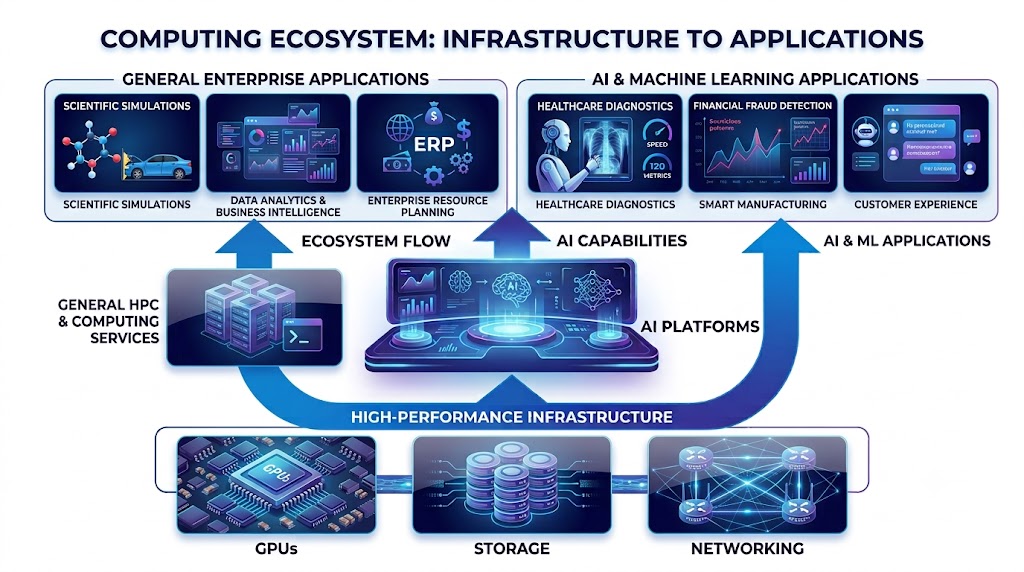
AI computing ecosystem connecting GPUs, storage, networking, AI platforms, and enterprise applications.
2. Why AI Computing Is Important for Modern AI
Modern AI development depends on computing resources throughout the entire AI lifecycle. Each stage has different infrastructure requirements, making AI computing essential for delivering high performance and scalability.
This shift is reflected in enterprise adoption. According to the Stanford AI Index Report 2025, 78% of organizations used AI in at least one business function in 2024, up from 55% in 2023, while 71% had adopted generative AI, more than double the previous year. At the same time, global private investment in generative AI reached US$33.9 billion, highlighting the growing demand for AI-ready infrastructure.
2.1 AI Development Stages
Every AI project follows a similar workflow: Data → Model training → Fine-tuning → Inference → AI application
Each stage places different demands on infrastructure. Training foundation models requires massive parallel computing to process billions of mathematical operations, while production inference prioritizes low latency and high availability to deliver fast, reliable responses. As AI applications expand across an organization, infrastructure must scale dynamically to support diverse workloads without compromising performance or resource efficiency.
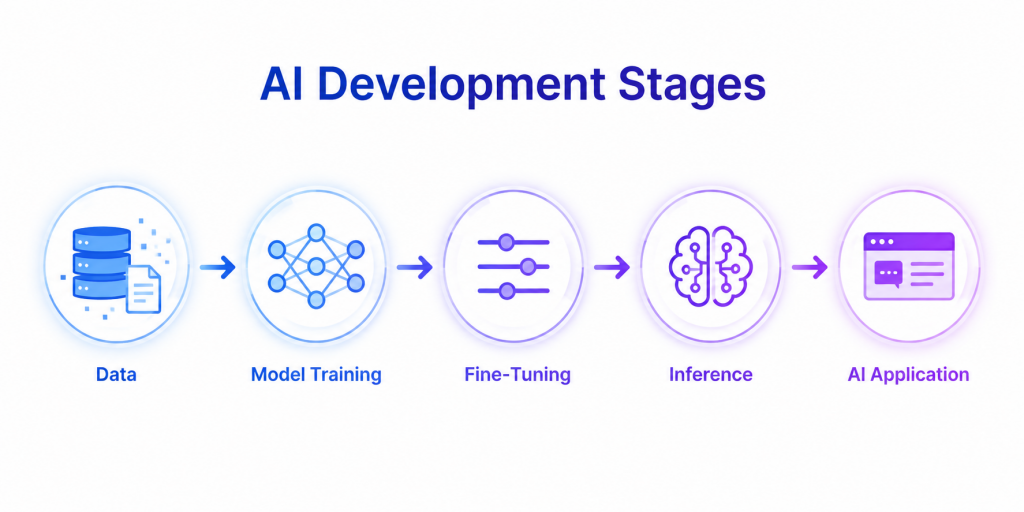
AI development lifecycle diagram
2.2 Development Challenges
As enterprises move AI into production, infrastructure often becomes the primary bottleneck rather than the AI model itself.
Key challenges include:
- Growing compute demand: Larger foundation models require significantly more GPU compute and memory than traditional machine learning workloads.
- Production-scale inference: Unlike training, which is performed periodically, inference must respond to millions of user requests with consistently low latency.
- Infrastructure efficiency: GPU resources are expensive, making workload scheduling and utilization critical for controlling costs.
- Scalability: Organizations need infrastructure that can expand quickly as AI adoption grows across teams and applications.
These challenges are becoming increasingly significant. A recent Google Cloud survey found that 83% of organizations believe they need to modernize their infrastructure to fully support next-generation AI applications, underscoring that infrastructure readiness – not model availability – is emerging as one of the biggest barriers to enterprise AI adoption.
3. How AI Computing Works
AI computing follows a structured workflow that transforms raw user input into meaningful, AI-generated results. Behind every interaction with an AI application is a sequence of computational steps involving data preprocessing, high-performance hardware, and trained machine learning models. Each stage contributes to delivering accurate, efficient, and scalable AI responses.
3.1. User Request
Every AI computing workflow starts with a user request. This could be a text prompt submitted to a chatbot, an image uploaded for analysis, a voice command given to a virtual assistant, or structured data sent through an API.
The application captures the request and forwards it to the AI system for processing. Depending on the use case, the request may contain natural language, images, audio, video, or numerical data.
Examples of user requests include:
- Asking an AI assistant to summarize a document
- Uploading an X-ray image for medical analysis
- Requesting code generation from a programming assistant
- Searching for products using an image instead of text
3.2. Data Processing
Before an AI model can understand the input, the data must be preprocessed into a machine-readable format. This stage ensures the input is clean, standardized, and compatible with the model’s architecture.
For text-based AI models, preprocessing often includes:
- Removing unnecessary characters
- Tokenizing text into smaller units (tokens)
- Converting tokens into numerical embeddings
- Applying normalization or formatting
For image, audio, or video applications, preprocessing may involve resizing images, extracting features, reducing noise, or converting data into tensors.
High-quality preprocessing helps improve inference accuracy while reducing unnecessary computational overhead.
3.3. GPU Computation
Once the input has been prepared, it is processed by specialized AI hardware—most commonly GPUs. Unlike traditional CPUs that execute tasks sequentially, GPUs contain thousands of processing cores capable of performing many mathematical operations simultaneously.
This parallel processing capability is essential because modern AI models perform billions or even trillions of matrix calculations during inference.
GPU computation accelerates workloads such as:
- Large language model (LLM) inference
- Computer vision processing
- Recommendation engines
- Speech recognition
- Scientific and engineering simulations
For enterprise-scale AI applications, multiple GPUs may work together in a distributed cluster to handle larger models and higher request volumes with lower latency.
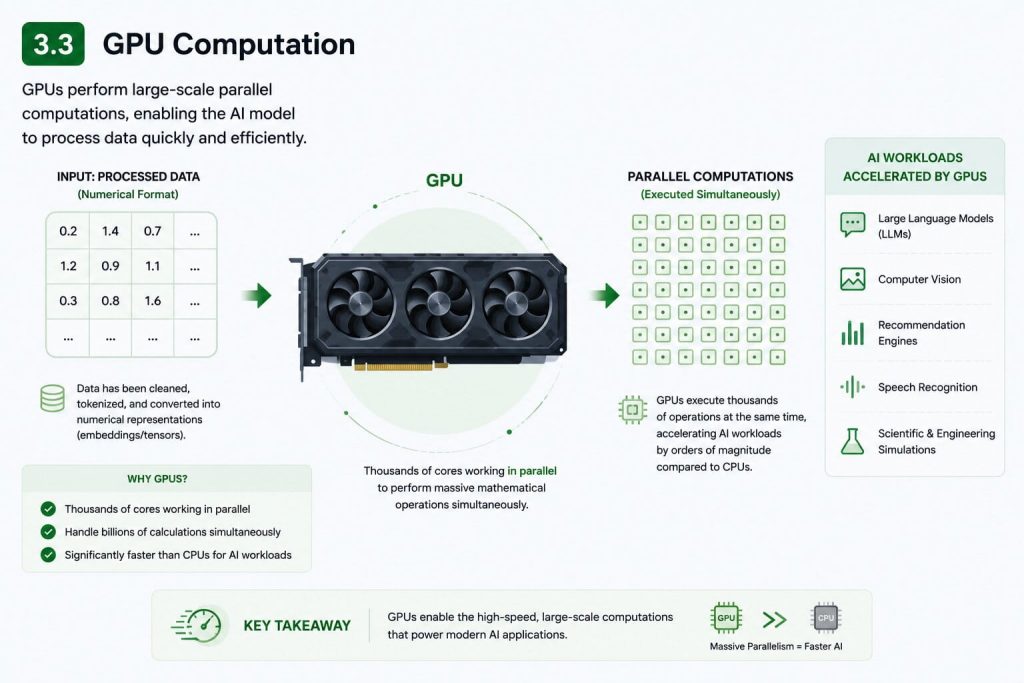
GPUs perform large-scale parallel computations, enabling the AI model to process data quickly and efficiently.
3.4. Model Inference
After the computations are completed, the trained AI model performs inference—the process of applying what it learned during training to new, unseen data.
During inference, the model analyzes the processed input, identifies relevant patterns, evaluates probabilities, and determines the most appropriate output. Unlike model training, inference does not update the model’s parameters; it simply uses existing knowledge to generate predictions.
Depending on the application, inference may involve:
- Understanding natural language
- Detecting objects within an image
- Translating text between languages
- Predicting customer behavior
- Generating entirely new content
Inference is often the most time-sensitive stage, making efficient AI computing infrastructure critical for delivering responsive AI services.
3.5. Prediction
Based on the inference results, the AI model selects the most probable prediction or response.
The prediction varies depending on the task:
- A chatbot generates the next sequence of words.
- An image classifier identifies the object shown in a picture.
- A fraud detection system determines whether a transaction is suspicious.
- A recommendation engine suggests products or content that best match user preferences.
Some AI systems also calculate confidence scores, allowing applications to estimate how reliable each prediction is before presenting it to the user.
3.6. Application Output
Finally, the prediction is converted into a format that users or downstream applications can consume.
The output may appear as:
- A conversational response from an AI assistant
- A generated image or video
- A translated document
- A predictive analytics dashboard
- An automated business decision
- An API response consumed by another application
Many enterprise AI systems also perform post-processing at this stage, such as formatting responses, applying safety filters, logging results, or integrating outputs with existing business workflows.
The entire AI computing pipeline, from user request to application output—typically takes only a fraction of a second, demonstrating how advances in GPUs, optimized AI models, and scalable infrastructure enable real-time intelligent applications across industries.
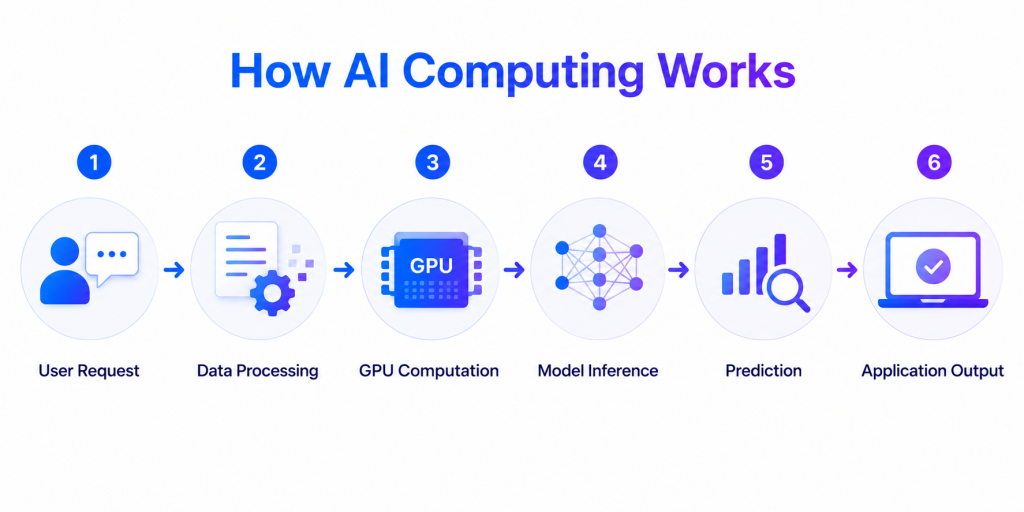
From input to output, AI computing leverages GPU-accelerated processing and model inference to power intelligent applications.
4. Key Components of AI Computing Infrastructure
4.1. GPU and AI Accelerators
GPUs are the core computing engines behind modern AI because they perform parallel calculations much faster than traditional CPUs. AI accelerators further improve performance for specialized deep learning workloads.
As AI models become increasingly complex, organizations need computing platforms that provide flexible GPU resources to support both AI development and production. GPU Container and GPU Virtual Machine from FPT AI Factory provide on-demand NVIDIA GPU resources, enabling businesses to scale AI projects without building dedicated infrastructure. Enterprises can also pre-order next-generation NVIDIA HGX B300 GPUs for future AI workloads.
4.2 High Performance Computing (HPC)
Many enterprise AI workloads exceed the capacity of a single GPU. High Performance Computing (HPC) addresses this challenge by connecting multiple GPUs and computing nodes into a unified cluster, enabling distributed training and large-scale data processing.
HPC is particularly valuable for training foundation models, running scientific simulations, and processing massive datasets, where parallel execution can dramatically reduce training time while improving overall resource utilization.
4.3 Storage and Data Processing
AI systems continuously read and write massive volumes of data during training and inference. Even the most powerful GPUs can become underutilized if storage cannot deliver data quickly enough.
High-performance storage provides the bandwidth required for fast data loading, preprocessing, checkpointing, and distributed access, ensuring AI workloads run efficiently without creating bottlenecks across the infrastructure.
4.4 AI Workload Management
As organizations run multiple AI projects simultaneously, efficient resource management becomes essential. AI workload management helps allocate GPU resources dynamically based on workload priorities, improving utilization while preventing idle or overloaded infrastructure.
Capabilities such as GPU scheduling, automatic scaling, and real-time resource monitoring enable organizations to optimize performance, reduce operational costs, and support multiple AI teams on shared infrastructure.
Understanding AI computing starts with understanding the hardware that powers it. GPUs play a critical role in accelerating AI workloads through parallel processing, making them the foundation of modern model training and inference. To learn more about this essential technology, explore our guide on GPU computing and how it works.
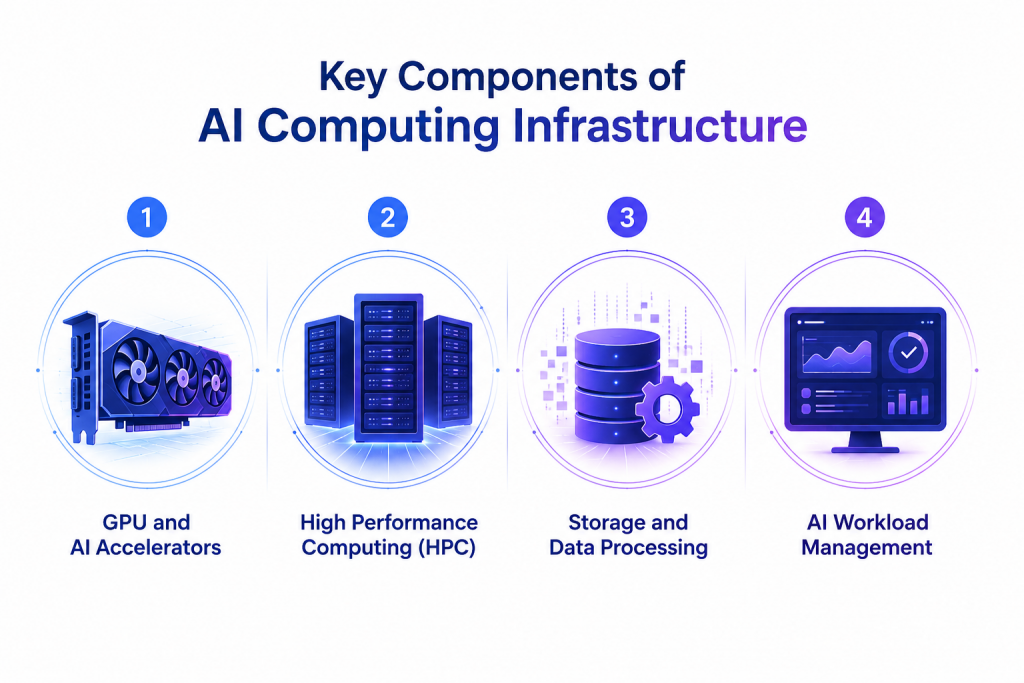
AI computing infrastructure architecture showing GPUs, HPC, storage, and workload management.
5. AI Computing vs Traditional Computing
| Criteria | AI Computing | Traditional Computing |
| Primary processor | GPUs and AI accelerators | CPUs |
| Processing model | Massively parallel processing | Sequential processing |
| Optimized for | AI training, inference, deep learning | Business applications, databases, web services |
| Scalability | Distributed GPU clusters | Vertical or CPU-based scaling |
| Performance focus | High-throughput matrix and tensor operations | Low-latency transaction processing |
| Typical use cases | LLMs, computer vision, recommendation systems | Enterprise software, file servers, transactional systems |
While traditional computing and AI computing share the same goal of processing data, they are designed for fundamentally different workloads.
Traditional computing is optimized for running business applications such as databases, ERP systems, and web services, where tasks are executed sequentially and response time for individual requests is critical. In contrast, AI computing is built to process massive volumes of parallel mathematical operations, making it ideal for training and deploying machine learning and deep learning models.
As AI workloads continue to grow in scale, traditional CPU-based infrastructure often struggles to provide the compute power, memory bandwidth, and scalability required for modern AI applications. AI computing addresses these limitations through GPU acceleration, distributed computing, and optimized AI software stacks.
6. AI Computing Use Cases
6.1. Generative AI Applications
Generative AI models such as GPT and Stable Diffusion require large GPU clusters to train and serve billions of parameters efficiently. AI computing enables organizations to develop chatbots, AI assistants, image generators, and content creation tools with significantly faster training times.
6.2. Computer Vision
Computer vision applications process images and videos in real time for manufacturing inspection, healthcare diagnostics, autonomous driving, and retail analytics. AI computing provides the performance needed to analyze visual data quickly and accurately.
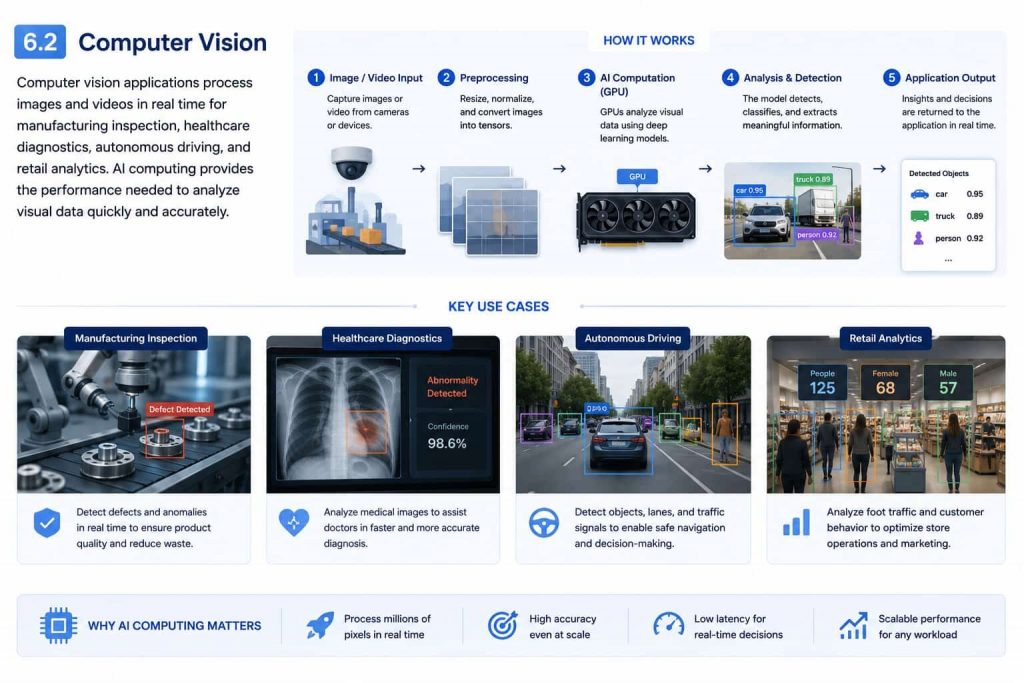
AI computing provides the performance needed to analyze visual data quickly and accurately
6.3. Machine Learning Workloads
Machine learning supports recommendation systems, fraud detection, demand forecasting, and predictive analytics. Scalable AI computing infrastructure enables organizations to train models faster, process larger datasets, and deploy AI solutions that deliver real business value.
6.4. Scientific Computing
AI computing accelerates scientific research by processing massive datasets and running complex simulations faster than traditional systems. Applications include climate modeling, drug discovery, genomics, molecular simulations, and particle physics. High-performance GPUs speed up experimentation, shorten research cycles, and deliver more accurate insights.
6.5. Robotics & Autonomous Systems
Robotics and autonomous systems use AI computing to process sensor data, understand their surroundings, and make real-time decisions. Common applications include autonomous vehicles, industrial robots, drones, warehouse automation, and smart manufacturing. GPU-accelerated AI enables faster navigation, object detection, motion planning, and adaptive decision-making.
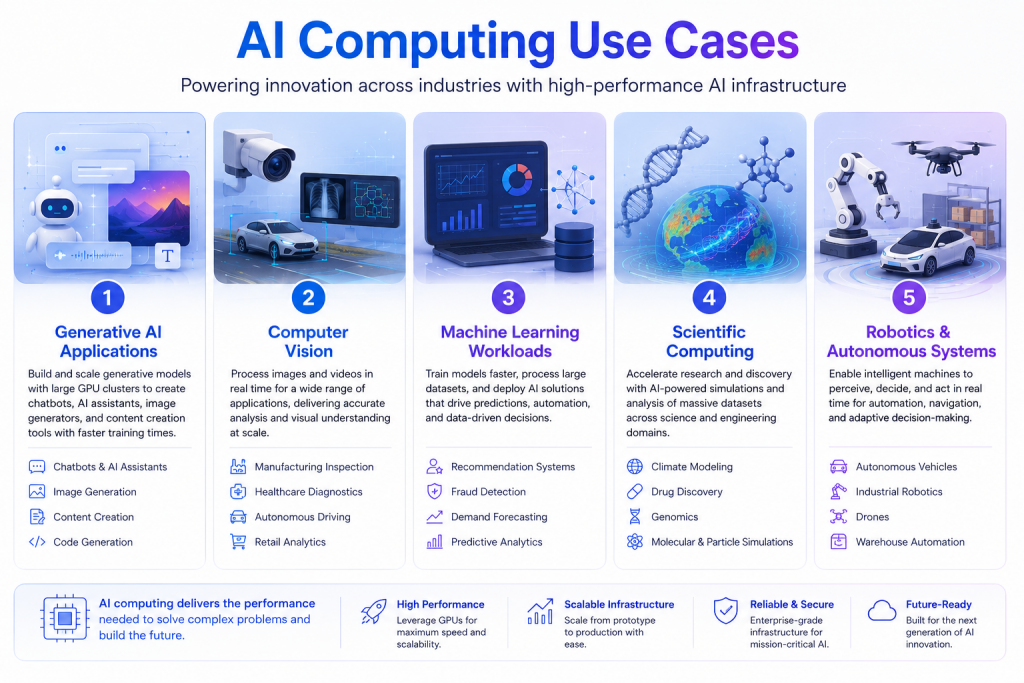
AI computing powers a wide range of applications, from generative AI and computer vision to scientific research and autonomous systems.
7. Choosing AI Computing Infrastructure
Selecting the right AI computing infrastructure is essential for achieving optimal performance, scalability, and cost efficiency. Organizations should evaluate their AI workloads, hardware requirements, deployment model, and long-term growth plans to ensure the infrastructure aligns with both technical and business objectives.
7.1. Workload Requirements
The first step is understanding the type of AI workload you plan to run. Model training, inference, fine-tuning, data analytics, and high-performance computing each have different requirements for GPU memory, compute power, storage, and networking. Matching infrastructure to workload characteristics helps maximize performance while avoiding unnecessary costs.
7.2. GPU Selection
Choosing the right GPU depends on model size, computational complexity, and latency requirements. Enterprise GPUs with larger memory capacity and Tensor Cores are ideal for training large language models and complex AI workloads, while smaller GPUs may be sufficient for inference or edge AI applications. Selecting the appropriate GPU improves both efficiency and return on investment.
7.3. Scalability
AI infrastructure should scale seamlessly as workloads grow. Organizations should consider platforms that support GPU clustering, distributed training, and elastic resource allocation, allowing them to increase computing capacity without disrupting operations. Scalable infrastructure also enables teams to support multiple AI projects simultaneously.
7.4. Cost Optimization
Balancing performance with cost is a critical consideration. Techniques such as GPU virtualization, workload scheduling, auto-scaling, and shared GPU resources help improve utilization while reducing idle capacity. Optimizing resource allocation allows organizations to lower infrastructure costs without compromising AI performance.
7.5. Cloud vs. On-Premises
The deployment model depends on business priorities, security requirements, and budget. Cloud-based AI infrastructure offers on-demand scalability, faster deployment, and pay-as-you-go pricing, making it ideal for dynamic workloads. On-premises infrastructure provides greater control, predictable long-term costs, and enhanced data governance for organizations with strict compliance or performance requirements. Many enterprises adopt a hybrid approach to combine the flexibility of the cloud with the control of on-premises infrastructure.
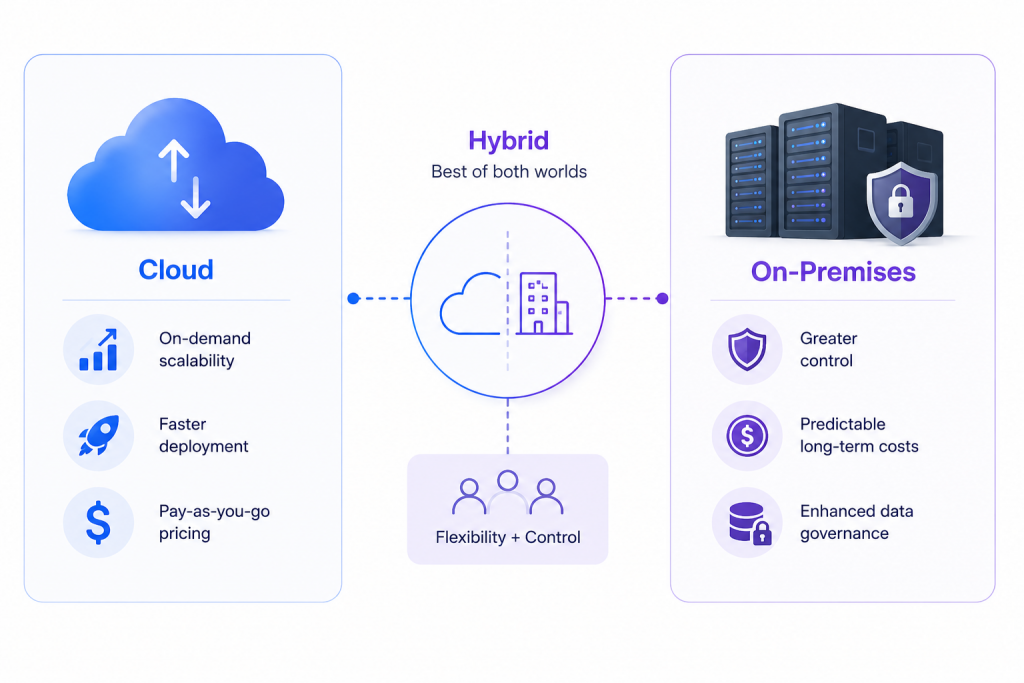
Selecting the right AI infrastructure means finding the optimal balance between flexibility, security, scalability, and cost efficiency.
AI computing is the foundation of modern artificial intelligence, providing the infrastructure required to train, deploy, and scale AI applications efficiently. By combining GPUs, HPC, storage, and intelligent workload management, organizations can accelerate AI innovation while optimizing performance and costs.
As AI workloads continue to grow in scale and complexity, organizations need a computing platform that can keep pace with evolving demands. FPT AI Factory provides the infrastructure and capabilities required to support the full AI lifecycle, from experimentation and model training to large-scale deployment and inference. For enterprises looking to design or optimize their AI infrastructure strategy, contact our team to explore solutions tailored to your business needs and use cases.
Contact FPT AI Factory:
- Hotline: 1900 638 399
- Email: support@fptcloud.com
Explore Related Articles:
Active Learning in Machine Learning: Benefits & Use Cases
Best GPU Cloud Providers in 2026: Compared for Workloads
What Is a Virtual Machine in Cloud Computing? Uses, Examples