


What is virtual machine in cloud computing? As cloud infrastructure becomes the foundation of modern enterprise growth, businesses are increasingly using virtual machines to optimize resources, scale workloads, and support AI-driven applications. In this article, FPT AI Factory will explore the definition of virtual machine in cloud computing and its common types.
1. What is a Virtual Machine in Cloud Computing?
A virtual machine (VM) is an isolated software-based environment that functions as an independent computer on shared physical cloud hardware. Enabled by a hypervisor layer, each VM operates with its own allocated virtual CPU (vCPU), RAM, storage, and independent operating system. This foundational cloud infrastructure allows multiple systems to run simultaneously on a single host without interference, maximizing hardware efficiency and deployment flexibility.
For example, a single physical server can be partitioned into separate, isolated environments to run completely different tasks. One virtual machine can host a Linux-based web server, while another simultaneously runs a Windows SQL database on the exact same hardware. Because they are securely isolated, a system crash or software bug in the web server will never impact the database operations.

An isolated software-based compute environment running as an independent system on cloud hardware.
2. Common types of Virtual Machines
Selecting the right virtual infrastructure requires matching specific operational workloads with the correct hardware configuration. Cloud providers categorize these instances based on how resource capacities like processing power, memory, and graphics acceleration are balanced.
2.1. General-purpose virtual machines
General-purpose virtual machines are engineered to maintain an equal ratio of CPU power to memory capacity. These instances are ideal for handling baseline workloads that do not experience sudden, dramatic spikes in processing demands. Enterprises frequently deploy them to run small-to-medium web servers, manage team collaboration tools, and host low-traffic corporate databases.
2.2. Compute-optimized virtual machines
Compute-optimized virtual machines feature a higher proportion of virtual processing cores relative to their memory allocation. They are tailored specifically for computational workloads that demand sustained high-CPU utilization to process large amounts of data quickly. Typical use cases include high-performance web servers, scientific modeling, batch processing, and intensive video encoding tasks.
2.3. Memory-optimized virtual machines
Memory-optimized virtual machines deliver a massive allocation of RAM relative to their vCPU count, allowing systems to hold large volumes of data directly in memory. This infrastructure is vital for processing large datasets in real time without facing disk-read bottlenecks. Organizations use these instances for running big data analytics frameworks, in-memory databases like SAP HANA, and large-scale enterprise resource planning systems.
2.4. GPU Virtual Machine
A GPU Virtual Machine utilizes specialized graphics processing units alongside standard processors to accelerate parallel computing tasks. Unlike standard instances, these machines break complex mathematical equations down into thousands of smaller tasks simultaneously. This high-velocity throughput makes them the industry standard for rendering 3D graphics, running deep learning models, and processing massive AI datasets efficiently.
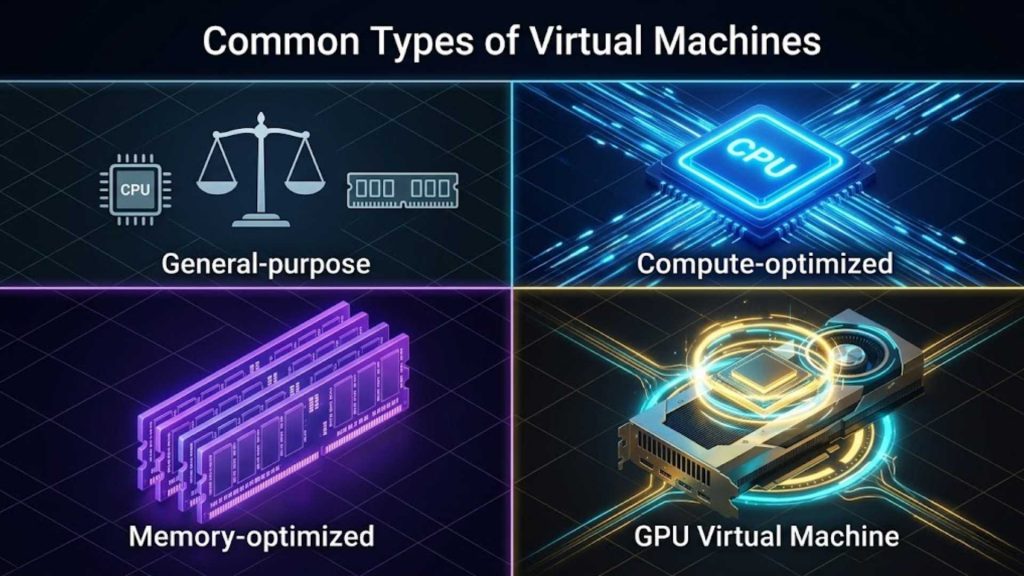
Different categories of virtual instances optimized for distinct enterprise processing workloads.
3. How Virtual Machines work
The mechanics behind virtualization rely on abstracting physical components into flexible, isolated software resources. This process maximizes raw machine utilization while giving users complete control over their provisioned computing environments.
3.1 Physical servers and hypervisors
At the base of virtualization lies the physical hardware, which contains actual silicon, memory chips, and network interfaces. A specialized software layer known as a hypervisor installs directly onto this hardware or the host operating system to abstract the physical resources. The hypervisor acts as a traffic controller, partitioning the physical machine into multiple isolated environments and presenting them as individual computers.
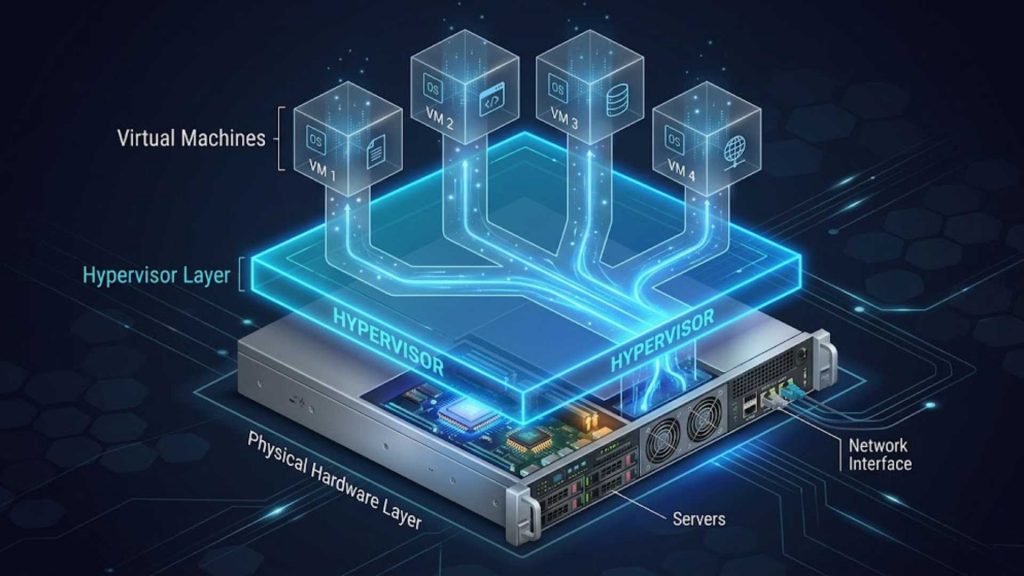
A hypervisor layer installed directly on bare-metal hardware to abstract and manage physical resources.
3.2. Virtualized CPU, memory, and storage
Once the hypervisor abstracts the hardware, it translates physical components into virtualized resources like vCPUs, virtual RAM, and virtual disks. When an application inside a VM requests processing power, the hypervisor schedules that task on the actual physical processor. This virtualization process ensures that physical hardware capacity is pooled together and distributed smoothly across multiple active instances.

Physical server components translated into flexible vCPU, vRAM, and virtual disk allocations.
3.3. Operating systems inside virtual machines
Each isolated instance runs its own guest operating system, which functions completely independently of the underlying physical host architecture. A single physical server can host multiple virtual environments running completely different platforms, such as Windows Server and various Linux distributions, at the same time.
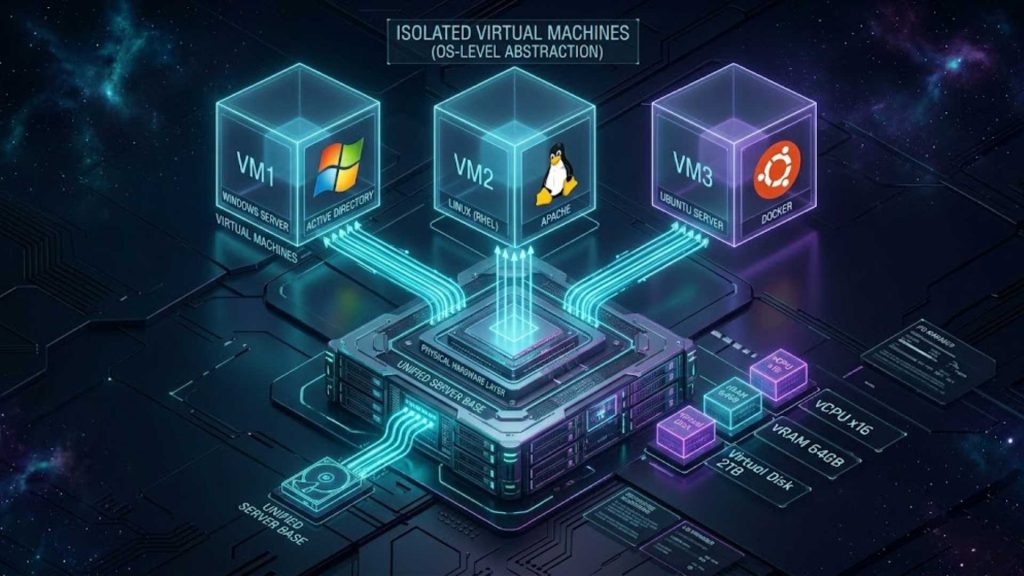
Multiple unique guest operating systems running concurrently and completely independent of the host setup.
3.4. Resource isolation and multi-tenancy
Resource isolation guarantees that every virtual container operates inside a secure boundary, preventing cross-contamination or unauthorized data access between tenants. If an application crashes or suffers a security breach within one specific instance, the neighboring environments remain entirely unaffected and secure. This multi-tenant architecture framework allows cloud providers to host multiple client architectures on shared physical machines safely.
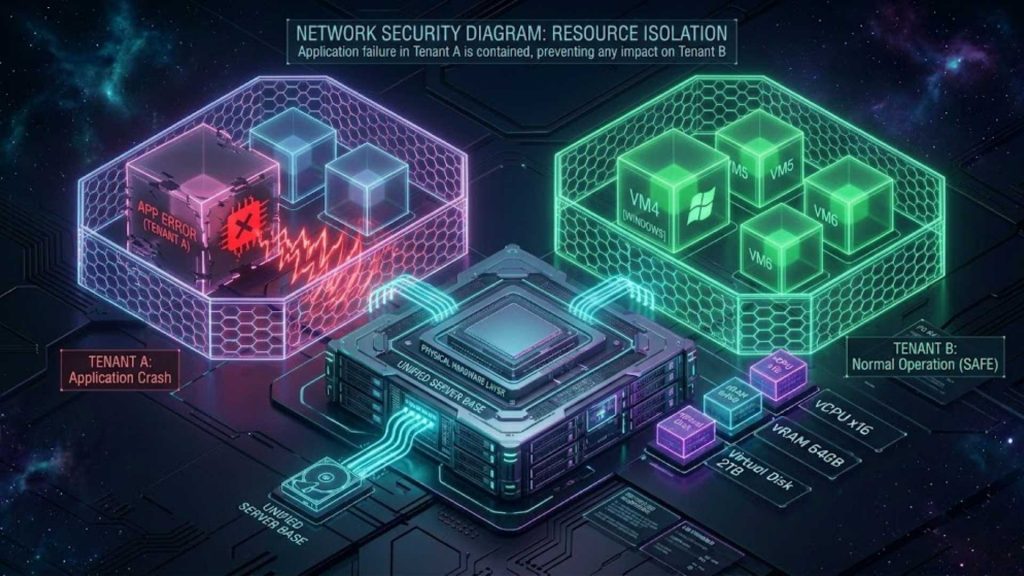
Secure infrastructure boundaries preventing cross-contamination and protecting multi-tenant cloud applications.
3.5. VM provisioning and scaling in the cloud
Cloud platforms automate the deployment process, allowing users to configure and spin up new virtual instances in minutes via dashboard controls or APIs. When computing demands fluctuate, scaling policies automatically adjust resource levels by adding more virtual machines or expanding existing allocations. This agility eliminates the traditional need to buy, mount, and configure physical server racks manually.

On-demand resource deployment and automated auto-scaling adjustments triggered by real-time traffic levels.
4. Comparison of Virtual Machine vs Containers vs Physical Server
Modern IT landscapes offer multiple ways to deploy applications, ranging from direct hardware installation to lightweight application wrappers. Understanding the technical structural differences between these deployment methods is essential for design efficiency.
| Criteria | Virtual Machine (VM) | Container | Physical Server (Bare Metal) |
| Architecture | Hypervisor abstracts the physical hardware layer. | Shares the host OS kernel via a container engine. | Direct access to hardware without abstraction layers. |
| Resource isolation | Complete isolation with an independent guest OS. | Process-level isolation sharing the host OS. | Hardware-level isolation per deployed machine. |
| Startup speed | Minutes (requires full guest OS boot cycle). | Seconds (launches as an isolated OS process). | Many minutes to hours (requires hardware POST). |
| OS dependency | Complete flexibility to run any guest OS platform. | Dependent on the underlying host OS architecture. | Tied directly to the specific installed OS image. |
| Scalability | High flexibility via rapid software cloning tools. | Extremely high, ideal for microservices designs. | Complex and slow, requiring physical manual labor. |
| Performance overhead | Moderate due to running a full guest OS layer. | Minimal, near-native performance execution speed. | Zero overhead, maximizing raw processing power. |
| AI workload suitability | Excellent for heavy model training and inference. | Ideal for microservice deployment and AI scaling. | Superb for sustained, massive compute clusters. |
| Best use cases | Legacy apps, multi-OS needs, heavy AI models. | Cloud-native microservices, DevOps pipelines. | Massive databases, fixed-scale core infrastructure. |

Structural comparison matrix analyzing architecture boundaries, deployment speeds, and performance metrics.
5. Benefits of Virtual Machines in Cloud Computing
Transitioning to virtualized architecture unlocks massive operational advantages for growing enterprises and technical development groups alike. By breaking the dependencies of physical hardware boundaries, businesses gain unparalleled speed and structural protection. These core benefits directly translate into reduced total cost of ownership and highly reliable software performance parameters.
- Infrastructure flexibility: Instantly modify configurations and deploy diverse operating systems without altering physical hardware setups.
- Better workload isolation: Prevent application crashes or security vulnerabilities within one instance from impacting adjacent operations.
- Cost efficiency: Lower upfront hardware procurement expenses and data center overhead by consolidating multiple workloads.
- Easier scalability: Adjust resource allocations up or down dynamically to handle seasonal application traffic spikes.
- Resource allocation: Distribute processing power, memory, and networking bandwidth dynamically exactly where they are needed most.
- Multi-OS support: Run legacy software built for older operating systems alongside cutting-edge platforms concurrently.
- Improved disaster recovery and backup options: Save point-in-time snapshots to restore data and systems immediately during unexpected server outages.
- Better infrastructure utilization: Eliminate costly idle capacity by running multiple virtual systems on a single physical host.
A clear example of these benefits is seen in data center consolidation initiatives across enterprise networks. According to official infrastructure reports by Gartner, traditional bare-metal servers often operate at a low utilization rate of just 12% to 15%. Transitioning to a virtualized machine architecture allows companies to push hardware utilization up to 80%, resulting in an immediate 50% reduction in overall hardware procurement costs and a 30% drop in ongoing energy consumption (Source: Gartner Research on Data Center Optimization).
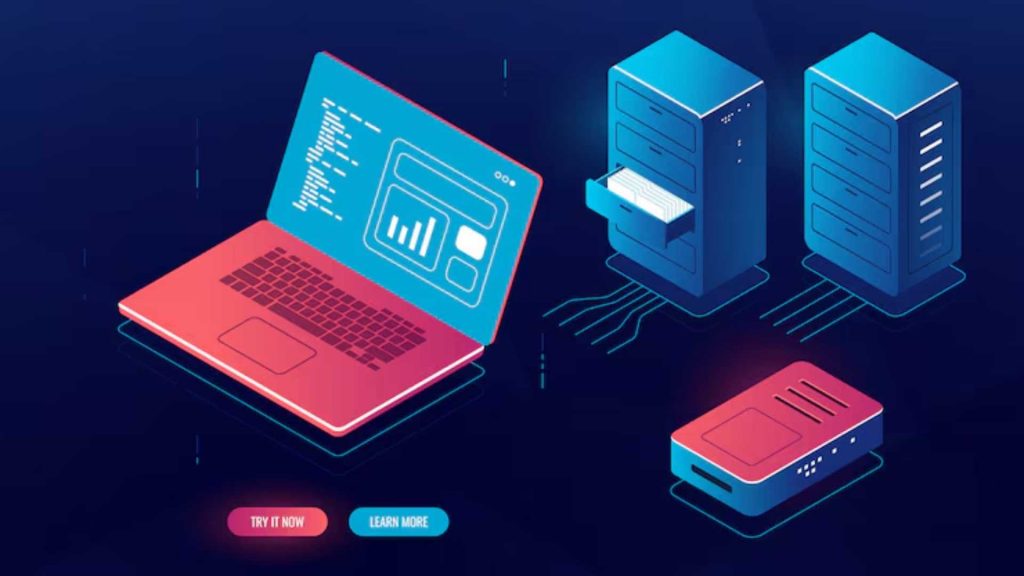
Key operational advantages including enhanced data protection, massive cost savings, and maximum hardware utility.
6. Common Cloud VM use cases
From small application testing sandboxes to international enterprise resource tracking, virtual instances adapt perfectly to modern operational demands. Their versatile structure makes them ideal for isolating delicate internal databases while supporting external web platforms. Today, they form the functional foundation for almost every major internet-facing software environment worldwide.
6.1 Hosting enterprise applications
Many corporate operations rely on legacy architectures, ERP programs, and CRM applications that require specific, older operating system configurations to remain stable. Virtual environments allow IT teams to build tailored configurations that keep these critical business tools running smoothly alongside modern systems. This setup provides a reliable way to sustain enterprise workflows without requiring expensive code rewrites.
A notable example is Coca-Cola Bottling Co. Consolidated, which migrated its massive enterprise systems to virtual infrastructure to automate high-volume data validation across platforms like SAP. This shift successfully compressed their data verification timeline from several weeks down to just 12 hours (Source: QuerySurge Case Study on Coca-Cola Consolidated). More broadly, data from Gartner indicates that moving legacy business software onto cloud virtual machines delivers an immediate 20% to 40% infrastructure cost reduction by eliminating physical hardware maintenance (Source: Gartner Research).
6.2. AI and machine learning workloads
Modern artificial intelligence pipelines demand significant computational power to handle massive numbers of data parameters simultaneously. High-performance computing setups allow teams to process complex machine learning calculations without running into local system hardware constraints. AI and GPU-intensive applications often require specialized GPU-enabled virtual machines for training and inference to manage these heavy workloads.
A prime example is autonomous driving leader Waymo, which leverages virtualized cloud infrastructure to run complex machine learning models. By utilizing scalable virtual environments, their engineers simulate over 20 million driving miles daily and analyze complex sensor data in real time (Source: Waymo Tech Reports & Google Cloud Case Studies). This virtual architecture enables a massive 10x acceleration in AI model training speeds compared to standard localized physical setups, dramatically reducing time-to-market for software updates.
6.3. Development and testing environments
Software development teams need separate environments to build, test, and run code configurations safely without affecting live systems. Virtual infrastructure allows engineers to spin up clean operating instances quickly, test for bugs, and tear them down immediately when finished. This sandbox capability speeds up deployment pipelines while protecting core production environments from experimental errors.
6.4. Database and backend infrastructure
Modern backend systems require reliable, isolated compute environments to manage large database queries and sensitive user transactions securely. Running these workflows inside virtual instances ensures that storage performance remains steady and protected from external application layer crashes. This structural separation helps organizations maintain system uptime and safeguard critical business records.
6.5. GPU computing and AI model training
Modern AI workloads demand significantly more computing power than traditional business applications because they involve large-scale parallel processing and complex mathematical computations. GPU Virtual Machines are designed to provide the accelerated computing resources required for these workloads, enabling faster training, inference, and data processing.
Key AI workloads that benefit from GPU Virtual Machines include:
- Deep Learning Training: Training neural networks requires processing large datasets through multiple layers of computation over many iterations. GPUs can perform thousands of parallel calculations simultaneously, significantly reducing training time compared to CPU-based environments.
- Large Language Model (LLM) Training and Fine-Tuning: LLMs often contain billions of parameters that must be continuously updated during training. GPU Virtual Machines provide the high-performance compute resources needed to handle these intensive workloads while supporting faster experimentation, model development, and fine-tuning.
- AI Inference: Once models are deployed, they must generate predictions or responses quickly. GPU acceleration helps reduce inference latency for applications such as chatbots, recommendation engines, intelligent search, and automated decision-making systems that require real-time performance.
- Computer Vision Processing: Tasks such as image classification, object detection, facial recognition, and video analytics involve processing large volumes of visual data. GPUs enable parallel image processing, allowing computer vision systems to analyze images and video streams more efficiently and at scale.
- Generative AI Applications: Modern generative AI workloads, including text generation, image generation, code assistants, and multimodal AI systems, require substantial GPU resources to deliver fast and responsive user experiences.
To support these requirements, organizations increasingly deploy GPU-enabled virtual machines. By combining the flexibility of cloud infrastructure with the parallel processing power of GPUs, these environments provide the computational foundation needed to accelerate AI development, optimize model performance, and scale production workloads efficiently.
One example is the FPT AI Factory GPU Virtual Machine service. The platform provides on-demand access to high-performance GPU infrastructure for AI training and inference workloads, helping organizations reduce model training times, streamline experimentation, and accelerate deployment cycles without the complexity of managing dedicated hardware.
6.6. Hybrid cloud and scalable infrastructure
Many organizations choose to keep sensitive data in private local data centers while routing variable consumer web traffic out to public cloud networks. Virtual infrastructure bridges these environments seamlessly, allowing systems to migrate workloads back and forth based on active user demand. This hybrid structure gives businesses the agility to scale up during peak traffic periods without overcommitting to permanent on-premise hardware.
A prime illustration of this approach is Netflix, which utilizes a highly scalable virtual infrastructure to stream content globally. While keeping certain core operational components localized, the entertainment giant utilizes cloud virtual machines to instantly scale processing power up or down based on millions of concurrent user demands (Source: Netflix Tech Blog & AWS Case Studies).

Modern enterprise applications utilizing virtual environments ranging from software development sandboxes to AI pipelines.
7. FAQs
7.1. What is the difference between a virtual machine and a container?
A virtual machine abstracts an entire physical hardware layout and runs a complete, independent guest operating system inside its isolated container. In contrast, a container abstracts only the software application layer and shares the host computer’s operating system kernel directly, making it much more lightweight and faster to launch.
7.2. Are virtual machines secure?
Yes, virtual environments are highly secure because the underlying hypervisor enforces strict data isolation boundaries around each active instance. If malware or an unexpected error crashes an application inside one specific virtual environment, the problem cannot break through the boundaries to access or infect neighboring instances on the shared server.
Virtual machines provide the core flexibility, data isolation, and performance necessary to run complex enterprise systems and cutting-edge artificial intelligence models smoothly. By abstracting raw hardware, businesses can unlock maximum resource efficiency while protecting critical operational workflows.
Ready to explore next-generation computing power? Receive a free $100 credit to start exploring our cloud ecosystem immediately upon completing the steps in the promotion banner! This full trial package includes $10 for a GPU Container, $10 for a GPU Virtual Machine, $10 for an AI Notebook, and $70 dedicated to AI Inference & AI Studio tools over a 30-day period.
For large-scale corporations, enterprises, or specialized teams requiring customized hardware configurations, massive computing clusters, or dedicated resource caps, please reach out to our solution engineering group via our official FPT AI Factory contact form to receive a tailored infrastructure framework.
Contact Information:
- Hotline: 1900 638 399
- Email: support@fptcloud.com
Read more:
Bare Metal vs Virtual Machine: Which Is Better for AI?
GPU Virtual Machine: Benefits, Use Cases, and How It Works
Edge Computing vs Cloud Computing: Key Differences


