


What is Docker and why has it become a core technology in modern software development? Docker helps developers package, deploy, and run applications consistently across different environments using lightweight containers. At FPT AI Factory, businesses can leverage scalable AI infrastructure and containerized deployment solutions to support cloud-native and AI-powered applications efficiently.
1. What Is Docker?
Docker is an open-source containerization platform that helps developers build, package, share, and run applications inside isolated environments called containers. Each container includes the application code together with its required libraries, dependencies, runtime components, and configuration files, allowing the application to operate reliably across different systems. Because containers are lightweight and portable, Docker has become widely used for modern software development, cloud-native applications, and distributed systems.
Docker helps applications run consistently across local, testing, staging, and production environments by packaging all dependencies and configurations into containers. This minimizes compatibility issues, simplifies deployment, and enables more reliable software delivery across different platforms.
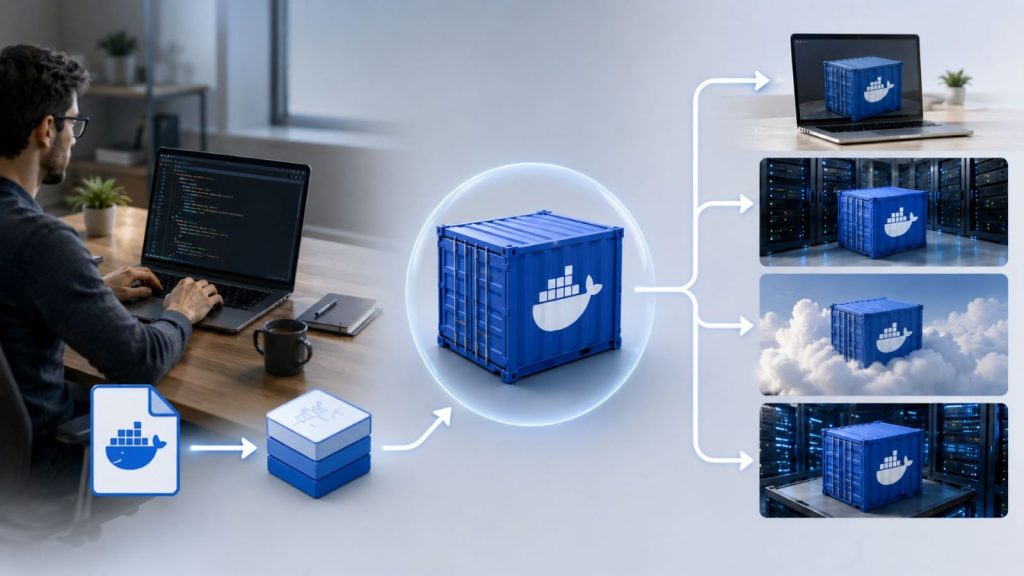
Docker helps applications run reliably across different environments
2. How Does Docker Work?
Docker operates through a set of interconnected components that work together to build, run, and manage containerized applications. Each component plays a specific role in ensuring that applications are packaged consistently and executed reliably across different environments. The architecture is built around the Docker Engine, supported by tools for building images, managing containers, and distributing workloads across systems.
2.1 Dockerfile
A Dockerfile serves as a text-based blueprint containing an ordered sequence of directives used to assemble a Docker image. This script defines everything from the choice of the foundational operating system (base image) and dependency installations to source code replication and default startup commands. It ensures that developers can mirror identical execution environments across diverse computing platforms without discrepancies.
2.2 Docker Image
A Docker image is a static, read-only snapshot generated upon compiling a Dockerfile.It packages all essential components needed for an application to operate independently, such as binaries, libraries, source files, and system settings. This standardized and immutable structure enables efficient storage, accurate version management, and secure distribution among development teams.
2.3 Docker Container
A Docker container is the active, functional deployment (runtime instance) of a specific Docker image. It isolates the application completely from the host system and other processes, establishing a secure execution boundary. Upon initialization, Docker dynamically provisions a temporary read-write layer over the image’s underlying immutable layers. Containers are inherently lightweight and highly agile, enabling them to boot up or terminate almost instantly.
2.4 Docker Engine
Acting as the core operational framework, the Docker Engine is the master utility that provisions and orchestrates container resources. It utilizes a standard client-server paradigm split into three primary components:
- Docker Daemon (dockerd): A continuous background process that manages heavy-duty tasks, including building images, structuring container networks, and provisioning storage volumes.
- Docker Client (CLI): The primary command-line interface developers use to issue instructions. When a command is triggered, the client translates it into API calls and relays them to the Daemon.
- Docker Engine API: A standardized REST API interface that bridges communication between the Client and Daemon, allowing automated workflows or third-party platforms to programmatically direct Docker operations.
2.5 Container Registries and Docker Hub
A container registry is a centralized digital repository used to store, catalogue, and share Docker images. While Docker Hub represents the largest public registry globally for open-source distributions, corporate enterprises frequently deploy private registries to safeguard intellectual property and restrict access to internal software releases.
2.6 Container Runtime and Host Operating Systems
Rather than replicating hardware and booting a resource-heavy Guest OS like traditional virtual machines (VMs), Docker relies on a container runtime (such as containerd) to execute software directly utilizing the host system’s kernel. This shared-kernel mechanism minimizes CPU and memory overhead, maximizing hardware efficiency and offering significantly faster boot times than conventional VMs.
2.7 Image Layers and Portability
Docker images leverage a highly efficient layered architecture, where every sequential instruction in a Dockerfile yields a distinct data layer. These individual layers are automatically cached and reutilized during subsequent builds, minimizing storage duplication and speeding up compilation times. This design guarantees ultimate portability, ensuring the application runs identically from local development machines to staging environments and live production servers.
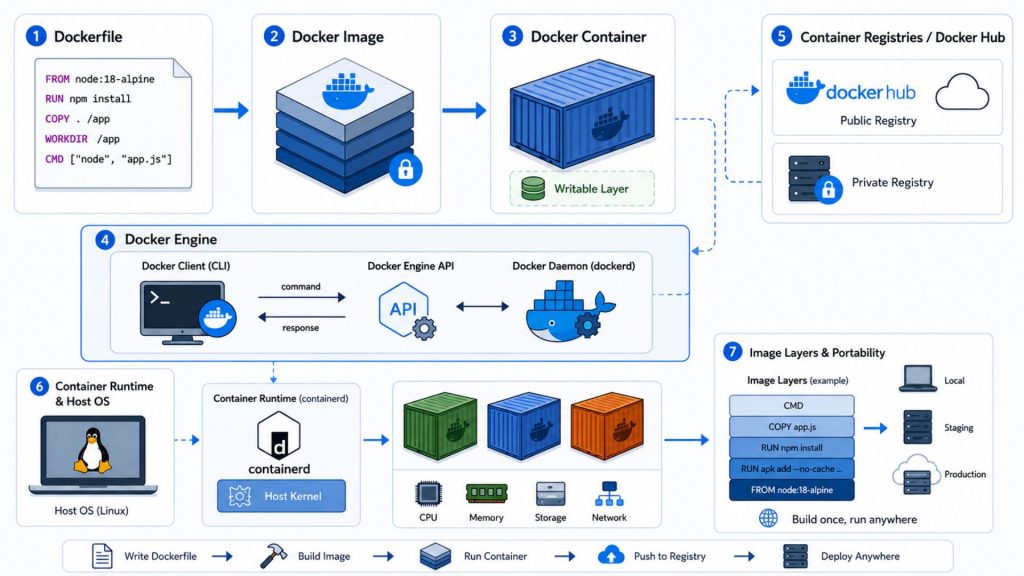
Docker architecture enables consistent application packaging, isolated execution, and fast deployment across environments
>>> Explore: What Is an AI Cloud Platform? Top 10 AI Platforms 2026
3. Docker Containers vs Virtual Machines
To understand the difference between Docker containers and virtual machines, it is important to look at how each technology isolates applications and manages system resources. While both provide separation between workloads, they operate at different levels of abstraction.
| Criteria | Docker Containers | Virtual Machines |
| Definition | Operating system-level virtualization that packages applications with dependencies into isolated units | Hardware-level virtualization that runs complete operating systems on virtualized hardware |
| Architecture | Uses a container runtime running on top of the host OS to execute isolated processes | Uses a hypervisor layer to create and manage separate virtual machines with virtual hardware |
| Operating System Usage | Shares the host operating system kernel among all containers | Each virtual machine runs its own full guest operating system |
| Resource Efficiency | Lightweight, consuming only the resources needed by the application | Heavier due to full OS duplication and dedicated resource allocation |
| Startup Speed | Starts quickly since it runs as a process on the host system | Takes longer due to full operating system boot process |
| Portability | Runs consistently across environments that support Docker | More dependent on underlying OS and virtualization setup |
| Isolation | Provides process-level isolation within the same kernel | Provides stronger separation through full system virtualization |
| Best Use Case | Microservices, CI/CD pipelines, cloud-native applications, and scalable services | Legacy applications, full OS environments, and workloads requiring strict isolation |
| Example | Running multiple web services (Node.js, Python, etc.) on one host using containers | Running a complete Linux or Windows OS inside VMware or VirtualBox |
>>>Explore: Container vs. Virtual Machine: What are the differences?
4. Key Benefits of Docker
Docker’s container-based architecture delivers multiple advantages for modern application development and cloud-native operations.
- Consistent execution environments: Ensures applications behave uniformly across all stages by packaging code, dependencies, and configurations into isolated containers.
- Accelerated development workflows: Enhances CI/CD processes by enabling rapid environment setup, testing, and deployment automation.
- High portability across infrastructures: Supports seamless execution across local systems, enterprise servers, and cloud environments without requiring configuration changes.
- Optimized resource consumption: Improves infrastructure efficiency by sharing the host OS kernel and minimizing overhead compared to traditional virtualization.
- Isolated dependency management: Prevents software conflicts by bundling all required libraries and runtime components within each container.
- Scalable system design support: Enables flexible scaling in microservices architectures, allowing systems to adjust resources dynamically based on demand.
5. Common Docker Use Cases
Docker has transitioned from a niche developer utility into an industry-standard ecosystem adopted by engineering teams globally. By isolating applications from the underlying operating system, it effectively eliminates major challenges encountered throughout different phases of the modern software development lifecycle.
5.1 Local Development Environments
Docker is frequently used to standardize development environments across engineering teams. Instead of manually installing dependencies and configuring local machines, developers define the required runtime stack using container definitions. This ensures that every developer works with the same versions of frameworks, services, and databases, reducing environment drift between team members and improving onboarding efficiency.
Example: Spotify engineers developed container-based workflows and internal platform tools to streamline software development across thousands of services. By using standardized environments, developers can work with consistent dependencies and configurations, reducing setup time and minimizing compatibility issues between team members.
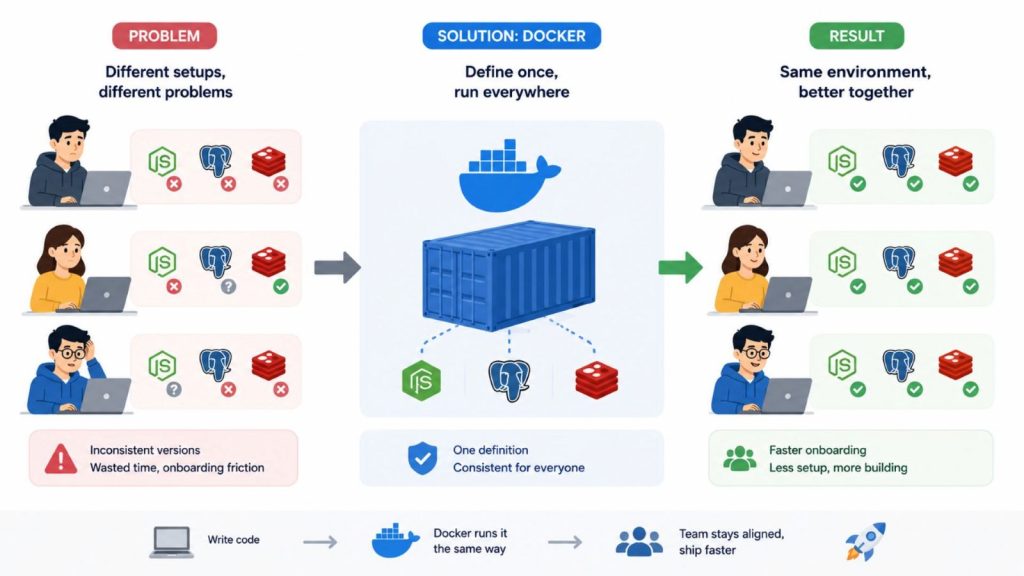
Docker keeps every developer environment consistent
5.2 Application Packaging and Deployment
One of Docker’s core use cases is packaging applications into portable artifacts that can be deployed consistently across environments. Once an application is containerized, the same image can be used in development, staging, and production without modification. This reduces risks caused by configuration differences between environments and improves deployment reliability.
Example: Nubank adopted Docker containers and Kubernetes to modernize its deployment infrastructure. As the company grew to more than 23 million customers and over 520 engineers, containerization helped reduce production deployment times from 90 minutes to 15 minutes and enabled engineering teams to deploy applications approximately 700 times per week
5.3 Microservices Architecture
Docker is commonly used in microservices-based systems where applications are decomposed into smaller, independently deployable services. Each service runs inside its own container, enabling isolated development, deployment, and scaling. This method enables teams to modify or scale specific components independently without disrupting the overall system.
Example: Netflix operates one of the world’s largest microservices ecosystems. Public engineering presentations and technical discussions from Netflix engineers describe an architecture consisting of hundreds to thousands of services supporting streaming, recommendations, user management, and content delivery. This architecture allows Netflix to deploy and scale services independently while maintaining platform reliability.
>>> Explore: How to Deploy AI Model: A Step-by-Step Guide 2026
5.4 CI/CD Pipelines and Automation
In CI/CD environments, Docker is used to create reproducible build and test environments. Each pipeline execution can run inside a clean container, ensuring consistent results regardless of the underlying infrastructure. This reduces build failures caused by environment inconsistencies and improves automation reliability.
Example: GitLab uses Docker containers extensively within GitLab CI/CD runners. Each pipeline job executes in an isolated container environment, allowing builds, tests, and deployments to run consistently across different projects and infrastructure configurations. This approach improves reproducibility and reduces dependency-related failures in automated workflows.

Consistent automated builds and testing across every deployment stage
5.5 Testing and Sandbox Environments
Docker provides isolated environments that can be used for testing applications without impacting the host system. These environments are lightweight and can be created or removed quickly, making them suitable for short-lived validation workflows. They are commonly used for QA testing, compatibility checks, and experimental configurations.
Example: QA teams can safely launch isolated Docker containers to test application behavior against different database versions (such as MySQL 5.7 and MySQL 8.0) without modifying their primary local environments. Docker sandbox environments are designed to be disposable and isolated, making them suitable for these validation scenarios
5.6 AI and Data Science Workflows
Docker is extensively used in machine learning and data engineering pipelines because it can bundle intricate dependencies, including CUDA toolkits, Python libraries, and operating system packages. This capability helps maintain consistent training and inference environments across local devices and cloud-based GPU platforms, leading to greater reproducibility and reliability in machine learning experiments.
Example: NVIDIA provides preconfigured Docker containers through its NGC platform that include CUDA, cuDNN, and popular machine learning frameworks such as PyTorch and TensorFlow. Data science teams use these containers to ensure consistent environments across development, training, and production systems, reducing configuration overhead and improving experiment reproducibility .
>>> Explore: PyTorch vs TensorFlow: Which One Is Better for You?
6. Docker vs Kubernetes
Docker and Kubernetes are often used together, but they serve different roles in the container ecosystem. Docker focuses on building and running containers, while Kubernetes is designed to manage and orchestrate containers at scale across multiple machines.
| Criteria | Docker | Kubernetes |
| Main purpose | Containerization platform used to build and run applications in containers | Container orchestration platform used to manage clusters of containers |
| Core function | Creates container images and runs containers on a single host or environment | Automates deployment, scaling, and management of containerized applications across multiple nodes |
| Scope | Primarily focused on individual containers or single-host environments | Designed for distributed systems running across multiple servers or cloud instances |
| Scaling | Manual or limited scaling depending on setup | Built-in automatic scaling based on workload and resource usage |
| Orchestration | Basic container management capabilities | Advanced orchestration including scheduling, load balancing, and self-healing |
| Best use case | Application packaging, local development, CI/CD pipelines, and single-node deployments | Large-scale microservices systems, cloud-native applications, and production workloads |
| How they work together | Provides the container runtime and packaging layer (build & run containers) | Manages and orchestrates those containers across a cluster for scalability and reliability |
7. Docker in Modern Cloud-Native Applications
Docker plays a foundational role in modern cloud-native architectures by standardizing how applications are packaged and executed. By isolating applications into containers, it enables consistent deployment, better scalability, and improved operational efficiency across distributed environments.
7.1 Microservices Architectures
Docker is commonly used to support microservices-based systems, where applications are decomposed into independent services that communicate through APIs. Each service runs in its own container, allowing teams to manage them separately in terms of development, deployment, and scaling.
This model improves system modularity and reduces dependency coupling between services. It also allows individual components to be updated or replaced without impacting the overall system.
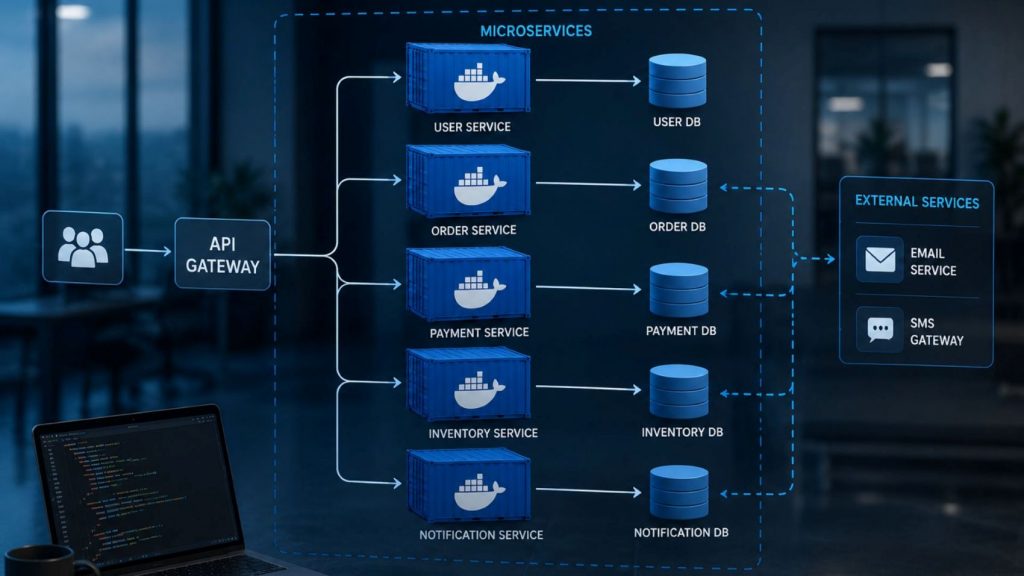
Independent containerized services for scalable modern applications
7.2 DevOps and CI/CD Workflows
In CI/CD pipelines, Docker provides reproducible execution environments for building, testing, and deploying applications. By using containerized workflows, teams can ensure that code behaves consistently across all stages of the delivery pipeline.
Docker is often used in automation tools such as GitHub Actions or GitLab CI to spin up isolated environments for testing and validation. Once execution is completed, containers are destroyed, ensuring clean and repeatable builds.
>>> Explore: MLOps vs DevOps: Key Differences, Use Cases & How to Choose
7.3 Multi-Cloud Portability
One of Docker’s key advantages is platform independence. Containerized applications can run consistently across on-premise infrastructure and multiple cloud providers without requiring changes to the application code.
This portability supports hybrid and multi-cloud strategies, allowing organizations to distribute workloads across different environments such as AWS, Azure, and Google Cloud while maintaining consistent runtime behavior.
7.4 AI and Scalable Infrastructure
Docker is widely used in AI Infrastructure to support scalable and high-performance workloads such as machine learning training, model deployment, and data processing. By containerizing AI environments, organizations can standardize dependencies, manage GPU resources more efficiently, and ensure consistent execution across development and production environments, especially in distributed and cloud-based AI systems.
In GPU-based workloads, Docker enables reproducible training and inference environments that can be deployed across local machines or cloud GPU clusters. This improves collaboration between data science teams and simplifies scaling for machine learning pipelines.
>>> Explore: GPU Virtual Machine: Benefits, Use Cases, and How It Works
8. When Should Businesses Use Docker?
Docker is typically adopted by organizations when they need a reliable way to standardize application delivery, reduce environment inconsistencies, and improve deployment efficiency across development and production systems.
8.1 When applications need consistent environments
Docker is useful when applications must run consistently across different stages such as development, testing, and production. By packaging applications with all required dependencies, it reduces issues caused by environment differences and configuration drift.
Example: Engineering teams at Airbnb use Docker to standardize complex development environments across thousands of remote workstations, ensuring zero variation between local engineering sandboxes and production web servers.
8.2 When teams want faster deployment cycles
Docker is highly valuable for organizations aiming to eliminate the slow, manual provisioning of server environments that delays software releases. By allowing teams to bundle code and infrastructure configuration together, it accelerates the entire testing, validation, and delivery pipeline within automated DevOps workflows.
Example: Adidas migrated its global e-commerce infrastructure to containerized architectures, successfully streamlining their software delivery velocity and shrinking release cycles by over 3,000%.
8.3 When building microservices-based systems
Docker becomes essential when software architectures transition from massive monolithic platforms into decentralized, autonomous services. It provides a secure and isolated boundary for each independent microservice, allowing them to be updated, managed, and scaled without causing resource contention or system-wide dependency conflicts.
Example: eBay split its massive, unified online auction infrastructure into autonomous microservices wrapped in individual Docker containers, allowing separate development teams to deploy features without affecting the global marketplace.
8.4 When modernizing legacy applications
Docker is ideal for companies that need to maintain older software running on obsolete operating systems or outdated framework configurations. Containerization wraps these legacy systems into portable images, enabling older software to run safely on modern cloud-native hardware without requiring a time-consuming and costly code rewrite.
Example: IBM partners with major global financial institutions to wrap decades-old monolithic banking applications inside modern Docker images, smoothly migrating legacy core systems onto hybrid cloud clusters.
8.5 When deploying containerized AI workloads
Docker is crucial when organizations deploy modern artificial intelligence models that require precise alignment of machine learning frameworks, system libraries, and GPU hardware drivers. Businesses running AI workloads can use GPU Container from FPT AI Factory to simplify containerized deployment, manage dependencies and scale GPU-powered applications more consistently across high-performance clusters.
Example: A machine learning team at ZEISS containerized its AI-based microscopy analysis pipeline using Docker, allowing the same deep learning models and GPU configurations to run consistently across local workstations and cloud environments, significantly reducing deployment friction.
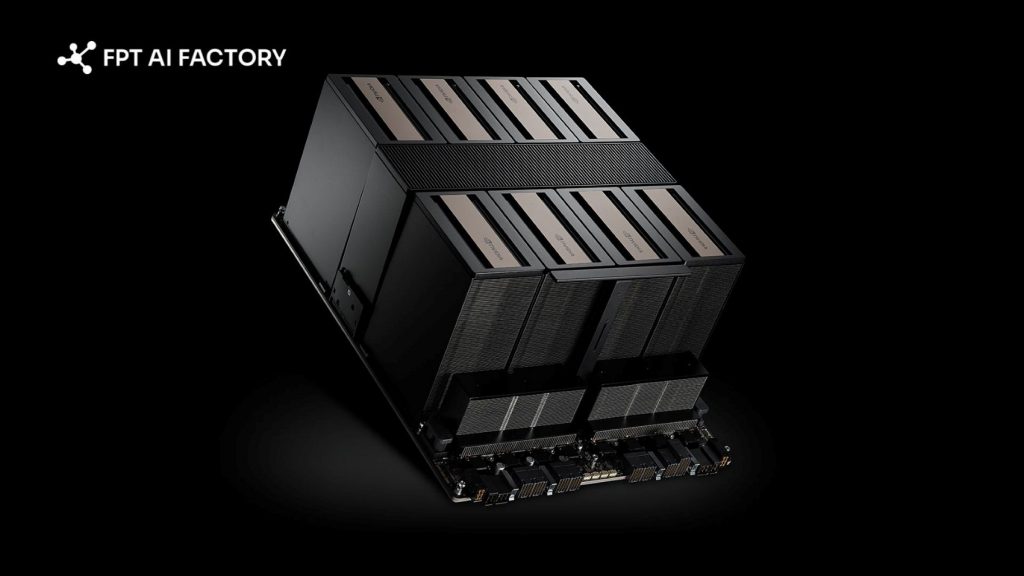
Consistent GPU powered AI deployment across scalable container environments
>>> Explore: What Is GPU Computing and How Does It Work? A Complete Guide
9. FAQs
9.1 Is Docker the same as Kubernetes?
Docker and Kubernetes are different technologies with distinct roles in the container ecosystem, where Docker is used to build and run containers while Kubernetes is used to manage, scale, and orchestrate containers across multiple machines.
9.2 Is Docker better than a virtual machine?
Neither Docker nor virtual machines are universally better because they are designed for different purposes, where Docker focuses on lightweight containerization that enables faster startup, efficient resource usage, and flexible application development, while virtual machines provide stronger isolation by running full operating systems on virtualized hardware, making them more suitable for workloads that require strict security boundaries or complete system separation.
9.3 Why do developers use Docker?
Developers use Docker to package applications along with all required dependencies into standardized, isolated containers, which helps ensure consistent execution across different environments and eliminates common issues such as “it works on my machine,” so that applications behave the same way on local development systems, testing servers, and cloud infrastructure.
Docker plays a key role in modern software development by enabling consistent application packaging, faster deployment, and better scalability across environments. It supports modern architectures like microservices, cloud-native systems, and AI workloads while reducing environment-related issues. In short, understanding what is Docker helps explain how it standardizes building and running applications across different systems.
If you are looking to explore containerized infrastructure, you can start with a $100 credit, which is available for immediate use after login. For enterprises, organizations, or teams that require customized deployments or large-scale GPU and container solutions, you can contact the FPT AI Factory team via the official form for tailored consultation and implementation support.
Contact Information:
- Hotline: 1900 638 399
- Email: support@fptcloud.com
Read more:
What is Data Annotation? Types, Challenges, Use Cases
What is Pipeline in Machine Learning? Why It’s Important
What is a Data Catalog? Types, Benefits, Core Features
Kubernetes vs Docker: Choosing the Right Container Strategy


