
An enterprise AI chatbot uses large language models, enterprise knowledge and APIs to understand user intent and support business workflows. It can answer customer questions, assist employees and connect with internal systems in real time. For organizations, it offers a practical way to improve customer experience, productivity and operational efficiency. This guide explains how enterprise AI chatbots work, what architecture they need and how teams scale them in production with FPT AI Factory.
|
Key Takeaways An enterprise AI chatbot uses LLMs, RAG, enterprise data and API integrations to understand user intent, answer questions and support business workflows at scale. To work effectively in production, it needs a clear architecture, reliable data access, monitoring and scalable infrastructure.
|
FPT AI Factory helps teams build, optimize and scale LLM inference from experimentation to production AI applications. With GPU infrastructure, AI development tools and inference services, teams can improve deployment efficiency, support high-performance workloads and manage production inference more effectively. Organizations that need customized AI solutions, large-scale deployment or expert consultation can contact FPT AI Factory to discuss the right architecture for their workloads.
1. What Is an Enterprise AI Chatbot?
1.1. Definition
An enterprise AI chatbot is a conversational AI system designed for business environments. It uses natural language processing, large language models, retrieval systems and enterprise integrations to understand user requests and generate useful responses. Unlike basic bots that follow fixed scripts, enterprise AI chatbots can handle more flexible questions, retrieve knowledge from internal systems and support workflows across customer service, sales, HR, IT and operations.
In practice, an enterprise AI chatbot may answer customer questions, summarize internal documents, retrieve policy information, create support tickets, recommend next steps or help employees complete repetitive tasks. Its value comes from combining reasoning in AI with trusted business data and secure system integrations.
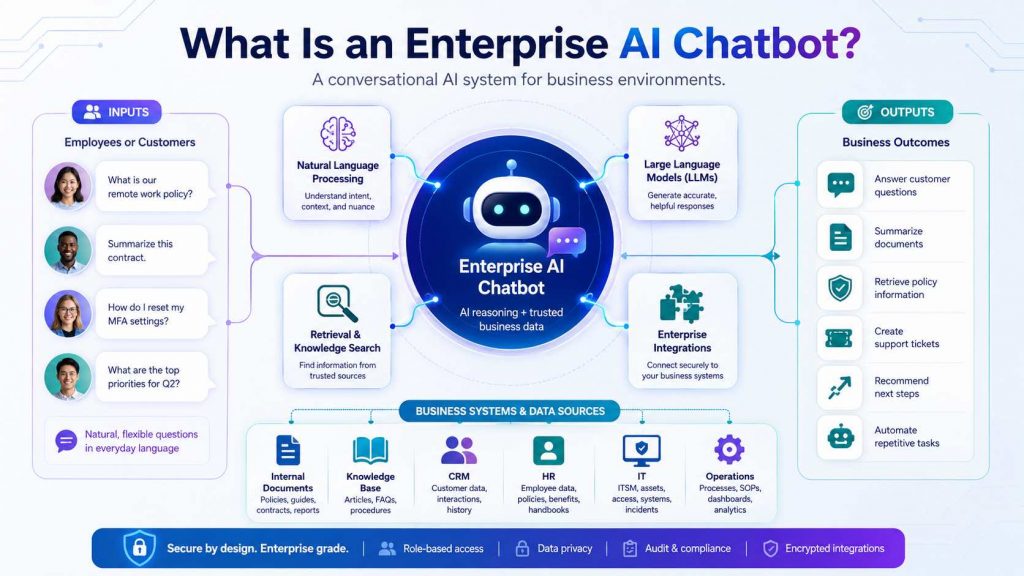
An enterprise AI chatbot combines language understanding, business data and secure integrations to answer questions, and support workflows across teams
1.2. Difference between traditional chatbot and AI-powered chatbot
Traditional chatbots and AI-powered enterprise chatbots both support user communication, but they differ in how they understand requests, scale across topics and handle complex workflows. The table below compares their key differences in technology, scalability and best use cases.
| Criteria | Traditional Chatbot | AI-powered Enterprise Chatbot |
| Technology | Uses predefined rules, keyword matching and scripted conversation flows. | Uses LLMs, NLP, RAG, vector search and API integrations to understand broader user intent. |
| Scalability | Harder to scale when questions become more complex because teams must manually update scripts. | Can scale across many topics by connecting to enterprise knowledge sources and model inference infrastructure. |
| Best use cases | Simple FAQs, fixed menus, appointment booking and basic routing. | Customer support, internal knowledge search, document assistance, sales enablement and enterprise workflow automation. |
1.3. Why enterprises are adopting AI chatbot solutions?
Enterprises are adopting AI chatbot solutions because customer and employee expectations are changing. Users want fast, accurate and personalized responses, while business teams need to reduce repetitive manual work. AI chatbots can support both goals by making information easier to access and automating common interaction flows.
Another driver is the shift from AI experimentation to production. The FPT AI Factory article Enterprise AI in 2026: 88% Report Positive ROI notes that enterprises are moving beyond pilot projects and treating AI as core infrastructure. For chatbots, this means businesses are no longer asking whether AI can answer questions, but how to connect AI with enterprise data, governance and scalable infrastructure.
- Reduce pressure on customer service and internal support teams.
- Make enterprise knowledge easier to access across departments.
- Improve response consistency and reduce manual handoffs.
- Support real-time service at higher interaction volumes.
- Create a foundation for more advanced AI agents and workflow automation.
2. How Enterprise AI Chatbots Work?
An enterprise AI chatbot works by receiving a user request, interpreting the intent, retrieving relevant enterprise context, generating a response and, when needed, connecting with business systems through APIs. A production chatbot should not rely only on the model’s general knowledge. It should use trusted data sources, monitoring and governance controls to provide reliable answers.
2.1. User Input
The workflow starts when a user sends a message through a web chat, mobile app, customer portal, messaging platform or internal workspace. The input may be a simple question, a request for a document summary, a complaint, a sales inquiry or a workflow command.
Before the request reaches the model, the system may clean the input, detect language, identify user intent and apply security checks. In enterprise environments, this step is important because the chatbot may need to respect user roles, data permissions and internal policy boundaries.
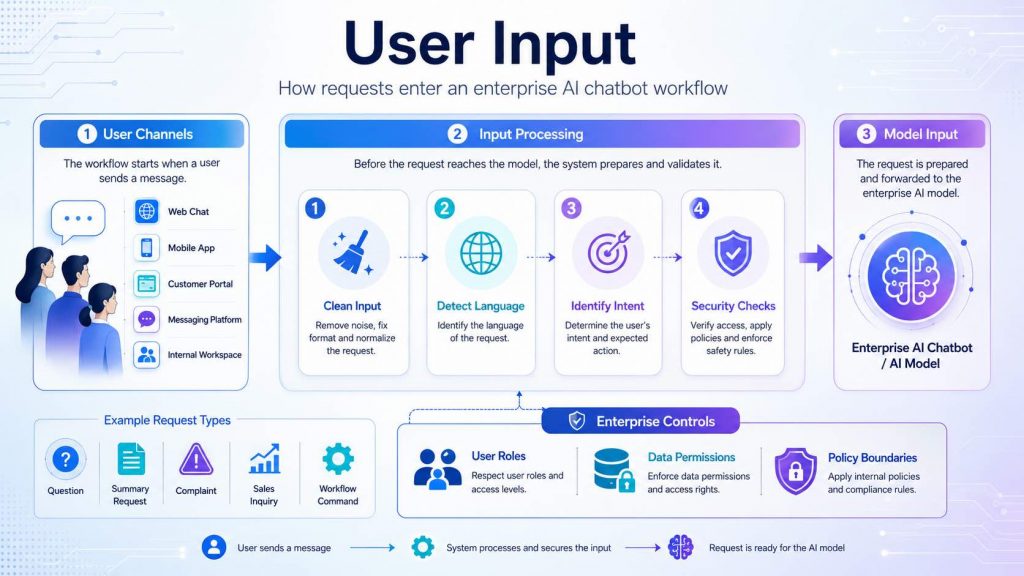
User input is the first step in an enterprise AI chatbot workflow, where messages from different channels are processed, checked and prepared before reaching the AI model.
2.2. LLM Reasoning
After receiving the input, the chatbot sends the request to a large language model. The model interprets the user’s intent, understands context and decides what type of answer or action is needed. For example, it may determine whether the user is asking for a policy explanation, an order status, a troubleshooting guide or a document summary.
LLM reasoning becomes more useful when it is connected with enterprise context and tool access. Instead of generating a generic answer, the model can use retrieved documents, customer data or workflow rules to produce a more relevant response.
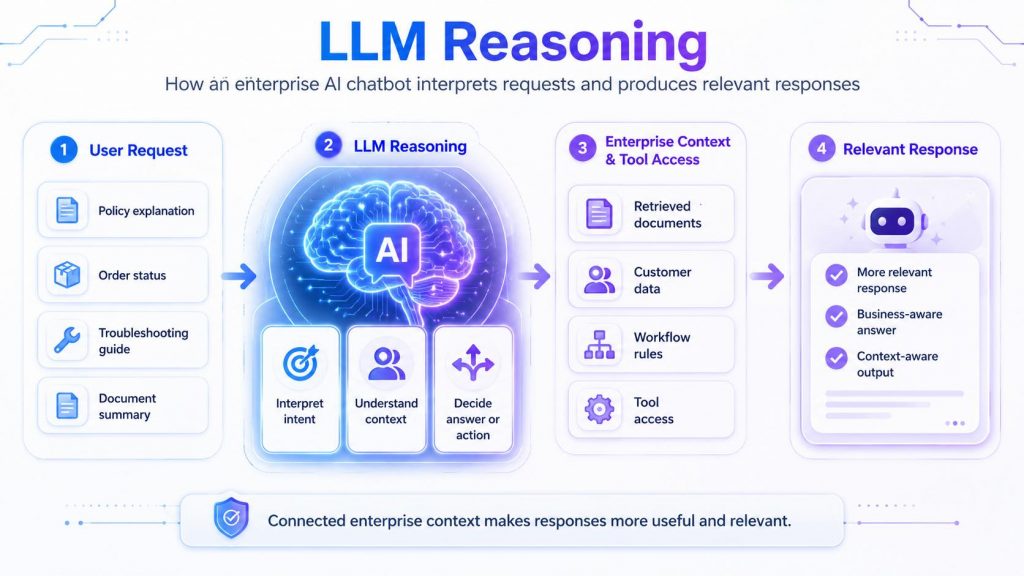
LLM reasoning helps an enterprise AI chatbot interpret user intent, understand context and use business data or tools to generate more relevant responses.
2.3. Retrieval-Augmented Generation (RAG)
Retrieval-Augmented Generation, or RAG, allows the chatbot to retrieve relevant information from enterprise knowledge sources before generating an answer. This is useful when the chatbot needs to answer questions based on internal policies, product documentation, contracts, FAQs, support tickets or technical manuals.
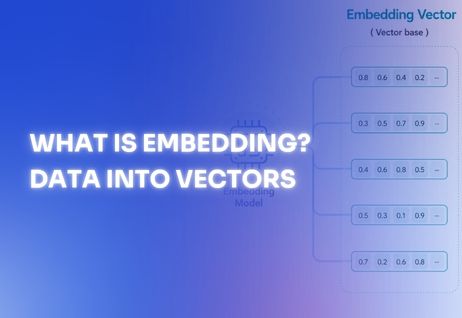
In a RAG workflow, documents are usually processed into chunks, converted into embeddings and stored in a vector database. When a user asks a question, the system searches for relevant chunks and adds them to the prompt as context. As explained in The Enterprise AI Playbook for RAG and Fine-Tuning, RAG focuses on giving the model the right information at inference time, while fine-tuning focuses on shaping how the model responds.
For enterprise AI chatbots, RAG grounds model responses in retrieved enterprise knowledge, which can improve factual accuracy and reduce hallucination risk when retrieval quality is high.
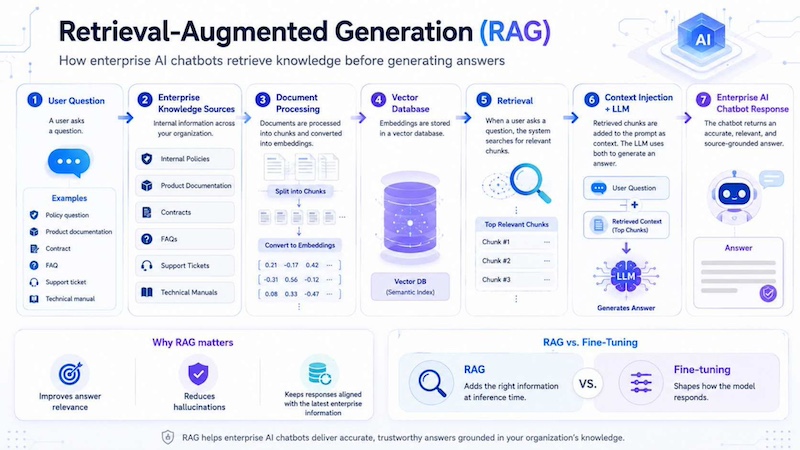
RAG helps enterprise AI chatbots retrieve relevant knowledge, add it as context and generate more accurate, source-grounded responses.
2.4. Enterprise Integrations
Enterprise AI chatbots become more valuable when they can connect with business systems. Through APIs, the chatbot may retrieve order details from a CRM, check inventory in an ERP, create a ticket in a service desk platform, search HR policies or update a customer profile.
These integrations turn a chatbot from a simple Q&A tool into a workflow assistant. For example, a customer may ask about a delayed order. The chatbot can identify the user, retrieve shipping status, summarize the issue and create an escalation ticket if needed.
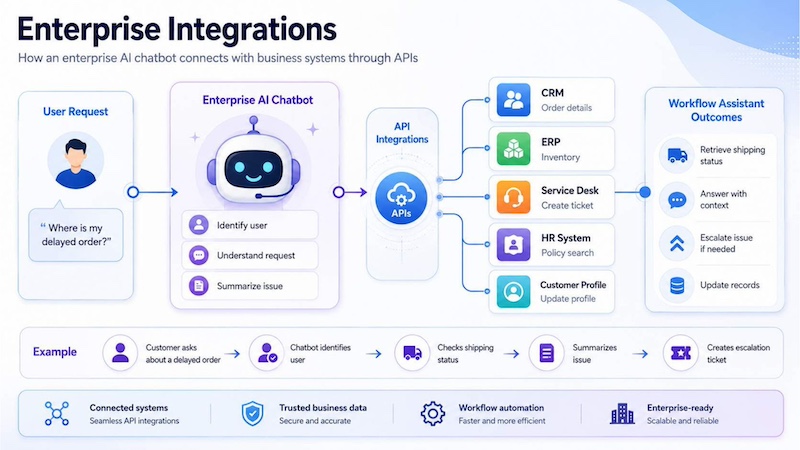
Enterprise integrations turn AI chatbots into workflow assistants by connecting them with CRM, ERP, service desk, HR and customer systems through APIs.
2.5. Response Generation
After reasoning over the request and relevant context, the chatbot generates a final response. The response may be a direct answer, a step-by-step instruction, a summary, a recommendation or a message for a human agent to review.
In production environments, response generation should include quality controls. The system may check whether the answer is grounded in retrieved sources, whether it follows brand tone, whether sensitive data is exposed and whether escalation is required. This helps enterprises maintain trust and consistency as chatbot usage grows.
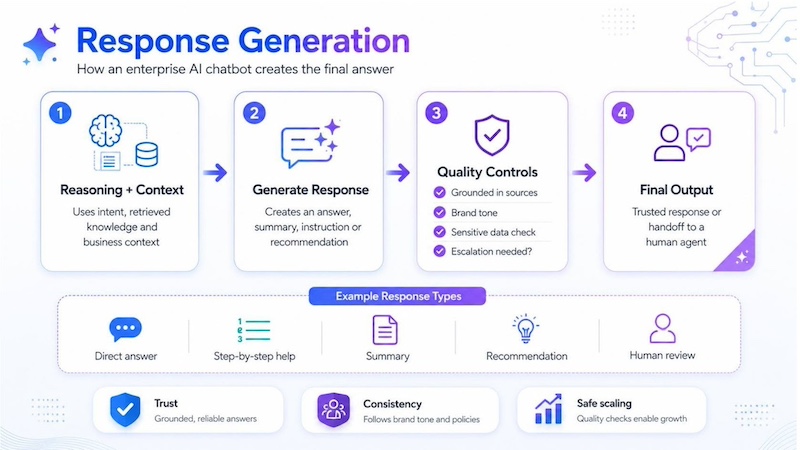
Response generation turns reasoning and context into a trusted final answer, with quality checks to ensure accuracy, brand consistency and safe handoff when needed.
3. Enterprise AI Chatbot Architecture
Enterprise AI chatbot architecture combines several layers: the user interface, AI model, retrieval system, vector database, enterprise data sources, API layer, monitoring tools and GPU infrastructure. Each component plays a role in making the chatbot accurate, secure and scalable.
3.1 User Interface
The user interface is where users interact with the chatbot. It may appear as a website widget, mobile app chatbot, internal employee portal, customer support console or messaging tool. A good interface should make it easy for users to ask questions, upload documents, confirm actions and escalate to a human agent when needed.
3.2. AI Model
The AI model is the reasoning engine of the chatbot. It understands user input, interprets intent and generates language-based outputs. Depending on the use case, the model may be a general-purpose LLM, a domain-adapted model, an embedding model, a rerank model or a multimodal model. For teams building chat, code or document workflows, Serverless Inference can provide API-based access to multiple AI models without requiring teams to build the full serving layer from scratch.
3.3. RAG
The RAG layer connects the AI model with external enterprise knowledge. It retrieves relevant documents or records and sends them to the model as context. This helps the chatbot answer based on trusted business information instead of relying only on static model knowledge.
3.4. Vector Database
A vector database stores document embeddings so the chatbot can search enterprise knowledge semantically. Instead of matching only exact keywords, vector search helps the system find information with similar meaning. This is especially useful for internal knowledge assistants, where employees may ask the same question in many different ways.
3.5. Enterprise Data
Enterprise data may include FAQs, policies, product documents, contracts, customer records, order data, knowledge base articles, meeting notes and support tickets. Before this data can be used by a chatbot, teams need to organize, clean and govern it carefully. Poor-quality or outdated data can lead to inaccurate answers, even if the AI model itself is strong.
3.6. API Layer
The API layer connects the chatbot with models, databases and enterprise applications. It handles communication between the frontend, orchestration logic, retrieval system, model endpoints and business systems. API design is important because chatbots often need to move data securely between multiple services.
For example, the chatbot may call one API to retrieve a customer profile, another API to search a document database and another API to send a request to an inference endpoint. Strong authentication, authorization, rate limiting and logging are necessary to keep these integrations secure.
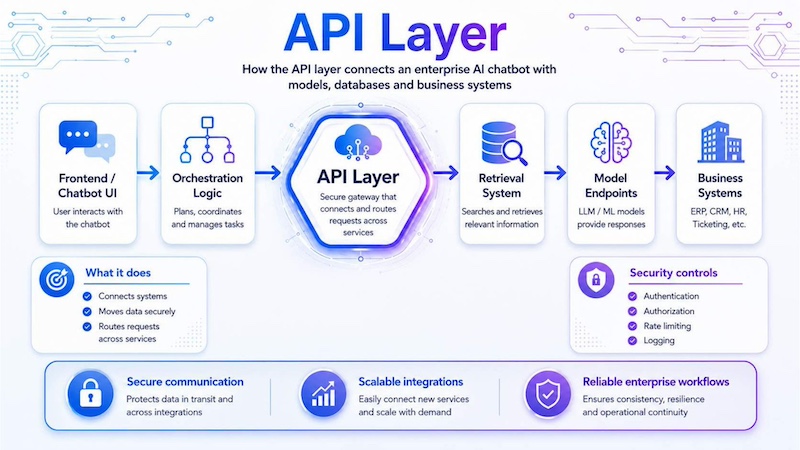
The API layer acts as a secure connection hub that routes chatbot requests between the frontend, orchestration logic, retrieval system, model endpoints and business systems.
3.7. Monitoring
Monitoring helps teams track chatbot performance, usage patterns, latency, failure rates and output quality. It also supports governance by helping teams detect abnormal activity, identify hallucination risks and review user feedback. In enterprise deployments, monitoring should cover both technical metrics and business outcomes.
3.8. GPU Infrastructure
GPU infrastructure provides the compute power needed for model inference, fine-tuning, RAG validation and high-volume chatbot workloads. Modern LLM workloads depend heavily on GPU acceleration because inference and generation involve large-scale parallel computation.
For teams that need flexible GPU environments, GPU Container can support containerized AI workloads, while GPU Virtual Machine can provide dedicated GPU resources for more controlled environments. For larger workloads, GPU Cluster can support distributed training, production-ready model serving and scalable AI infrastructure
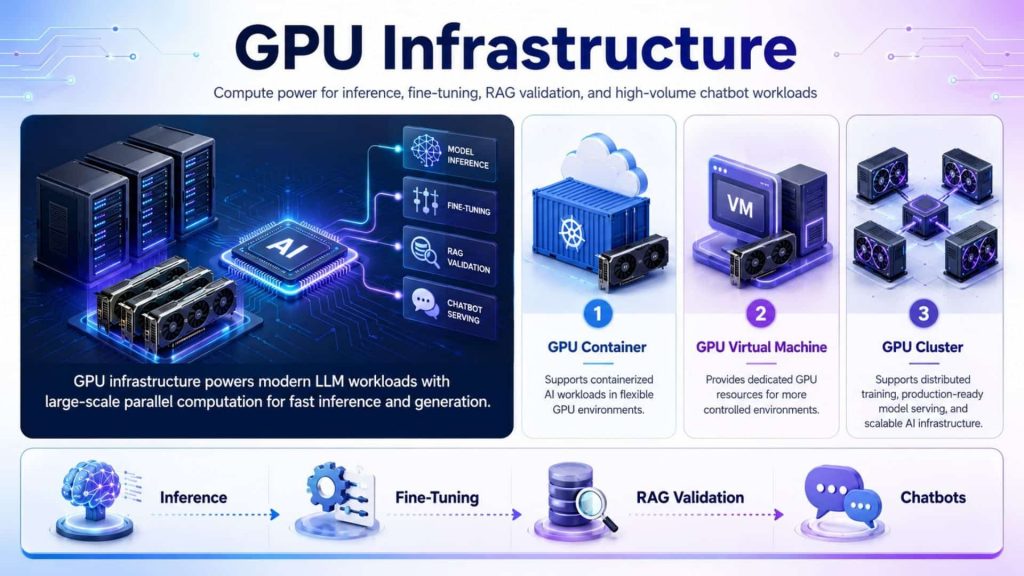
GPU infrastructure supports AI inference, fine-tuning, and chatbot workloads through flexible GPU Container, GPU Virtual Machine, Cluster environments.
4. Enterprise AI Chatbot Implementation Roadmap
Building an enterprise AI chatbot requires more than selecting a language model. Teams need a clear roadmap that connects business goals, enterprise data, retrieval workflows, inference infrastructure and ongoing performance monitoring.
4.1. Identify Business Use Cases
Start by defining the problems the chatbot should solve. Common use cases include customer support, employee knowledge access, document search, product guidance and internal process assistance. Each use case should have clear success metrics such as response accuracy, resolution rate, latency or reduced workload for human teams.
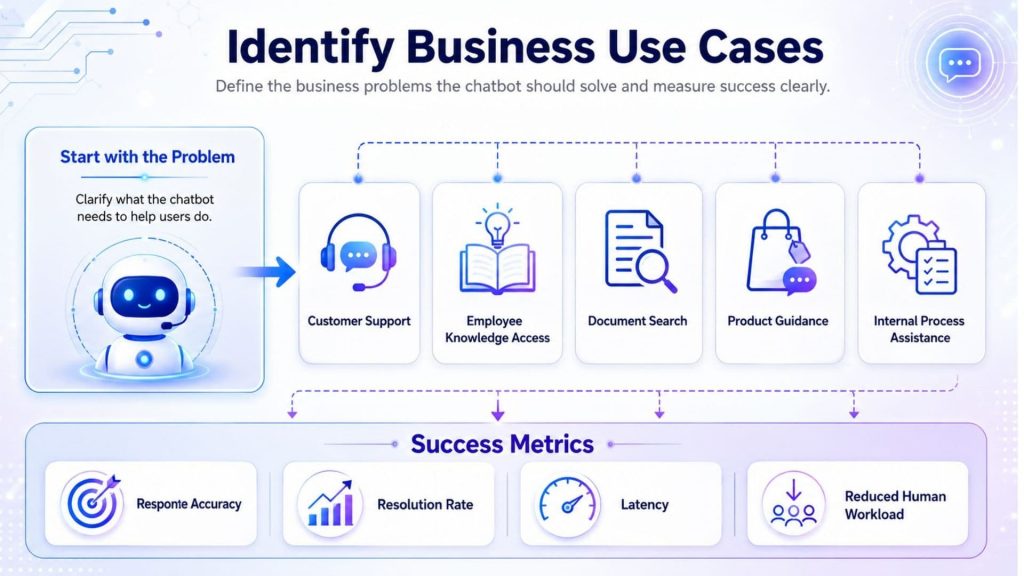
Identifying clear chatbot use cases and measurable success metrics helps teams align AI solutions with real business needs and user expectations.
4.2. Prepare Enterprise Data
Collect and organize the documents the chatbot will use, including policies, manuals, FAQs, contracts, support tickets and product documentation. Teams should remove outdated or duplicate content, apply access controls and define which users may retrieve specific information.
4.3. Build the RAG Pipeline
Process documents into chunks, generate embeddings and store them in a vector database. The retrieval layer should be tested carefully because weak chunking, inaccurate retrieval or poor context selection can reduce answer quality. A reliable RAG pipeline grounds responses in relevant enterprise knowledge instead of relying only on the model’s internal training data.
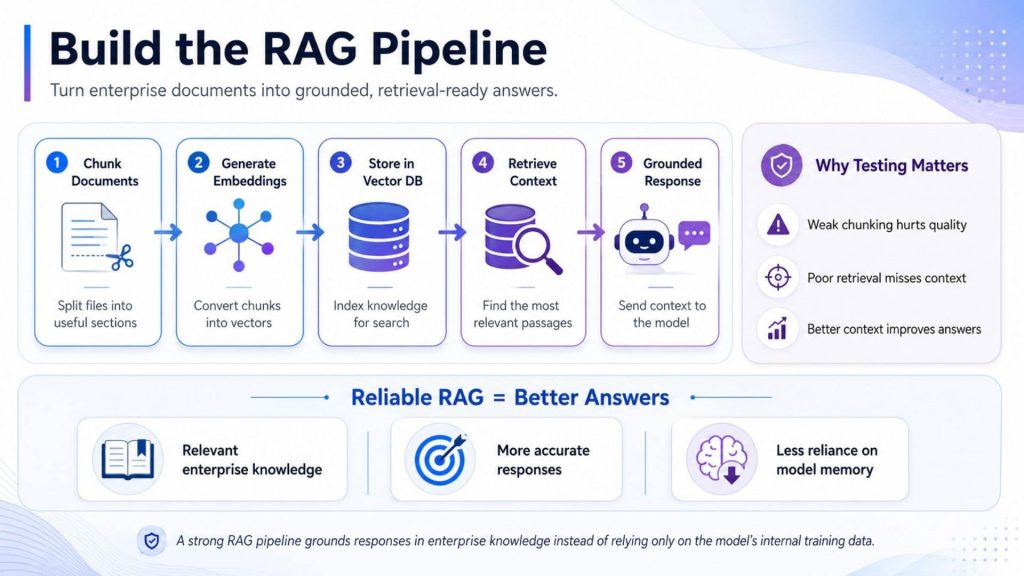
A reliable RAG pipeline transforms enterprise documents into searchable embeddings, retrieves relevant context, and up-to-date knowledge.
4.4. Select the LLM
Choose a model based on language support, reasoning capability, context length, latency, cost and data requirements. Teams should test several models with real business questions before selecting one for production, because the largest model is not always the most suitable option.
4.5. Deploy Inference Infrastructure
Select infrastructure that can support expected traffic, model size and response-time requirements. GPU Container can support portable development environments, GPU Virtual Machine provides dedicated GPU control, and GPU Cluster supports larger distributed workloads. For API-based deployment, Serverless Inference can simplify model integration without requiring teams to manage the complete serving layer.
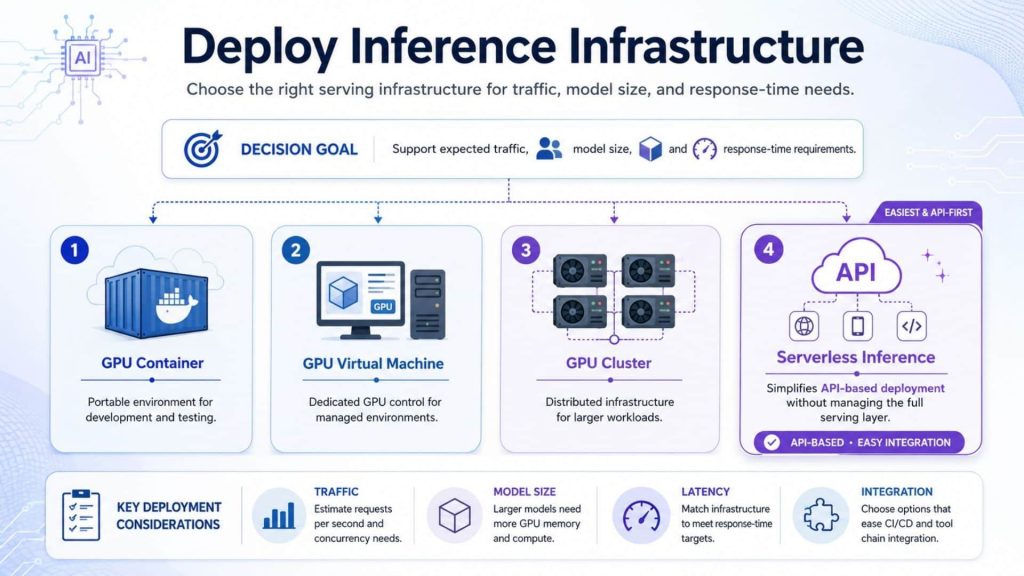
The right inference infrastructure helps teams match traffic, and latency needs by choosing between GPU Container, GPU Virtual Machine for scalable AI deployment.
4.6. Monitor and Optimize
After deployment, monitor response quality, retrieval accuracy, latency, GPU utilization, cost and user feedback. Teams should regularly update knowledge sources, evaluate failure cases and refine prompts, retrieval settings and model configurations as business needs change.
5. Key Benefits of Enterprise AI Chatbots
5.1. 24/7 customer support
Enterprise AI chatbots can support users at any time, including outside business hours. They can answer common questions, provide troubleshooting steps, collect customer information and route complex cases to human agents. This improves service availability without requiring support teams to expand at the same rate as customer demand.
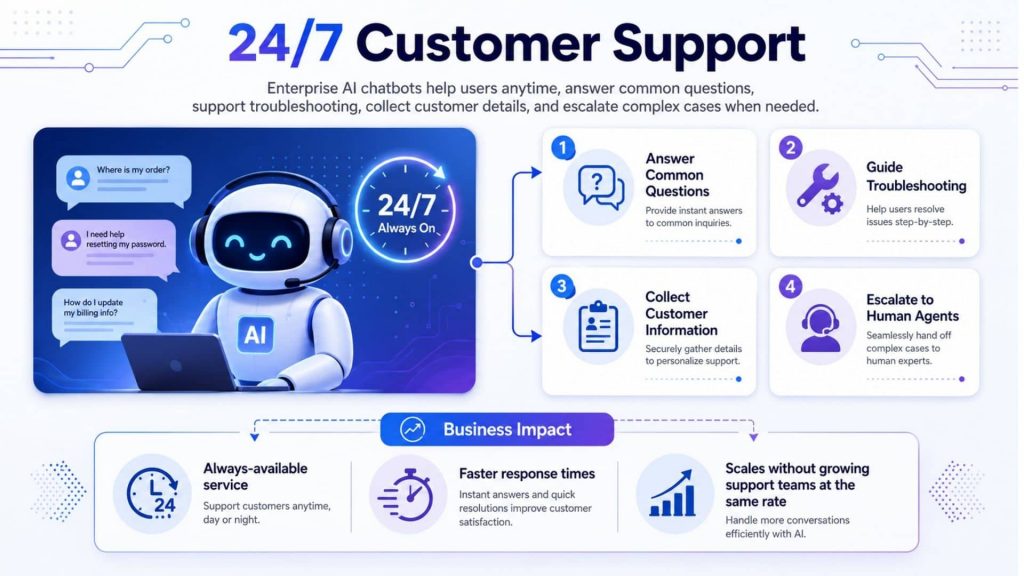
Enterprise AI chatbots provide 24/7 customer support by answering common questions, and escalating complex cases to human agents.
5.2. Reduce operational workload
AI chatbots reduce repetitive work by handling routine questions, summarizing documents, preparing draft responses and guiding users through common workflows. This allows employees to focus on higher-value tasks such as complex case resolution, relationship management and decision-making.
5.3. Improve response accuracy
When connected with RAG and governed enterprise data, AI chatbots can provide more accurate and context-aware answers. Instead of depending only on the model’s training data, the chatbot can retrieve the latest internal documents and generate a grounded response. This is especially important for regulated or knowledge-heavy industries.
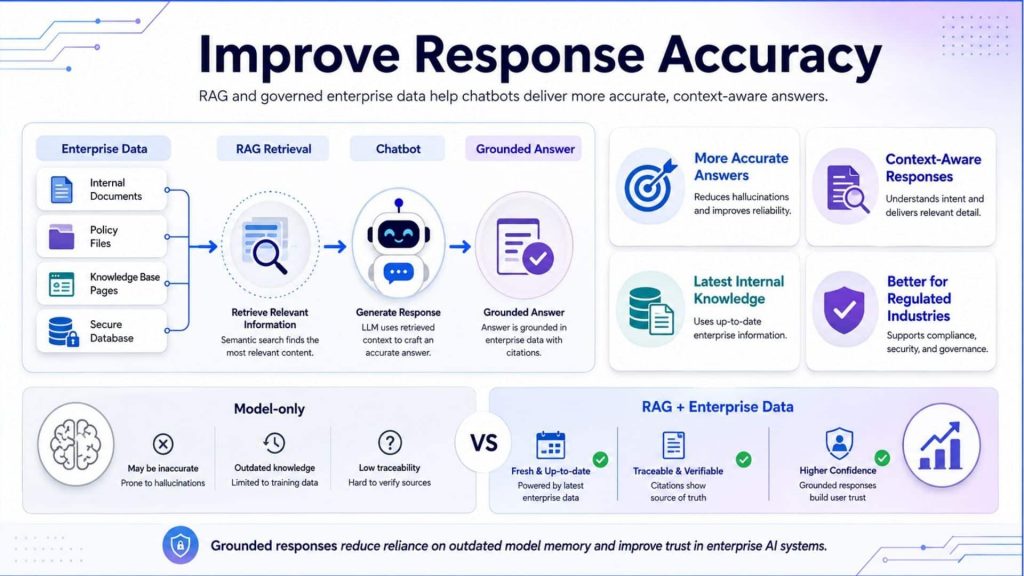
RAG connects AI chatbots with governed enterprise data, enabling more accurate, context-aware, traceable, and up-to-date responses.
5.4. Personalize user experience
Enterprise AI chatbots can personalize responses based on user role, customer history, previous interactions and business context. For example, a sales assistant can recommend different materials to a prospect and an existing customer, while an HR chatbot can adjust answers based on region, policy group or employee status.
5.5. Scale customer interactions
AI chatbots help enterprises handle large volumes of interactions without sacrificing speed. This is valuable during peak periods, product launches, service disruptions or seasonal campaigns. With the right inference infrastructure, teams can scale chatbot usage while keeping response latency and operating cost under control.
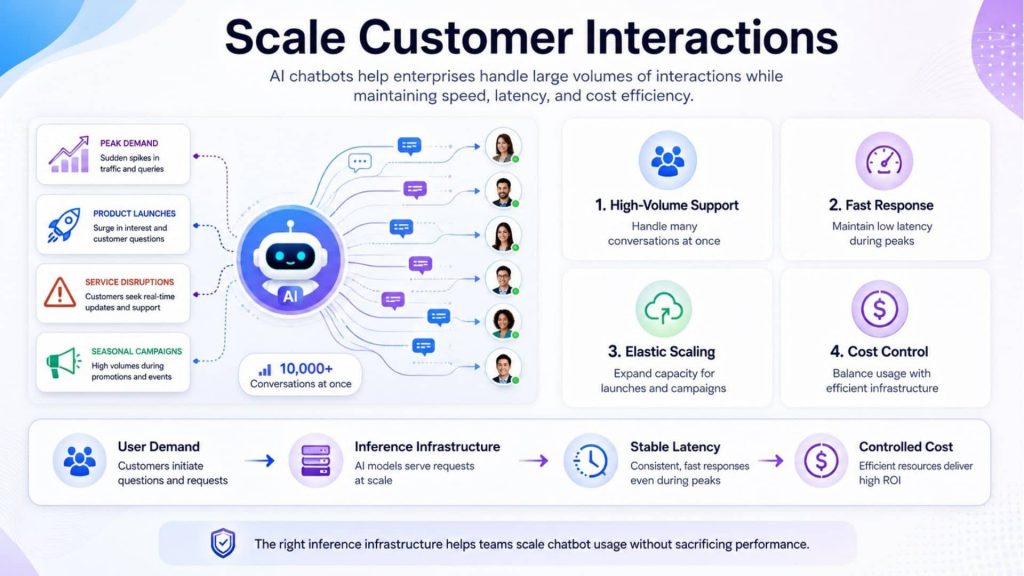
AI chatbots scale customer interactions while maintaining speed and cost efficiency.
6. Enterprise AI Chatbot Use Cases
6.1. Customer service chatbot
Customer service chatbots can answer FAQs, check order status, explain return policies, troubleshoot issues and collect information before handoff to human agents. For enterprise teams, the goal is not to replace support teams completely, but to reduce repetitive requests and improve response speed.
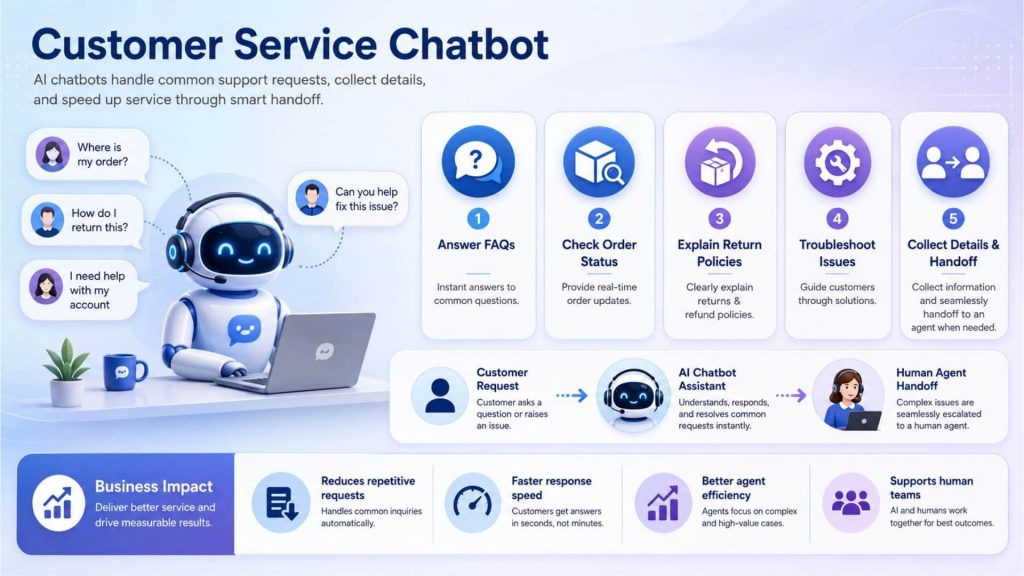
Customer service chatbots handle routine requests, speed up responses, and transfer complex issues to human agents.
6.2. Internal knowledge assistant
An internal knowledge assistant helps employees search company policies, technical documentation, product guides, training materials and internal reports. By combining RAG with enterprise data, the chatbot can provide answers grounded in trusted documents, helping employees find information faster.
6.3. Sales assistant
A sales assistant chatbot can help sales teams prepare product explanations, qualify leads, summarize customer notes and suggest follow-up actions. It can also retrieve pricing guidelines, product comparison sheets and customer context to support more relevant conversations.
6.4. Employee productivity chatbot
Employee productivity chatbots can draft emails, summarize meetings, answer policy questions, create checklists and automate internal requests. As enterprises expand AI use, these assistants can become part of broader agentic AI workflows that connect models, tools and business systems to complete multi-step tasks.
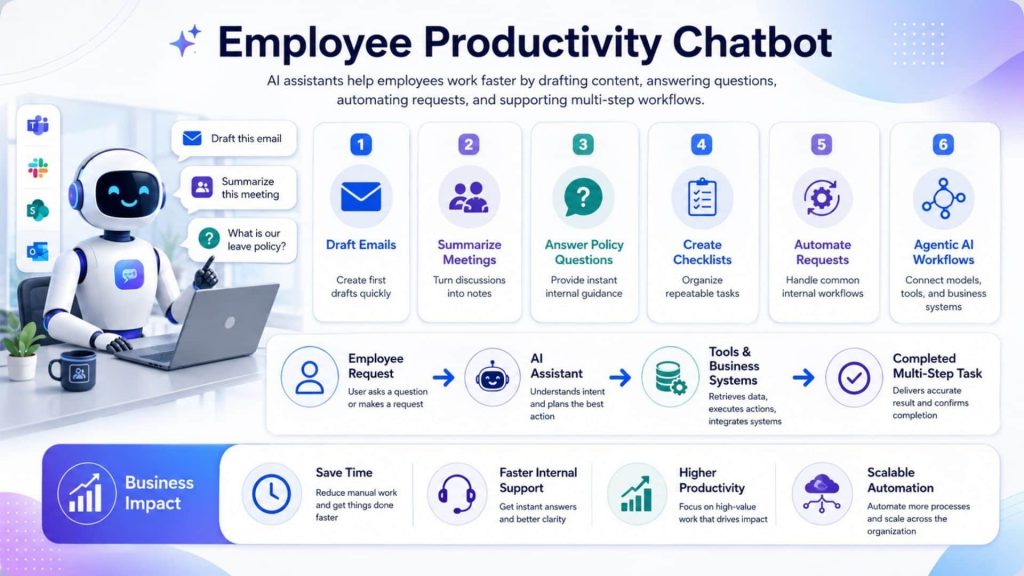
Employee productivity chatbots help teams draft, summarize, answer questions, automate requests, and complete multi-step workflows faster.
7. Challenges When Deploying Enterprise AI Chatbots
7.1. Data privacy
Data privacy is one of the most important concerns in enterprise chatbot deployment. Chatbots may process customer information, employee records, financial data, contracts or confidential business documents. Teams need clear controls over what data the chatbot can access, where data is stored and how user permissions are enforced.
A strong deployment should include data classification, access control, encryption, secure API authentication and policies for sensitive information. For highly regulated use cases, enterprises may also need private serving, isolated endpoints or dedicated infrastructure.
7.2. Response accuracy
AI chatbots can produce inaccurate answers if the model lacks context, retrieves the wrong documents or receives poorly structured prompts. This creates business risk, especially in customer-facing or compliance-sensitive workflows.
To improve accuracy, teams should combine RAG, prompt design, evaluation datasets, human review and continuous monitoring. For stable response formats or brand-specific behavior, teams may also consider fine-tuning after diagnosing whether the issue is caused by missing knowledge or inconsistent model behavior.
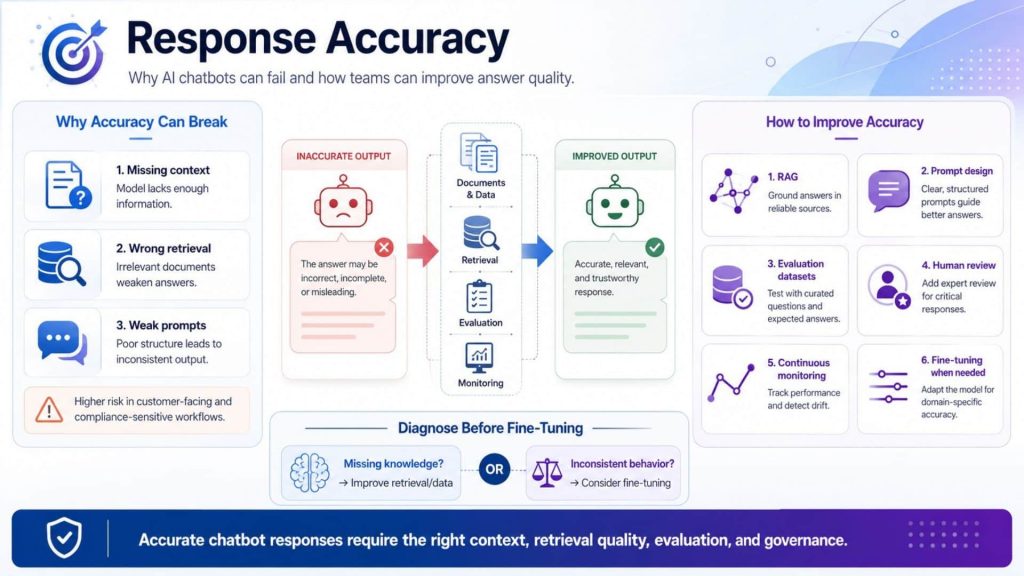
Improving chatbot accuracy requires reliable context, strong retrieval, clear prompts, evaluation, human review, and continuous monitoring.
7.3. Governance & Monitoring
Enterprise AI chatbots need governance because they interact with users, business systems and sensitive data. Governance should define acceptable use cases, escalation rules, data access policies, approval workflows and quality standards. Monitoring should track both system performance and response quality.
Useful monitoring metrics include request volume, response latency, fallback rate, escalation rate, hallucination reports, user satisfaction and cost per interaction. Audit logging is also important because it helps teams trace user requests, model responses and system actions during review or incident investigation.
7.4. AI infrastructure scalability
An enterprise AI chatbot does not only need an LLM. It also needs infrastructure that can handle many real-time requests, retrieval workloads, model calls and integrations with enterprise systems. As usage increases, weak infrastructure can lead to high latency, unstable responses and poor user experience.
For teams building or scaling chatbot infrastructure, FPT AI Factory provides multiple GPU infrastructure options. GPU Container can support containerized AI workloads and rapid experimentation. GPU Virtual Machine can provide dedicated GPU environments for more controlled deployments. GPU Cluster can support larger AI workloads with managed Kubernetes, autoscaling and production-ready model serving.
This infrastructure layer is especially important when enterprises deploy chatbots across multiple departments, serve many users at the same time or combine chatbots with RAG, document processing and AI agents.
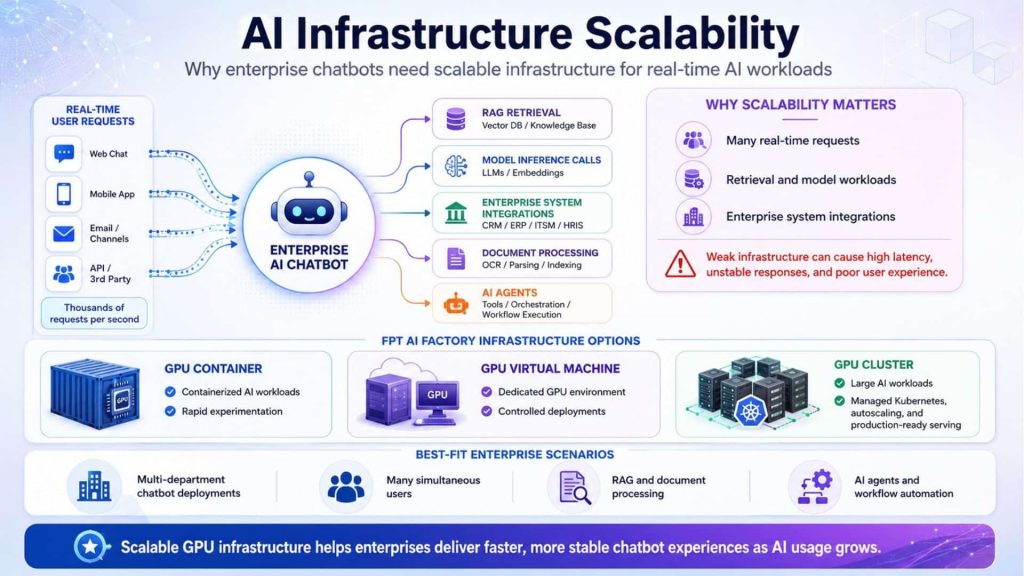
Scalable GPU infrastructure supports high-volume chatbot requests, RAG, enterprise integrations, and AI agents while maintaining fast, stable performance.
7.5. Managing AI Infrastructure inference cost
Inference cost can grow quickly when chatbot usage scales. Every user message may trigger model calls, retrieval steps, reranking, tool calls or document processing. If the system is not optimized, enterprises may overpay for unused compute or experience unpredictable operating costs.
Serverless Inference helps address this challenge by offering API-based access to diverse AI models, OpenAI-compatible APIs, pay-as-you-go usage and dynamic scalability. It supports chat, code, embedding, rerank, speech and multimodal model options, making it suitable for enterprises that want to build custom AI chatbot workflows without managing every infrastructure layer manually.
For example, a business can use a language model for chatbot responses, an embedding model for RAG search and a rerank model to improve retrieved context. By using an API-based inference service, teams can focus on application logic, data quality and user experience while reducing the operational burden of model serving.
Enterprise AI chatbots are becoming an important part of the enterprise AI stack. They help organizations improve support, reduce manual work, scale knowledge access and create more intelligent customer and employee experiences. However, successful deployment requires more than a powerful model. Teams also need reliable architecture, trusted data, secure integrations, governance, monitoring and scalable inference infrastructure.
FPT AI Factory supports this process through GPU infrastructure, AI Studio tools and Inference services. FPT offers a $100 free trial credit program for users to explore the platform. For businesses or organizations that need customized AI solutions, large-scale deployment or expert consultation, contact FPT AI Factory through the official contact form.
Contact information
- Hotline: 1900 638 399
- Email: support@fptcloud.com
Explore more articles
What is API Integration? How it works, Benefits, and Examples