

From personalized artwork to branded visual content, AI-generated images are transforming the way creators and businesses produce digital assets. However, achieving consistent styles, specific subjects, and tailored outputs often requires more than using a pre-trained Stable Diffusion model. Fine-tuning Stable Diffusion enables users to customize the model based on their unique datasets and creative goals. In this guide, FPT AI Factory explains what stable diffusion fine-tuning is, when to use it, and provides a complete step-by-step process to train your own custom model.
Key takeaways:
|
Fine-tuning Stable Diffusion enables organizations and creators to customize image generation models for specific styles, products, and business needs. Here are the key points to remember.
|
FPT AI Factory offers a comprehensive AI platform for developing, testing, and deploying production-ready models. Supported by GPU infrastructure, AI Notebook, Model Testing, and Serverless Inference, organizations can accelerate AI development while optimizing performance and operational efficiency. For customized deployments or enterprise-scale AI projects, the FPT AI Factory team provides tailored infrastructure solutions and technical support.
1. What Is Stable Diffusion Fine-Tuning?
Stable diffusion fine-tuning is the process of training a pre-trained stable diffusion model on a custom dataset to improve its ability to generate images that match specific styles, subjects, products, or visual concepts. Instead of creating a model from scratch, fine-tuning builds on an existing foundation model, allowing it to learn new visual patterns while retaining its original image generation capabilities.
By exposing the model to carefully curated images, businesses and creators can produce more accurate, consistent, and brand-aligned results. Depending on the use case, popular fine-tuning methods include DreamBooth, LoRA (Low-Rank Adaptation), Textual Inversion, and full-model fine-tuning, each offering different trade-offs between training cost, flexibility, and performance.
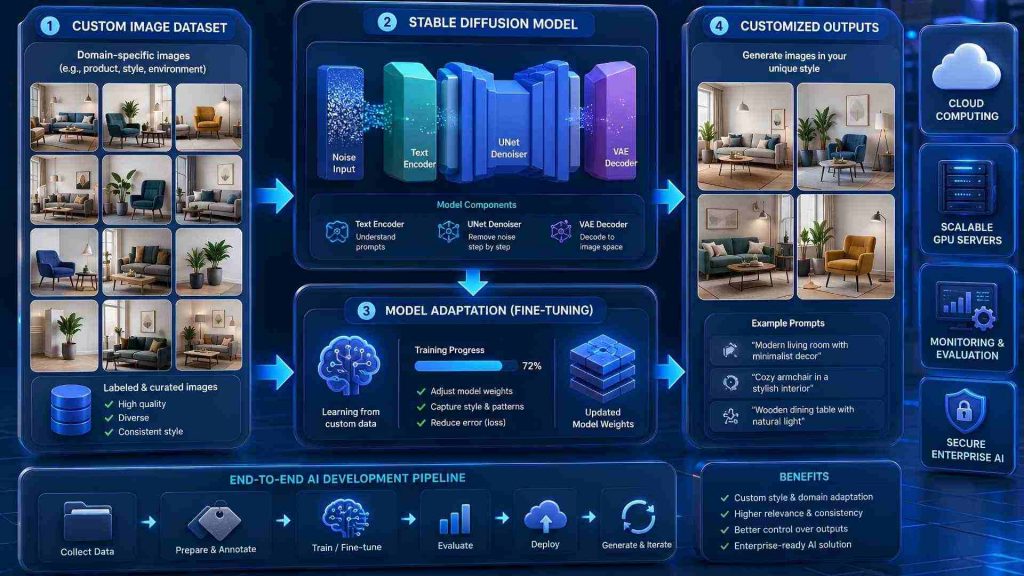
Stable diffusion fine-tuning adapts a pre-trained model using custom datasets
2. Why Fine-Tune Stable Diffusion Models?
Although stable diffusion performs well out of the box, it may not meet specialized business or creative needs. Fine-tuning allows the model to learn from custom datasets, improving accuracy, consistency, and relevance for specific applications. Below are the key benefits of fine-tuning stable diffusion models.
2.1. Brand-specific image generation
Fine-tuning allows organizations to generate images that reflect their unique brand identity, including logos, products, packaging, colors, and marketing style. This helps maintain visual consistency across websites, advertisements, and social media campaigns while reducing manual design work.
For example, Coca-Cola has explored generative AI in creating real magic campaigns, using AI-powered tools to produce branded marketing content inspired by its iconic visual identity. Likewise, a business can fine-tune Stable Diffusion on its own logos, products, or packaging using as few as 5 – 20 high-quality reference images with methods such as DreamBooth.

Fine-tuning helps maintain consistent brand identity across AI-generated content
2.2. Style customization
Fine-tuning enables creators to train Stable Diffusion on a specific artistic style, allowing newly generated images to maintain a consistent visual aesthetic across projects. This helps ensure visual consistency across multiple images and creative assets.
For instance, Netflix has publicly discussed using generative AI to support parts of the creative production workflow. A fine-tuned stable diffusion model can likewise learn a studio’s established concept art style, enabling artists to rapidly generate new scenes that match the existing visual direction.
2.3. Domain-specific applications
General-purpose image generation models often struggle with specialized content. Fine-tuning allows Stable Diffusion to learn industry-specific datasets, improving accuracy for professional applications.
For example, researchers at Mayo Clinic and other medical institutions have investigated generative AI for medical imaging, education, and research. A fine-tuned stable diffusion model can generate realistic medical illustrations based on curated clinical datasets while preserving domain-specific features.

Fine-tuning supports industry-specific AI image generation
2.4. Character Consistency
Fine-tuning helps maintain the same character’s appearance across multiple images by preserving facial features, clothing, hairstyles, and other defining attributes. This enables creators to generate consistent visual identities across illustrations, animations, comics, and other multi-image projects.
For instance, independent game developers and comic artists commonly use DreamBooth or LoRA to train stable diffusion on a single character. In many practical workflows, LoRA ranks of 16 – 32 are often used for characters with complex facial features or clothing, helping preserve a consistent identity across different poses, expressions, and environments
2.5. Product Visualization
Fine-tuning allows businesses to generate realistic product images from different angles, backgrounds, or marketing scenarios without repeated photo shoots. This enables faster content creation while maintaining consistent product representation across marketing channels.
For example, IKEA has invested heavily in AI and 3D visualization technologies to create product imagery at scale. Similarly, a fine-tuned stable diffusion model can generate the same sofa or table in multiple room settings while preserving its dimensions, materials, and colors, significantly reducing the cost of producing marketing assets.

Fine-tuned models generate consistent product images for marketing
3. When should you apply Stable Diffusion Fine-Tuning?
Now that we have explored why Stable Diffusion fine-tuning is valuable, let’s look at when it should be applied. The following scenarios highlight use cases where fine-tuning can deliver better performance and customization.
3.1 When you need consistent brand identity or visual style
For businesses that frequently create marketing materials, maintaining a consistent visual identity across hundreds of images can be challenging with a general-purpose AI model. Fine-tuning allows Stable Diffusion to learn specific brand elements, such as product appearance, design style, color palette, or artistic direction.
Example:
A cosmetics brand needs to create hundreds of marketing images for its website, social media campaigns, and email promotions. Instead of repeatedly describing the brand’s color palette, packaging design, and photography style in prompts, the company fine-tunes Stable Diffusion using its existing product images. The resulting model can generate new visuals that consistently match the brand’s established identity.
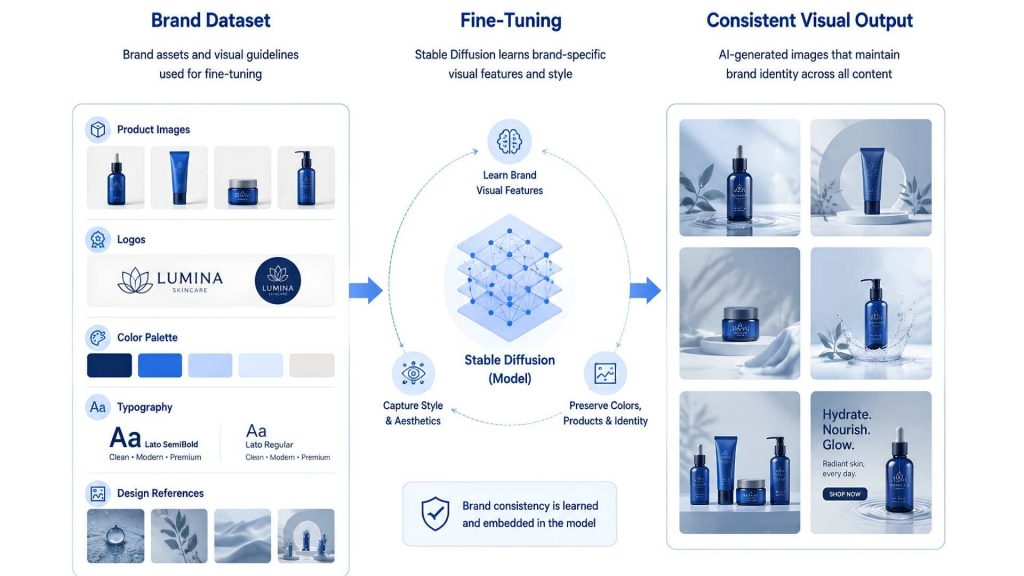
Fine-tuning enables Stable Diffusion to learn brand-specific visual elements, helping businesses generate consistent content
3.2 When generating specific objects or characters repeatedly
Pre-trained Stable Diffusion models may not accurately reproduce uncommon objects, custom products, or unique characters. Fine-tuning helps the model learn the characteristics of these specific subjects.
Example:
A game studio regularly produces promotional artwork featuring its main character. With a pre-trained model, the character’s appearance may change across different generations, including facial features, clothing, or accessories. By fine-tuning Stable Diffusion on images of the character, the studio can generate consistent artwork across multiple poses, scenes, and marketing materia
3.3 When working with specialized domains or industries
General AI image models are trained on diverse internet images, but they may lack detailed knowledge of specialized fields. Fine-tuning enables the model to adapt to industry-specific datasets and generate more relevant results.
Example:
A medical device manufacturer wants to generate illustrations of MRI and CT scanning equipment for training materials and product brochures. A general-purpose image model may produce inaccurate structures or miss critical technical details. Fine-tuning the model on a dataset of real medical equipment enables it to generate more accurate and industry-relevant visuals.
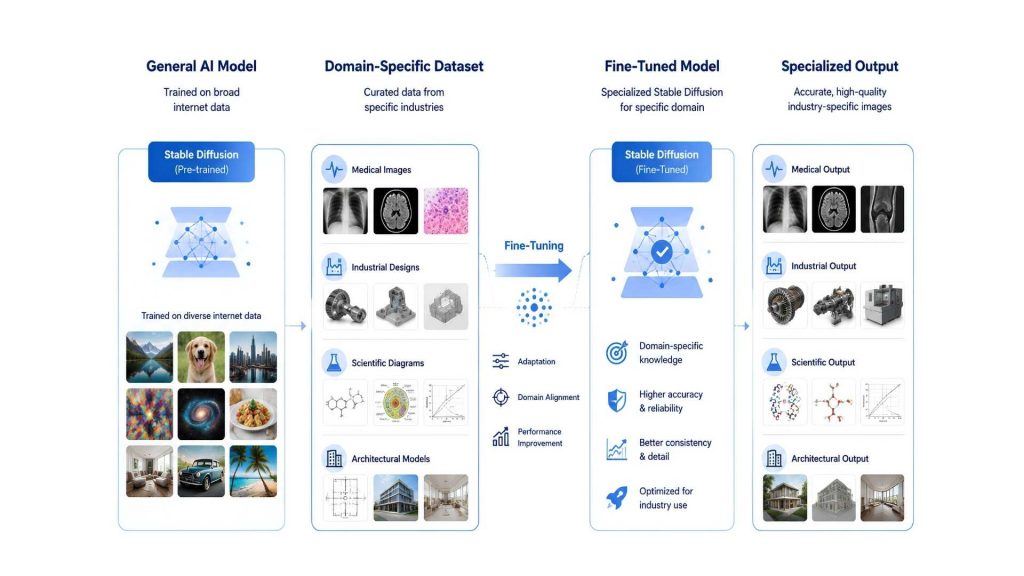
Fine-tuning adapts Stable Diffusion to specialized datasets, enabling more accurate and relevant outputs for industry-specific applications
3.4 When prompt engineering alone cannot achieve the desired results
Prompt engineering can improve image generation by refining text descriptions, but it has limitations when the model does not inherently understand a specific concept, style, or object. Fine-tuning is a better approach when repeated prompt adjustments still fail to deliver consistent outputs.
Example:
A fashion retailer wants to generate product images that match its signature lookbook photography style. Despite experimenting with prompts such as “luxury fashion editorial,” “high-end magazine photography,” and “minimalist studio shoot,” the outputs remain inconsistent. By fine-tuning Stable Diffusion on previous lookbook images, the company can teach the model its preferred visual style and achieve more reliable results without extensive prompt adjustments.
4. How Stable Diffusion Fine Tuning works
Now that we’ve explored why Stable Diffusion fine-tuning is valuable across different applications, let’s look at how the fine-tuning process works from preparing training data to evaluating the final model.
4.1 Preparing training dataset
A high-quality training dataset is the foundation of successful Stable Diffusion fine-tuning. The dataset should contain clear, diverse images that accurately represent the subject, style, or concept you want the model to learn. Including images from different angles, lighting conditions, backgrounds, and compositions helps improve the model’s ability to generalize. In addition, well-written captions or text descriptions strengthen the relationship between images and prompts, resulting in more accurate and consistent image generation.
4.2 Selecting fine-tuning methods
The right fine-tuning method depends on your project goals, available computing resources, and the level of customization you need. Below are the two most widely used approaches:
- DreamBooth: Fine-tunes the model using images of a specific subject, such as a person, product, pet, or object. It delivers excellent subject consistency and is ideal for personalized image generation, though it typically requires more GPU memory and training time.
- LoRA (Low-Rank Adaptation): Updates only a small subset of the model’s parameters, making training faster and more resource-efficient. LoRA is widely used for style transfer, brand-specific image generation, and other applications where high-quality results are needed without retraining the entire model.
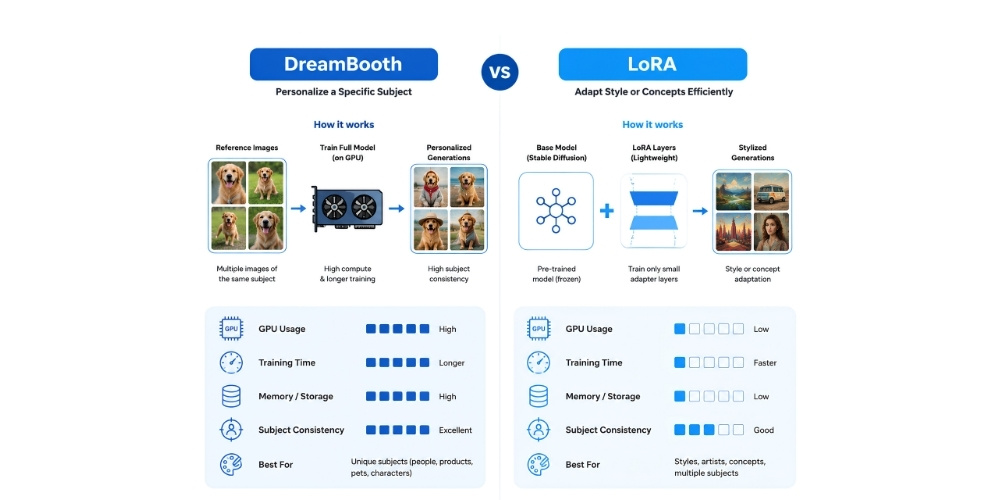
DreamBooth and LoRA serve different fine-tuning needs, balancing subject accuracy, training speed, and computational efficiency
4.3 Training the model
Once the dataset and fine-tuning method have been selected, the model begins learning from the training images and their corresponding text prompts. During this stage, parameters such as the learning rate, batch size, and number of training steps are configured to balance training efficiency and output quality. Depending on the dataset size, chosen method, and available GPU resources, the training process can take anywhere from a few minutes to several hours before the model is ready for evaluation.
4.4 Testing generated outputs
After training is complete, the model should be evaluated using prompts that were not included in the training dataset. This helps determine whether it has learned the intended concepts instead of simply memorizing the training images. The generated outputs should be assessed for accuracy, consistency, visual quality, and prompt adherence. If necessary, additional training data or parameter adjustments can be applied to further improve the model’s performance before deployment.
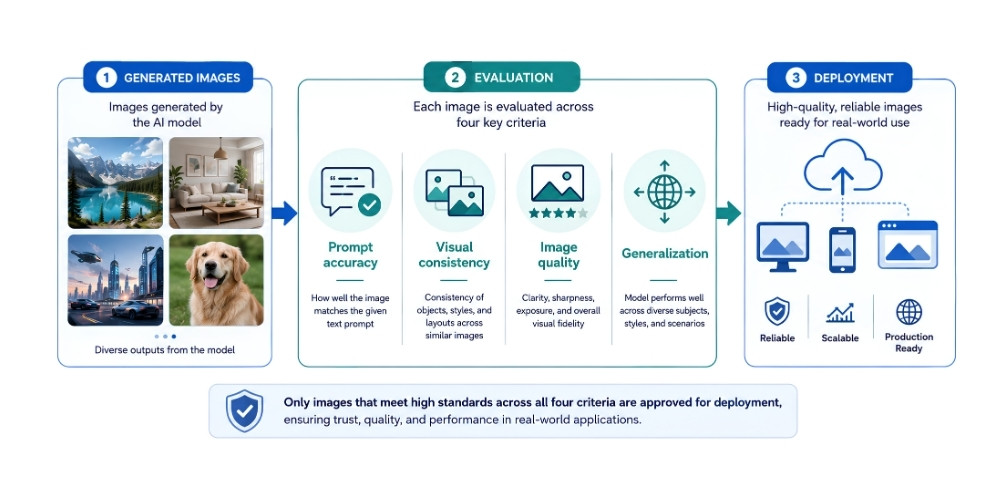
Generated images are evaluated for prompt accuracy, visual consistency, image quality, and generalization before deployment
5. Popular Fine-Tuning methods
Different stable diffusion fine-tuning methods offer unique trade-offs in training speed, hardware requirements, flexibility, and image quality. The table below compares the four most widely used approaches to help you choose the right method for your project.
| Feature | LoRA | DreamBooth | Textual Inversion | Full Fine-Tuning |
| Best for | Style customization, brand assets, products | Specific people, products, or characters | Learning new concepts or styles | Complete model customization |
| Training speed | Fast | Moderate | Fast | Slow |
| GPU requirement | Low | Medium | Low | High |
| Storage size | Small | Medium | Very small | Large |
| Image quality | High | Very high | Moderate | Excellent |
| Training data needed | 20-100 images | 10-30 images | 5-20 images | Hundreds to thousands of images |
| Difficulty | Easy | Moderate | Easy | Advanced |
| Typical use cases | Marketing content, product visualization, style transfer | Character consistency, personalized image generation | Custom objects, logos, symbols | Enterprise AI models, research, highly specialized applications |
Each fine-tuning method offers distinct advantages depending on the use case. LoRA is the preferred choice for most projects due to its efficiency, low hardware requirements, and strong performance. For highly specialized applications or maximum customization, DreamBooth, Textual Inversion, and Full Fine-Tuning may be more suitable depending on the project goals and available resources.
6. Requirements for Stable Diffusion Fine Tuning
Successful stable diffusion fine-tuning requires more than just a pre-trained model. High-performance GPU resources, high-quality datasets, and an optimized AI development environment all play an important role in achieving efficient training and high-quality outputs.
6.1. GPU resources
Fine-tuning stable diffusion is computationally intensive and typically requires modern NVIDIA GPUs with sufficient VRAM. The required hardware depends on the chosen training method, dataset size, and model architecture, with lightweight approaches such as LoRA demanding fewer resources than full fine-tuning.
6.2. Dataset quality
A well-prepared dataset directly affects the accuracy and consistency of the fine-tuned model. Images should be high resolution, clearly labeled, and diverse enough to capture different angles, lighting conditions, backgrounds, and visual variations while remaining relevant to the training objective.
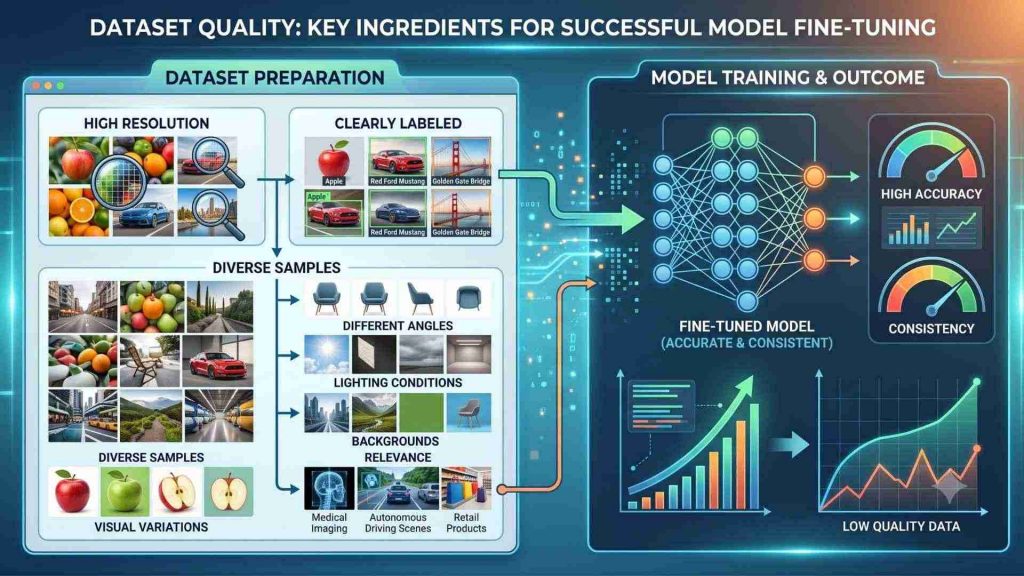
High-quality datasets improve stable diffusion fine-tuning performance
6.3. Computing environment
A well-configured computing environment is essential for efficient Stable Diffusion fine-tuning. In addition to GPU resources, teams need tools for dataset management, experiment tracking, model versioning, and deployment. An integrated environment helps streamline the entire workflow, reducing setup time and improving collaboration throughout the AI development process.
To simplify AI development, FPT AI Factory offers flexible options for Stable Diffusion fine-tuning. Organizations can use the integrated Model Fine-Tuning platform for managed training workflows, rent high-performance GPUs to run their own fine-tuning pipelines, or develop and experiment in AI Notebook. Backed by scalable GPU infrastructure, these options help accelerate AI development while reducing operational complexity and infrastructure management overhead.
7. Common challenges
Although stable diffusion fine-tuning delivers highly customized image generation, organizations often face challenges related to computational cost, infrastructure, and maintaining output quality throughout the training process.
7.1. Training cost
Training large diffusion models can be expensive due to high GPU utilization, storage requirements, and extended training times. Costs increase further as datasets grow larger or multiple experiments are needed to optimize model performance and fine-tuning parameters. For organizations developing AI applications at scale, managing these infrastructure and operational expenses can become a significant challenge without efficient resource planning.
7.2. GPU memory requirement
Because Stable Diffusion fine-tuning involves training large image generation models, sufficient GPU resources are essential for maintaining training speed and efficiency. As projects become larger or datasets grow, scalable infrastructure plays an increasingly important role in supporting the fine-tuning process.
FPT AI Factory provides GPU infrastructure for different AI workloads. GPU Virtual Machine supports development and experimentation, while GPU Container provides an on-demand environment for training and fine-tuning. For organizations with large-scale or specialized AI requirements, GPU Cluster is offered as a tailored solution following consultation with the FPT AI Factory team to ensure the infrastructure matches project needs.

Scalable GPU infrastructure supports memory-intensive AI training workloads
7.3. Maintaining image quality
Training large diffusion models can be expensive due to GPU usage, storage requirements, and extended training times. Costs increase further as datasets grow larger or multiple experiments are conducted to optimize model performance. Additionally, repeated testing and parameter tuning can increase both development time and overall infrastructure costs.
8. Guide to implementing stable fine-tuning
Understanding these challenges is the first step toward building a more efficient fine-tuning workflow. The following best practices can help improve training quality, reduce resource consumption, and streamline deployment.
8.1. Dataset Preparation
Start by collecting a high-quality dataset that closely matches your training objectives. Images should be clear, diverse, and accurately represent the subject, style, or concept you want the model to learn. Removing duplicate or low-quality images and providing descriptive captions can significantly improve training results.
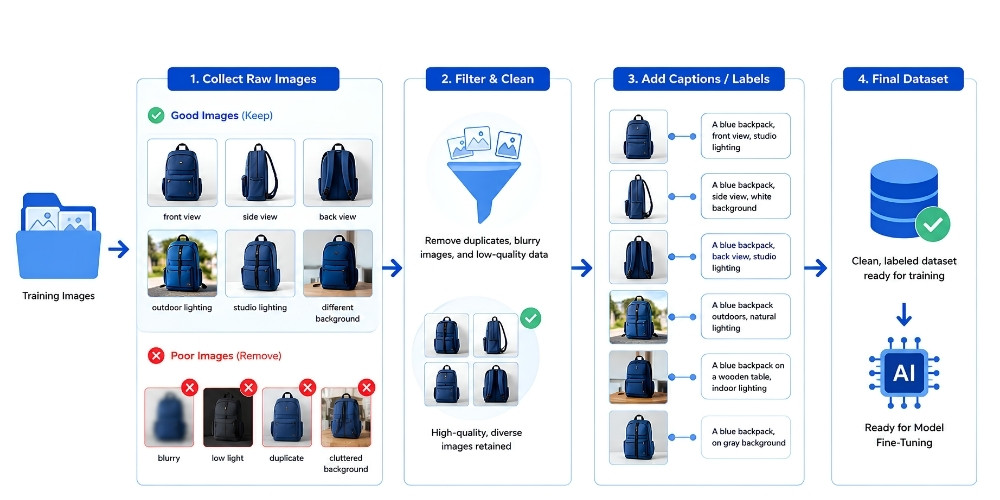
A clean, diverse, and well-labeled dataset improves model accuracy, consistency, and overall fine-tuning performance
8.2. Method Selection
Choose a fine-tuning method based on your project requirements, available GPU resources, and desired level of customization. For example, LoRA is suitable for lightweight and cost-efficient training, while DreamBooth is ideal for learning specific subjects with greater consistency.
8.3. Monitoring Quality
Evaluate generated images regularly throughout the training process instead of waiting until training is complete. Monitoring image quality, prompt accuracy, and consistency allows you to identify overfitting or performance issues early and make adjustments before they affect the final model.
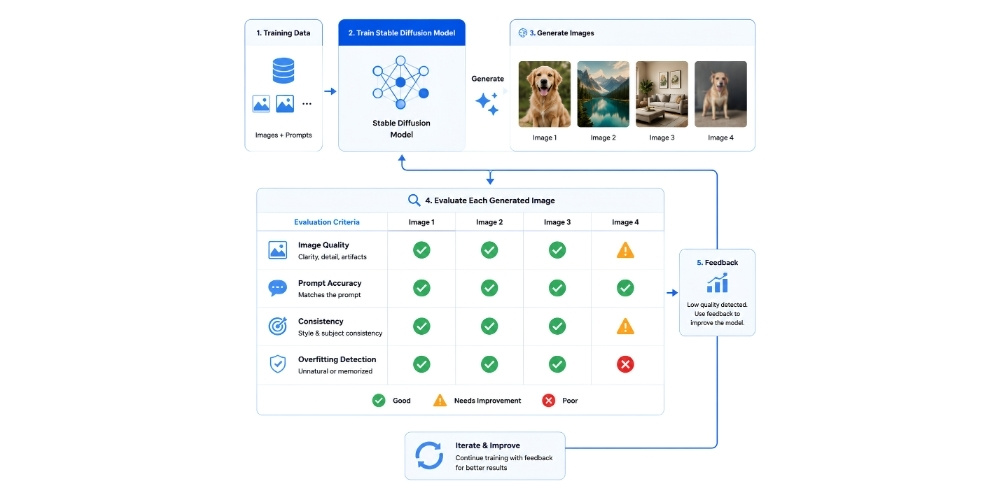
Regularly reviewing generated images helps detect quality issues early and improve model performance before deployment
8.4. Infrastructure Optimization
Efficient infrastructure plays a key role in reducing training time and operational costs. Using scalable GPU resources, automated workflows, and integrated AI development tools can improve resource utilization and accelerate model fine-tuning, especially for enterprise-scale AI projects.
In summary, stable diffusion fine-tuning enables organizations to customize AI image generation for specific brands, styles, products, and industry applications while improving consistency and output quality. By selecting the right fine-tuning method, preparing high-quality datasets, and leveraging scalable GPU infrastructure, businesses can accelerate AI development and maximize the value of generative AI.
To support production-scale AI workloads, FPT AI Factory provides scalable GPU infrastructure in Vietnam and Japan, with Malaysia coming soon. With FPT AI Factory, organizations can take advantage of competitive hourly GPU pricing and work with a dedicated consulting team to design infrastructure that fits their AI projects.
Contact Information:
- Hotline: 1900 638 399
- Email: support@fptcloud.com
Explore Related Articles:
AI Development Platforms: Key Features and How to Choose
What Is Model Serving? From AI Research to Real-World Impact
What is an AI Data Platform and How Does It Work?