


What is model serving? Model serving is the process of deploying trained AI models into production so they can generate predictions, responses or recommendations for real users and applications. It connects model development with real-world business value through APIs, applications, and automated workflows. In this article, FPT AI Factory explains how model serving works, why it matters, and what teams should consider when scaling AI inference in production.
1. What is Model Serving?
Model serving is the process of deploying a trained AI model into a production environment where it can receive input data and return predictions, classifications, recommendations or generated outputs. In simple terms, it is the stage where a model moves from research or experimentation into real-world use.
Model serving also creates a bridge between models and the applications that need them. Instead of a model staying inside a notebook or experiment environment, it becomes accessible through APIs, web apps, backend systems or business workflows. This allows developers, products, and users to interact with AI models in real time or near real time.
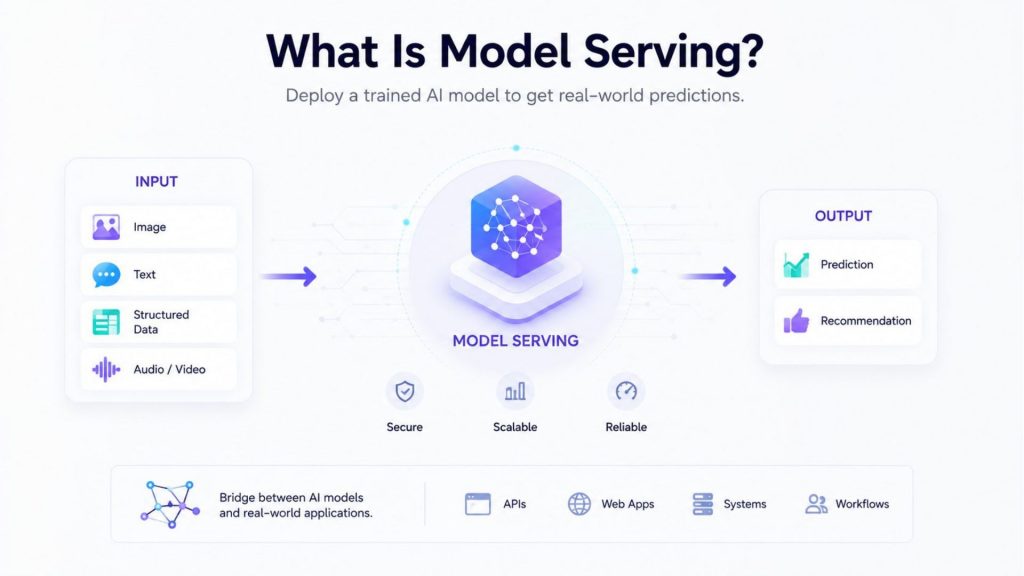
Model serving makes trained AI models accessible through APIs, apps, and workflows, allowing them to process real-world inputs and deliver useful outputs.
2. Why is Model Serving important?
Model serving is important because AI models only create value when they can be used reliably in production. A model may perform well during testing, but businesses still need a serving layer that can handle real requests, scale with traffic, monitor performance, and connect outputs to practical workflows.
- Turns trained models into usable AI applications: Model serving moves AI models from research or testing environments into real products that users and businesses can access.
- Enables real-time predictions for users and systems: It allows applications to send input data to the model and receive predictions, recommendations or generated outputs almost instantly.
- Connects AI models with APIs, apps, and business workflows: Model serving makes models accessible through APIs, web apps, backend systems and automated business processes.
- Supports scalable inference when traffic increases: A serving system can handle more requests as user demand grows, helping AI applications stay responsive.
- Helps monitor model performance in production: Teams can track latency, errors, usage and output quality to make sure the model continues to work reliably.
- Improves deployment consistency across environments: Model serving helps teams deploy models in a standardized way, reducing differences between testing, staging and production.
- Reduces the gap between model development and business impact: It helps turn trained models into practical AI services that support decisions, automation, and user-facing features.
For teams moving models into production, AI model deployment is the broader process that includes model packaging, API development, infrastructure setup, and operations. Model serving is one of the most important parts of this process because it defines how the model actually handles requests after deployment.
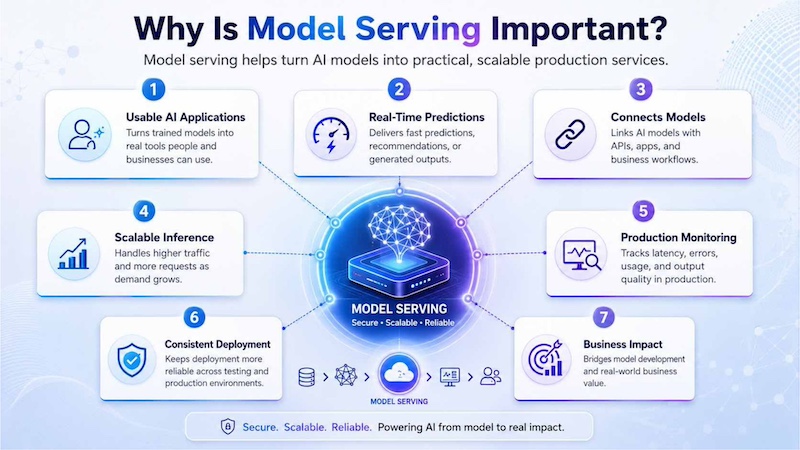
Model serving helps bring AI models into real-world use by making them accessible, scalable, and ready to deliver fast outputs in production.
3. Key components of Model Serving
A model serving system usually includes several components that work together to keep AI applications fast, reliable, and scalable. These components may vary by architecture, but most production systems include a model server, inference engine, compute resources, load balancing, and monitoring.
3.1 Model server
A model server hosts the trained model and exposes it to applications through an endpoint or API. It receives input data, forwards the request to the model, and returns the output to the calling application. In production, the model server must handle requests reliably while supporting version management and deployment consistency.
NVIDIA Triton Inference Server is a model server that lets teams deploy trained models from frameworks like TensorRT, PyTorch, ONNX, and TensorFlow for production inference. For example, a chatbot can send a user message to a model hosted on Triton, receive the generated answer, and display it in the chat interface. This shows how a model server creates a stable layer between AI models and real applications.
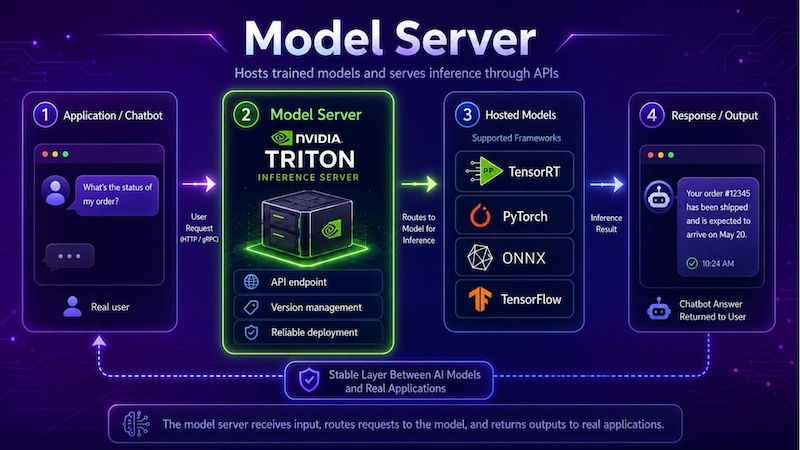
A model server acts as a stable production layer that receives application requests, and returns outputs to real-world applications.
3.2 Inference engine
The inference engine is responsible for running the model efficiently. It optimizes how inputs are processed, how model operations are executed and how outputs are generated. For large language models, the inference engine may also manage token generation, batching and memory usage.
For LLM-based applications, understanding LLM inference is especially important because performance depends on factors such as latency, throughput, context length, GPU memory, and request concurrency. These factors directly affect how responsive the final application feels to users
3.3 GPU acceleration
GPU acceleration helps model serving systems handle larger models and higher request volumes. GPUs are especially important for deep learning, computer vision, large language models, and workloads that need low-latency inference. They can process many operations in parallel, making them suitable for real-time AI applications.
For teams that need scalable compute for training, fine-tuning or serving workloads, GPU Virtual Machine can provide flexible GPU resources without requiring teams to manage physical hardware. This is useful when inference workloads need stronger performance or dedicated environments.
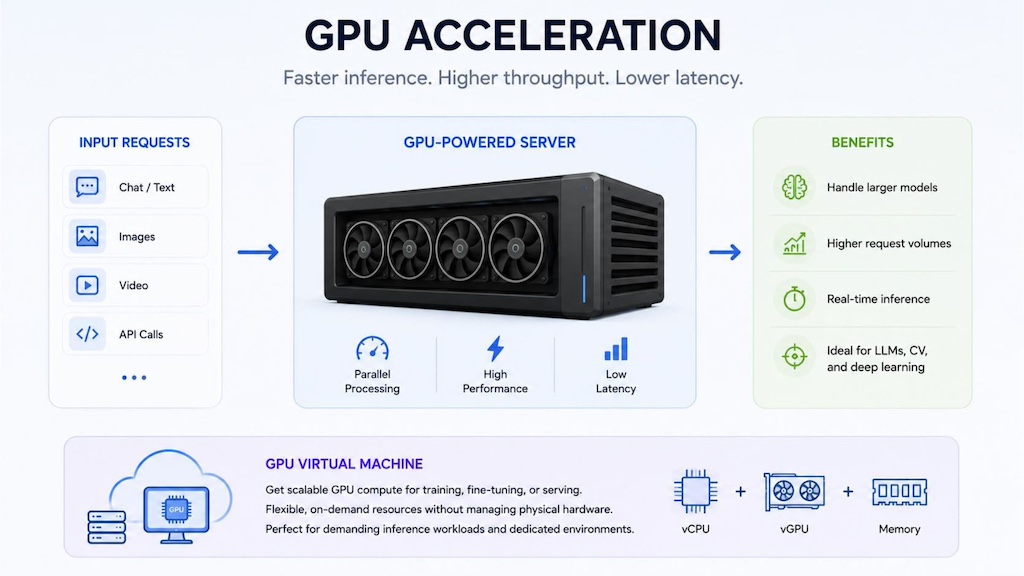
GPU acceleration enables model serving systems to process complex AI workloads faster, supporting real-time responses, larger models and higher traffic.
3.4 Load balancing
Load balancing distributes inference requests across multiple servers, containers or model replicas. This prevents one instance from becoming overloaded and helps maintain stable response times when traffic increases. Load balancing is especially important for applications with unpredictable user demand, such as chatbots, search systems, and recommendation engines.
For example, if a product recommendation system suddenly receives a traffic spike during a sales campaign, load balancing can route requests across multiple serving instances so the application remains responsive.
3.5 Monitoring and logging
Monitoring and logging help teams understand how a served model behaves in production. Important metrics include latency, throughput, error rates, GPU utilization, request volume, output quality, and model drift. Logs also help teams debug failures, review usage patterns, and investigate unexpected behavior.
In addition to system metrics, teams should monitor evaluation metrics in machine learning to understand whether the model continues to deliver reliable, and accurate outputs after deployment. This is important because production data can change over time, affecting model quality.
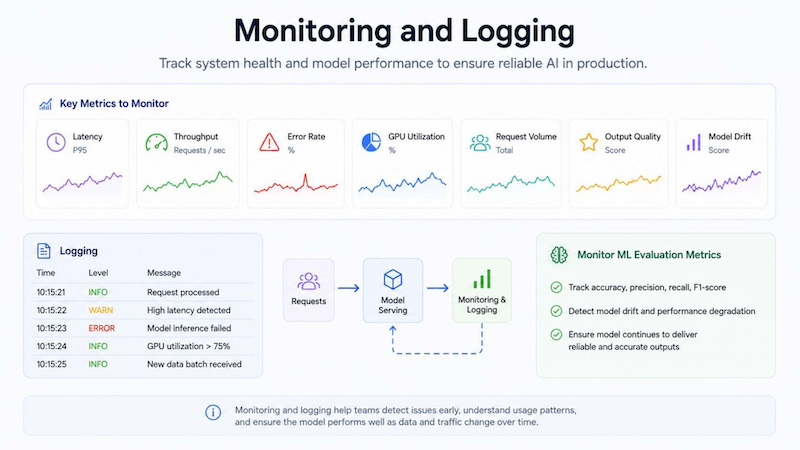
Monitoring and logging help teams track model health, detect issues early and maintain reliable AI performance in production.
4. How Model Serving works
Model serving follows a practical workflow that starts with a trained model and ends with production monitoring. The goal is to make the model available to applications in a consistent, scalable and reliable way.
4.1 Packaging the trained model
The first step is packaging the trained model so it can run in a production environment. This may include saving model weights, defining dependencies, preparing preprocessing logic and selecting the runtime framework. Packaging helps ensure the model behaves consistently outside the training notebook.
For example, a computer vision model may require image resizing, normalization and post-processing steps. If these steps are not packaged correctly, the model may produce inconsistent results even if it performed well during training.
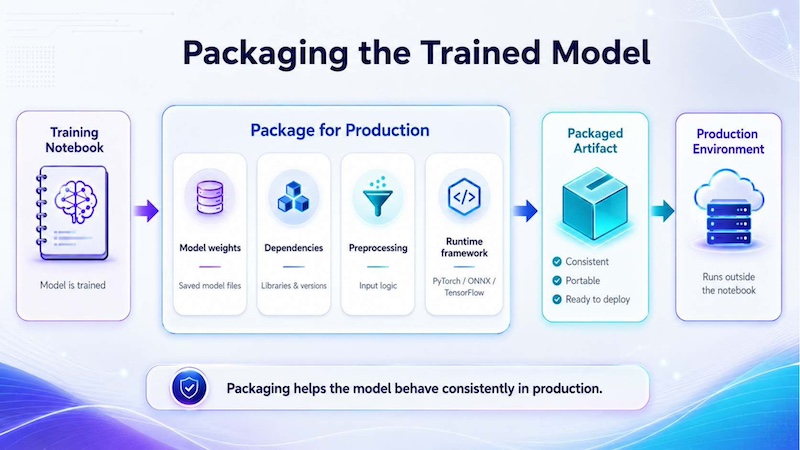
Packaging a trained model prepares model weights, dependencies, preprocessing logic and runtime settings so the model can run consistently in production.
4.2 Deploying models to inference infrastructure
After packaging, the model is deployed to inference infrastructure. This infrastructure may be a GPU virtual machine, container, Kubernetes cluster, managed endpoint or serverless inference service. The goal is to give applications a reliable endpoint for sending requests and receiving outputs.
FPT AI Factory describes Serverless Inference as a way to use AI models through OpenAI-compatible APIs, helping teams integrate models into applications, agents and production workflows with less infrastructure management.
4.3 Processing inference requests
Once the model is deployed, applications can send inference requests. A request may contain a user prompt, an image, a document, an audio file or structured input data. The serving system processes the input, runs the model and returns an output such as a prediction, generated answer, classification label or extracted field.
For example, a document processing application can send an invoice to a model serving endpoint. The model can extract fields such as invoice number, supplier name, due date and total amount, then return structured data to an ERP or accounting system.
4.4 Scaling and load balancing inference traffic
Production traffic can change quickly. A model serving system must scale when request volume increases and reduce unused resources when demand falls. Scaling may happen by adding more replicas, increasing GPU capacity or using serverless infrastructure that responds to request demand.
This is where serverless GPU and managed inference services become useful. They can reduce the need for teams to provision and maintain always-on infrastructure, especially for applications with variable or unpredictable traffic.
4.5 Monitoring latency, usage, and model performance
The final stage is continuous monitoring. Teams need to track latency, usage, throughput, error rates and model quality to ensure the application remains reliable. Monitoring also helps identify model drift, infrastructure bottlenecks and cost issues.
For regulated or high-impact applications, AI governance also matters. Teams may need access control, audit logs, human review and responsible AI practices to ensure model serving is safe, transparent and aligned with business requirements.
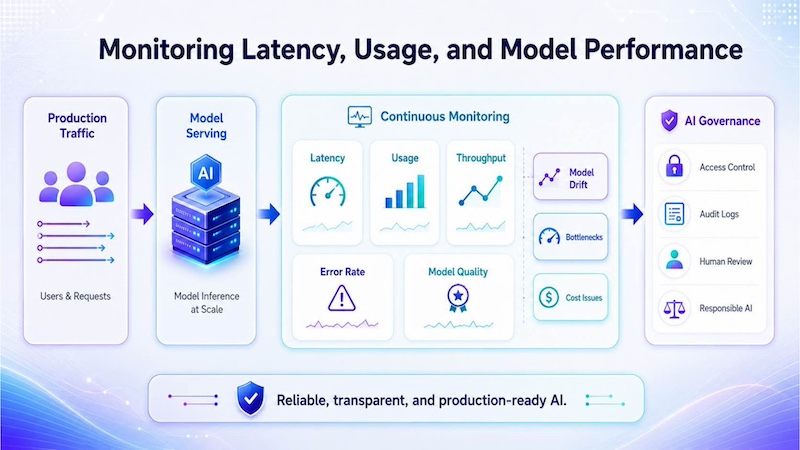
Continuous monitoring helps teams track AI model health, identify performance or quality issues, and keep production systems safe, stable, and reliable.
5. Model Serving Architecture and Infrastructure
A model serving architecture connects trained models with real applications through model servers, inference engines, API endpoints, compute resources, monitoring and scaling tools. It allows applications to send requests and receive predictions or generated outputs reliably in production.
For applications such as chatbots, copilots and document processing systems, this architecture helps maintain low latency and stable performance as demand grows. Serverless Inference supports API-based model serving with OpenAI-compatible APIs and dynamic scalability, helping teams deploy AI models into applications without managing the full inference infrastructure directly.
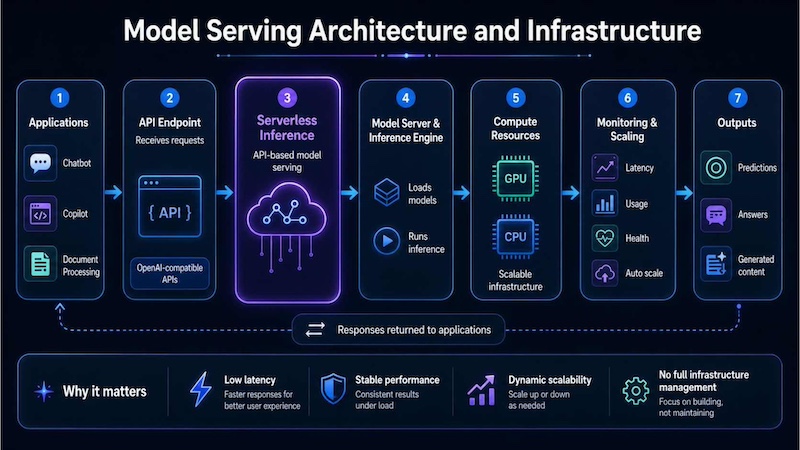
Model serving architecture connects applications to AI models through APIs, scalable compute, monitoring
6. Model Serving vs Model Training
Model training and model serving are both important parts of the AI lifecycle, but they solve different problems. Training teaches or improves the model, while serving makes the trained model available for real-world use.
| Criteria | Model Training | Model Serving |
| Purpose | Teach or improve a model using data | Use a trained model to generate outputs in production |
| Compute pattern | Heavy batch processing and repeated optimization | Request-based inference, often real-time or near real-time |
| Infrastructure | GPU clusters, notebooks, storage and training pipelines | Model servers, inference endpoints, APIs, load balancers and monitoring |
| Latency requirements | Training time matters, but per-request latency is not the main focus | Low latency and stable response time are critical |
| Resource utilization | High GPU usage during training jobs | Variable usage depending on traffic and request volume |
| End users | Data scientists, ML engineers and research teams | Applications, APIs, business users and customers |
| Scaling requirements | Scale around training jobs and experiments | Scale with user traffic, API requests and production demand |
| Example workloads | Fine-tuning, pretraining, hyperparameter tuning | Chatbots, recommendations, document extraction, real-time classification |
7. Model Serving example in the real world
Model serving appears in many real-world AI applications. Any system that sends data to a trained model and receives an output for users or workflows depends on some form of model serving.
7.1 Generative AI applications
Generative AI applications need model serving to generate text, code, images, summaries or answers from user prompts. When a user submits a prompt, the application sends the request to a model serving endpoint and receives generated output. Serving infrastructure must handle token generation, latency, concurrency and safety controls.
Canva’s Magic Studio is a practical example of generative AI model serving. OpenAI explains that Canva’s Magic Design combines OpenAI’s API with Canva’s design engine and template library, allowing users to generate presentations, social media posts and videos from a prompt. In this workflow, Canva serves the generative model behind the scenes: the user enters a request, the application sends it to the model through an API, and the model returns generated content inside the Canva interface.
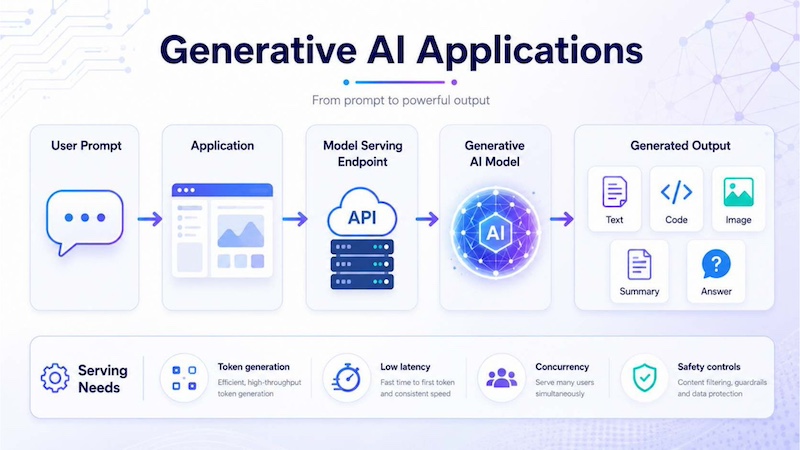
Generative AI applications use model serving endpoints to turn user prompts into outputs such as text, code, images, summaries and answers in real time.
7.2 Chatbots and copilots
Chatbots and copilots rely on model serving to respond to users in real time. A chatbot may receive a question, retrieve relevant knowledge, send context to a language model and return a response in seconds. For copilots, the serving system may also connect with tools, databases or internal documents.
Microsoft 365 Copilot shows how model serving supports enterprise copilots across daily work tools. Microsoft states that Copilot works across apps such as Word, Excel, PowerPoint, Outlook and Teams, using large language models and the content users have access to. For example, a user can ask Copilot to summarize a missed Teams meeting, draft a document or find information across work content. Behind the scenes, the application sends the user request and relevant context to served AI models, then returns the generated answer inside the Microsoft 365 interface.
7.3 Recommendation systems
Recommendation systems use model serving to deliver personalized suggestions in real time. When a user views a product, watches a video, reads an article or interacts with an app, the system sends user behavior and item data to a served model. The model then returns ranked recommendations, such as “products you may like,” “videos to watch next” or “next-best actions.”
Reliable recommendations also depend on a strong data pipeline because the model needs fresh signals such as browsing behavior, purchase history, product metadata, and user preferences. If this data is outdated, the served recommendations may become less relevant and less useful over time.
Netflix is a well-known example of model serving for recommendation systems. Netflix says its recommendation system uses signals such as viewing history, ratings, title information and viewing behavior to personalize what each member sees. When a user opens Netflix, served recommendation models rank and display movies, shows or games that the user may enjoy. This shows how model serving turns user behavior and content data into real-time personalized recommendations inside a production application.
7.4 Computer vision inference
Computer vision inference uses served models to analyze images or video frames and return results such as labels, bounding boxes, segmentation masks or quality scores. It is commonly used in defect detection, medical image analysis, retail shelf monitoring, security analytics and traffic inspection. In production, the serving system must process visual data quickly and reliably so users or automated systems can act on the results in real time.
BMW Group uses AI-based image recognition in production to support automated quality control. According to BMW, its AI applications evaluate component images during ongoing production and compare them in milliseconds with other images from the same sequence. Intel also notes that BMW uses machine vision to detect issues such as cracks, scratched paint or incorrect labeling in production and quality control.
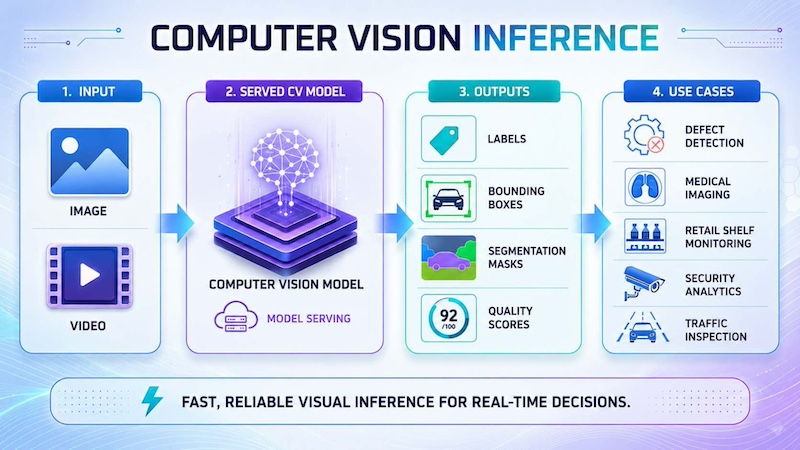
Computer vision inference analyzes images or videos and returns real-time results like labels, boxes, masks and quality scores.
7.5 Multi-model serving environments
Large organizations often need to serve multiple AI models at the same time. One AI application may use a language model for conversation, an embedding model for search, a rerank model for better retrieval, a speech model for transcription and a vision model for image analysis. A multi-model serving environment helps teams manage different models, versions, endpoints and workloads without building a separate serving system for every model.
For enterprises deploying AI applications at scale, this is where elastic inference infrastructure becomes important. Instead of maintaining separate serving layers for each model, FPT AI Factory’s Serverless Inference offers access to 20+ AI models through OpenAI-compatible APIs, scale with request demand and monitor real-time usage. This makes it easier to combine different model capabilities into chatbots, AI agents, document workflows or AI-powered applications while reducing the operational effort of managing GPU-backed model serving infrastructure.
Amazon SageMaker Multi-Model Endpoints are designed for serving many models from one shared endpoint. AWS explains that multi-model endpoints are useful when teams need to host a large number of models using the same machine learning framework, especially when some models are used frequently and others only occasionally. For example, a retail company could serve separate demand forecasting models for different product categories through one endpoint instead of creating a separate endpoint for every model.

FPT AI Factory’s Serverless Inference enables scalable AI model serving through APIs for chatbots, agents and production apps. (Source: FPT AI Factory)
8. Common challenges in Model Serving
Model serving can be difficult because production environments introduce requirements that may not appear during experimentation. Teams must manage performance, scalability, reliability, monitoring, and cost while keeping the AI application useful for real users.
- High inference latency: Users expect fast responses. If inference latency is high, chatbots feel slow, recommendations arrive late, and real-time applications become less useful.
- GPU memory and utilization limitations: Large models can consume significant GPU memory. Poor batching or model placement can lead to low utilization or out-of-memory failures.
- Scaling traffic spikes efficiently: Production traffic may change suddenly. Serving systems must scale without creating high cost or downtime.
- Multi-model deployment complexity: Teams may need to serve several models with different dependencies, versions, and runtime requirements.
- Managing dependency and model versions: A small change in model version, tokenizer, preprocessing logic or library dependency can affect output quality.
- Monitoring model drift and failures: Production data can change over time, causing model performance to decline. Teams need monitoring to detect quality issues early.
- Infrastructure and operational cost management: Always-on serving infrastructure can become expensive if traffic is variable or if GPUs are underused.
- Ensuring reliability and availability: Business-critical AI applications need stable endpoints, retries, fallbacks, and clear failure handling.
These challenges are why AI development platforms often include deployment, monitoring, and infrastructure management capabilities. They help teams move from model experimentation to production applications with more consistency.
9. FAQs
9.1 What is the difference between model training and serving?
Model training is the process of teaching or improving a model using data. Model serving is the process of deploying the trained model so applications can use it to generate predictions or outputs. Training focuses on learning; serving focuses on production use.
9.2 Why is GPU acceleration important for model serving?
GPU acceleration is important because many AI models, especially large language models and computer vision models, require parallel computation to generate outputs quickly. GPUs help reduce latency, support higher throughput, and make model serving more practical for real-time applications.
9.3 Which framework is best for model serving?
The best framework depends on the model type, latency target, infrastructure, and team expertise. Common options include TorchServe, TensorFlow Serving, NVIDIA Triton Inference Server, and managed inference platforms. For teams that want to reduce infrastructure management, managed services such as Serverless Inference can simplify deployment and scaling.
Model serving is the step that turns trained AI models into real-world applications. It allows models to receive requests, generate outputs, scale with traffic, and support business workflows through APIs and production systems. From chatbots and copilots to recommendation engines, document processing, and computer vision, model serving is essential for delivering AI value beyond research environments.
FPT AI Factory supports this process through GPU infrastructure, AI Studio tools and Inference services. FPT AI Factory offers a $100 free trial credit program for users to explore the platform. For businesses or organizations that need customized AI solutions, large-scale deployment or expert consultation, contact FPT AI Factory through the official contact form.
Contact Information:
- Hotline: 1900 638 399
- Email: support@fptcloud.com
Explore more articles
AI Inference vs Training: What’s the Difference?


