

Modern AI applications rely on GPUs for model training, fine-tuning, inference, and large-scale data processing. As AI workloads compete for limited GPU resources, inefficient scheduling can increase costs and reduce performance. FPT AI Factory enables enterprises to optimize GPU scheduling, maximize resource utilization, accelerate AI workloads, and build a scalable, cost-efficient AI infrastructure.
|
Key Takeaways
|
As AI adoption grows, enterprises need infrastructure that efficiently manages GPU resources. FPT AI Factory provides an AI ecosystem with GPU Virtual Machine, GPU Container, GPU Cluster, AI Notebook, and AI Inference to optimize GPU utilization for AI training, fine-tuning, and production inference.
1. Why GPU Scheduling Matters for AI Workloads
GPU scheduling is the process of allocating GPU resources to AI workloads based on factors such as workload priority, resource requirements, and GPU availability. Its primary goal is to maximize GPU utilization, ensure fair resource sharing, reduce waiting time, and improve the overall efficiency of AI infrastructure.
This process is especially important because GPUs are among the most expensive resources in AI environments. As multiple teams run training, fine-tuning, inference, and other compute-intensive workloads on shared GPU clusters, inefficient allocation can lead to idle GPUs, resource contention, and long job queues.
According to SysArt, many enterprise GPU clusters operate at only 30-50% utilization, while Mirantis reports that idle resources can account for 60-70% of GPU spending. Instead of expanding GPU capacity, organizations can often improve performance and reduce costs through intelligent scheduling that allocates resources based on workload priority and real-time demand.
Common challenges include:
- Low GPU utilization and idle resources
- Resource contention between AI workloads
- Long training and inference queues
- Higher cloud infrastructure costs
- Difficulty scaling AI projects across teams
Understanding why GPU scheduling matters is the first step. Next, let’s explore how modern AI platforms allocate GPU resources efficiently across multiple workloads.
To better understand the hardware driving these advancements, dive deeper into how graphics processors accelerate complex workloads in our comprehensive guide: What Is a GPU? How GPUs Power Modern AI Computing.
Effective GPU scheduling improves GPU utilization, reduces bottlenecks, and lowers infrastructure costs (Source: FPT AI Factory)
2. How GPU Scheduling Works
GPU scheduling follows a structured workflow that determines how AI workloads are submitted, prioritized, assigned to available GPU resources, executed, and continuously optimized. Rather than allowing workloads to compete for GPUs, the scheduler automatically evaluates workload requirements and cluster status to maximize GPU utilization, reduce waiting time, and ensure efficient resource sharing.
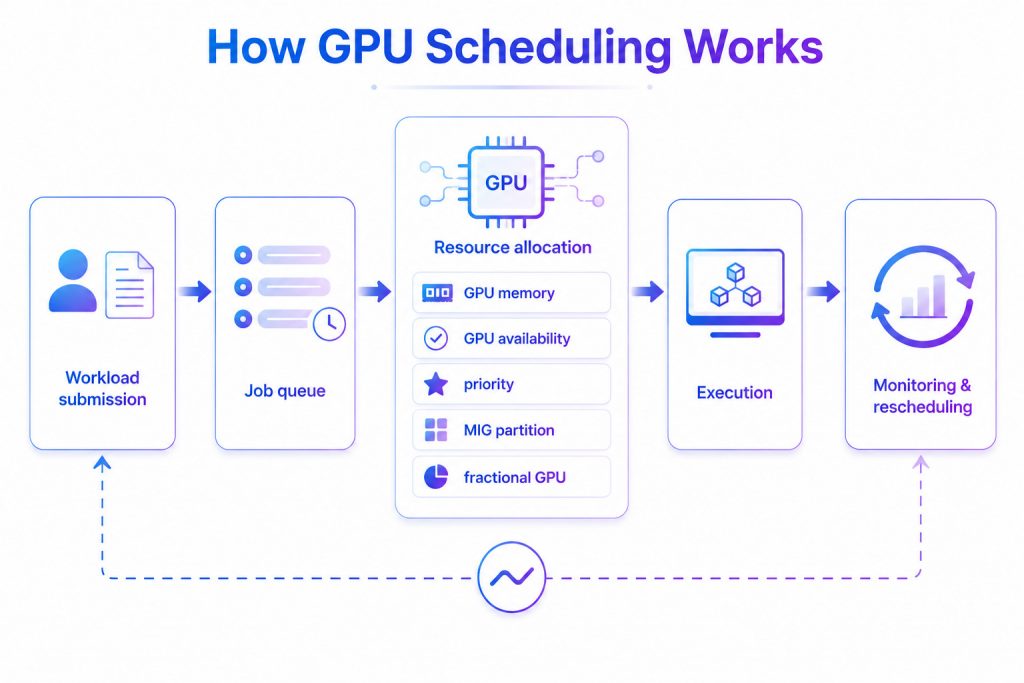
Overview of the GPU scheduling workflow, from workload submission to intelligent continuous monitoring.
2.1 Workload Submission
The scheduling process begins when a user, application, or automated pipeline submits an AI workload to the platform. Along with the job itself, the scheduler receives resource requirements that help determine the most appropriate GPU allocation.
Typical information includes:
- Number of GPUs required
- GPU memory requirements
- Expected runtime
- Workload type (training, fine-tuning, inference, batch processing)
- Optional priority or SLA requirements
For example, distributed LLM training may require multiple high-memory GPUs, while an inference endpoint may only require a single GPU or a fractional GPU allocation.
2.2 Job Queue
If sufficient GPU resources are not immediately available, the workload enters a job queue. The scheduler organizes pending jobs according to predefined scheduling policies to ensure that GPU resources are allocated fairly and efficiently.
Common scheduling criteria include:
- Workload priority
- Submission time (FIFO)
- Service-Level Agreements (SLAs)
- Fair-share scheduling across teams
- Resource availability
By intelligently managing the queue, organizations can reduce wait times for business-critical workloads while preventing smaller jobs from being delayed indefinitely.
GPU scheduling evaluates workloads, allocates resources, and monitors execution to maximize infrastructure efficiency. (Source: FPT AI Factory)
2.3 Resource Allocation
When GPU resources become available, the scheduler identifies the best execution environment for each workload based on both workload requirements and the current state of the GPU cluster.
Resource allocation typically considers:
- GPU availability: selecting GPUs that are currently idle or have sufficient remaining capacity.
- GPU memory: matching workloads with GPUs that provide enough VRAM for the model and dataset.
- Workload priority: allocating resources according to business importance or SLA requirements.
- MIG (Multi-Instance GPU): partitioning supported NVIDIA GPUs into multiple isolated instances so several workloads can securely share a single physical GPU.
- Fractional GPU allocation: assigning only a portion of GPU compute resources to lightweight inference or development workloads instead of dedicating an entire GPU.
Modern AI platforms dynamically allocate these resources based on real-time demand, maximizing utilization while minimizing idle capacity and resource contention.
Selecting the right hardware is critical to maximizing your model’s efficiency. Explore the best GPUs for different AI workloads in our comprehensive breakdown: Best GPUs for AI in 2026: Use Case and Performance
2.4 Execution
After resources are assigned, the workload begins execution on the selected GPU or GPU cluster. During execution, the scheduler coordinates compute resources to ensure workloads receive the allocated GPU capacity and can run efficiently.
Depending on the workload, execution may involve:
- Single-GPU inference
- Multi-GPU distributed training
- Shared GPU execution through MIG or fractional GPU allocation
Efficient execution enables organizations to support diverse AI workloads without requiring dedicated GPU hardware for every task.
2.5 Monitoring & Rescheduling
GPU scheduling does not end once a workload starts running. Modern scheduling systems continuously monitor GPU utilization, memory consumption, workload progress, and overall cluster health.
If cluster conditions change – for example, higher-priority jobs arrive, GPUs become overloaded, or hardware failures occur – the scheduler can rebalance workloads or reschedule pending jobs to maintain performance and resource efficiency.
Continuous monitoring also provides historical utilization data that organizations can use to optimize future scheduling policies, improve GPU utilization, and reduce infrastructure costs.
3. GPU Scheduling Tools: Choosing the Right Scheduler
GPU scheduling requirements vary depending on AI workloads, infrastructure scale, and orchestration architecture. While some tools are designed for cloud-native Kubernetes environments, others are optimized for HPC clusters or distributed AI frameworks. The table below compares the most widely used GPU scheduling solutions.
| Tool | Best For | Architecture | GPU Scheduling Features | Ideal AI Workloads |
| Kubernetes | Cloud-native AI platforms | Container orchestration | GPU device plugins, scheduling policies, autoscaling, integrates with Volcano | Production AI services, MLOps, enterprise AI platforms |
| Slurm | HPC and supercomputing | Batch job scheduler | GPU-aware scheduling, priority queues, fair-share scheduling, multi-node GPU jobs | Scientific computing, large-scale model training, research |
| NVIDIA Run:ai / GPU Operator | NVIDIA GPU infrastructure | Kubernetes ecosystem | MIG partitioning, fractional GPU, GPU sharing, monitoring, dynamic allocation | Enterprise AI, LLM training & inference |
| Ray | Distributed AI applications | Python distributed computing framework | Resource-aware scheduling, actor/task scheduling, elastic scaling | Distributed training, reinforcement learning, hyperparameter tuning |
| Volcano | AI/ML on Kubernetes | Kubernetes batch scheduler | Gang scheduling, queue management, job priority, GPU-aware scheduling | Distributed deep learning, batch AI training, Kubeflow workloads |
Which Tool Should You Choose?
- Choose Kubernetes if you are building a cloud-native AI platform with containerized applications.
- Choose Slurm for HPC environments that prioritize throughput, fair resource sharing, and large GPU clusters.
- Choose NVIDIA Run:ai or GPU Operator if your infrastructure relies on NVIDIA GPUs and requires advanced capabilities such as MIG partitioning, fractional GPU allocation, and GPU sharing.
- Choose Ray when developing distributed AI applications in Python that require flexible task scheduling and horizontal scaling.
- Choose Volcano for Kubernetes-based AI clusters running distributed training jobs that need gang scheduling, queue management, and higher GPU utilization.
4. GPU Scheduling Policies
GPU scheduling policies define how GPU resources are allocated among competing workloads. Choosing the appropriate scheduling policy helps organizations balance GPU utilization, workload fairness, execution latency, and business priorities.
4.1. Static Scheduling
Static scheduling assigns GPU resources before workloads begin execution and keeps those assignments unchanged throughout the job lifecycle. This approach is simple to implement and provides predictable performance, making it suitable for dedicated production environments with stable workloads. However, it may lead to underutilized GPUs when workload demands fluctuate.
4.2. Dynamic Scheduling
Dynamic scheduling continuously adjusts GPU allocation based on workload demand and resource availability. By reallocating resources in real time, organizations can improve GPU utilization, reduce idle capacity, and support elastic AI workloads. This policy is commonly used in cloud-native AI platforms and Kubernetes-based environments.
4.3. Priority Scheduling
Priority scheduling allocates GPU resources according to predefined workload priorities, such as business importance, service-level agreements (SLAs), or urgency. High-priority jobs are scheduled before lower-priority workloads, ensuring that mission-critical AI applications receive timely access to GPU resources. The trade-off is that lower-priority jobs may experience longer waiting times.
4.4 Fair-share Scheduling
Fair-share scheduling distributes GPU resources fairly across users, teams, or projects over time. Instead of allowing a single user to monopolize GPU resources, the scheduler tracks historical resource consumption and adjusts scheduling decisions to maintain fairness. This policy is widely adopted in enterprise AI clusters and high-performance computing (HPC) environments.
4.5 Gang Scheduling
Gang scheduling ensures that all GPUs required by a distributed AI job are allocated simultaneously before execution begins. If sufficient resources are unavailable, the job waits until the entire resource request can be satisfied. This policy prevents distributed training tasks from starting with insufficient GPUs, improving synchronization and reducing execution failures.
4.6. Fractional GPU Scheduling (MIG)
Fractional GPU scheduling divides a physical GPU into multiple isolated instances, allowing several workloads to share the same hardware concurrently. NVIDIA Multi-Instance GPU (MIG) enables dedicated compute, memory, and cache resources for each partition, improving GPU utilization while maintaining predictable performance and workload isolation. This approach is especially effective for inference services and lightweight AI workloads that do not require an entire GPU.
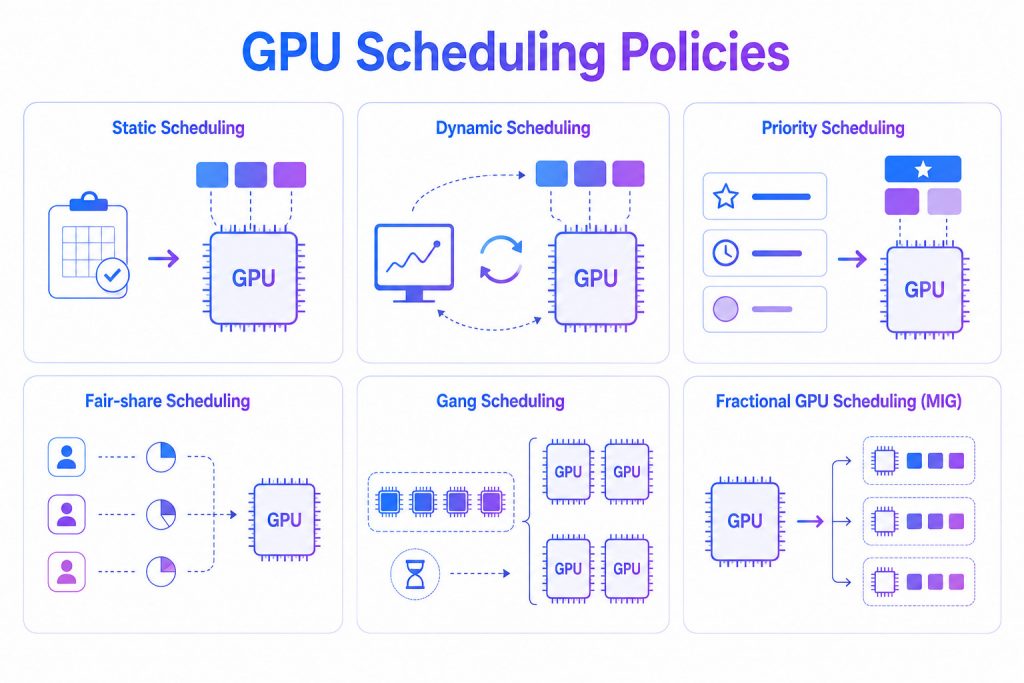
Overview of common GPU scheduling policies, each designed to optimize GPU allocation for different AI workload requirements.
5. GPU Scheduling Best Practices for AI Infrastructure
As AI workloads continue to grow in complexity and scale, effective GPU scheduling requires more than intelligent allocation policies. Organizations should adopt operational best practices that maximize GPU utilization, improve workload reliability, and support long-term infrastructure scalability.
5.1 Monitor GPU Usage Continuously
Continuous GPU monitoring provides visibility into utilization, memory usage, workload status, and cluster health. These insights help identify bottlenecks, optimize scheduling policies, and improve capacity planning before performance issues occur.
FPT AI Factory helps enterprises monitor and optimize AI infrastructure while enabling on-demand GPU provisioning through GPU Virtual Machine and GPU Container. For organizations requiring dedicated AI infrastructure at scale, GPU Cluster provides enterprise-grade GPU resources tailored to business requirements, supporting AI training, fine-tuning, and inference workloads.

Continuous GPU monitoring identifies bottlenecks and optimizes AI infrastructure efficiency. (Source: FPT AI Factory)
5.2 Balance Workloads Across GPUs
Distributing AI jobs evenly across available GPUs prevents some devices from becoming overloaded while others remain idle. Balanced scheduling improves hardware utilization, reduces processing delays, and provides more consistent performance for shared AI environments.
5.3 Automate Job Scheduling
As AI workloads increase, manual GPU allocation becomes difficult to manage. Automated scheduling assigns jobs based on workload requirements, available resources, and predefined policies, reducing administrative effort while ensuring business-critical workloads receive priority.
5.4 Scale Resources Based on Demand
AI resource requirements often change throughout the development lifecycle. Scalable infrastructure enables organizations to increase or decrease GPU resources based on workload demand, maintaining performance during peak periods while avoiding unnecessary infrastructure costs during lower utilization.
6. FAQs
6.1 Should You Have GPU Scheduling On?
Yes, for enterprise AI environments with shared GPU resources, GPU scheduling improves utilization, reduces idle time, and prioritizes AI workloads. For personal computers, the benefits are usually limited.
6.2 Does Hardware-Accelerated GPU Scheduling Give More FPS?
HAGS may slightly improve FPS or reduce latency in some games, but it is unrelated to enterprise AI GPU scheduling, which focuses on optimizing GPU resource allocation for AI workloads.
6.3 How Does GPU Scheduling Improve GPU Utilization?
By allocating resources based on workload demand, minimizing idle time, and enabling multiple AI jobs to share GPU resources efficiently. Advanced scheduling techniques such as dynamic allocation and fractional GPU scheduling further increase overall cluster efficiency.
6.4 GPU Scheduling vs. GPU Partitioning: What’s the Difference?
GPU scheduling determines when and how GPU resources are assigned to workloads, while GPU partitioning divides a physical GPU into multiple isolated instances that can run workloads simultaneously. Technologies such as NVIDIA Multi-Instance GPU (MIG) combine partitioning with scheduling to maximize utilization and workload isolation.
As AI workloads continue to grow in scale and complexity, optimizing GPU utilization is becoming just as important as expanding compute capacity. Intelligent GPU scheduling helps organizations allocate resources more efficiently, reduce idle infrastructure, shorten job queues, and control cloud GPU costs-making it a key capability for scaling AI in production.
FPT AI Factory supports this journey with enterprise AI infrastructure across Vietnam and Japan, with Malaysia planned as the next expansion. Organizations can access competitive hourly NVIDIA GPU resources, including GPU Container, GPU Virtual Machine, and customized GPU Cluster solutions, while working with FPT AI specialists to design infrastructure tailored to their AI workloads. Contact us today to schedule a professional consultation and discover how we can accelerate your AI infrastructure.
Contact FPT AI Factory
- Hotline: 1900 638 399
- Email: support@fptcloud.com
Related Articles