


What is object storage is a key concept for modern cloud and AI-driven systems, where scalability and efficient handling of unstructured data are essential. This article explains how object storage works, its advantages, and why it is widely used in data, analytics, and AI workloads. At FPT AI Factory, businesses can leverage AI-ready infrastructure to manage and scale data more effectively.
1. What Is Object Storage?
Object storage is a storage architecture that manages data as independent objects within a distributed system. Each object encapsulates three core components: the data payload, extensible metadata, and a globally unique identifier used for retrieval and access operations. Instead of organizing data through hierarchical file paths, object storage uses a flat namespace that enables direct access to objects via APIs and object IDs. This architecture is optimized for storing and managing massive volumes of unstructured data across cloud-scale environments.
For example, in a cloud-based video streaming platform, every uploaded video is stored as a separate object within an object storage cluster. The object contains the video binary, metadata such as codec type, resolution, upload timestamp, and access permissions, along with a unique identifier for retrieval through RESTful APIs. This model allows the platform to efficiently distribute, replicate, and scale petabytes of media content across geographically distributed infrastructure.

Object storage enables scalable management of unstructured data across distributed cloud infrastructure environments.
2. How Does Object Storage Work?
Object storage uses a different approach from traditional storage systems by organizing data as independent objects rather than files or storage blocks. This architecture improves scalability, flexibility, and data accessibility across modern cloud environments.
2.1 Objects, metadata, and unique identifiers
In object storage, every uploaded file is converted into an independent object containing the data itself, descriptive metadata, and a unique object identifier. The metadata may include details such as file type, ownership, timestamps, access permissions, or application-specific attributes. Instead of relying on file paths or block locations, the system retrieves data directly through the object key, enabling more efficient data management at large scale
2.2 Buckets and flat namespace
Objects are stored inside logical containers called buckets. Unlike traditional file systems that organize data into nested folders, object storage uses a flat namespace where all objects exist at the same structural level. Folder-like views shown in user interfaces are typically created using naming prefixes rather than actual physical directories.
2.3 API-based data access
Object storage systems expose data access via API-based communication, typically using RESTful interfaces such as S3-compatible APIs. Applications can programmatically upload, retrieve, modify, and manage objects from anywhere with network connectivity, making object storage highly suitable for cloud-native applications and distributed systems.
2.4 Data durability and replication
To improve availability and fault tolerance, object storage systems automatically replicate data across multiple disks, servers, or geographic regions. This distributed redundancy helps protect against hardware failures, service interruptions, and accidental data loss while maintaining consistent access to stored objects.
2.5. Distributed architecture and horizontal scalability
Object storage is designed for horizontal scalability, allowing storage capacity to expand by adding more nodes into the infrastructure. Because the architecture distributes objects across multiple systems, organizations can efficiently manage petabyte-scale datasets without the limitations commonly associated with traditional storage architectures.
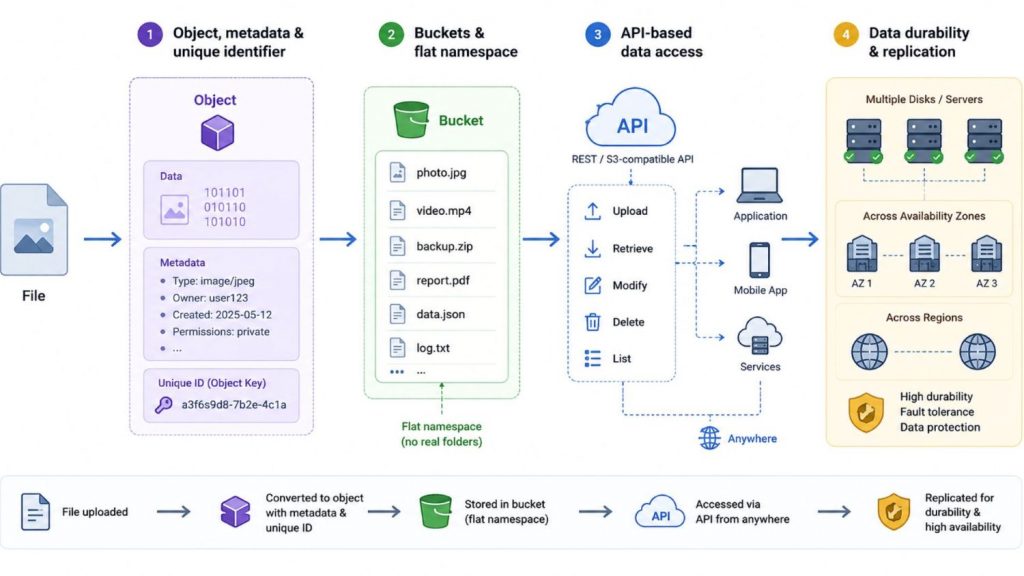
Object storage stores data as objects accessed via API in buckets with built-in replication
3. Object Storage vs File Storage vs Block Storage
Modern applications generate massive amounts of structured and unstructured data, creating different storage requirements for scalability, performance, and accessibility. As a result, object storage, file storage, and block storage are designed to support different workloads and infrastructure needs depending on how data is organized and accessed.
| Criteria | Object Storage | File Storage | Block Storage |
| Data structure | Stores data as self-contained objects with metadata and unique object IDs | Organizes data into files and hierarchical folders | Divides data into fixed-size storage blocks |
| Access method | Accessed through RESTful or S3-compatible APIs | Accessed through file paths and network file systems | Accessed as raw storage volumes through block-level protocols |
| Metadata | Supports rich and customizable metadata | Provides standard file metadata | Metadata is primarily managed by the operating system or application |
| Scalability | Highly scalable through distributed architecture and storage pools | Moderate scalability as directory structures become larger | High-performance scaling but infrastructure complexity increases at scale |
| Performance | Optimized for high-capacity and throughput-oriented workloads | Suitable for shared file access and collaborative environments | Optimized for low-latency and performance-sensitive workloads |
| Cost efficiency | Cost-effective for storing large volumes of unstructured data | Moderate cost depending on storage capacity and file system design | Higher cost due to performance-focused infrastructure |
| Best use case | Cloud storage, AI datasets, backups, archives, media storage, and data lakes | Shared enterprise files, collaborative workspaces, and document management | Databases, transactional systems, virtual machines, and mission-critical applications |
| Example | Amazon S3, OpenStack Swift | NAS systems, enterprise file servers | SAN storage, SSD block volumes |
Object storage is commonly used for cloud-native and AI-driven workloads that need massive scalability and customizable metadata capabilities. File storage is still widely adopted for shared access and collaborative environments, whereas block storage is more appropriate for high-performance workloads requiring low latency, including databases and transaction-intensive applications.
4. Benefits of Object Storage
Object storage has become a foundational technology for cloud platforms, AI systems, and large-scale enterprise applications because it offers flexibility, scalability, and efficient data management for modern workloads.
- Scales for large volumes of unstructured data: Object storage is designed to manage massive datasets such as images, videos, logs, backups, and AI training data without the limitations of traditional hierarchical file systems.
- Improves data durability and availability: Most object storage platforms automatically replicate data across multiple nodes or regions to reduce the risk of data loss and maintain high availability.
- Supports flexible metadata management: Rich and customizable metadata allows organizations to categorize, search, manage, and automate data workflows more efficiently.
- Reduces storage cost for high-volume data: Object storage is typically more cost-efficient than performance-focused storage systems, especially for long-term storage and large-scale archives.
- Works well for cloud-native applications: API-based access enables seamless integration with microservices, containerized applications, analytics platforms, and distributed cloud environments.
- Provides virtually unlimited scalability: Organizations can expand storage capacity horizontally by adding more storage nodes without significantly changing the existing infrastructure.
- Simplifies cloud-scale data management: The flat namespace architecture reduces the complexity associated with managing deep directory structures and large-scale file systems.
Object storage stores data as objects accessed via API in buckets with built-in replication.

Object storage enables scalable, flexible, and cost-efficient cloud data management
5. Common Object Storage Use Cases
Object storage is widely adopted across modern cloud environments because it can efficiently manage massive volumes of unstructured data while maintaining scalability, durability, and cost efficiency. Its API-driven architecture also makes it suitable for distributed applications, analytics platforms, and AI workloads.
5.1 Backup and disaster recovery
Object storage is commonly used for backup and disaster recovery because it supports distributed replication and long-term data durability across multiple storage locations. Organizations can store backup snapshots, system images, and recovery data in scalable storage pools without relying on traditional on-premises infrastructure.
For example, CERN (The European Organization for Nuclear Research) utilizes object storage to manage massive scientific datasets from the Large Hadron Collider (LHC). In 2025, CERN’s data archive officially passed the milestone of 1 exabyte (1,000 petabytes) of stored experimental data, relying on highly resilient, distributed object architecture to ensure long-term preservation and recovery workflows.
5.2 Data archiving
Object storage is widely used for long-term data archiving because it provides scalable and cost-efficient storage for data that is rarely modified but must remain accessible for future reference or compliance purposes. Since archived data is typically static, object storage can retain massive datasets efficiently while supporting metadata-based search and lifecycle management policies.
For example, Mayo Clinic and other major healthcare networks leverage object storage to archive medical imaging files like MRIs and CT scans. A single healthcare enterprise can generate over 1 billion medical images per year, totaling petabytes of data. Object storage reduces retention costs by up to 60% compared to traditional tier-1 storage while meeting strict HIPAA compliance for keeping records up to 7 years or longer.
5.3 Media files and content delivery
Streaming platforms and digital media services rely heavily on object storage to manage large media libraries, including videos, images, and audio content. The architecture supports distributed content delivery and integrates efficiently with CDNs to improve global accessibility and streaming performance.
For example, Netflix utilizes cloud-based object storage (AWS S3) as the central repository for its master video assets before distributing them through its Open Connect Content Delivery Network (CDN). This architecture allows Netflix to handle petabytes of media assets and efficiently feed its distributed network, which serves tens of terabits per second of video traffic globally.

Object storage powers global media streaming through scalable, distributed content delivery systems
5.4 Logs, analytics, and data lakes
Object storage is widely used as the storage foundation for modern data lakes and analytics platforms because it can manage massive datasets from multiple sources without rigid schema limitations. Logs, clickstream data, IoT records, and operational datasets can be centrally stored and processed at scale.
For example, Uber operates one of the world’s largest data lake environments, managing approximately 19,500 datasets, 350 petabytes of logical storage, and ingesting around 10 petabytes of data per day across HDFS and cloud object storage systems. The platform supports trillions of records, millions of daily file additions, and millions of analytical queries each week, enabling large-scale analytics, machine learning, and business intelligence workloads
5.5 AI and machine learning datasets
AI and machine learning workflows frequently use object storage to manage training datasets, model checkpoints, and experiment outputs. The architecture supports scalable access to large unstructured datasets such as images, videos, text, and sensor data used in AI development.
For example, teams using AI Notebook can seamlessly access large-scale datasets stored in high-performance object storage. This integration allows data scientists to experiment with complex models, process massive training datasets, and build scalable AI applications within a secure, cloud-based development environment.

AI notebooks use object storage for scalable model training and data processing
6. Object Storage Security Features
Security is a critical aspect of object storage because organizations often use it to store business data, backups, analytics datasets, and AI training data at scale. Modern object storage platforms provide multiple security mechanisms that help protect data confidentiality, integrity, availability, and regulatory compliance throughout the data lifecycle.
6.1. Encryption at Rest
Encryption at rest protects stored objects by encrypting data while it resides on physical storage devices. Even if disks or storage media are compromised, the stored data remains unreadable without the appropriate encryption keys. Most object storage platforms support server-side encryption and integration with centralized key management services.
6.2. Encryption in Transit
Encryption in transit secures data while it is transferred between users, applications, and object storage services. Protocols such as TLS and HTTPS help prevent interception, tampering, and unauthorized access during network communication, ensuring data remains protected throughout transmission.
6.3. Access Control and IAM
Object storage platforms commonly integrate with Identity and Access Management (IAM) systems to enforce granular permissions. Organizations can define access policies based on users, groups, roles, or applications, helping ensure that only authorized entities can access or modify stored objects.
6.4. Object Locking
Object locking enables objects to remain immutable for a specified retention period, preventing modification or deletion. This feature is commonly used for regulatory compliance, legal hold requirements, ransomware protection, and long-term data preservation.
6.5. Versioning
Versioning maintains multiple versions of an object whenever updates occur. If an object is accidentally overwritten, deleted, or corrupted, previous versions can be recovered, improving data resilience and supporting business continuity.
6.6. Data Governance
Data governance features help organizations manage retention policies, auditing, lifecycle controls, and compliance requirements. These capabilities improve visibility into stored data while supporting regulatory standards and long-term data management practices.
Object storage security features help organizations protect data through encryption, access control, immutability, versioning, and governance policies.
7. Object Storage Challenges
Although object storage offers scalability and flexibility for modern cloud workloads, it also introduces several operational and architectural challenges depending on the use case and performance requirements.
7.1. Metadata and Naming Management
Object storage relies heavily on metadata and object naming conventions to organize and retrieve data efficiently. As datasets grow to billions of objects, inconsistent naming structures or poorly managed metadata can make indexing, search, and governance more difficult.
For smaller environments or collaborative document workflows, file storage may be more practical because it provides a familiar hierarchical folder structure that is easier for users to navigate manually.
7.2. Access Control and Data Security
Managing permissions and security policies across large object storage environments can become complex, especially in multi-user or multi-tenant cloud systems. Organizations must carefully configure identity management, encryption, and access controls to prevent unauthorized access or accidental exposure of sensitive data.
For highly regulated applications with strict operating system-level controls, file storage or dedicated block storage environments may offer simpler security management depending on the infrastructure design.
7.3. Cost Management for Large-Scale Storage
While object storage is generally cost-efficient for large datasets, storage costs can still increase significantly when organizations retain massive volumes of data without lifecycle optimization. Additional expenses may also come from replication, cross-region transfers, or frequent data retrieval operations.
In workloads that require storing smaller datasets with frequent transactional updates, traditional file or block storage may provide more predictable infrastructure costs.
7.4. Latency for Performance-Sensitive Workloads
Object storage is optimized for scalability and throughput rather than ultra-low latency. Because data is accessed through APIs over distributed infrastructure, response times may not be suitable for workloads requiring real-time processing or high-frequency transactional operations.
For applications such as relational databases, transactional systems, or virtual machine disks, block storage is typically more appropriate due to its low-latency and high-performance architecture.

Object storage delivers scalability, while block storage ensures low-latency performance for real-time workloads
7.5. Lifecycle and Retention Policy Management
Managing retention policies, object versioning, and automated lifecycle rules can become operationally complex in large-scale environments. Organizations must carefully define policies for data movement, archival, and deletion to avoid unnecessary storage growth or compliance issues.
For simpler environments with shorter data retention requirements, file storage systems may require less policy management overhead.
7.6. Integration with Analytics and AI Workflows
Although object storage is widely used in analytics and AI environments, integrating large datasets across data pipelines, processing frameworks, and machine learning platforms may require additional orchestration and data management tools.
For workloads that require extremely fast local processing or tightly coupled database access, block storage can sometimes provide more consistent performance for compute-intensive applications.
8. Object Storage in Modern AI and Cloud Infrastructure
As modern AI systems and AI infrastructure continue to process larger datasets, object storage has become a critical layer for storing and managing unstructured data at scale.
8.1. Data lakes and analytics platforms
Organizations commonly use object storage as the storage foundation for modern data infrastructure and analytics environments. It allows large volumes of logs, IoT records, transactional data, and operational datasets to be collected within centralized storage environments that can scale more efficiently than traditional file systems.
Because object storage supports distributed processing frameworks, analytics platforms can process growing datasets without major infrastructure redesign.
8.2. AI and machine learning datasets
AI and machine learning applications rely on storage solutions that can efficiently manage large volumes of unstructured data, including images, videos, audio recordings, and text-based files. Object storage is particularly effective for these use cases because it enables datasets, trained models, and experimental results to be stored and shared across distributed AI infrastructures.
In addition, its flexible metadata features allow teams to classify and organize training data using labels, categories, and other attributes, making data management and model development processes more efficient.

AI workflows powered by scalable object storage
8.3. Backup and disaster recovery pipelines
Object storage is widely adopted for backup and disaster recovery because it supports durable and geographically distributed data protection. Backup copies, snapshots, and archival data can be replicated across multiple locations to improve resilience during infrastructure failures, outages, or ransomware incidents.
Features such as object versioning and immutability policies also help organizations maintain data integrity and long-term compliance requirements.
8.4. Cloud-native and containerized applications
Cloud-native applications and containerized systems often use object storage to manage persistent unstructured data separately from compute resources. Applications can dynamically retrieve and store data through APIs, making it easier to support distributed services across hybrid and multicloud environments.
Modern object storage platforms also improve performance through distributed caching, parallel data access, and high-speed storage infrastructure that help reduce bottlenecks for AI and analytics workloads.
9. When Should Businesses Use Object Storage?
Object storage is best suited for workloads that require scalability, durability, and efficient management of large volumes of unstructured data. Businesses often adopt object storage when traditional file or block storage systems become difficult to scale or too costly to manage for cloud-scale environments.
9.1 When storing massive unstructured data
Organizations should use object storage when managing large volumes of unstructured data such as images, videos, audio files, documents, logs, and IoT data. Its distributed architecture allows businesses to scale storage capacity efficiently without relying on complex hierarchical file systems.
Example: Airbnb and Pinterest both utilize object storage (Amazon S3) to store and process billions of high-resolution images uploaded by users every day. This system allows them to automatically compress, resize, and deliver images to global users instantly without overloading traditional storage infrastructure.
9.2 When building cloud-native applications
Object storage is well suited for cloud-native applications and microservices that require API-driven access to distributed datasets. Because applications can retrieve objects through RESTful APIs, developers can build scalable services that operate consistently across cloud and hybrid environments.
Example: Spotify runs thousands of containerized microservices in the cloud and utilizes Cloud Object Storage to store audio files, album cover art, and system logs. By accessing data via RESTful APIs, these services can instantaneously audit, process, and stream music to users from any region worldwide.
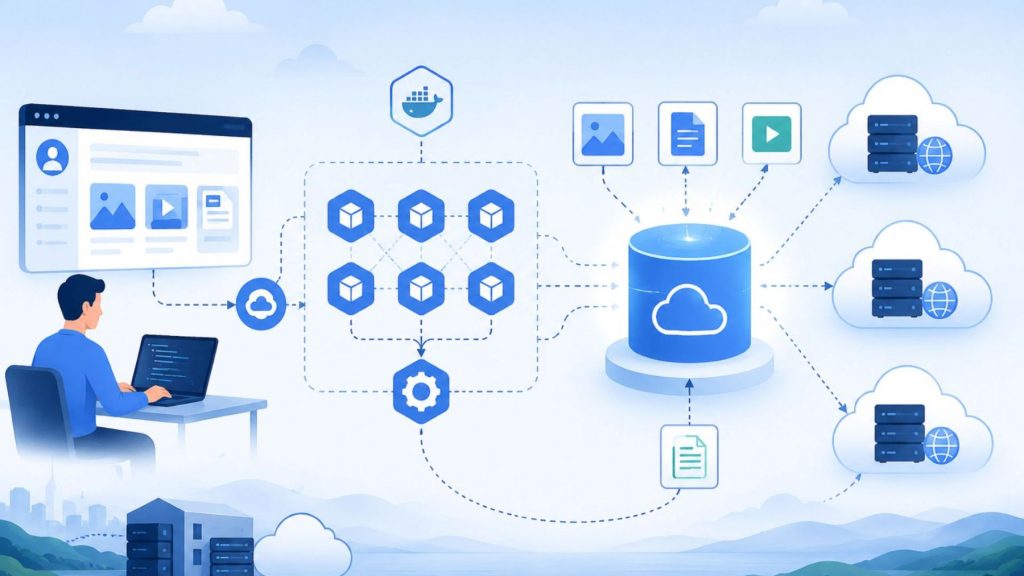
Scalable cloud-native storage for modern applications.
9.3 When managing backups, archives, or compliance data
Many organizations rely on object storage for backup, archival, and compliance purposes due to its durability and cost-effective approach to long-term data retention. Features such as data replication and lifecycle management further support disaster recovery planning and help businesses meet regulatory retention requirements.
Example: Nasdaq moved its massive historical financial transaction records to object storage. This solution allows them to securely retain data for years at minimal cost while fully complying with strict financial regulatory and auditing standards.
9.4 When supporting AI, analytics, and data-intensive workloads
Object storage is well suited for AI, analytics, and GPU-powered workloads because it can efficiently store and manage massive volumes of unstructured data across distributed environments. AI systems often rely on petabyte-scale datasets such as images, videos, logs, text files, and sensor data for model training, inference, and large-scale analytics processing. Its scalable architecture and API-based access model allow organizations to retrieve and process datasets efficiently across cloud infrastructure and distributed AI environments.
For example, organizations can store AI training datasets in object storage while using GPU Container to run scalable containerized AI workloads that access large datasets for machine learning, analytics, and distributed inference pipelines.
9.5 When cost-efficient long-term storage matters
Organizations should consider object storage when they need to retain large datasets for extended periods while controlling infrastructure costs. Compared with performance-focused storage systems, object storage offers a more cost-efficient approach for storing infrequently accessed or static data at scale.
For example, financial institutions may retain historical transaction records and audit logs in object storage for years without significantly increasing storage infrastructure costs.
10. FAQs
10.1 What is the difference between object storage and file storage?
File storage organizes data into hierarchical folders and directories accessed through file paths, while object storage stores data as independent objects within a flat storage environment using unique object identifiers and metadata. Object storage is generally more scalable for cloud and unstructured data workloads, whereas file storage is better suited for shared file access and collaborative environments.
10.2 What is the difference between object storage and block storage?
Object storage manages data as self-contained objects accessed through APIs, while block storage divides data into fixed-size blocks that are managed by operating systems or applications. Object storage is optimized for scalability and large unstructured datasets, whereas block storage is designed for low-latency and high-performance workloads such as databases, transactional systems, and virtual machines.
10.3 Is object storage good for databases?
Object storage is generally not ideal for traditional transactional databases such as MySQL or Oracle because these workloads require low-latency and high-performance block-level access. However, object storage works well for modern analytics platforms, distributed data systems, database backups, and large-scale data warehouses that manage massive volumes of unstructured or infrequently accessed data.
Understanding what is object storage is essential for organizations building modern cloud, AI, and data-intensive infrastructures. With its scalable architecture, flexible metadata management, and cost-efficient approach to handling unstructured data, object storage has become a foundational technology for analytics platforms, backup systems, cloud-native applications, and AI workloads.
With FPT AI Factory, businesses can access scalable AI infrastructure and cloud-based services designed to support modern data and AI workflows. FPT AI Factory offers a Starter Plan with $100 credits to support users in their projects. For enterprises or organizations with large-scale or customized AI infrastructure requirements, contact the FPT AI Factory team for consultation and tailored deployment support.
Contact Information:
- Hotline: 1900 638 399
- Email: support@fptcloud.com
Explore more related articles:
What Is AI Infrastructure? Key Components and How It Works
AI Development Platforms: Key Features and How to Choose
Container vs. Virtual Machine: What are the differences?
What Is a Virtual Private Server? Speed, Control and Cost


