


GPU virtual machine (GPU VM) enables organizations to access high-performance GPU infrastructure without building physical AI servers. As AI workloads become larger and more compute-intensive, GPU virtual machines help teams accelerate model training, inference, simulation, and large-scale data processing with flexible cloud-based GPU resources. In this article, FPT AI Factory will explore the definition of GPU virtual machine and how it works for business applications.
1. What is a GPU virtual machine?
A GPU virtual machine is a cloud-based virtual environment that combines CPU, memory, storage, networking, an operating system, and GPU acceleration. It helps teams run high-performance workloads such as AI training, fine-tuning, inference, data processing, rendering, and simulation faster than CPU-only environments. NVIDIA reports that H100 GPUs can speed up large language model inference by up to 30x compared with the prior generation, showing why GPU acceleration is critical for modern AI workloads.
For example, instead of buying a physical GPU server, an AI team can create a GPU virtual machine in the cloud, set up frameworks like PyTorch or TensorFlow, and start training a model. After the project ends, they can scale down or stop the VM to control costs, making GPU VMs a practical choice for teams that need powerful computing without building GPU infrastructure from scratch.

A GPU virtual machine uses parallel processing power to accelerate complex computations and data-intensive workloads
2. How does a GPU virtual machine work?
2.1. Virtual machine layer
The VM layer serves as the foundation, where the hypervisor abstracts physical hardware into virtual resources. This layer provides the essential components: CPU, memory (RAM), storage, and networking. It creates a standalone Operating System (OS) environment, allowing users to run isolated applications as if they were on a dedicated physical machine but with the flexibility of the cloud.
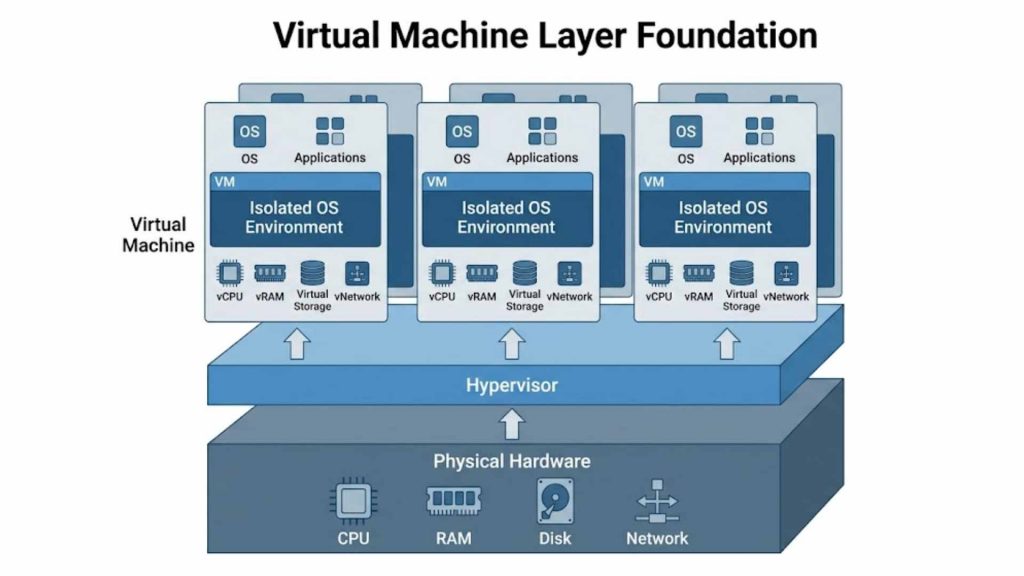
Hypervisor architecture abstracting physical hardware into isolated virtual machine environments.
2.2. GPU acceleration layer
In this layer, physical GPU resources are allocated to the VM using technologies like GPU Passthrough or vGPU (virtual GPU). By bypassing the standard virtualization overhead, the VM gains direct or near-native access to the GPU’s hardware. This ensures that the VM can utilize the full computational potential of the hardware to accelerate parallel computing workloads significantly.
In high-performance GPU environments, interconnect speed also matters. For example, NVIDIA H100 uses fourth-generation NVLink with up to 900 GB/s GPU-to-GPU interconnect bandwidth, helping multi-GPU systems scale more efficiently for large AI training and HPC workloads.
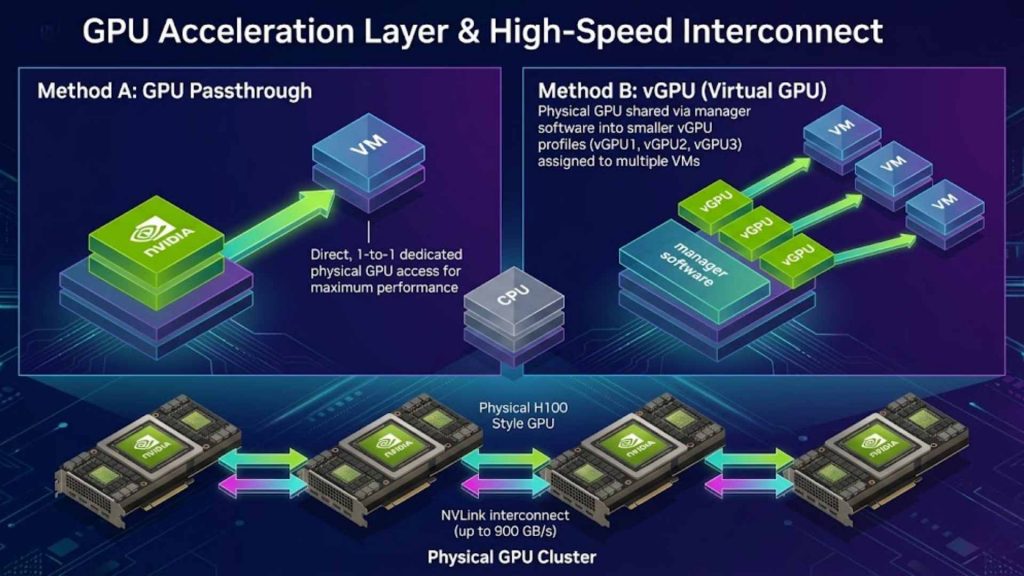
GPU allocation via Passthrough/vGPU with high-speed NVLink interconnect bandwidth.
2.3. Software and framework layer
To bridge the gap between hardware and applications, this layer includes essential drivers and libraries such as NVIDIA CUDA. It also encompasses various AI frameworks like PyTorch or TensorFlow, which are optimized to communicate with the GPU cores. This stack ensures that developers can execute complex algorithms without worrying about low-level hardware compatibility issues.
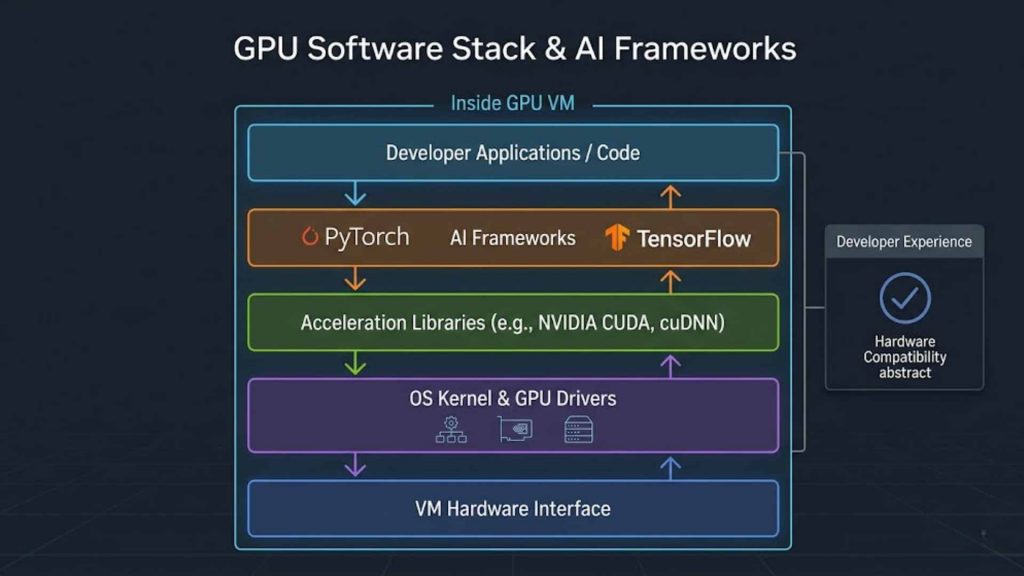
Software stack from GPU drivers and CUDA libraries to AI frameworks like PyTorch.
2.4. Workload execution
Once the environment is configured, users can execute specific tasks directly within the VM. This includes training deep learning models, fine-tuning Large Language Models (LLMs), or running inference for production apps. Beyond AI, these VMs are also used for high-end rendering, interactive notebooks, and heavy data processing tasks, providing a seamless transition from development to production.
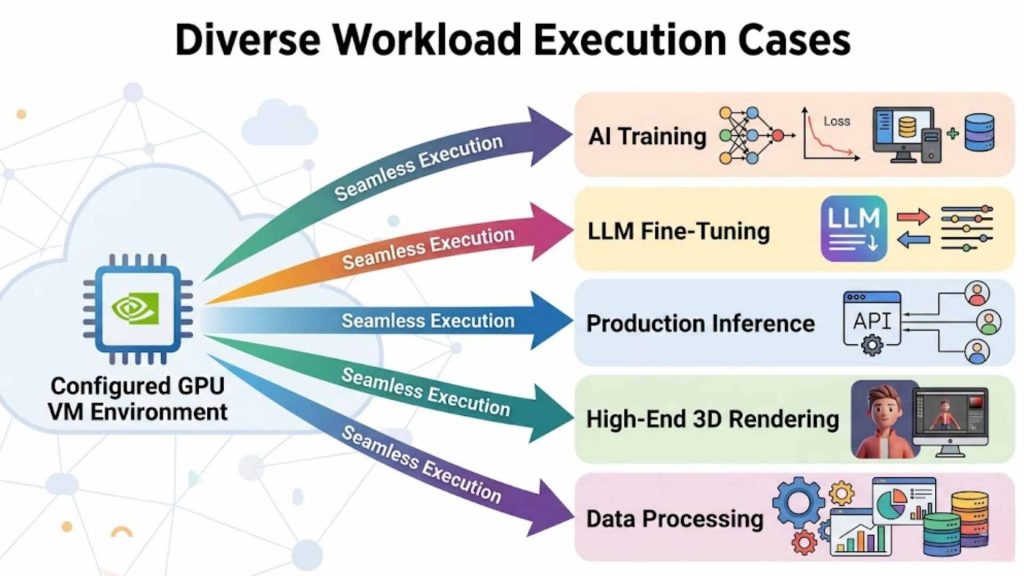
Real-world execution of AI training, LLM fine-tuning, and high-end data processing.
3. Key benefits of GPU virtual machines
Adopting GPU VMs offers enterprises a strategic advantage by combining extreme performance with the agility of cloud infrastructure:
- On-demand access to GPU compute: Access high-end hardware instantly without the need for physical procurement.
- Faster provisioning than physical GPU servers: Spin up a fully configured environment in minutes rather than waiting weeks for hardware delivery.
- Flexible scaling for different AI workloads: Easily adjust GPU, RAM, or storage capacity as your project grows.
- Better cost control compared with buying dedicated hardware: Transition from heavy capital expenditure (CapEx) to a flexible operational expenditure (OpEx) model. Cost control is especially important as cloud spending grows. According to Flexera’s 2025 State of the Cloud Report, 84% of respondents said managing cloud spend is the top cloud challenge, while cloud spend is expected to increase by 28% in the coming year. This makes on-demand GPU VMs useful for teams that need powerful compute without committing to large upfront infrastructure investments.
- Full environment control for developers and ML teams: Enjoy root access to customize the OS, drivers, and software stack precisely.
- Suitable for both experimentation and production workloads: Use the same infrastructure for prototyping and scaling to millions of users.
The GPU Virtual Machine service at FPT AI Factory serves as an on-demand GPU compute layer for model training, fine-tuning, and scalable AI experimentation. This allows teams to deploy AI workloads faster without the complexity of building and maintaining GPU infrastructure from scratch.
For a broader view of how GPU VMs fit into the full AI stack, you can read more about AI infrastructure, including compute resources, storage, networking, and deployment systems for AI workloads.

GPU virtual machines deliver high performance, flexible scaling, and cost-efficient infrastructure for modern AI workloads
4. GPU virtual machine vs traditional GPU server
Choosing between a VM and a physical server depends on your need for flexibility versus raw, dedicated hardware ownership.
| Aspect | GPU virtual machine | Traditional GPU server |
| Deployment speed | Minutes | Weeks to Months |
| Infrastructure ownership | Service Provider | User/Enterprise |
| Scalability | High & Instant | Limited & Manual |
| Cost model | Pay-as-you-go or custom time-based package
• Flexible package based on the project timeline • Optimized pricing for committed usage • Reserved GPU capacity during the project period |
Large upfront hardware investment |
| Environment control | Full (Virtual) | Absolute (Physical) |
| Maintenance | Handled by Provider | Handled by User |
| Best fit | Agile Dev, AI Scaling | Static, 24/7 Long-term use |
>>> Read more: Container vs. Virtual Machine: What are the differences?
5. Common use cases of GPU virtual machines
The versatility of a GPU virtual machine makes it the go-to infrastructure for any data-heavy industry. While a GPU VM provides the raw “engine” for computation, its effectiveness is often amplified when paired with specialized platforms that simplify the complex workflows of AI development.
5.1. AI Model Training and Fine-tuning
Training deep learning models or fine-tuning Large Language Models (LLMs) requires massive throughput to process billions of parameters. A GPU VM provides the necessary environment where developers can exert full control over the hardware to manage long-running training cycles. This raw infrastructure is essential for high-level experts who need to customize every driver and library for maximum performance. This is why GPU choice matters for large-scale training. According to NVIDIA, H100’s fourth-generation Tensor Cores and Transformer Engine with FP8 precision can deliver up to 4x faster training than the prior generation for GPT-3 175B models.
To make this process even more accessible for teams who want to focus on the model rather than the infrastructure, FPT AI Factory offers FPT AI Studio. This platform sits on top of our GPU infrastructure, providing a managed environment for building and fine-tuning models. By using FPT AI Studio, users can streamline the training process with integrated tools and pre-configured settings, significantly reducing the time spent on manual setup.
5.2. AI Inference and Model Serving
Once a model is trained, it must be deployed to handle real-world requests, a process known as inference. Running inference on a GPU VM ensures that applications-such as real-time language translators or fraud detection systems-operate with ultra-low latency. The VM’s architecture allows for high concurrency, meaning it can process multiple user requests simultaneously without a drop in speed.
For businesses looking for a “production-ready” shortcut, FPT AI Inference is the ideal solution. It is a specialized platform designed specifically to integrate and serve models into real-world applications without the need for manual server management. While the underlying power comes from our GPU VMs, FPT AI Inference provides the API-ready layer that helps developers deploy their AI solutions into the market faster and more reliably.
5.3. AI Notebooks and Rapid Experimentation
Data scientists often start their journey in interactive environments like Jupyter Notebooks to prototype ideas. A GPU VM allows these researchers to spin up an environment in minutes, test various neural network architectures, and run small-scale experiments. This flexibility is vital for the early “trial and error” phase of AI development where committing to permanent hardware would be inefficient.
For a more seamless experimentation experience, FPT AI Factory provides AI Notebooks with ready-to-use AI environments. Instead of renting a GPU VM and manually connecting it to Jupyter Notebook, users can launch FPT AI Factory’s pre-configured notebook environment and start working almost immediately. This helps reduce the time normally spent configuring notebooks, GPU drivers, libraries, or frameworks manually.
In a self-managed setup, teams may spend around 10-15 minutes preparing the environment while GPU resources are already being charged. With FPT AI Factory’s AI Notebooks, users can avoid this waiting time, reduce dependency conflicts, prevent training delays, and control unnecessary GPU costs before actual experimentation begins.
5.4. Data Processing and Analytics at Scale
Modern big data analytics involves processing datasets so large that traditional CPUs become a bottleneck. GPU VMs excel at parallelizing these workloads, enabling tasks like real-time sentiment analysis or large-scale financial modeling to be completed in seconds. This capability allows enterprises to transform raw data into actionable insights with unprecedented speed.
By offloading compute-heavy analytics to a GPU-accelerated environment, organizations can handle complex data pipelines that would otherwise stall. This infrastructure supports various data processing frameworks, ensuring that whether you are performing ETL (Extract, Transform, Load) operations or complex statistical simulations, your data pipeline remains fluid and highly responsive.
5.5. High-End Rendering and Scientific Simulation
Beyond the world of Artificial Intelligence, GPU VMs are the backbone of the creative and scientific industries. They are used extensively for 3D rendering in filmmaking, architectural visualization, and engineering simulations. The thousands of cores within a GPU allow for the simultaneous calculation of light, physics, and complex fluid dynamics that a standard PC cannot handle.
In the scientific community, these virtual machines facilitate High-Performance Computing (HPC) for tasks like drug discovery, weather forecasting, and molecular modeling. By providing scalable GPU power on demand, FPT AI Factory enables researchers and engineers to run these resource-intensive simulations without the massive capital investment required to build a physical supercomputing cluster.
6. How to choose the right GPU virtual machine
Selecting the right GPU virtual machine is not just about picking the most expensive option; it is about finding the precise balance between performance and cost. Failing to align your hardware with your specific workload can lead to project delays or budget overruns.
Consider the following critical factors when making your choice:
- GPU Type and VRAM Capacity
- Why it matters: Different workloads require different architectures (e.g., NVIDIA H100 for LLMs vs. A100 for general AI). VRAM determines the maximum size of the model or data batch you can load at once.
- The Risk: If you underestimate VRAM, your model will fail to load with “Out of Memory” (OOM) errors. Conversely, choosing an overpowered GPU for a simple task results in significant wasted expenditure.
- CPU, RAM, and Storage Balanced Configuration
- Why it matters: The GPU needs a fast CPU and sufficient RAM to feed it data. Think of the CPU as the “pipeline” to the GPU’s “engine”.
- The Risk: If the CPU or RAM is too weak, your high-end GPU will sit idle while waiting for data. This is known as a “bottleneck,” where you pay for GPU power you cannot actually utilize.
- Network Bandwidth and Interconnectivity
- Why it matters: For distributed training (using multiple GPUs across different VMs), the speed at which nodes communicate is vital.
- The Risk: Low bandwidth will cause massive delays during data synchronization, making the training process take significantly longer and potentially causing synchronization errors between your virtual instances.
- Framework and Driver Compatibility
- Why it matters: Not every GPU supports every version of CUDA or every AI framework (like older versions of PyTorch).
- The Risk: You might spend hours setting up a VM only to find that your specific software stack is incompatible with the hardware drivers, forcing you to restart the entire deployment process from scratch.
- Cost and Billing Model Flexibility
- Why it matters: AI projects often have unpredictable timelines. A pay-per-use model allows you to stop paying the moment your task is finished.
- The Risk: Without a flexible billing model, you may be locked into long-term contracts for hardware you no longer need, or conversely, face high “on-demand” spikes that blow your project’s budget prematurely.
- Security and Data Compliance
- Why it matters: AI models often train on sensitive proprietary or user data. The infrastructure must meet standards like SOC2 or local data protection laws.
- The Risk: Choosing an unverified or non-compliant provider could lead to data leaks or legal complications, especially in highly regulated industries like finance or healthcare.
By carefully evaluating these factors, you ensure that your GPU virtual machine from FPT AI Factory acts as a catalyst for your project rather than a technical or financial hurdle.
7. Challenges of using GPU virtual machines
While the power of a GPU virtual machine is transformative, managing high-performance virtual environments in a production or research setting comes with unique operational hurdles:
- GPU availability and capacity planning: This challenge often occurs during peak demand periods or when trying to scale large clusters, as high-end GPUs can face global supply shortages or regional capacity limits that stall project timelines.
- Cost optimization for long-running workloads: Without strict monitoring tools, the continuous running of high-spec VMs-especially during long training cycles-can lead to unexpected expenses that quickly exceed the allocated project budget.
- Driver and framework compatibility issues: These typically arise during environment setup or software updates, where keeping the software stack (like CUDA or PyTorch) synchronized with hardware drivers requires deep technical expertise to avoid system crashes.
- Data transfer and storage bottlenecks: This is a common issue when handling massive datasets; slow disk I/O or low-speed networking can starve the GPU of data, significantly reducing overall compute efficiency and wasting expensive resources.
- Monitoring GPU utilization and health: Monitoring becomes difficult when running multiple instances at scale, as teams may struggle to identify if a GPU is being underutilized or if it is overheating, leading to suboptimal performance or hardware throttling.
- Infrastructure orchestration for high-performance GPU training: As AI workloads scale across multiple GPUs or nodes, infrastructure coordination becomes significantly more complex. Technical teams must manage workload synchronization, inter node communication, network bottlenecks, and distributed training configurations at the framework level to maintain stable performance and maximize GPU utilization efficiency.
FPT AI Factory helps enterprises overcome these hurdles by offering a managed platform that reduces the complexity of deploying and managing GPU workloads at a production scale. Furthermore, FPT AI Factory is currently offering pre-orders for the next-generation NVIDIA HGX B300 GPU services. You can pre-order or leave your information for a consultation at the GPU Virtual Machine page to stay ahead of the technology curve.
8. FAQ
8.1. What is the difference between a GPU VM and a cloud GPU?
A cloud GPU refers to raw GPU hardware delivered over the internet. It provides computing power without a full system environment. In contrast, a GPU virtual machine is a complete setup. It includes an operating system, CPU, RAM, and is pre-configured to use the GPU efficiently.
8.2. Is a GPU virtual machine good for AI training?
Yes, a GPU virtual machine is well-suited for AI training workloads. It delivers performance comparable to physical servers. At the same time, it offers cloud flexibility. You can quickly create or shut down environments based on demand.
8.3. Can GPU VMs be used for inference?
Yes, GPU VMs are highly effective for inference tasks. They support low-latency processing for real-time applications. They also handle high request volumes efficiently. This makes them suitable for production AI deployments.
8.4. Do GPU virtual machines support PyTorch and TensorFlow?
Yes, GPU virtual machines support major frameworks like PyTorch and TensorFlow. These environments are often pre-configured with necessary drivers. This setup reduces installation time. It also helps accelerate model development and deployment.
Harness the power of GPU virtual machines to drive your AI innovation forward. With FPT AI Factory, you get the performance, flexibility, and support needed to turn complex data into actionable intelligence.
To summarize:
- GPU virtual machines provide scalable, cloud-based GPU acceleration for AI training, inference, data processing, rendering, and HPC workloads.
- Compared with traditional GPU servers, GPU VMs offer faster provisioning, flexible scaling, and lower upfront infrastructure costs.
- The effectiveness of a GPU VM depends on selecting the right GPU type, VRAM, CPU/RAM balance, networking, and billing model for specific workloads.
- Common GPU VM use cases include LLM training, AI inference, AI notebooks, large-scale analytics, and scientific simulations.
- Organizations must also address challenges such as GPU availability, cost optimization, orchestration complexity, and framework compatibility.
- FPT AI Factory provides enterprise-grade GPU Virtual Machine infrastructure, AI Studio, AI Inference, and scalable GPU Cloud services to help businesses deploy and scale AI workloads efficiently.
Take the next step in your AI journey today! Explore how FPT AI Factory can provide the high-performance foundation for your business’s AI goals. New users can join our Starter Plan and receive $100 in credits to test our ecosystem for 30 days. Log in now to begin scaling your AI capabilities immediately!
For large-scale enterprises requiring customized AI infrastructure or high-performance GPU services, please contact our expert team for a personalized consultation today.
Contact information
- Hotline: 1900 638 399
- Email: support@fptcloud.com
References:
Flexera. (2025, March 19). New Flexera report finds that 84% of organizations struggle to manage cloud spend.
NVIDIA. (n.d.). An Order-of-Magnitude Leap for Accelerated Computing.
NVIDIA. (n.d.). The Accelerated Computing Platform for Next-Generation Workloads.
NVIDIA. (2022, March 22). NVIDIA Hopper architecture in-depth.
Explore related articles:
Top Cloud Service Providers with GPU for AI Workloads
What is a GPU cluster? Architecture, Nodes and Use Cases
B200 vs B300: Which Blackwell GPU Should You Choose?


