


GPU as a Service is a cloud-based model that gives businesses instant access to powerful GPU resources, eliminating the need for heavy upfront infrastructure investment. As AI, machine learning, and data-intensive workloads continue to grow, this approach has become a critical enabler for organizations. At FPT AI Factory, we provide flexible, enterprise-grade GPU solutions designed to accelerate your AI initiatives without the complexity of managing physical hardware.
Quick summary
|
1. What Is GPU as a Service?
GPU as a Service (GPUaaS) is a cloud computing model that lets organizations access GPU capabilities over the internet, rather than purchasing physical hardware. Think of it as renting compute power on demand, which providers invest in enterprise-grade GPU infrastructure, handle all the maintenance, and you pay only based on your consumption.
GPUaaS is widely adopted for artificial intelligence, machine learning, deep learning, high-performance computing, data analytics, and graphics-intensive workloads. These use cases demand massive parallel processing power, exactly what GPUs are architected to deliver, making GPUaaS the go-to infrastructure layer for modern compute-heavy applications.
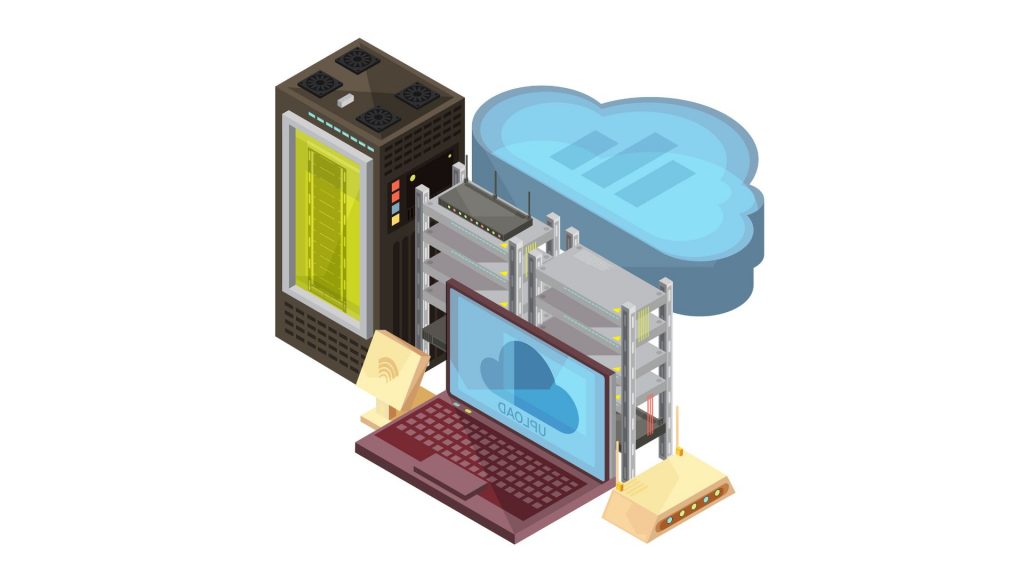
GPU as a Service lets organizations access GPU capabilities over the internet
2. How Does GPU as a Service Work?
GPUaaS typically works through five key stages:
2.1 On-demand GPU provisioning
High-end GPUs such as NVIDIA H100, A100, and L40 are hosted across provider data centers worldwide. When a workload is triggered, the system instantly allocates the required GPU capacity, eliminating hardware procurement delays and enabling rapid experimentation and scaling.
2.2 Virtual machines, containers, and cloud GPU instances
A virtualization layer partitions or allocates GPUs using virtualization or container technologies. This allows multiple users to share physical hardware efficiently, or gives dedicated users exclusive access, depending on the service tier selected.
2.3 Remote access through console, API, or platform
Users can work from anywhere by accessing GPU resources through the cloud. Access is typically provided via a web-based console, REST APIs, or integrated cloud platforms, enabling teams to connect, configure, and run workloads without local hardware.
2.4 Usage-based billing and resource scaling
On-demand pricing charges hourly rates during active usage, ranging from under $1 per hour for basic GPUs to $15 or more for enterprise-grade processors. Resources can be scaled up or down in real time, so organizations only pay for what they actually consume.
2.5. GPU orchestration and workload management
Behind the scenes, orchestration layers manage how workloads are scheduled, distributed, and prioritized across GPU clusters. The provider typically bundles managed services that handle these operational tasks, so teams can focus on running workloads rather than managing infrastructure.
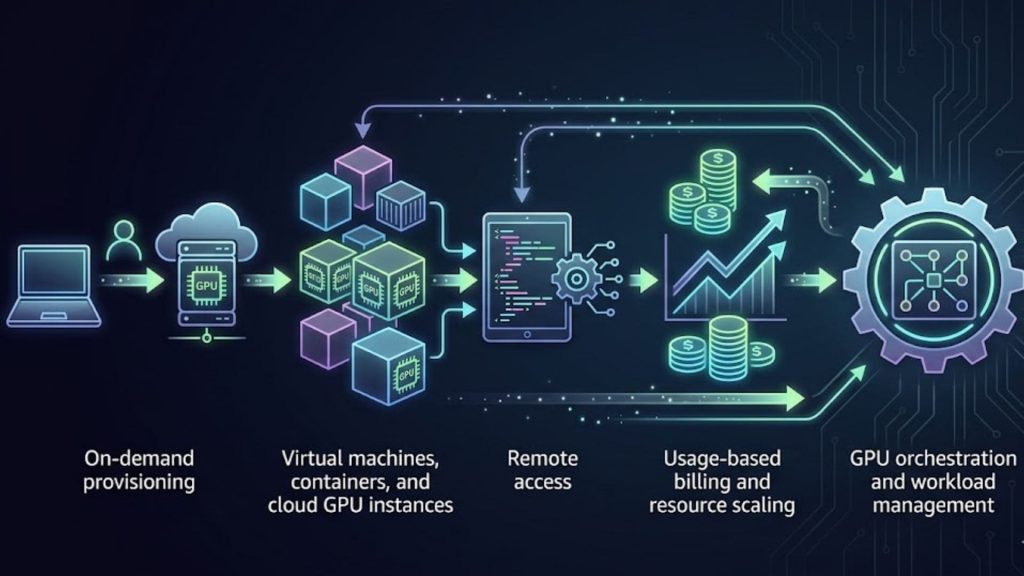
Understanding the mechanics behind GPUaaS helps organizations make smarter decisions
3. Types of GPU as a Service
GPUaaS providers typically offer five main instance models. Choosing the right one depends on workload characteristics, budget, and tolerance for interruption.
3.1 Dedicated GPU
Dedicated GPU gives one tenant exclusive access to an entire GPU, ensuring stable performance, stronger isolation, and more predictable resource availability. This model is suitable for workloads that require consistent compute power, such as AI model training, fine-tuning, 3D rendering, and high-performance inference. Since the GPU is not shared with other users, businesses can avoid performance fluctuations caused by competing workloads.
3.2 Shared GPU
Shared GPU allows multiple users to share a physical GPU, reducing costs for lightweight workloads such as development, testing, and small-scale inference.
3.3 Virtual GPU (vGPU)
Virtual GPU, or vGPU, uses virtualization technology to divide a physical GPU into multiple virtual GPU instances. Each virtual GPU can be assigned to a separate virtual machine or workload, giving teams more flexibility in resource allocation. This model is useful for organizations that need better GPU utilization, isolated environments, and scalable access to GPU resources without renting an entire physical GPU for every task.
3.4 Bare Metal GPU
Bare Metal GPU gives users access to an entire physical server equipped with one or more GPUs, without a virtualization layer between the workload and hardware. This model offers high performance, low latency, and full control over the server environment. It is commonly used for large-scale model training, high-performance computing, distributed AI workloads, and cases where teams need direct hardware access for maximum efficiency.
3.5 Managed GPU Platform
A Managed GPU Platform combines GPU infrastructure with orchestration, monitoring, automation, and MLOps capabilities. Instead of manually provisioning servers, configuring environments, and managing scaling, teams can use a managed platform to train, fine-tune, deploy, and monitor AI models more efficiently. This model is suitable for businesses that want GPU power together with production-ready workflows, especially when building deep learning, generative AI, or enterprise AI applications at scale.

GPUaaS providers typically offer three main instance models
4. GPU as a Service vs Buying Physical GPUs
Before committing to a GPU strategy, it helps to understand the trade-offs between renting and owning. Cloud GPUs offer flexible scaling, predictable costs, and quicker deployment, while physical GPU servers deliver greater control and dedicated performance, the better fit depends on utilization, compliance, and long-term total cost of ownership.
| Criteria | GPU as a Service | Physical GPUs |
| Upfront cost | Low: Pay-as-you-go, no hardware purchase | High: GPU units alone can cost $10,000–$40,000+ |
| Maintenance responsibility | Handled by the provider | Managed in-house by your IT team |
| Scalability | Scale up or down in minutes based on demand | Limited by the physical hardware available on-site |
| Availability | Instant access via console or API | Subject to procurement lead times (weeks to months) |
| Hardware upgrades | Access to the latest GPUs without additional investment | Requires new capital expenditure per upgrade cycle |
| Utilization efficiency | Pay only for active usage, no idle hardware costs | Risk of underutilization during off-peak periods |
| Deployment speed | Provision GPU instances in minutes | Weeks to set up, configure, and go live |
| Best use case | Variable, experimental, or short-term workloads | Fixed, high-volume, long-term production workloads |
| Example | AI startups, research teams, seasonal workloads | Large enterprises with steady, predictable GPU demand |
5. Benefits of GPU as a Service
GPU as a Service removes the friction of traditional hardware ownership, giving organizations a faster and more flexible path to high-performance computing. Here are the core advantages:
- Lower upfront infrastructure investment: No need to buy expensive hardware. Organizations pay incrementally based on usage, converting what would be capital expenses into manageable operational expenditures.
- Faster access to high-performance GPUs: Eliminate hardware procurement delays and provision GPU instances in minutes instead of weeks or months.
- Flexible scaling for changing workloads: Resources can scale dynamically to meet changing computational demands, reducing idle hardware costs.
- Reduced hardware maintenance burden: The provider manages drivers, firmware, cooling, and physical upkeep. Your team stays focused on building, not maintaining.
- Better GPU utilization: You pay based on your actual consumption model, whether hourly on-demand, reserved capacity, or spot pricing, avoiding the waste of idle hardware.
- Easier access to the latest GPU models: Hardware refresh cycles in high-performance computing are accelerating. GPUaaS ensures access to the latest technology without depreciation risk or upgrade complexity.
- Faster AI experimentation and deployment: Businesses can reduce training cycles from weeks to hours while accessing specialized hardware optimized for AI workloads.
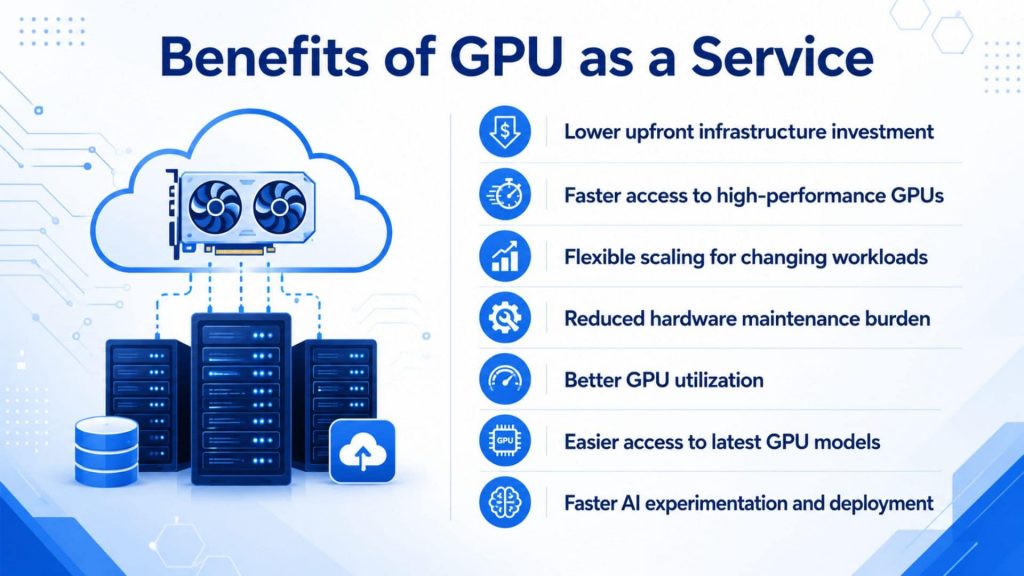
GPU as a Service removes the friction of traditional hardware ownership
6. GPU as a Service Use Cases
GPU as a Service is no longer a niche solution, it now powers some of the most demanding workloads across industries. From training billion-parameter models to rendering award-winning visual effects, cloud GPUs are becoming the default compute layer for teams that need performance without infrastructure complexity.
6.1 AI model training
AI model training is among the most resource-intensive tasks in modern computing, requiring sustained access to high-memory, high-throughput GPU clusters. Training deep learning models for natural language processing, computer vision, and predictive analytics requires substantial GPU resources, often in bursts. You can scale up for large model training, then scale down for inference workloads that need less compute.
For AI teams that need scalable GPU compute for model training, fine-tuning, or high-performance AI workloads without investing in physical GPU infrastructure, GPU Virtual Machine provides on-demand, enterprise-grade GPU instances designed to accelerate every stage of the AI development lifecycle.
Example: Uxify used DigitalOcean’s Gradient GPU Droplets to establish the infrastructure for its AI website optimization platform, enabling it to increase product market penetration and expand into new geographical areas.
6.2 Deep learning and computer vision
Deep learning and computer vision applications rely on GPUs to process enormous volumes of image and video data in parallel. Companies use GPUaaS to process medical imaging data, develop autonomous vehicle algorithms, and run real-time recommendation engines.
Example: One company reduced model training time by up to 40% using Amazon SageMaker HyperPod accelerated by NVIDIA GPUs, and during spike periods delivered near-real-time inference for 10,000 concurrent users and 100,000 queries per hour using Amazon EC2 P5 Instances.
6.3 Generative AI and large language models
Training and running large language models (LLMs) demands enormous GPU memory and sustained parallel compute power. Cloud computing plays a crucial role in deploying LLMs by providing the necessary infrastructure, with scalability allowing resources to adjust to the demands of LLM processing dynamically.
Example: Google Cloud Run with NVIDIA L4 GPUs enables real-time inference for lightweight open models such as Gemma and Meta’s Llama 3, supporting custom chatbots, on-the-fly document summarization, and fine-tuned image generation models, while scaling down to zero during inactivity to optimize costs.
6.4 Model fine-tuning
Model fine-tuning is one of the most important GPUaaS use cases for businesses that want to adapt pre-trained AI models to their own data, domain, or application requirements. Instead of training a model from scratch, teams can use GPU resources to fine-tune existing large language models, vision models, or multimodal models for specific tasks such as customer support, document analysis, code generation, recommendation, or industry-specific knowledge extraction.
For teams that need scalable infrastructure for model customization, GPU Container provides on-demand GPU resources for fine-tuning, training, and AI experimentation. For organizations that prefer a managed approach, FPT AI Factory also provides Model Fine-Tuning, where model customization is delivered as a service, helping businesses adapt AI models to domain-specific requirements without investing heavily in infrastructure management.
Example: AWS demonstrated domain-adaptation fine-tuning by using Amazon SageMaker JumpStart to fine-tune the GPT-J 6B language model on financial text from SEC filings. The case shows how fine-tuning can adapt a general-purpose model to domain-specific financial language and make it more useful for specialized text-generation tasks. Source: AWS Machine Learning Blog.
6.5 AI inference and application deployment
Once a model is trained, serving it at scale requires a different kind of infrastructure, one optimized for low latency, high availability, and cost efficiency under variable traffic. Cloud Run’s GPU support enables real-time, fast-scaling AI inference, with low cold-start latency allowing models to serve predictions almost instantly, critical for time-sensitive customer experiences.
For businesses that need to deploy AI models into applications via API, scale inference flexibly, and reduce operational overhead without managing their own GPU infrastructure, Serverless Inference offers a fully managed inference layer that handles scaling automatically.
Example: Teams running LLM inference with variable traffic use RunPod’s serverless endpoints with pay-per-request pricing, allowing them to handle unpredictable demand without committing to fixed GPU capacity.
6.6 3D rendering, simulation, and HPC workloads
Visual effects studios, engineering firms, and scientific research teams all share a common challenge: massive parallel computing needs that spike around project deadlines. Digital content creation demands GPU acceleration for rendering workflows, teams working on 4K and 8K video, photorealistic visualization, and 3D animation can burst compute resources to meet production deadlines without maintaining peak capacity year-round.
Example: Blockhead VFX used CoreWeave’s NVIDIA GPUs to render effects for television and film projects, dynamically scaling GPU resources to cut rendering time significantly and reduce overhead costs associated with maintaining local hardware. Similarly, Weta Digital – the VFX studio behind Avatar and Avengers: Endgame – shifted to an AWS Cloud Render Farm to power its VFX production at scale.
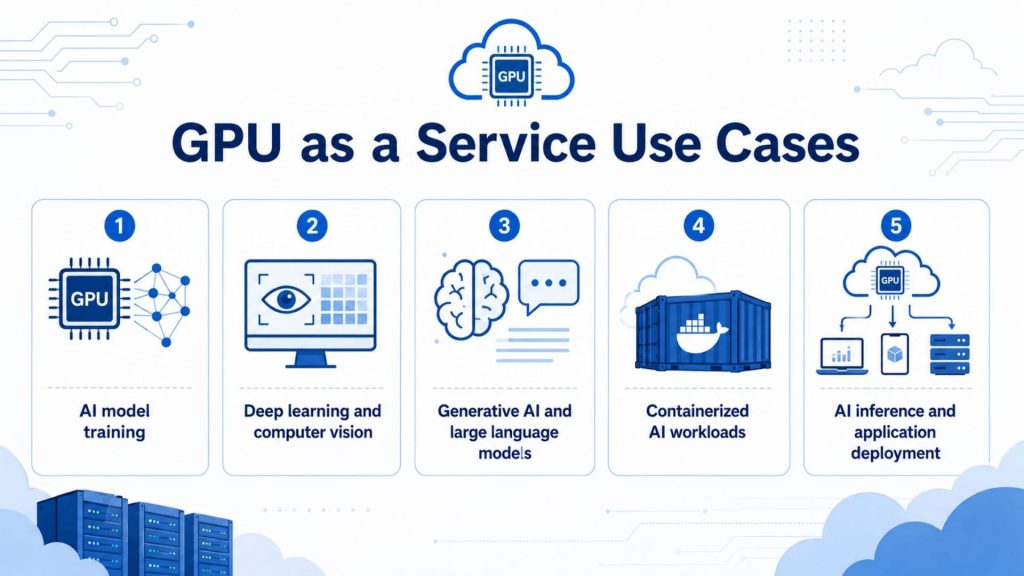
Cloud GPUs are becoming the default compute layer for teams that need performance
7. GPU as a Service Pricing and Cost Factors
Understanding what drives GPU as a Service costs helps organizations budget more accurately and avoid surprises on their cloud bill. The lowest advertised rates may not represent the most economical option, the total cost of ownership includes compute charges, data transfer fees, storage costs, and any additional service charges.
8. When Should Businesses Use GPU as a Service?
GPU as a Service isn’t the right fit for every organization or every workload. But for many teams, it’s the most practical and cost-effective path to production-grade AI compute. The following scenarios highlight when renting GPU power makes more sense than owning it.
8.1 When GPU demand changes over time
AI workloads are rarely constant. Training jobs spike during development, inference demand fluctuates with user traffic, and new projects can require rapid scale-up. Organizations facing variable workload patterns benefit from elastic scaling, if GPU requirements fluctuate significantly, consumption-based pricing typically proves more economical than maintaining peak capacity.
An e-commerce platform can handle sudden spikes in recommendation engine queries during peak seasons by instantly deploying inference-optimised cloud GPU instances, without over-investing in hardware that sits idle the rest of the year.
8.2 When buying GPUs is too expensive upfront
For startups and growing teams, the capital barrier to owning enterprise GPUs is significant. Building an on-premise GPU cluster has historically required $500,000+ in capital expenditure, 6–12 month lead times, and dedicated infrastructure teams. GPUaaS removes that barrier entirely.
Over 65% of AI startups now rely primarily on hosted GPU solutions instead of building their own infrastructure, eliminating upfront capital expenses while accessing the latest hardware generations and scaling resources dynamically.
8.3 When teams need faster AI experimentation
Speed of iteration is a competitive advantage in AI development. By removing hardware procurement from the equation, GPU cloud dramatically shortens product development cycles, a startup experimenting with a new model can test it today, tweak it tomorrow, and deploy it by the end of the week.
Datadog’s State of Cloud Costs 2024 report found that organizations using GPU instances increased their average spend on those instances by 40% year-over-year, with the most widely used GPU type being the least expensive, indicating that many companies are actively leveraging cloud GPUs for AI experimentation and early-stage model development.
8.4 When scaling AI workloads across projects
As AI initiatives multiply across business units, managing separate physical GPU clusters for each team becomes complex and costly. Hybrid approaches combine cloud and on-premises resources, maintaining baseline capacity on-premises while bursting to GPUaaS for peak demand, or using cloud resources for development and testing while running production workloads on dedicated hardware.
Many established companies opt for reserved GPU capacity on cloud platforms to ensure availability and lower pricing for ongoing projects, while using spot instances for budget-conscious, non-time-sensitive training tasks, balancing cost and performance across multiple AI workloads.
8.5 When businesses need production-ready AI infrastructure
Moving from experimentation to production requires infrastructure that is reliable, scalable, and ready to handle real user traffic. With GPU cloud services, organizations gain instant access to ready-to-use AI-optimized hardware environments, accelerating experimentation, development, training, and deployment of AI models without weeks of procurement and setup.
Example: Companies use GPUaaS to train large language models, process medical imaging data, develop autonomous vehicle algorithms, and run real-time recommendation engines, leveraging the ability to burst compute during training phases and scale down for inference to maximize cost-efficiency across the full AI lifecycle.

When renting GPU power makes more sense than owning it
9. FAQs
9.1 Is GPU as a Service cheaper than buying GPUs?
GPU as a Service is often cheaper for short-term, seasonal, experimental, or fast-scaling workloads because businesses do not need to buy expensive GPU hardware, build server infrastructure, manage cooling, or handle maintenance. Instead, they rent GPU resources on demand and pay based on usage. However, if a company runs GPU workloads at very high and stable capacity for years, buying and operating its own GPUs may become more cost-effective in the long run.
9.2 What is GPUaaS used for?
GPUaaS is commonly used for AI model training, machine learning, deep learning, inference, data analytics, scientific computing, simulation, rendering, and other workloads that need high parallel-processing power. For example, Google Cloud describes GPU use for accelerating machine learning, data processing, and graphics-intensive workloads, while NVIDIA DGX Cloud is positioned for building and operating AI workloads at scale.
9.3 What is the difference between cloud GPU and GPUaaS?
A cloud GPU usually refers to GPU hardware made available through a cloud virtual machine or instance, where users configure and manage much of the environment themselves. GPUaaS is a broader service model that provides on-demand GPU access and may include managed infrastructure, orchestration, scaling, monitoring, or AI-ready environments. In simple terms, cloud GPU is often the raw compute resource, while GPUaaS is the service package built around GPU compute.
9.4 Who should use GPU as a Service?
GPU as a Service is suitable for AI startups, data science teams, research labs, enterprises, game studios, 3D rendering teams, and software companies that need powerful GPU compute without investing in physical hardware. It is especially useful for teams with changing workloads, limited infrastructure teams, tight project timelines, or a need to test and scale AI/ML projects quickly before committing to long-term GPU ownership.
If you are ready to accelerate your AI development, explore the Starter Plan today. New users receive a $100 credit automatically after completing registration through promotion banner and logging in. The credit is added to the account within minutes, allowing users to start exploring the platform right away without any setup delay.
This credit is valid for 30 days and includes $10 for GPU Container and $10 for GPU Virtual Machine, $10 for AI Notebook and $70 for AI Inference & AI Studio, along with access to up to 5M tokens with Llama-3.3 and more than 20 state-of-the-art models.
For enterprises or organizations that need customization, private deployment, large-scale GPU resources, or tailored infrastructure support, please contact FPT AI Factory directly through the official contact form. Our team will help assess your requirements and recommend a suitable GPU as a Service solution for your business goals.
In conclusion, GPU as a Service gives businesses and developers a flexible way to access high-performance GPU resources without the cost and complexity of owning physical infrastructure. Whether you are training AI models, running inference, developing applications, or scaling compute-heavy workloads, GPUaaS helps you move faster with on-demand resources and better cost control.
Contact Information:
- Hotline: 1900 638 399
- Email: support@fptcloud.com
Explore more articles
What Is GPU Computing and How Does It Work? A Complete Guide
What is a GPU? A Guide to Graphics Processing Units


