


What is Zero Trust and why has it become an important cybersecurity strategy for modern businesses? As organizations increasingly adopt cloud computing, remote work, AI infrastructure, and distributed applications, Zero Trust helps reduce security risks through continuous verification and granular access control. In this article, FPT AI Factory helps you understand how Zero Trust works, its core principles, architecture components, benefits, challenges, and modern enterprise security use cases.
1. What Is Zero Trust?
Zero Trust is a cybersecurity model based on the principle “never trust, always verify.” Instead of assuming that users, devices, applications, or workloads are safe because they are inside a corporate network, Zero Trust requires every access request to be authenticated, authorized, and continuously validated.
This means no user, device, or application is automatically trusted, whether it is connecting from inside or outside the network. Every request must be checked based on identity, device health, access permissions, behavior, location, and risk level. This approach helps organizations reduce the risk of data breaches, compromised accounts, insider threats, cloud misconfigurations, and lateral movement across systems.
2. How Does Zero Trust Work?
Zero Trust works by continuously validating users, devices, applications, and workloads before granting access to digital resources. Instead of relying on one-time authentication, the model evaluates multiple security factors such as identity, device health, permissions, and workload behavior throughout the session lifecycle. This approach helps organizations strengthen access control and reduce security risks across cloud, hybrid, and AI environments.
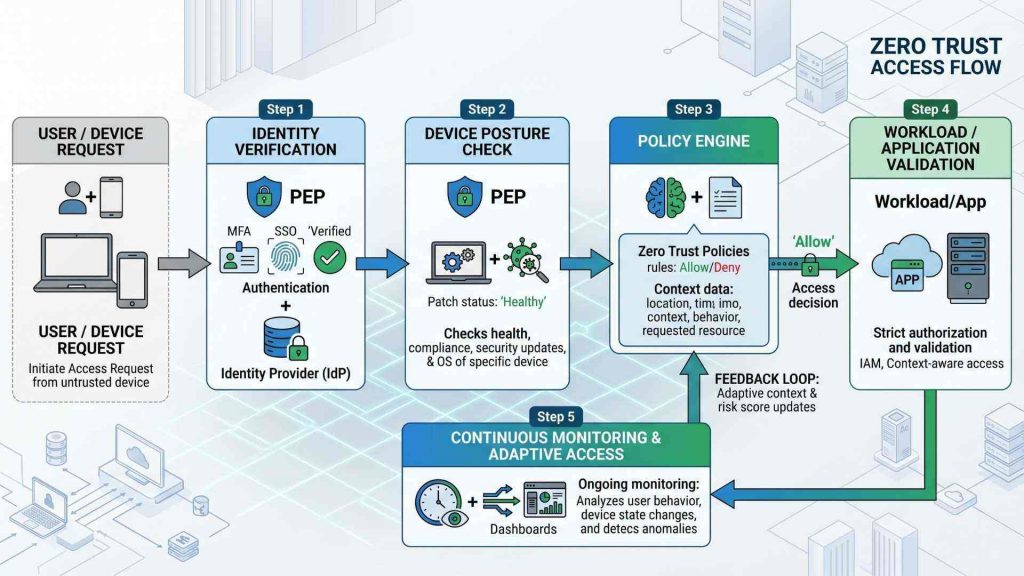
Zero Trust secures access through continuous identity validation, device checks, and policy-based controls
2.1. Identity verification
Identity verification is one of the most important layers in a Zero Trust architecture because every access request must be authenticated before users can access systems or data. Organizations commonly use technologies such as multi-factor authentication (MFA), single sign-on (SSO), biometrics, and identity providers to strengthen authentication processes. This helps reduce risks associated with stolen credentials and unauthorized access.

Zero Trust verifies every user identity before granting access to enterprise systems
2.2. Device posture checks
Zero Trust evaluates whether devices meet security requirements before granting access to resources or applications. Security systems check factors such as operating system updates, antivirus status, encryption, and compliance settings. This helps organizations reduce risks caused by compromised or unmanaged devices. Consequently, any endpoint that fails to meet these stringent criteria is automatically isolated or denied access until it is fully remediated.
2.3. Least-privilege access
Least-privilege access means users and workloads only get the minimum level of access they need to complete a specific task. This approach helps reduce attack surfaces and insider threat risks. For example, a marketing employee may need access to a campaign dashboard, but not to financial records or backend databases. If the account is compromised, least-privilege access helps limit the damage because the attacker cannot freely move across the entire system.
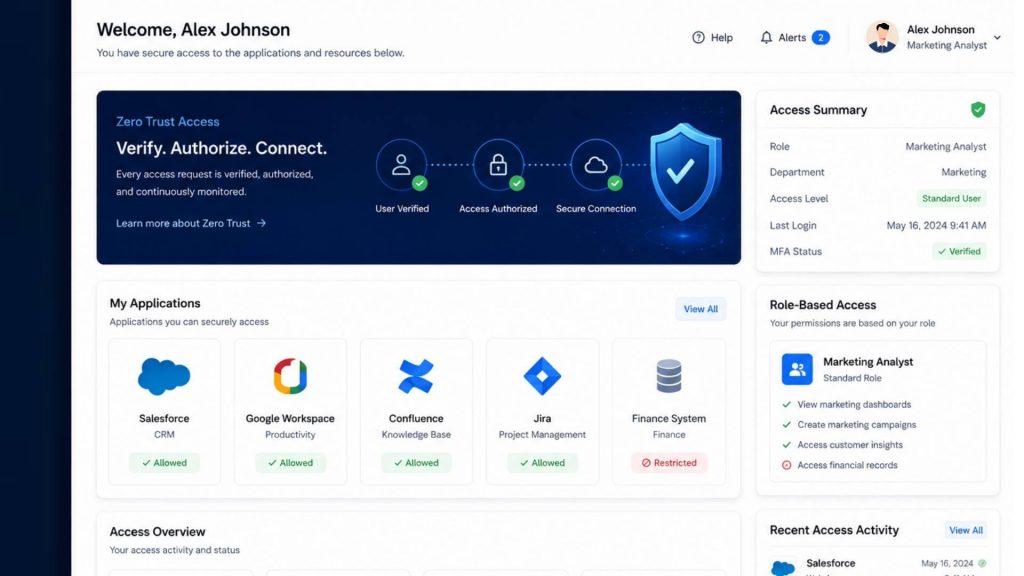
Least-privilege access minimizes unnecessary exposure across enterprise systems
2.4. Continuous monitoring and validation
Continuous monitoring allows organizations to track user activity, workload behavior, and network traffic in real time. Suspicious activity can automatically trigger alerts or access restrictions before threats spread further. This improves visibility and strengthens incident response capabilities across distributed environments. As a result, security teams can transition from a reactive posture to a proactive defense, neutralizing anomalies before they escalate into full-scale breaches.
2.5. Policy-based access control
Policy-based access control evaluates requests using factors such as identity, device type, workload sensitivity, and contextual risk. Access permissions can automatically change depending on real-time security conditions and predefined policies. This helps organizations apply more adaptive and granular security controls. Hence, a user might be granted full access under normal office conditions but restricted to read-only mode when connecting from an unfamiliar public network.
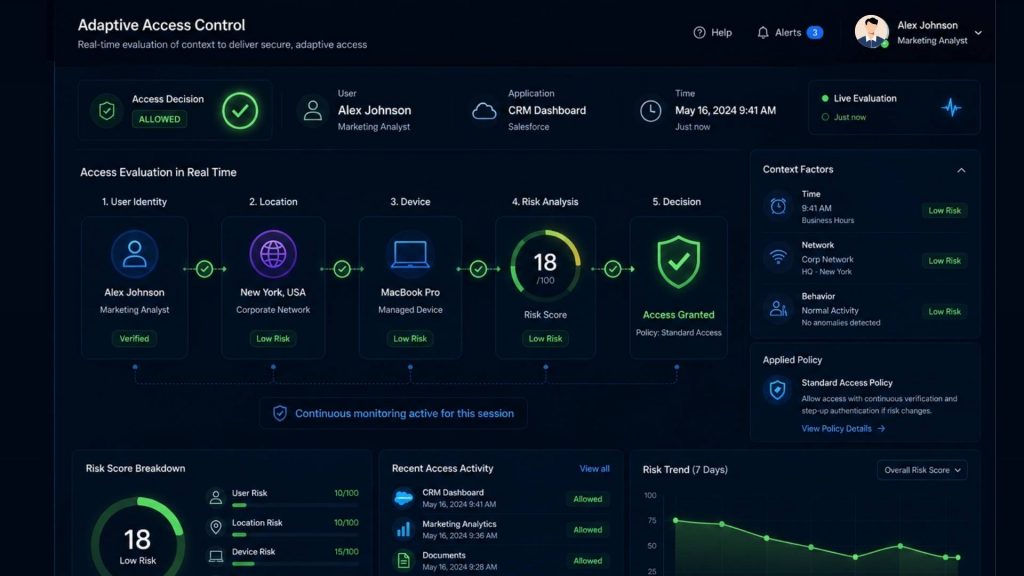
Access policies dynamically adjust permissions based on contextual risk
2.6. Application and workload verification
Zero Trust continuously validates applications, APIs, containers, and workloads before allowing communication between systems. This helps organizations secure cloud-native applications, AI workloads, and distributed infrastructures from unauthorized interactions. Moreover, by treating every microservice-to-microservice interaction as potentially hostile, the system effectively prevents attackers from exploiting trusted software components.
3. Core Principles of Zero Trust
Zero Trust is built around several security principles designed to reduce implicit trust and strengthen access control across enterprise environments. Here are some core principles that form the foundation of a Zero Trust architecture.
3.1 Never trust, always verify
Zero Trust assumes that no user, device, or workload should be trusted automatically, even inside the corporate network. Every request must be continuously authenticated and validated before access is granted. This helps organizations reduce risks associated with unauthorized access and compromised credentials.
3.2. Assume breach
The Zero Trust model assumes attackers may already exist inside the environment and focuses on minimizing damage. Security teams continuously monitor activity and isolate workloads to contain threats faster. This improves resilience against ransomware and lateral movement attacks.
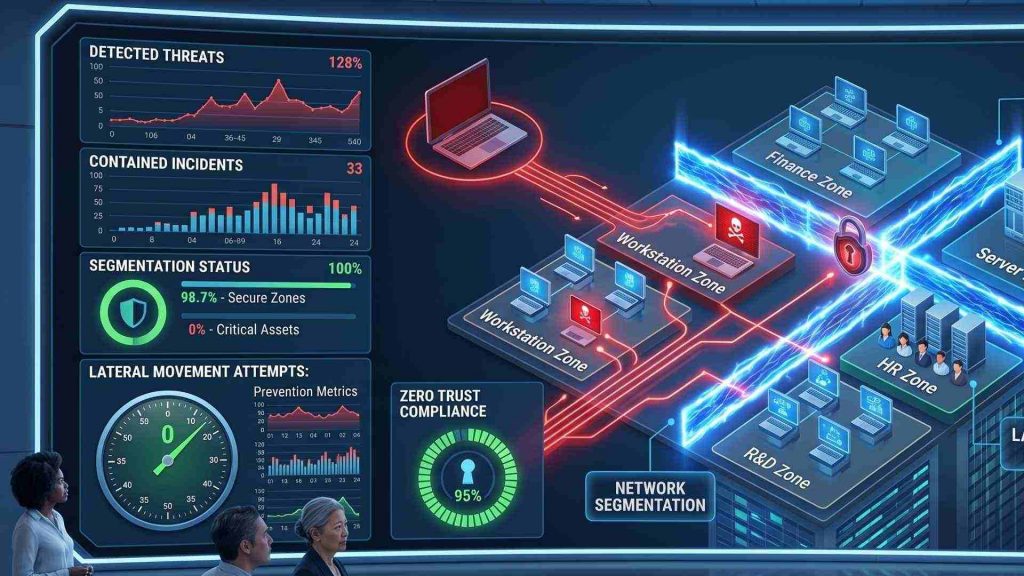
Zero Trust assumes threats may already exist inside the environment and focuses on limiting damage
3.3. Apply least-privilege access
Least-privilege access limits permissions to only the resources necessary for a specific task or role. Organizations can reduce unnecessary exposure and improve workload protection through granular access controls. This approach also strengthens compliance and governance management.
3.4. Use microsegmentation
Microsegmentation divides systems and workloads into isolated security zones to prevent attackers from moving freely across networks. Even if one environment is compromised, threats remain contained within smaller segments. This improves enterprise security visibility and attack containment.
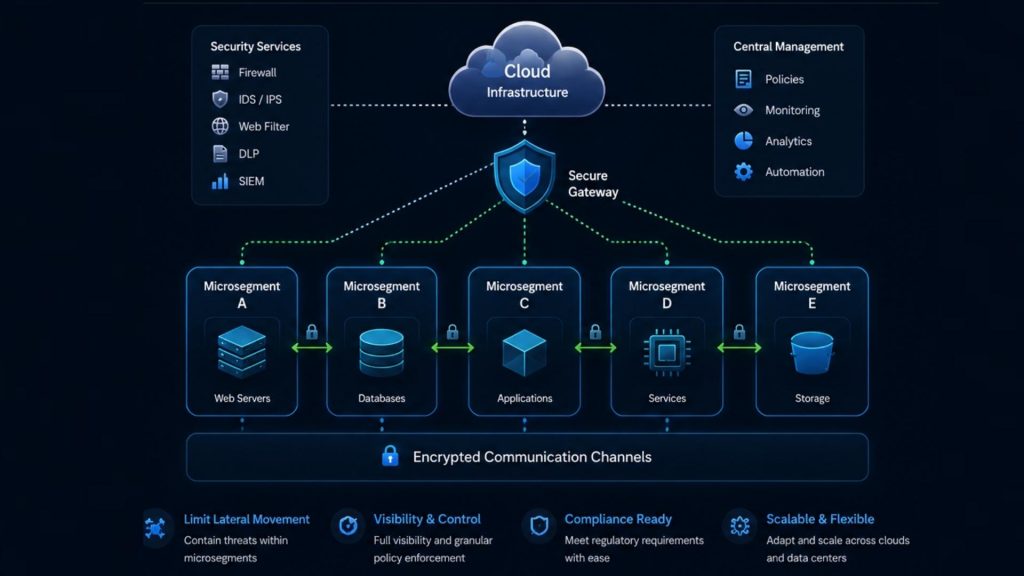
Microsegmentation helps contain threats by isolating workloads and systems
3.5. Verify users, devices, applications, and workloads
Zero Trust continuously validates identities, device posture, applications, APIs, and workloads before granting access to resources. This helps organizations secure cloud-native environments and AI infrastructures more effectively. Continuous validation also improves monitoring and risk detection capabilities.
3.6. Zero Trust Network Access (ZTNA)
ZTNA provides secure access to applications without exposing the full internal network like traditional VPNs. Access decisions are based on identity, device health, and security policies. This improves security for remote work and cloud-based environments.
4. Zero Trust and the NIST Framework
The concept of Zero Trust is widely supported by the National Institute of Standards and Technology (NIST). Rather than treating Zero Trust as a single product or technology, NIST defines it as a cybersecurity framework that continuously verifies users, devices, applications, and workloads before granting access to resources.
According to NIST, a Zero Trust Architecture is built around several key concepts:
- Continuous verification: Every access request is authenticated and authorized regardless of network location.
- Least-privilege access: Users and systems receive only the permissions necessary to perform their tasks.
- Assume breach: Security controls are designed with the expectation that attackers may already be present within the environment.
- Dynamic policy enforcement: Access decisions are based on identity, device health, location, behavior, and other contextual factors.
- Comprehensive monitoring: Organizations continuously collect and analyze security telemetry to detect threats and respond quickly.
The NIST framework provides a practical blueprint for organizations implementing Zero Trust across cloud environments, data centers, remote workforces, and hybrid infrastructures. By following NIST guidelines, businesses can build a more resilient security model that reduces attack surfaces and limits the impact of potential breaches.
5. Key Components of a Zero Trust Architecture
A Zero Trust architecture combines multiple security technologies to continuously verify access and protect digital resources across modern environments. Here are the key components popularly used in a Zero Trust architecture:
- Identity and Access Management (IAM): IAM manages user identities, authentication, and access permissions across systems and applications. It ensures only verified users can access approved resources.
- Multi-Factor Authentication (MFA): MFA adds extra verification layers beyond passwords, such as biometrics or authentication apps. This helps reduce unauthorized access risks.
- Endpoint Detection and Response (EDR): EDR continuously monitors endpoint devices for suspicious activity and security threats. It helps organizations detect and respond to attacks faster.
- Security Information and Event Management (SIEM): SIEM platforms collect and analyze security logs from multiple systems in real time. This improves visibility and threat detection capabilities.
- Microsegmentation Tools: Microsegmentation isolates networks and workloads into smaller security segments. This helps contain attacks and reduce lateral movement risks.
- Policy Engines and Enforcement Points: Policy engines evaluate access requests based on identity, device posture, and contextual risk. Enforcement points apply security decisions in real time.
- Zero Trust Network Access (ZTNA): ZTNA provides secure, identity-based access to specific applications without exposing the full network. This improves security for remote and cloud environments.
- Continuous Monitoring and Analytics: Continuous monitoring tools track user behavior, workloads, and network activity in real time. Analytics help identify suspicious patterns and policy violations.
- Data Encryption and Workload Protection: Encryption protects sensitive data across cloud and hybrid infrastructures. Workload protection tools secure applications, APIs, containers, and AI environments.
- Cloud Security Posture Management: Cloud security posture management identifies misconfigurations, vulnerabilities, and compliance issues across cloud environments. This improves overall cloud security visibility and governance.
These components form the foundation of a strong Zero Trust architecture capable of protecting users, workloads, applications, and cloud environments. By combining identity verification, segmentation, monitoring, and workload protection, organizations can reduce security risks and improve operational visibility.

A Zero Trust architecture combines identity, monitoring, and workload protection technologies
6. Zero Trust vs Traditional Network Security
Zero Trust and traditional network security follow very different approaches when protecting users, devices, applications, and enterprise systems. Here is a table comparing the differences between Zero Trust security and traditional network one:
| Criteria | Zero Trust Security | Traditional Network Security |
| Security model | Identity-centric security | Perimeter-based security |
| Trust assumption | Never trust by default | Trust users inside the network |
| Access control | Granular and policy-based | Broad network-level access |
| Network perimeter | Assumes no fixed perimeter | Relies on defined network perimeter |
| User and device verification | Continuous verification | Limited initial verification |
| Threat containment | Strong microsegmentation and isolation | Higher risk of lateral movement |
| Best use case | Cloud, hybrid work, AI infrastructure | Traditional on-premise environments |
| Example | ZTNA for cloud applications | VPN-based internal access |
Understanding these differences helps organizations evaluate which security model better fits modern cloud, AI, and remote work environments. As businesses adopt distributed infrastructures and cloud-native applications, Zero Trust provides stronger visibility, access control, and threat containment capabilities.
7. Benefits of Zero Trust
Zero Trust provides important security and operational benefits for organizations managing cloud environments, remote workforces, AI systems, and distributed infrastructures. Here are some key benefits of implementing Zero Trust:
- Reduces Data Breach Risks: Continuous verification helps reduce unauthorized access and sensitive data exposure.
- Limits Lateral Movement: Microsegmentation and least-privilege access help contain attacks more effectively.
- Improves Visibility and Access Control: Continuous monitoring improves visibility into user activity, workloads, and access behavior.
- Supports Remote and Hybrid Work: Zero Trust enables secure remote access without exposing the full corporate network.
- Strengthens Cloud and Application Security: Identity-based access control helps secure cloud applications, APIs, and workloads.
- Helps Contain Ransomware Attacks: Workload isolation and restricted permissions help prevent ransomware from spreading.
- Supports Hybrid and Multi-Cloud Environments: Zero Trust works well across public, private, and hybrid cloud infrastructures where traditional network boundaries no longer exist.
- Improves Compliance and Governance: Continuous monitoring, logging, and access controls help organizations meet regulatory and compliance requirements more effectively.
These benefits make Zero Trust an effective security strategy for modern cloud, hybrid, and AI-driven environments. Organizations adopting Zero Trust can improve resilience, visibility, and workload protection across enterprise infrastructures.

Zero Trust improves visibility, reduces breach risks, and strengthens cloud security
8. Common Zero Trust Use Cases
Different industries adopt Zero Trust to improve access control, reduce security risks, and strengthen workload protection across distributed infrastructures. Here are some of the most common Zero Trust use cases in modern organizations:
8.1. Secure remote workforce access
Organizations use Zero Trust to securely support remote employees without exposing internal networks or granting excessive permissions. Identity verification, device posture checks, and continuous monitoring help ensure users only access approved systems and applications.
For example, Sandvik transitioned 20,000 global employees to Zero Trust application access in fewer than five days (Sandvik Case Study | Customer Stories | ZScaler, n.d.). Zero Trust helped the company reduce VPN dependency, enable secure work-from-anywhere operations, and manage employee access more securely.
8.2. Protect cloud applications and data
Zero Trust helps organizations secure cloud applications and sensitive data through continuous identity verification and granular access control. Continuous monitoring also improves visibility into user activity across SaaS platforms and cloud-native environments.
For instance, Zscaler uses Zero Trust Cloud to protect workload traffic, workload-to-workload communication, and mission-critical applications across multicloud environments (ZScaler Case Study | ZScaler on ZScaler, n.d.). It also helps secure sensitive data and reduce risks caused by cloud misconfigurations.
8.3. Secure third-party and vendor access
Third-party vendors and contractors often require temporary access to enterprise systems, which can introduce additional security risks. Zero Trust limits vendor permissions, continuously monitors activity, and isolates access to reduce exposure risks.
For example, a contractor may only access a testing environment instead of the full corporate network. This works because Zero Trust applies workload isolation and granular identity-based permissions.
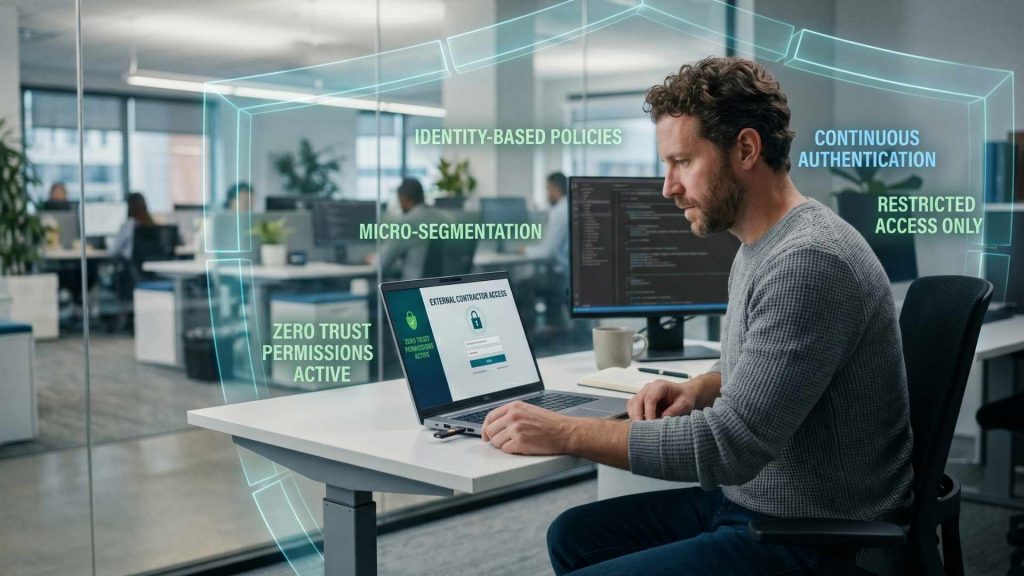
Third-party access can be restricted through workload isolation and granular permissions
8.4. Protect sensitive business systems
Critical systems such as healthcare platforms, ERP systems, and customer databases require stronger access controls and workload segmentation. Zero Trust continuously validates user authorization and limits unnecessary permissions to protect sensitive environments.
For instance, Main Line Health adopted Zero Trust and unified data security to protect sensitive patient data and streamline access to medical devices for mobile clinicians (Main Line Health Case Study | ZScaler, n.d.). Zero Trust application can protect sensitive business systems through granular controls and validated access.
8.5. Secure AI and data workloads
AI infrastructure environments often involve shared GPU resources, APIs, and sensitive datasets that require stronger identity-based security. Zero Trust helps organizations secure AI workloads through workload isolation, continuous monitoring, and granular access management.
For example, research on Zero Trust for AI-powered cloud systems notes that distributed AI workloads face security challenges such as model poisoning, adversarial attacks, and model extraction attempts (Obbu, 2025). This supports the need for Zero Trust controls around datasets, model access, APIs, and inference workloads.
Businesses running AI workloads on GPU infrastructure can strengthen security using the GPU Virtual Machine service from FPT AI Factory. This works because workload segmentation and identity-based permissions help reduce unauthorized access risks across AI environments.

FPT AI Factory’s GPU Virtual Machine service (Source: FPT AI Factory)
9. Zero Trust in Modern Cloud and AI Infrastructure
Modern cloud and AI infrastructure require stronger security controls because workloads, APIs, users, and applications operate across highly distributed environments. Here are some important ways Zero Trust helps organizations:
9.1. Zero Trust for cloud-native applications
Cloud-native applications rely heavily on APIs, microservices, and distributed workloads operating across dynamic environments. Zero Trust helps secure these systems by continuously validating service identities and enforcing granular security policies between workloads. This improves visibility and reduces unauthorized access risks across cloud infrastructures.
9.2. Zero Trust for containerized workloads
Containerized workloads require strong workload-level security because multiple services often operate across shared infrastructure. Zero Trust applies segmentation, identity-based permissions, and runtime monitoring to secure communication between containers and workloads. This helps reduce lateral movement and unauthorized access risks across Kubernetes and AI environments.
9.3. Identity-based access for AI infrastructure
AI infrastructure environments often involve shared GPU resources, APIs, and collaborative development platforms that require stronger access management. Identity-based access control ensures only authorized users and workloads can access AI systems and production environments. Continuous validation also helps reduce risks associated with credential misuse and unauthorized access.
9.4. Securing AI models, APIs, and inference workloads
AI models, APIs, and inference workloads are increasingly becoming targets for unauthorized access and misuse. Zero Trust continuously authenticates requests, validates workload identities, and monitors communication between AI services and production systems. This helps organizations better secure AI applications operating in production environments.
>> Explore: How to Deploy AI Model: A Step-by-Step Guide 2026
10. Challenges of Implementing Zero Trust
Although Zero Trust provides strong security benefits, implementation can still be challenging across cloud, hybrid, and legacy environments. Here are some common challenges organizations may face when adopting a Zero Trust architecture.
10.1 Legacy system compatibility
Many legacy systems do not support modern identity verification or granular access control required by Zero Trust. Older applications may rely on outdated authentication methods and broad network permissions. This can make integration and policy enforcement more difficult during implementation. Organizations often need additional modernization efforts, security layers, or infrastructure upgrades to apply Zero Trust effectively across legacy environments.
10.2. Implementation complexity
Zero Trust requires coordination across users, devices, workloads, applications, and security policies. Organizations often need to integrate multiple tools and redesign existing security workflows. Large-scale deployments may require phased implementation and long-term planning. Large enterprises may also need to integrate multiple security tools and platforms to support Zero Trust operations.

Zero Trust implementation often involves multiple systems and security layers
10.3. User experience and access friction
Zero Trust introduces additional authentication and verification steps that may impact user convenience if not implemented properly. Frequent MFA requests, device checks, or restricted permissions can create frustration for employees and external users. Organizations must balance strong security controls with usability to avoid reducing productivity or slowing operational workflows.
10.4. Policy management
Zero Trust relies heavily on security policies that define how users, devices, workloads, and applications can access resources. As organizations grow and infrastructure changes, these policies must be continuously updated to reflect evolving business requirements and risk conditions. Poorly configured policies may create security gaps or unintentionally block legitimate access requests.
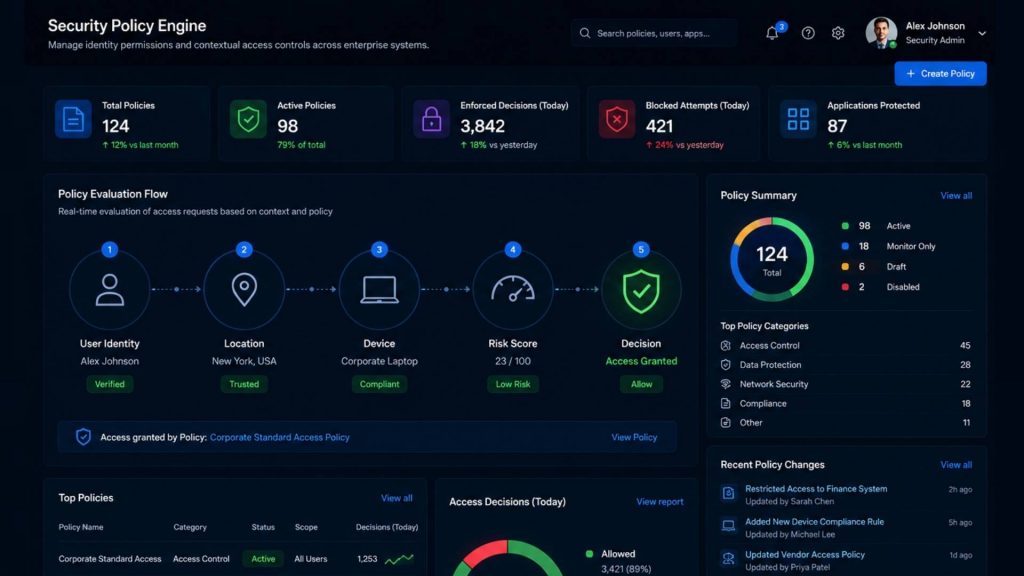
Access policies must continuously evolve with business and infrastructure changes
10.5. Skill and resource requirements
Successful Zero Trust implementation often requires specialized cybersecurity expertise, infrastructure planning, and operational resources. Organizations may need security engineers, cloud architects, compliance specialists, and monitoring teams to design and maintain the environment effectively. Smaller businesses may face challenges related to staffing, training, or budget limitations during deployment.
10.6. Continuous monitoring requirements
Zero Trust depends on real-time monitoring, analytics, and threat detection across users, devices, APIs, and workloads. Maintaining visibility across distributed environments can generate large amounts of operational data. Organizations must monitor user activity, workload behavior, device health, and API communication to quickly identify suspicious actions or policy violations. Continuous monitoring is essential for detecting threats early and maintaining effective Zero Trust protection.
Containerized AI workloads especially require continuous monitoring, workload isolation, and permission management to reduce risks when multiple AI workloads run on shared infrastructure. Solutions such as GPU Container from FPT AI Factory help organizations manage containerized AI environments more securely and efficiently.
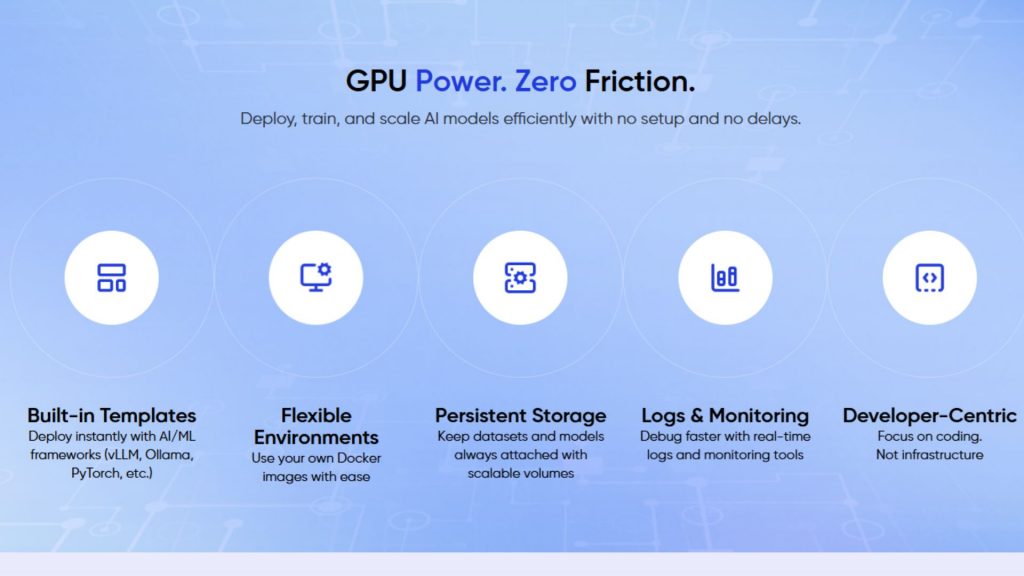
GPU Container’s benefits (Source: FPT AI Factory)
11. FAQs
11.1. Is Zero Trust a product or a strategy?
Zero Trust is a cybersecurity strategy, not a single product. Organizations implement it using multiple tools such as identity management, MFA, endpoint security, and monitoring solutions. The goal is to continuously verify users, devices, and workloads before granting access.
11.2. What is the difference between Zero Trust and VPN?
Traditional VPNs often provide broad network access after login, while Zero Trust limits users to only authorized applications or resources. Zero Trust also continuously verifies user activity and device security throughout the session. This makes it more effective for cloud environments and remote work.
11.3. What is Zero Trust Network Access?
Zero Trust Network Access (ZTNA) is a security model that provides secure, identity-based access to specific applications without exposing the full network. It helps organizations reduce attack surfaces and improve access control. ZTNA is commonly used for remote work and cloud application security.
11.4. Why is Zero Trust important for cloud security?
Cloud environments involve distributed users, applications, APIs, and workloads operating outside traditional network boundaries. Zero Trust improves cloud security by continuously validating access requests and limiting unnecessary permissions. This helps organizations better protect sensitive data, AI workloads, and cloud-native applications.
Zero Trust helps organizations strengthen cybersecurity by continuously verifying users, devices, applications, and workloads before granting access to sensitive resources. The model improves visibility, limits unauthorized access, and reduces security risks across cloud, hybrid, and AI environments.
With FPT AI Factory’s Serverless Inference, businesses can deploy and run AI models in production more efficiently while reducing operational complexity. FPT offers a $100 free trial credit program for users to explore the platform. For enterprises with customization or large-scale needs, please contact the FPT AI Factory team via the official contact form for dedicated support.
Contact Information:
- Hotline: 1900 638 399
- Email: support@fptcloud.com
Read more:
- What is Data Annotation? Types, Challenges, Use Cases
- What is Pipeline in Machine Learning? Why It’s Important
- What is a Data Catalog? Types, Benefits, Core Features


