


What is JupyterHub, and how does it transform the way data science teams collaborate on complex AI projects? By providing a centralized, multi-user workspace, this powerful platform eliminates local infrastructure bottlenecks and streamlines machine learning workflows across entire organizations. Partner with FPT AI Factory to effortlessly deploy and manage these scalable environments, empowering your team to focus entirely on driving innovation rather than managing servers.
1. What is JupyterHub?
To understand what JupyterHub is, it is helpful to first look at why teams need it. As notebook-based workflows become more common in data science, AI development, research, and education, many organizations need a simpler way to give multiple users access to consistent, shared computing environments. The section below explains how JupyterHub solves this challenge.
1.1. Definition of JupyterHub
JupyterHub is an open-source system that manages multiple instances of Jupyter Notebook for different users. It handles user authentication, creates individual environments, and connects users to their own notebooks running on shared resources such as servers or cloud infrastructure.
Instead of requiring each user to install and configure their own setup, JupyterHub provides a centralized, ready-to-use environment. This makes it easier to manage resources, ensure consistency, and scale usage for teams of any size.
1.2. JupyterHub vs Jupyter Notebook: What is the difference?
JupyterHub and Jupyter Notebook are closely connected, but they are not the same thing. Jupyter Notebook is typically used by one person on a local or dedicated environment, while JupyterHub is built to manage multi-user access to notebook environments on shared infrastructure.
| Criteria | Jupyter Notebook | JupyterHub |
| Usage model | Single-user environment | Multi-user platform |
| Deployment | Typically runs locally on a personal machine | Runs on a centralized server or cloud infrastructure |
| User management | No built-in user management | Supports authentication and multiple users |
| Scalability | Limited to local machine resources | Scales across servers, clusters, or cloud |
| Setup | Requires manual installation per user | Centrally managed and pre-configured for users |
| Collaboration | Limited sharing (file-based) | Easier collaboration with shared infrastructure |
| Use cases | Individual projects, learning, experimentation | Teams, classrooms, enterprises, research groups |
If you are new to notebook-based workflows, you can also read our guide on how to use Jupyter Notebook to better understand how notebooks support coding, documentation, and experimentation in AI projects.
>> Read more: Jupyter Notebook vs JupyterLab: Which one should you choose?
2. How JupyterHub works?
JupyterHub works by coordinating multiple components to provide each user with their own isolated Jupyter Notebook environment, all managed through a centralized system. At a high level, it acts as a bridge between users and individual notebook servers, handling authentication, resource allocation, and request routing. The architecture of JupyterHub consists of three main components:
- Hub (core system): The Hub manages user authentication, handles login requests, and controls how notebook servers are created and assigned to each user.
- Proxy (request router): The proxy is the public-facing entry point. It receives user requests and routes them to the correct notebook server based on the user’s session.
- Single-user Notebook Servers: Each user gets their own dedicated notebook server, which runs independently and ensures isolated working environments.
Here is a breakdown of the standard user journey:
- Connection: The user connects to the platform using a standard web interface.
- Verification: The central Hub manages the login and identity verification process.
- Provisioning: Once authenticated, the system automatically allocates a personalized, independent server instance.
- Routing: An internal proxy seamlessly directs all network traffic to that specific workspace.
- Execution: The user can then write code and run experiments with the same experience as a local setup.
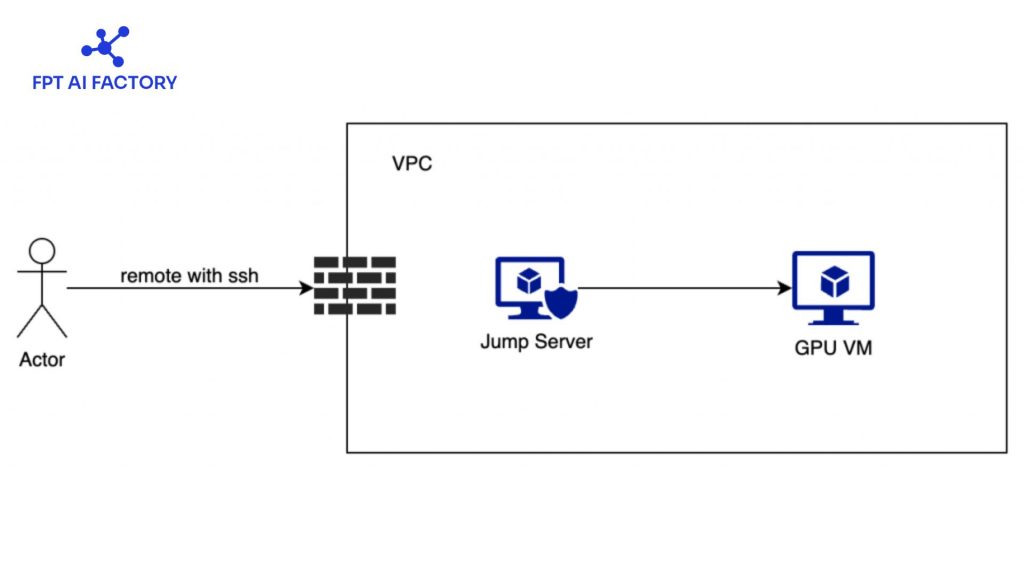
JupyterHub works by coordinating multiple components (Source: FPT AI Factory)
For teams evaluating infrastructure choices behind notebook environments, the comparison between container vs virtual machine can help clarify how different deployment models affect scalability, isolation, and resource efficiency.
3. Who should use JupyterHub?
JupyterHub is designed for environments where multiple users need access to shared computing resources while maintaining separate, secure workspaces. It is especially suitable for organizations that want to simplify setup, centralize infrastructure, and enable collaboration at scale.
3.1. Teams and research labs
JupyterHub is widely used by data science teams and research labs that need a shared environment for experimentation and analysis. Each user gets an isolated workspace while still accessing common datasets and compute resources. This setup helps teams collaborate more effectively, avoid environment inconsistencies, and streamline workflows such as data exploration, model development, and reproducible research.
>> Read more: Top best AI tools need to know for researchers in 2026
3.2. Classrooms and training environments
This setup helps teams collaborate more effectively, avoid environment inconsistencies, and streamline workflows such as data exploration, model development, and reproducible research. This reduces setup time, ensures consistency across all users, and allows instructors to monitor, support, and even access student work when needed.
3.3. Enterprise teams with shared notebook workflows
In enterprises, JupyterHub is used to support large-scale data science and AI workflows across teams. It enables centralized management of resources, secure access control, and scalable infrastructure for handling large datasets and complex workloads.
JupyterHub is used to support large-scale data science and AI workflows (Source: FPT AI Factory)
4. Applications of JupyterHub in real life
JupyterHub is used across many industries where teams need shared access to data, computing resources, and collaborative environments. Its ability to provide multi-user notebook access makes it suitable for both technical and non-technical workflows.
| Field | How JupyterHub is used |
| Education | Provides students with ready-to-use coding environments for teaching programming, data science, and AI without local setup |
| Research & Academia | Enables researchers to collaborate on data analysis, simulations, and reproducible experiments using shared infrastructure |
| Data Science & AI teams | Supports collaborative model development, data exploration, and experiment tracking across multiple users |
| Finance & Banking | Used for risk modeling, fraud detection, and financial data analysis with secure, centralized environments |
| Healthcare & Life Sciences | Helps analyze medical data, run bioinformatics workflows, and support research in genomics and drug discovery |
| Technology companies | Powers internal data platforms where teams build, test, and deploy machine learning models at scale |
| Government & public sector | Used for data analysis, policy modeling, and handling large public datasets securely |
| Training & corporate learning | Provides hands-on environments for employee training in coding, analytics, and AI without complex setup |
5. Challenges of self-hosting JupyterHub
Self-hosting JupyterHub gives full control over infrastructure, but it also introduces several technical and operational challenges. These challenges often become more complex as the system scales or integrates with enterprise environments.
5.1. Complex infrastructure setup and maintenance
Self-hosting JupyterHub gives full control over infrastructure, but it also introduces several technical and operational challenges. These challenges often become more complex as the system scales or integrates with enterprise environments.
Additionally, troubleshooting issues can be difficult because problems may come from the underlying infrastructure (networking, storage, or cloud setup), not just JupyterHub itself.
5.2. Resource management at scale
JupyterHub does not manage compute resources on its own, it relies on the underlying infrastructure to allocate CPU, GPU, and memory. As usage grows, ensuring fair resource allocation, avoiding bottlenecks, and maintaining performance across multiple users becomes increasingly challenging, especially in large-scale deployments.
If your workloads require high-performance compute for model training or large-scale experimentation, understanding what GPU Computing is can help you plan resources more effectively.
5.3. Security and access control overhead
Self-hosted JupyterHub requires implementing authentication systems, managing user access, and ensuring secure isolation between environments. This includes integrating with OAuth, LDAP, or other identity providers.
In addition, maintaining security, such as handling certificates, network restrictions, and system vulnerabilities, adds ongoing operational overhead and requires dedicated expertise.
6. Managed notebook vs self-hosted JupyterHub
When deploying JupyterHub for teams or organizations, there are two main approaches: self-hosted JupyterHub and managed notebook platforms. While self-hosting offers full control, managed solutions are increasingly preferred because they simplify infrastructure, reduce operational burden, and support end-to-end AI workflows more effectively.
6.1. When to choose a self-hosted JupyterHub?
Deploying JupyterHub on your own servers is the ideal route when absolute authority over data, settings, and hardware is non-negotiable. This model is particularly advantageous for:
- Teams equipped with a robust DevOps workforce and pre-established IT infrastructure.
- Enterprises governed by rigid data security protocols and regulatory compliance.
- Specialized R&D departments require deeply personalized computing environments.
Despite these benefits, this level of control demands significant effort. The deployment process requires managing server architecture, identity verification, file systems, and scalability, making it a resource-intensive and technically demanding endeavor.
6.2. When to choose a managed notebook platform
Managed notebook platforms are often a better choice for most businesses because they remove the complexity of infrastructure management and allow teams to focus on building AI applications. Compared to self-hosted JupyterHub, managed platforms provide several key advantages:
- Ready-to-use infrastructure: No need to set up servers, Kubernetes, or networking; everything is pre-configured and maintained by the provider.
- Faster setup and deployment: Users can start working in minutes instead of spending hours or days configuring environments.
- Lower operational overhead: Updates, monitoring, security, and maintenance are handled automatically, reducing the need for dedicated DevOps resources.
- Lower operational overhead: Updates, monitoring, security, and maintenance are handled automatically, reducing the need for dedicated DevOps resources.
- End-to-end AI workflow support: Many managed platforms integrate the full AI lifecycle, from data processing and experimentation to training and deployment, helping teams move faster from idea to production.
In this context, managed solutions such as AI Notebook offer a more practical path for many businesses. Available on FPT AI Factory, AI Notebook provides a pre-configured Jupyter environment, flexible CPU and GPU usage, clear pricing visibility, and a more streamlined workflow for AI development.
To help new users get started, FPT AI Factory offers a 30-day Starter Plan with $100 in free credits across AI Notebook, GPU services, Serverless Inference, and Model Fine-tuning, along with access to 20+ AI models. The full $100 credit is available immediately after login, so you can start using it right away without any setup or approval steps.
For enterprises or organizations with needs for customization or large-scale deployment, please contact FPT AI Factory via the official contact form to receive tailored consultation and solutions.
In conclusion, understanding what JupyterHub is can help teams choose the right way to manage notebook-based workflows at scale. JupyterHub is a strong option for organizations that need shared notebook environments, centralized infrastructure, and separate workspaces for multiple users. However, for many businesses, a managed notebook platform may be the more practical choice because it reduces setup complexity, lowers operational overhead, and makes it easier to scale AI development. With solutions such as AI Notebook, FPT AI Factory helps teams move from experimentation to production more efficiently in a centralized environment.
Contact information
Hotline: 1900 638 399
Email: support@fptcloud.com
Explore related articles
Jupyter Notebook vs JupyterLab: Which one should you choose?
What Is AI Infrastructure? Key Components and How It Works
What is Fine-Tuning? An In-Depth Guide for When to Use


