AI agents are becoming a major part of how businesses automate work, connect data, and build more intelligent applications. Unlike basic chatbots that only respond to prompts, AI agents can understand goals, plan tasks, use tools, access data, and take actions across systems. In this article, FPT AI Factory explains “what are AI agents?”, how they work, and what enterprises need to build and deploy them effectively.
1. What are AI agents?
AI agents are artificial intelligence systems designed to understand a goal, make decisions, and take actions to complete a task. They can process information, plan next steps, use external tools, and interact with software systems or data sources with different levels of human supervision.
The main difference between an AI agent and a standard AI model is action. A language model can generate an answer, but an AI agent can use that model as part of a larger workflow. For example, it may read a document, search a database, call an API, summarize the result, and trigger the next step in a business process. In simple terms, AI agents are built to do more than respond. They are designed to reason, act, and complete goal-oriented workflows.
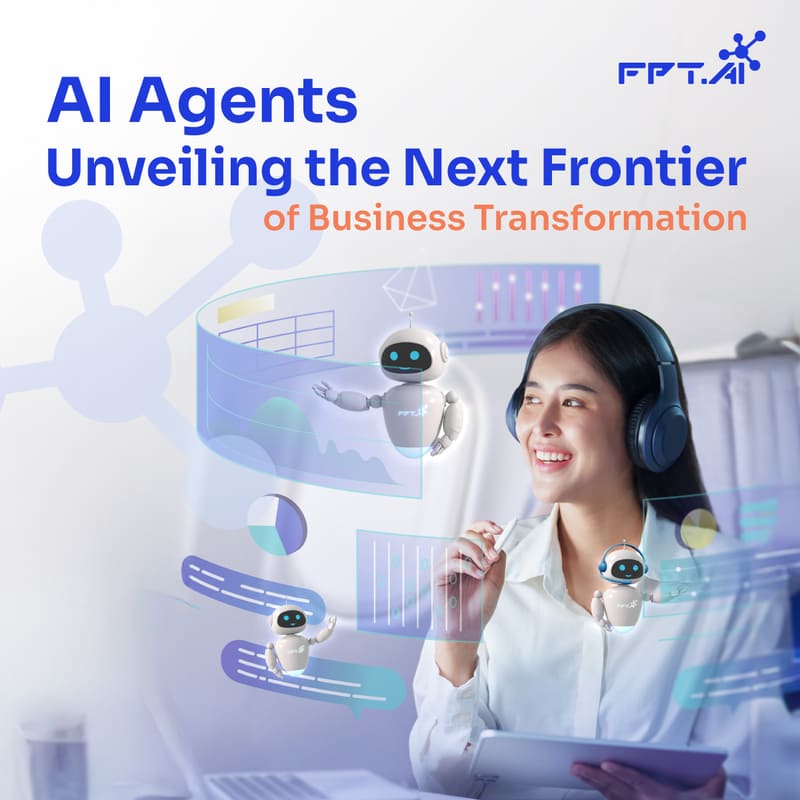
AI agents help businesses move beyond simple automation by reasoning, using tools, and completing goal-oriented workflows across software and data systems
2. What are the core components of an AI agent?
The core components of an AI agent are the parts that allow it to understand goals, access context, make decisions, use tools, and complete workflows. A modern AI agent usually includes several connected layers.
| Component | Role in an AI agent |
| Reasoning model | Interprets requests, evaluates context, and decides the next action |
| Instructions and goals | Define what the agent should do and what rules it must follow |
| Memory | Stores useful context, task history, or user preferences |
| Tools and APIs | Allow the agent to search, calculate, update records, send messages, or call external systems |
| Knowledge base or RAG | Connects the agent with enterprise documents, data, and business knowledge |
| Orchestration layer | Manages task planning, tool calls, workflow steps, and execution order |
| Guardrails and monitoring | Help control safety, permissions, output quality, and human approval |
These components are important because an AI agent is not just one model. It is a system that combines model intelligence with data access, tool execution, and operational controls.
3. How AI agents work
AI agents work by turning a user goal into a sequence of actions. Instead of answering only once, the agent can break the goal into smaller steps, gather context, choose tools, execute tasks, and review the result. A typical AI agent workflow includes:
| Step | What happens |
| Goal input | The user gives the agent a task or objective |
| Task interpretation | The agent understands the request and identifies what needs to be done |
| Planning | The agent breaks the goal into smaller steps |
| Context retrieval | The agent pulls information from files, databases, knowledge bases, APIs, or applications |
| Tool use | The agent selects tools to search, calculate, update, create, or trigger actions |
| Execution | The agent completes the task or prepares the output |
| Feedback | The agent reviews the result or asks for human approval when needed |
For example, a customer support AI agent can help check a refund request. After receiving the customer’s question, the agent identifies the order, retrieves payment and refund data from connected systems, checks the refund policy, and prepares a response with the latest status. If the refund is delayed or requires approval, the agent can create a support ticket or escalate the case to a human agent. This shows how AI agents can move beyond answering questions and support multi-step workflows across business systems.
This workflow is what makes AI agents useful for more complex business tasks. They can move across multiple systems, use the right tool at the right step, and continue working until the task is completed or requires human input.
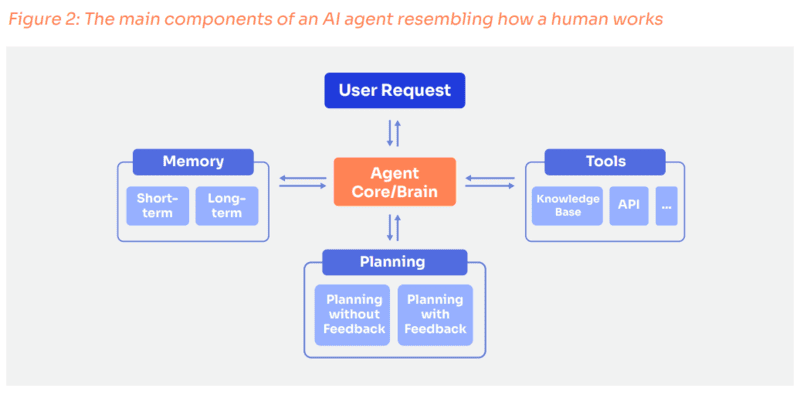
Technically, an AI agent system consists of four main components, simulating the way humans operate
4. What makes AI agents different from chatbots and LLMs?
AI agents, chatbots, and LLMs are often discussed together, but they serve different roles. An LLM provides reasoning and language generation capability, a chatbot delivers a conversational interface, and an AI agent combines reasoning with memory, tools, and workflow execution to complete tasks.
| Dimension | LLM | Traditional AI Chatbot | AI Agent |
| Autonomy | Generates responses based on prompts | Responds when prompted and needs user direction | Operates toward a goal and can self-direct sub-tasks |
| Memory | Usually limited to the current context window unless connected to memory systems | Often resets each session with little or no persistent memory | Can maintain task history, user context, or long-term memory |
| Tool use | Does not use external tools by default | Limited or predefined tool use | Uses APIs, databases, search, code execution, or business apps dynamically |
| Task complexity | Handles reasoning, writing, summarization, and analysis within a prompt | Handles simple conversations or FAQ-style queries | Handles multi-step workflows and breaks complex goals into subtasks |
| Error handling | May revise outputs when prompted, but does not independently recover | Often falls back to predefined responses | Can detect issues, retry steps, or escalate to a human |
| Learning | Does not automatically learn from each interaction | Usually static unless manually updated | Can improve through memory, feedback loops, fine-tuning, or workflow updates |
In short, an LLM can generate and reason, a chatbot can interact with users, and an AI agent can coordinate multiple steps to achieve a goal. This is why AI agents are better suited for workflows that require data access, tool use, decision-making, and action across enterprise systems.
5. Benefits of AI agents for enterprises
AI agents can bring more value than basic automation because they are able to understand goals, use tools, access business data, and complete multi-step workflows with less manual intervention. For enterprises, this makes AI agents useful not only for improving productivity, but also for building more adaptive and intelligent operations.
- Higher operational efficiency: AI agents can automate repetitive tasks such as information retrieval, report generation, ticket routing, data updates, and workflow coordination.
- Faster decision support: By connecting to knowledge bases, APIs, and business systems, AI agents can retrieve relevant context and help teams analyze information more quickly.
- Better workflow continuity: AI agents can handle multi-step processes across tools and departments, reducing delays caused by manual handoffs.
- Improved personalization: AI agents can use memory, context, and user preferences to deliver more relevant responses or actions in customer-facing and internal workflows.
- Scalable task execution: Once properly governed, AI agents can support a larger volume of tasks without requiring teams to expand manual operations at the same pace.
- Stronger enterprise AI adoption: AI agents help move AI from isolated chatbot use cases to practical business workflows, where models can support real actions, systems, and outcomes.
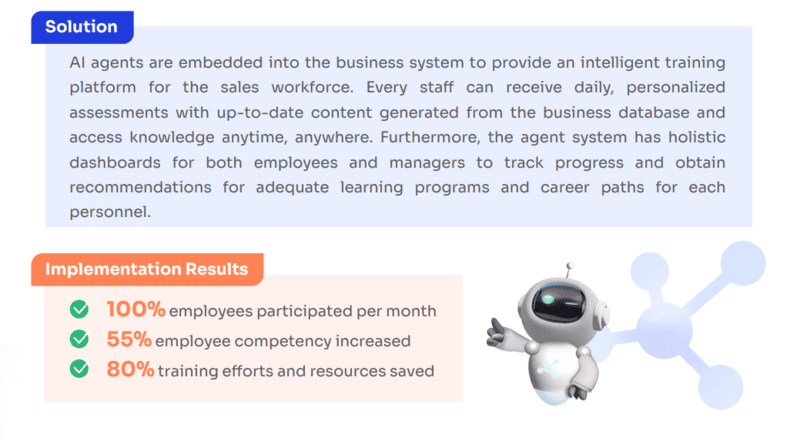
AI agents have many benefits for enterprises in daily work
6. What are common AI agent examples in enterprise?
AI agents can be used across many enterprise workflows where teams need automation, context retrieval, and multi-step task execution. The most practical examples usually appear in customer service, sales, operations, software development, and data analysis.
- Customer support agent: Answers customer questions, retrieves account information, creates tickets, and escalates complex cases to human agents.
- Sales assistant agent: Summarizes customer calls, qualifies leads, suggests next actions, and updates CRM records.
- Data analysis agent: Queries databases, generates reports, explains trends, and helps teams interpret business performance.
- Code assistant agent: Helps developers generate code, review pull requests, debug issues, and document technical work.
- Knowledge management agent: Searches internal documents, retrieves relevant information, and gives context-aware answers to employees.
- Operations agent: Monitors workflows, detects issues, sends alerts, and triggers follow-up actions when certain conditions are met.
These examples show why AI agents are useful for enterprises. They can reduce manual handoffs, support faster decisions, and help teams complete repetitive or information-heavy tasks more efficiently.
7. What infrastructure do AI agents need?
AI agents need more than a language model to work reliably in enterprise environments. They require infrastructure for model serving, data access, tool integration, compute resources, security, monitoring, and cost control.
The most important infrastructure requirements include:
- Model serving and inference endpoints: Agents need reliable model APIs to process requests, generate outputs, and support real-time workflows.
- Enterprise data access: Agents often need to connect with documents, databases, knowledge bases, and internal systems to provide accurate and context-aware responses.
- Scalable CPU and GPU compute: More advanced agent workflows may require stronger compute for fine-tuning, testing, inference, or multi-agent workloads.
- Tool and API integration: Agents need controlled access to tools such as search systems, CRMs, ticketing platforms, analytics tools, and business applications.
- Monitoring and governance: Teams need to track latency, tool calls, output quality, errors, access permissions, and human approval points.
- Cost and latency management: Multi-step agent workflows can increase inference usage and response time, so infrastructure must be optimized for performance and cost efficiency.
FPT AI Factory supports AI agent infrastructure through a connected ecosystem of development, inference, and GPU services. Instead of managing each layer separately, teams can use these services to build, deploy, and scale agent workflows more efficiently.
- AI Studio supports model experimentation, dataset management, notebook-based development, and fine-tuning for task-specific AI agents.
- Data Hub helps teams organize and manage datasets used for training, fine-tuning, and evaluating agent workflows.
- Model Hub provides a centralized place to work with models before they are adapted or deployed for agent-based applications.
- Serverless Inference and Dedicated Inference support model deployment through API endpoints, which is essential for agents that need reliable and scalable model serving.
- GPU Virtual Machine and GPU Container provide flexible GPU infrastructure for testing, fine-tuning, and running compute-intensive AI workloads in controlled environments.
8. Frequently asked questions about AI agents
8.1. What is the difference between LLMs and AI agents?
An LLM is an AI model designed to understand and generate language, while an AI agent is a broader system that can use an LLM together with tools, APIs, memory, and workflow logic to complete tasks. In simple terms, an LLM mainly generates responses, while an AI agent can reason, access external systems, and take actions within a defined workflow.
8.2. Are reasoning models like OpenAI o3 and DeepSeek R1 AI agents?
No. Reasoning models like OpenAI o3 and DeepSeek R1 are advanced LLMs designed for complex reasoning, but they are not AI agents by themselves. They can become part of an AI agent system when connected to tools, APIs, memory, planning logic, and execution workflows.
8.3. How do AI agents integrate with existing systems and workflows?
AI agents integrate with existing systems through APIs, RAG systems, knowledge bases, and workflow automation tools. These integrations allow agents to retrieve business data, call external services, update records, trigger actions, and complete tasks across existing enterprise workflows.
8.4. How does human-in-the-loop fit into the AI agent workflow?
Human-in-the-loop adds human review or approval checkpoints into the AI agent workflow. The agent pauses at predefined steps so users can verify decisions, adjust outputs, or approve actions before the workflow continues, which helps improve accuracy, control, and accountability.
8.5. Will AI agents take our jobs?
AI agents may automate some repetitive, rules-based, or coordination-heavy tasks, but they are more likely to change how many jobs are done rather than replace every role entirely. Human judgment, creativity, supervision, and strategic decision-making remain important in most AI-assisted workflows.
8.6. Do AI agents increase bias and discrimination?
AI agents can increase bias if they rely on biased training data, incomplete knowledge sources, or poorly designed decision rules. To reduce this risk, organizations need clear governance, high-quality data, regular evaluation, human oversight, and monitoring throughout the AI agent lifecycle.
8.7. Who is responsible when an AI agent makes a mistake?
Responsibility for AI agent mistakes depends on how the system is built, deployed, supervised, and used. In most cases, accountability is shared between developers, organizations, operators, and human reviewers, so businesses should define governance rules before using AI agents in high-impact workflows.
In conclusion, AI agents are AI systems that can understand goals, reason through tasks, use tools, access data, and take action across workflows. For enterprises, their value depends not only on the model itself, but also on the infrastructure behind it, including data access, inference endpoints, compute resources, monitoring, and governance. With AI Studio, AI Inference, and GPU infrastructure, FPT AI Factory helps teams build and scale agentic AI workflows more effectively.
Contact information
- Hotline: 1900 638 399
- Email: support@fptcloud.com
Explore more: