


AI is increasingly being integrated into products and services, but building a model is only the beginning. The real challenge lies in deploying it so the system runs reliably, efficiently, and can scale. In this article, FPT AI Factory will guide you step by step on how to deploy AI model in practice, from packaging and API development to infrastructure and operations, helping you move from experimentation to production effectively in 2026.
1. What is AI Model Deployment?
AI model deployment is the process of moving a trained model from the development environment into a production environment, where it can process real data and deliver results to users or other systems.
In the AI lifecycle, deployment acts as the bridge between model development (training and validation) and real-world application. Even a highly accurate model in a testing environment does not create value until it is properly deployed.
Specifically, deployment enables you to:
- Integrate the model into applications (web, mobile, backend systems)
- Handle user requests through APIs or services
- Operate at scale with the ability to handle increasing workloads
- Monitor and improve performance through logging and monitoring tools
In short, deployment is the step that transforms an AI model from a “lab prototype” into a “real-world product” that delivers value to users.
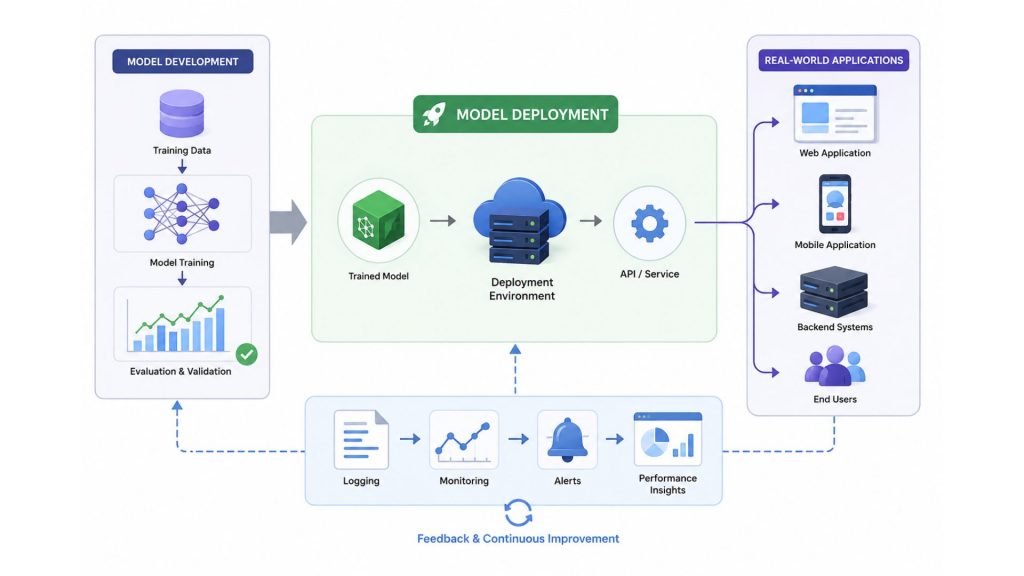
AI model deployment is the process of moving a trained model from development to production
2. Common AI deployment types
In practice, AI models are not only built but also need to be deployed in a way that fits specific usage requirements. Depending on factors such as response speed, infrastructure design, scalability, and application context, AI deployment can generally be divided into traditional deployment methods and modern AI deployment patterns.
2.1. Traditional AI deployment methods
These are the foundational deployment approaches commonly used across machine learning and AI systems:
- Batch inference: This method processes large volumes of data in scheduled batches, without requiring immediate responses. Data is collected over time and then processed periodically (e.g., daily or weekly).
Example: An e-commerce company aggregates daily transaction data and runs AI models overnight to generate revenue reports or analyze customer behavior.
- Real-time inference: The model generates results almost instantly after receiving input. This approach is ideal for systems that require fast, interactive responses.
Example: A chatbot replying immediately to user queries, or a recommendation system suggesting products as soon as you view an item.
- Edge deployment: The model runs directly on user devices (such as smartphones, cameras, or IoT devices) instead of sending data to a central server. This reduces latency and enhances data privacy.
Example: Facial recognition used to unlock a smartphone operates locally on the device without needing an internet connection.
In summary, each deployment approach serves different needs: batch inference is suitable for large-scale analysis, real-time inference enables instant user interaction, and edge deployment allows fast, independent processing directly on devices.
2.2. Modern AI deployment patterns in 2026
As AI systems become more advanced and application demands grow, organizations are increasingly adopting modern deployment patterns designed for generative AI and autonomous workflows:
- LLM serving: Large Language Models (LLMs) are deployed through scalable serving infrastructure that supports high-throughput inference, low latency, and multi-user interactions.
Example: AI copilots and enterprise chat assistants powered by hosted or self-managed LLM endpoints.
- RAG (Retrieval-Augmented Generation) pipelines: RAG architectures combine LLMs with external knowledge retrieval systems, allowing models to generate more accurate and up-to-date responses based on proprietary or real-time data sources.
Example: Enterprise AI assistants retrieving information from internal documents before generating answers.
- Agentic AI systems: These systems enable AI agents to autonomously plan, reason, and execute multi-step tasks by interacting with tools, APIs, and other systems.
Example: An AI agent automatically scheduling meetings, generating reports, and sending follow-up emails.
- Edge AI deployment: Modern edge AI enables lightweight generative or predictive models to run directly on edge devices for faster processing, lower bandwidth usage, and improved privacy.
Example: Smart cameras performing real-time object detection locally without cloud dependency.
In summary, traditional deployment methods such as batch and real-time inference remain essential for many AI workloads, while newer deployment patterns like LLM serving, RAG pipelines, and agentic AI are shaping the next generation of intelligent applications.

Common AI deployment types include: batch, real-time, and edge
>>> Read more: What Is AI Inference? How It Works, Benefits & Challenges
3. Criteria in pre-deployment checklist
Before deploying an AI model into a real-world environment, it is essential to carefully evaluate multiple aspects to ensure the system is stable, efficient, and scalable. Below are the key criteria typically included in a deployment checklist:
3.1 Model validation and performance benchmarking
Before deployment, you need to verify that the model performs reliably on data that reflects real-world usage, not only on the training or test dataset. This includes checking task-specific metrics such as accuracy, precision, recall, F1-score, error rate, or other business-relevant KPIs.
Beyond prediction quality, teams should also benchmark operational performance, including latency, throughput, memory usage, and stability under different request volumes. These factors help determine whether the model is ready for production or still needs optimization.
Example: An image classification model may achieve 95% accuracy on a controlled test set but drop to 80% when users upload images with different lighting, angles, or image quality. This gap should be identified before deployment through validation and benchmarking.
3.2 Dependency management and environment reproducibility
The runtime environment (libraries, versions, operating system, etc.) must be carefully managed to ensure it can be reproduced at any time. This helps avoid the common issue of “it works on my machine but not in production.”
Example: Using Docker to package the entire environment (Python, ML libraries, configurations) ensures consistent deployment across development and production.
3.3 Choosing the right inference hardware (CPU vs GPU)
The choice of hardware depends on the model’s complexity and performance requirements. GPUs are more powerful for large models and parallel processing but come with higher costs, while CPUs are suitable for lighter workloads or cases without strict real-time requirements.
Example: A small NLP model can run efficiently on a CPU, whereas large deep learning models (e.g., for image or video processing) typically require GPUs for optimal performance.
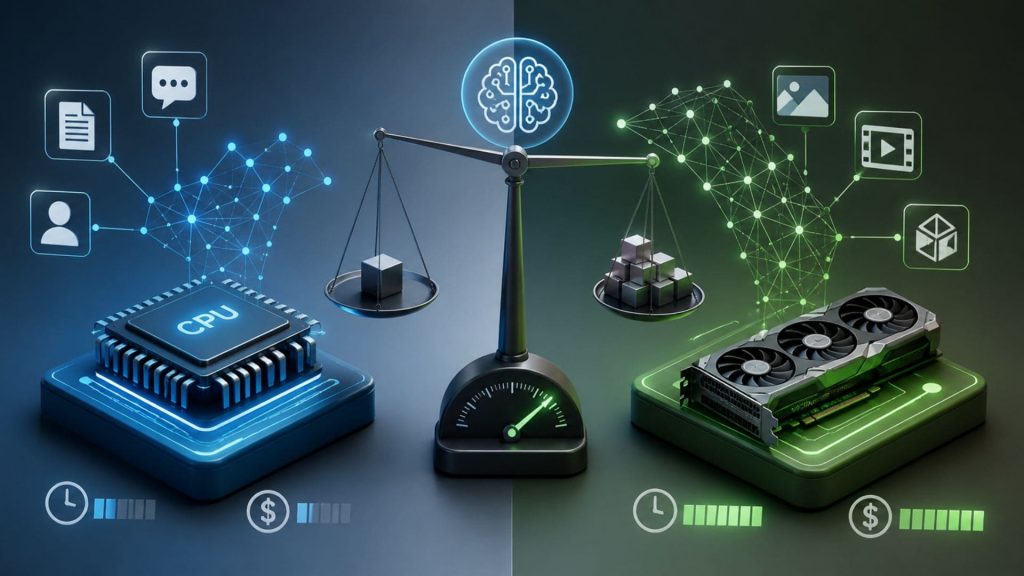
CPU vs GPU for AI inference: balancing performance, cost, and workload complexity
>>> Read more: What Is AI Infrastructure? Key Layers & Business Benefits
3.4 Latency and throughput requirements
You need to clearly define how fast the system should respond (latency) and how many requests it should handle at the same time (throughput). These factors directly influence the deployment architecture.
Example:
- A chatbot requires low latency (a few hundred milliseconds) for smooth interaction.
- A batch reporting system can tolerate higher latency but needs high throughput to process large volumes of data.
4. AI deployment architecture flow
When deploying an AI model in real-world applications, the system is typically organized into a clear architectural flow that separates components and makes scaling easier. A basic flow can be represented as:
[ Model ] → [ API Layer ] → [ Orchestration ] → [ Infrastructure ] → [User / Application ]
This flow describes how a request moves from the user, through the system, to the model, and then returns the result.
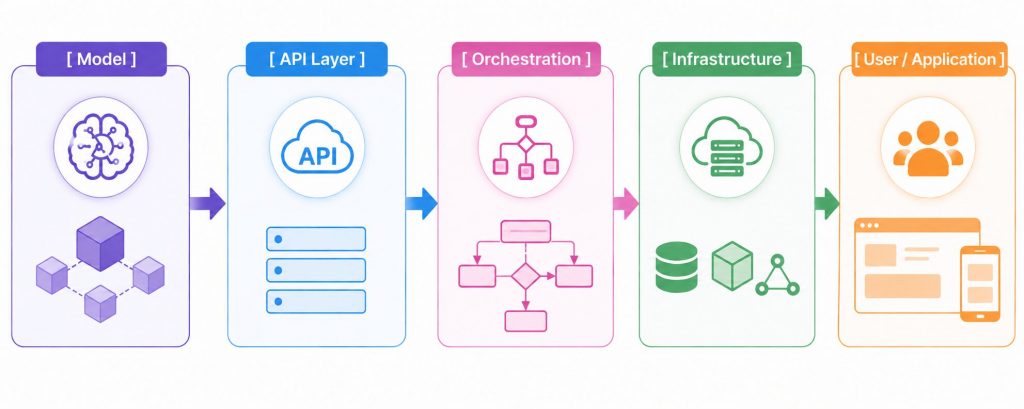
The system is typically organized into a clear architectural flow
Layer breakdown:
Model – The “brain” of the system
This is the trained or fine-tuned model responsible for processing input data and generating outputs. Depending on the use case, it could be an image classifier, an NLP model, or a recommendation system.
Example: A face recognition model takes an image as input and returns an identity or a probability score.
API Layer – The bridge between the model and external systems
The API layer wraps the model into an accessible service. Instead of interacting directly with the model, applications send requests (typically via HTTP) and receive responses through the API.
Example: A POST/predict endpoint receives input data and returns predictions. This layer may also handle authentication, logging, and traffic control.
Orchestration – Coordinating workflows and system operations
This layer manages how different services, models, and infrastructure components work together to execute requests efficiently. It handles task routing, workflow automation, load balancing, monitoring, and service coordination across the AI system.
Example: When a user sends a request, the orchestration layer can decide which model instance should process it, distribute workloads across available resources, and trigger additional services such as data preprocessing or post-processing before returning the final response.
Infrastructure – The operational foundation
This layer ensures the system runs reliably with appropriate resources, including CPU/GPU, memory, networking, and autoscaling mechanisms to handle varying workloads.
Example: When user traffic spikes, the system can automatically scale up additional servers to prevent overload.
User/Application – The consumer of results
This is the endpoint where users or applications consume the AI output. It can be a mobile app, website, or another backend system.
Example: A chatbot responding to users in real time, or an e-commerce app displaying product recommendations.
In summary, this architecture clearly separates system components, making it easier to scale, maintain, and optimize performance. It also serves as a foundational structure for building production-ready AI systems.
5. How to Deploy AI Model Step by Step
To move an AI model from a local (experimental) environment to production, you need to follow a structured process. Below are the common steps, from preparing the model to running it in a real-world system:
Step 1: Serialize and optimize your model
After training, the model should be exported into a format that is safe, portable, and optimized for inference.
Instead of using unsafe or framework-dependent formats like .pkl, modern deployments prefer:
- ONNX (Open Neural Network Exchange): cross-platform, interoperable across frameworks
- Safetensors: secure format that avoids arbitrary code execution
- TensorRT: optimized for high-performance GPU inference (especially NVIDIA environments)
Example: After training a house price prediction model, you export it to model.onnx or model.safetensors. These formats allow safe loading and efficient inference without executing embedded code.
Step 2: Wrap in an API endpoint
AI models cannot be directly used by applications (web, mobile), so they need to be exposed through an API. This API receives input data and returns predictions.
Example: You create an API endpoint like POST /predict. When a user submits data (e.g., area, location), the system sends it to the API and receives the predicted price.
Step 3: Containerize with Docker
To ensure the model runs consistently across different environments (local machine, server, cloud), you package the entire application into a Docker container.
[ Model + API + Libraries ] → [ Docker Container ]
This container includes all required code, dependencies, and configurations, helping avoid issues like “it works on my machine but not on the server.”
Example: You build a Docker image containing Python, the model, and the API, and run it consistently anywhere.
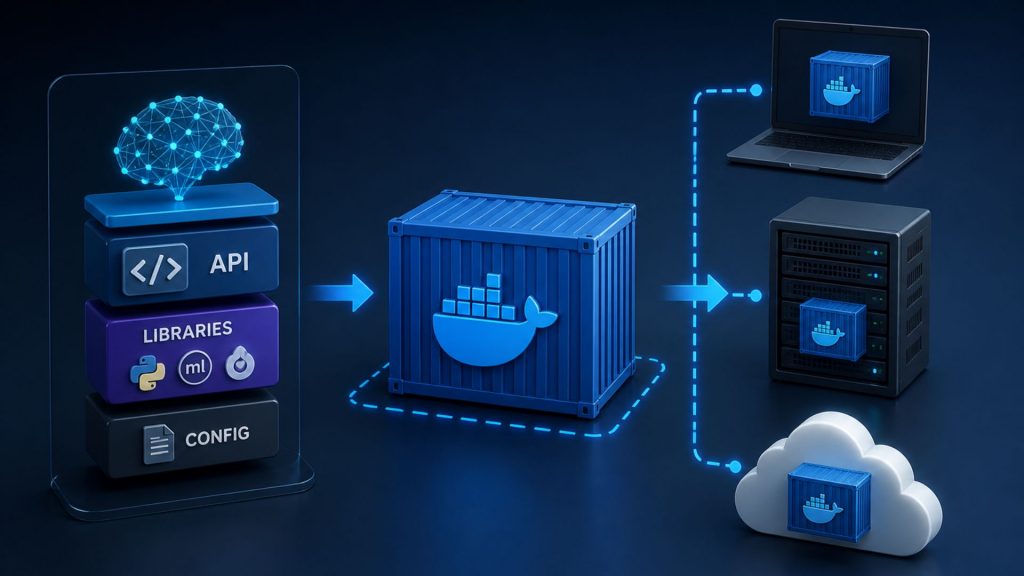
Docker containerization ensures consistent AI model deployment across local, server, and cloud environments
Step 4: Deploy to Production Infrastructure
Once the model and API are containerized, the next step is to deploy them into a production environment. This environment may run on cloud infrastructure, on-premise servers, GPU virtual machines, Kubernetes clusters, or managed inference platforms. The right infrastructure depends on your workload. Lightweight models may run well on CPU-based environments, while large deep learning models or latency-sensitive applications often require GPU resources for better performance.
For teams that want to reduce infrastructure management, managed inference services can simplify this step by providing scalable endpoints and operational support. For example, FPT AI Factory Serverless Inference enables businesses to deploy and use AI models via API in a fully managed environment, reducing the need to provision and maintain infrastructure manually.
Step 5: Set up monitoring and logging
After deployment, continuous monitoring is essential to ensure the system runs smoothly.
- Monitoring: tracks performance metrics such as latency and request volume
- Logging: records detailed system activities and errors
Example: If the API response becomes slower than usual, monitoring tools will alert you, and logs can help identify the root cause (e.g., unusual input or system issues).
6. Common AI deployment mistakes to avoid
When deploying AI into production, many systems run into issues not because the model is poor, but because the deployment and operational phases were not properly prepared. The following common mistakes should be clearly identified to avoid repeating them in practice:
6.1 Skipping model versioning
Many teams only keep the “latest model” without maintaining proper version control. This makes it difficult to compare, debug, or roll back to previous versions.
Example: After updating to a new model, prediction quality drops. Without versioning, it’s hard to pinpoint what changed between versions.
→ Solution: Always assign versions to models (v1, v2, etc.) and store associated training data and configurations.
6.2 No rollback strategy
Deploying a new model without a rollback plan is a significant risk. If issues occur, the system may be impacted for an extended period.
Example: You deploy a new recommendation model, but it produces poor results. Without rollback, you cannot quickly revert to the previously stable version.
→ Solution: Keep a stable version ready and implement fast-switch mechanisms (e.g., A/B testing or feature flags).
6.3 Ignoring model drift after launch
Over time, real-world data changes, causing the model’s performance to degrade—this is known as model drift. It’s a common issue but often overlooked.
Example: A model trained on past user behavior may become inaccurate as user preferences evolve.
→ Recommendation: Continuously monitor model performance and plan for periodic retraining and updates.
6.4 Underestimating inference hardware requirements
A model that performs well in a testing environment may not remain stable under real-world traffic. When the number of requests increases, insufficient CPU, GPU, memory, or networking capacity can lead to high latency, timeouts, or service interruptions.
Example: A chatbot may respond quickly during internal testing, but slow down significantly when thousands of users interact with it at the same time.
→ Recommendation: Benchmark inference performance before deployment and choose hardware based on actual workload requirements, including model size, request volume, latency target, and cost. For teams that do not want to manage GPU infrastructure manually, serverless GPU or managed inference options can help allocate compute resources based on workload demand while reducing infrastructure setup complexity.
FPT AI Factory serverless inference to automatically scale inference resources without managing infrastructure (Source: FPT AI Factory)
7. Frequently asked questions
7.1 How long does it take to deploy an AI model?
The timeline depends on the complexity of the problem and the maturity of the system. A simple demo can take a few days, while production deployment may take weeks to months. Optimization, testing, and operations are the most time-consuming steps.
7.2 What’s the difference between training and inference?
Training is the process of teaching a model to learn patterns from data. Inference is the process of using the trained model to generate predictions, classifications, or outputs from new data. Simply put, training is when the model learns, while inference is when the model applies what it has learned in real-world tasks.
7.3 Do I need a GPU to run inference?
Not always, smaller models can run efficiently on CPUs. However, for larger models or real-time requirements, GPUs can significantly improve performance. The choice depends on your use case and budget.
7.4. Can I deploy an AI model without managing infrastructure?
Yes. Instead of provisioning servers, configuring GPU environments, and maintaining scaling logic manually, teams can use managed inference or serverless inference services. These platforms allow developers to access models through APIs, handle inference workloads more easily, and reduce the operational burden of infrastructure management. This is especially useful for teams that want to move faster from prototype to production without building the full serving stack from scratch.
In conclusion, successful AI deployment requires more than exporting a trained model. Teams need to prepare the serving layer, infrastructure, monitoring process, rollback strategy, and scaling plan so the model can run reliably in production. For teams that want to deploy AI workloads faster, FPT AI Factory provides infrastructure and managed AI services such as GPU Virtual Machine, GPU Container, AI Notebook, Model Fine-tuning, and Serverless Inference.
New users can start with the Starter Plan from FPT AI Factory, which includes $100 in free credits available immediately after sign-up. If your business or organization requires customized solutions or large-scale AI deployment, you can reach out via the FPT AI Factory contact form to receive consultation and tailored system design support.
Contact Information:
- Hotline: 1900 638 399
- Email: support@fptcloud.com
Explore related articles
What is LLM Inference? How it works, metrics, and scaling
What Is GPU Computing and How Does It Work? A Complete Guide


