


Kubernetes vs Docker is a critical comparison for businesses adopting containerized applications, microservices, and cloud-native infrastructure. While Docker focuses on building and running containers, Kubernetes helps automate deployment, scaling, and orchestration across production environments. At FPT AI Factory, organizations can leverage containerized GPU infrastructure and scalable AI environments to support modern application deployment and AI workloads more efficiently.
1. What are Containers?
Containers are lightweight software packages that include an application together with all required dependencies, libraries, and runtime files needed to run consistently across different systems. In traditional deployment models, applications are typically installed directly on physical servers or virtual machines, which can create compatibility issues between development and production environments. Containers solve this challenge by isolating applications from the underlying infrastructure, allowing developers to package workloads into portable container images that run reliably across local machines, cloud platforms, and production systems.
Containers are fundamental to cloud-native applications because they package applications and dependencies into portable units, ensuring consistent deployment across environments. They also support microservices and DevOps practices, enabling services to be deployed, updated, and scaled independently.

Containers package applications and dependencies into portable, consistent runtime environments across different systems
2. What Is Docker?
Docker is a containerization platform that allows developers to build, package, and run applications inside containers. It became widely adopted across DevOps, software engineering, and cloud infrastructure teams because it simplifies application deployment and improves portability between environments. Docker helps organizations package applications together with their dependencies into lightweight containerized environments that can run consistently across different systems.
Docker is widely used to create container images and ensure application consistency across development, testing, and production environments. Its workflow typically involves Dockerfiles for defining build instructions, Docker Images as portable application packages, and container registries for storing and sharing images, simplifying deployment and collaboration.
>>> Explore: Benefits of cloud computing: When is the right time to move?
3. What Is Kubernetes?
Kubernetes is an open-source container orchestration platform used to deploy, scale, and manage containerized applications across clusters of machines. Originally developed by Google, Kubernetes helps organizations automate container operations and maintain application availability in cloud-native environments. Instead of managing individual containers manually, businesses can use Kubernetes to coordinate workloads, optimize resource utilization, and maintain consistent application performance across large-scale infrastructure.
Kubernetes operates through a cluster-based architecture consisting of a Control Plane and multiple Worker Nodes. The Control Plane manages the overall state of the cluster, schedules workloads, and coordinates container operations, while Worker Nodes provide the compute resources where application workloads run inside Pods. This architecture allows Kubernetes to distribute workloads efficiently across multiple machines while maintaining availability and reliability at scale.
Kubernetes provides several orchestration capabilities that simplify container management in production environments, including:
- Service discovery and networking: Enables services to automatically find and communicate with each other while handling internal networking and traffic routing across containers.
- Autoscaling and self-healing: Automatically adjusts the number of running containers based on workload demand and restarts or replaces failed containers to maintain system availability and stability.
- Workload scheduling and orchestration: Intelligently distributes containers across nodes based on available CPU, memory, and resource requirements to optimize performance and infrastructure utilization.
- Infrastructure abstraction: Hides underlying hardware complexity, allowing applications to run consistently across cloud, hybrid, or on-premise environments without modification.
- Resource management and load balancing: Ensures efficient use of cluster resources while distributing traffic evenly across healthy containers to prevent overload.
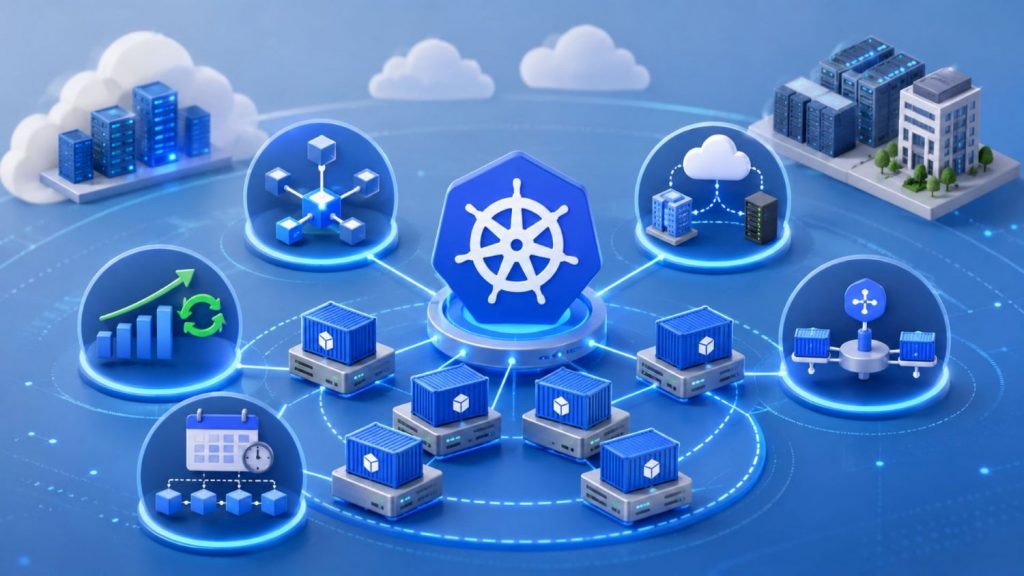
Kubernetes keeps containerized systems scalable and resilient
>>> Explore: Container vs. Virtual Machine: What are the differences?
4. Kubernetes vs Docker: Key Differences
Although Docker and Kubernetes are often discussed together, they serve different purposes in containerized infrastructure. Docker focuses on building and running containers, while Kubernetes is designed to orchestrate and manage containers across large-scale production environments.
| Criteria | Docker | Kubernetes |
| Primary purpose | Containerization platform for building and running containers | Container orchestration platform for managing containerized applications |
| Core function | Packages applications into portable container images | Automates deployment, scaling, and container management |
| Architecture | Typically operates on a single host | Operates across clusters of machines |
| Container management | Manages individual containers | Coordinates and manages multiple containers across environments |
| Scaling | Supports manual or limited scaling | Supports automated horizontal scaling |
| Networking | Provides basic container networking | Provides advanced service networking and traffic management |
| Deployment complexity | Easier to configure and maintain | More complex infrastructure setup and operations |
| Cost and operations | Lower operational overhead for smaller workloads | Higher operational and maintenance requirements |
| Storage support | Supports volumes and bind mounts for persistent storage | Supports storage orchestration and dynamic provisioning |
| Best use case | Development, testing, and smaller deployments | Large-scale production and cloud-native environments |
| Example | Adobe uses Docker to support consistent application development workflows | Shopify uses Kubernetes to manage large-scale production workloads |
5. How Docker and Kubernetes Work Together
Docker and Kubernetes are commonly used together within modern cloud-native infrastructure workflows. Docker focuses on building and packaging applications into portable container images, while Kubernetes manages deployment, scaling, networking, and orchestration across production environments. Rather than replacing each other, the two technologies work together to support scalable and consistent containerized application deployment.
5.1. Docker for building container images
Docker is used to create container images that package applications together with their dependencies, libraries, and runtime environments. These images help developers maintain consistency between local development, testing, and production systems.
For example, a team can build a Docker image for a web application locally and deploy the same image across staging and cloud production environments without modifying configurations.
5.2. Container registry for storing images
Once container images are created, they are typically stored in container registries such as Docker Hub, Amazon ECR, or private enterprise registries. These registries allow teams to distribute, manage, and version container images efficiently across infrastructure environments.
Using centralized registries also improves collaboration between development and operations teams while supporting automated deployment workflows.
5.3. Kubernetes for orchestration and scaling
Kubernetes retrieves container images from registries and deploys them across clusters of machines. It automates workload scheduling, service networking, scaling, and recovery processes within production environments.
For instance, Kubernetes can automatically increase application replicas during traffic spikes and redistribute workloads if infrastructure failures occur.
5.4. Container runtime and production deployment
Container runtimes execute containerized applications within Kubernetes environments, allowing workloads to run consistently across distributed infrastructure. Kubernetes coordinates these runtimes to maintain application availability, optimize resource usage, and automate operational management.
This deployment model is widely used in modern DevOps pipelines and cloud-native architectures because it supports scalable, resilient, and continuously deployed applications
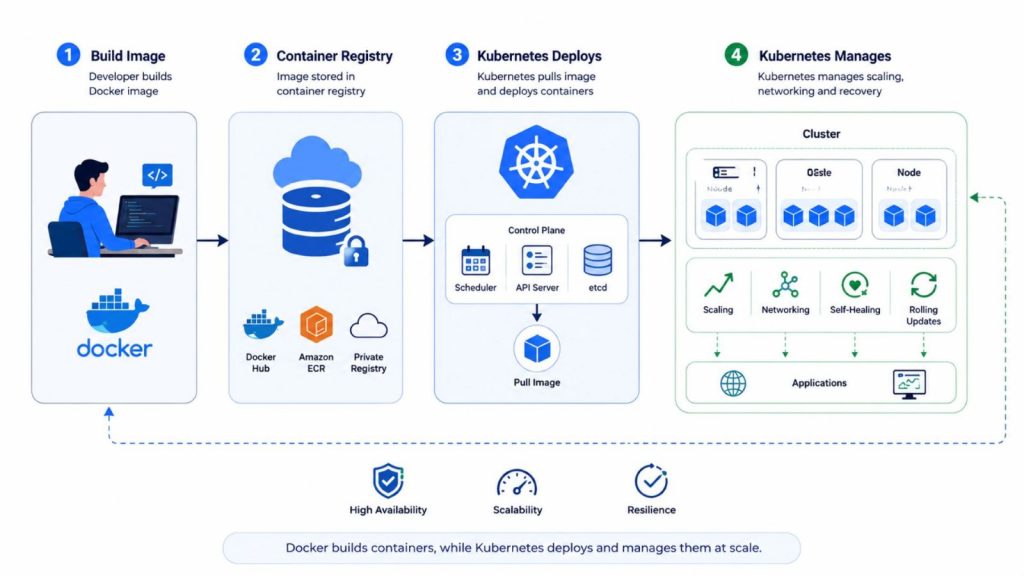
Docker builds containers, while Kubernetes deploys and manages them at scale
>>> Explore: The Importance of Cloud Computing in DevOps: Detailed Guide
6. Typical Docker and Kubernetes Deployment Workflow
A typical deployment workflow demonstrates how Docker and Kubernetes complement each other throughout the application lifecycle. Docker is responsible for creating and packaging application images, while Kubernetes uses those images to deploy, operate, and scale applications across a cluster.
Step 1: Build the Application Image with Docker
The process begins with Docker, which packages an application together with its dependencies, libraries, and runtime environment into a portable container image. This ensures the application behaves consistently across development, testing, and production environments.
Step 2: Store and Distribute Images Through a Container Registry
Once the image has been tested, it is pushed to a container registry such as Docker Hub, Amazon ECR, Google Artifact Registry, or a private enterprise registry. The registry serves as a centralized repository where images can be stored, versioned, and distributed across deployment environments.
Step 3: Define the Desired Application State in Kubernetes
Kubernetes uses declarative configuration files to define how applications should run. These configurations typically specify deployment settings, resource requirements, networking rules, scaling policies, and the container image that should be used.
Step 4: Deploy Containerized Applications to the Cluster
When the configuration is applied, Kubernetes retrieves the required image from the registry and creates Pods to run the application. The scheduler automatically places Pods on appropriate Worker Nodes based on available resources and cluster policies.
Step 5: Automate Operations, Scaling, and Recovery
After deployment, Kubernetes continuously manages the running workloads. It monitors application health, distributes traffic between healthy Pods, scales resources based on demand, and automatically replaces failed workloads to maintain availability and performance.
This workflow highlights the complementary roles of Docker and Kubernetes. Docker standardizes how applications are packaged and distributed, while Kubernetes automates how those applications are deployed, managed, and scaled in production environments.
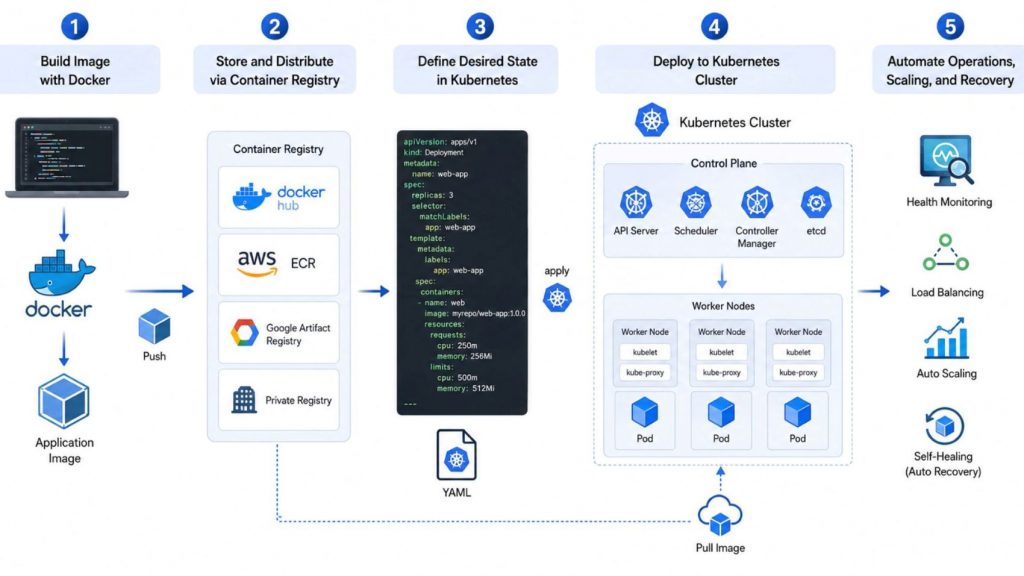
Docker delivers application portability, while Kubernetes automates deployment, scaling, and operational management
7. When Should You Use Docker?
Docker is widely used in modern software development because it makes it easier to build, package, and run applications in a consistent and portable way. It is especially useful when teams need stable environments, fast deployment, and repeatable workflows across development and production systems.
7.1. Local development and testing
Docker is commonly used to run applications and their dependencies directly on a developer’s machine without installing them into the host operating system. This helps avoid version conflicts and keeps the local environment clean and isolated.
Example: NTT DATA INTRAMART uses Docker Desktop and Docker Compose to standardize development environments across its engineering teams. By containerizing required services, the company reduced environment setup time from hours to approximately 10 minutes while improving consistency across developer machines.
>>> Explore: How to use Jupyter Notebook? A comprehensive tutorial
7.2. Packaging applications into containers
Docker allows developers to package an application together with its code, libraries, and runtime dependencies into a single portable unit called a container image. This ensures the application behaves the same across all environments.
Example: Uber packages its Node.js and Go applications into Docker Images, allowing them to run consistently from local development environments to cloud platforms like AWS or GCP without dependency issues.
7.3. Running small applications or simple services
Docker is well-suited for lightweight applications and simple services because it uses fewer resources compared to traditional virtual machines. It enables quick deployment without complex infrastructure setup.
Example: A WordPress site can be launched instantly by pulling the official image from Docker Hub and running it in a container with minimal configuration.
7.4. Building consistent development environments
Docker solves the common “it works on my machine” problem by ensuring all developers work in identical environments regardless of their operating system. This improves collaboration and reduces environment-related bugs.
Example: Cisco engineers use Docker-based development environments to streamline local development workflows and maintain consistency across containerized projects.
7.5. Using Docker Compose for simple multi-container apps
Docker Compose helps manage applications that require multiple services by defining them in a single configuration file. This makes it easier to run and connect services like databases, APIs, and frontend applications together.
Example: Nextcloud offers official Docker Compose configurations that deploy Nextcloud, MariaDB, and Redis together, enabling users to launch a complete application stack with a single command.
7.6. CI/CD and build automation workflows
Docker is commonly used in CI/CD pipelines to provide consistent and isolated environments for building, testing, and deploying applications. This ensures that automation workflows behave the same across all stages.
Example: In a GitHub Actions pipeline, every code push can trigger a Docker container to run automated tests and build a production-ready image that is then pushed to a container registry.
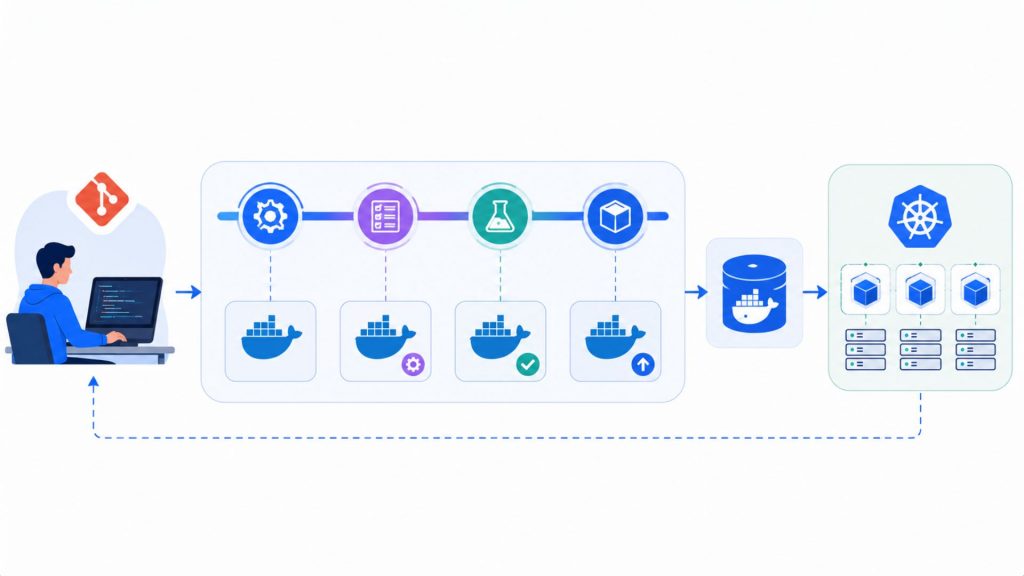
Docker supports consistent CI/CD workflows across build, testing, and deployment stages
>>> Explore: What Is MLOps? The Guide to Machine Learning Operations
8. When Should You Use Kubernetes?
While Docker helps package applications into containers, Kubernetes (K8s) is the ultimate solution for orchestrating, managing, and operating hundreds or thousands of those containers automatically and efficiently in production.
8.1. Running production applications at scale
When applications grow and need to run across multiple servers to serve large numbers of users, manual container management becomes inefficient. Kubernetes helps automate deployment, rollouts, and rollbacks while improving resource utilization and system reliability.
Example: Global e-commerce leader eBay rearchitected its core platform to run on Kubernetes clusters. This infrastructure shift enables them to efficiently manage and deploy thousands of micro-applications that power millions of active listings and transactions simultaneously across the globe.
8.2. Managing microservices architectures
Microservices architectures consist of multiple independent services that communicate over a network. Kubernetes supports this model through built-in service discovery, load balancing, and service-to-service communication across distributed systems.
Example: BlaBlaCar, the world’s leading community-based travel network, migrated their legacy infrastructure to a microservices architecture managed entirely by Kubernetes. This transition allowed their engineering teams to deploy independent services autonomously multiple times a day.
>>> Explore: What is a Data Pipeline
8.3. Automating scaling and self-healing
Kubernetes can automatically scale applications based on traffic demand and system load. It also monitors container health and replaces failed containers to maintain system stability without manual intervention.
Example: Global music streaming giant Spotify runs its core microservices on Kubernetes. K8s automatically scales their container infrastructure to handle massive global traffic spikes during major album drops or localized peak hours, while ensuring high availability.
8.4. Deploying containerized AI workloads
Artificial Intelligence (AI) and Machine Learning (ML) applications require large-scale compute resources, complex dependencies, and highly scalable infrastructure. Kubernetes helps organizations orchestrate containerized AI workloads across distributed GPU and CPU clusters, while environments such as GPU Container provide more consistent deployment workflows for training and AI inference workloads across development and production environments.
Example: OpenAI runs large-scale deep learning training workloads on top of infrastructure managed by Kubernetes. K8s enables them to efficiently orchestrate, schedule, and maximize the utilization of thousands of specialized AI accelerators and high-performance GPUs.

Kubernetes enables scalable AI and ML workloads across distributed GPU and CPU infrastructure
8.5. Managing complex cloud-native infrastructure
For enterprises operating in multi-cloud or hybrid-cloud environments, Kubernetes acts as a standardized orchestration layer across different infrastructure providers. It helps improve portability, consistency, and deployment management across systems.
Example: Global financial institution Capital One leverages Kubernetes to manage a resilient multi-region architecture on the public cloud. This approach ensures strict compliance, disaster recovery readiness, and standardized deployment workflows across all banking product lines.
>>> Explore: What Is GPU Computing and How Does It Work? A Complete Guide
9. Cost and Operational Considerations
When comparing Docker and Kubernetes, one of the key differences lies in operational complexity and overall cost. Docker is generally simpler and more cost-efficient for smaller workloads, while Kubernetes introduces higher operational overhead in exchange for advanced scalability, automation, and production-grade orchestration capabilities.
| Criteria | Docker | Kubernetes |
| Setup complexity | Simple and quick to install and configure | More complex setup involving clusters and multiple components |
| Infrastructure cost | Low cost, suitable for single-host or small-scale environments | Higher cost due to multi-node infrastructure and orchestration overhead |
| Maintenance effort | Minimal maintenance for individual containers | Requires continuous maintenance for clusters, services, and configurations |
| Required expertise | Basic container knowledge is sufficient | Requires advanced knowledge of cloud, DevOps, and orchestration concepts |
| Monitoring and troubleshooting | Simpler monitoring at container level | Complex monitoring across clusters, services, and workloads |
| Scalability needs | Suitable for limited or manual scaling scenarios | Designed for large-scale, automated, and dynamic scaling |
| Best fit for small teams | Ideal for startups, individual developers, and small projects | Often too complex for small teams without dedicated DevOps support |
| Best fit for enterprise teams | Limited use in large-scale production environments | Ideal for enterprise-grade systems and distributed cloud-native architectures |
>>> Explore: Top Cloud Service Providers with GPU for AI Workloads
10. Kubernetes and Docker in Modern Cloud-Native Infrastructure
In modern cloud-native infrastructure, Docker and Kubernetes work together as complementary technologies within a unified ecosystem. Docker is responsible for packaging applications into portable container images, while Kubernetes orchestrates how those containers are deployed, scaled, and managed across distributed environments. This combination allows organizations to build consistent, automated, and scalable systems that can run reliably across development, testing, and production stages.
10.1. Microservices architectures
In microservices-based systems, applications are divided into small, independent services that operate separately but communicate with each other. Docker is used to containerize each microservice along with its dependencies, ensuring consistency across environments. Kubernetes then manages how these services interact, discover each other, and scale independently based on workload demand, enabling more flexible and resilient system architecture.
10.2. DevOps and CI/CD pipelines
Docker and Kubernetes play a central role in modern DevOps and CI/CD pipelines. Docker provides consistent application environments for development, testing, and deployment, helping teams reduce configuration inconsistencies across different stages of the software lifecycle. Once an image is created, Kubernetes automates deployment, updates, and rollbacks in production environments, allowing teams to deliver software faster and with higher reliability through continuous integration and continuous delivery pipelines.
10.3. Multi-cloud and hybrid cloud deployments
Kubernetes enables workload portability across different cloud providers and on-premises systems by abstracting underlying infrastructure. Docker ensures that container images remain consistent regardless of where they are deployed. Together, they support multi-cloud and hybrid cloud strategies, allowing organizations to avoid vendor lock-in while maintaining flexible and standardized deployment across AWS, Google Cloud, Azure, and private data centers.
10.4. AI and scalable infrastructure workloads
Docker and Kubernetes play an important role in modern AI Infrastructure by supporting scalable and efficient deployment workflows for AI and data-intensive applications. Docker helps package machine learning frameworks, libraries, and dependencies into portable container environments, while Kubernetes orchestrates distributed training and inference workloads across clusters of CPUs and GPUs. Businesses can also leverage containerized GPU environments such as GPU Container to deploy and scale AI workloads more consistently across development, testing, and production environments.

Docker and Kubernetes power scalable AI infrastructure across distributed GPU and CPU environments
>>> Explore: What is a hybrid cloud? Benefits, architecture & use cases
11. FAQs
11.1. Is Kubernetes the same as Docker?
Kubernetes and Docker are not the same and serve different roles in the container ecosystem. Docker is used to build and run individual containers, while Kubernetes is used to orchestrate, manage, and scale those containers across multiple machines in production environments. In most real-world systems, Docker handles container creation, while Kubernetes manages how those containers are deployed and operated at scale.
11.2. Can Kubernetes run without Docker?
Kubernetes can run without Docker. Since Kubernetes v1.24, the “dockershim” component that previously enabled direct support for Docker has been removed. Instead, Kubernetes uses container runtimes such as containerd or CRI-O through the Container Runtime Interface (CRI) to manage containers in modern cloud-native environments.
11.3. Is Kubernetes better than Docker for production?
Kubernetes is not “better” than Docker for production because they serve different purposes. Docker is used to build and package applications into container images, while Kubernetes is used to deploy, manage, and scale those containers in production environments. In most production systems, they are used together rather than being direct alternatives.
11.4. Do businesses need both Docker and Kubernetes?
Not every business is required to use both tools, but they are commonly paired in modern infrastructure because they solve different operational needs. Docker is primarily used to standardize and package applications into containers so they can run consistently anywhere, while Kubernetes focuses on running and managing those containers reliably at scale across distributed systems. For most production-grade environments, using both together provides a more complete and flexible deployment strategy.
Docker and Kubernetes are complementary technologies that power modern cloud-native infrastructure. Docker packages applications into portable containers, while Kubernetes manages, scales, and orchestrates those containers across distributed environments. Together, they enable scalable, reliable, and efficient application delivery from development to production, making them essential for building modern cloud-native systems.
FPT offers a $100 free trial credit program for users to explore the platform. For enterprise-scale needs, customized GPU infrastructure, or dedicated technical consultation, please reach out via the contact form for tailored support.
Contact Information:
- Hotline: 1900 638 399
- Email: support@fptcloud.com


