Learn how to pair OpenClaw with FPT AI Inference — a high-performance, OpenAI-compatible inference API with data centers in Vietnam and Japan.
What is FPT AI Inference?
FPT AI Inference gives you access to leading open-source models — Llama 4, Qwen3, DeepSeek, and more — through a single OpenAI-compatible API, backed by data centers in Vietnam and Japan.
By pairing OpenClaw with FPT AI Inference, you get a fully local agent powered by frontier open-source models — your machine, your keys, your data.
Get started in 5 minutes
Prerequisites
- An OpenClaw installation (docs.openclaw.ai/install)
- An FPT AI API key — grab one at marketplace.fptcloud.com (new users get $100 free credit — including $70 for AI Inference, enough for millions of tokens to power your first OpenClaw workflows)
Step 1: Install OpenClaw
Since FPT AI Inference is fully OpenAI-compatible, you can connect it to OpenClaw using a custom base URL. Open your OpenClaw config file.’
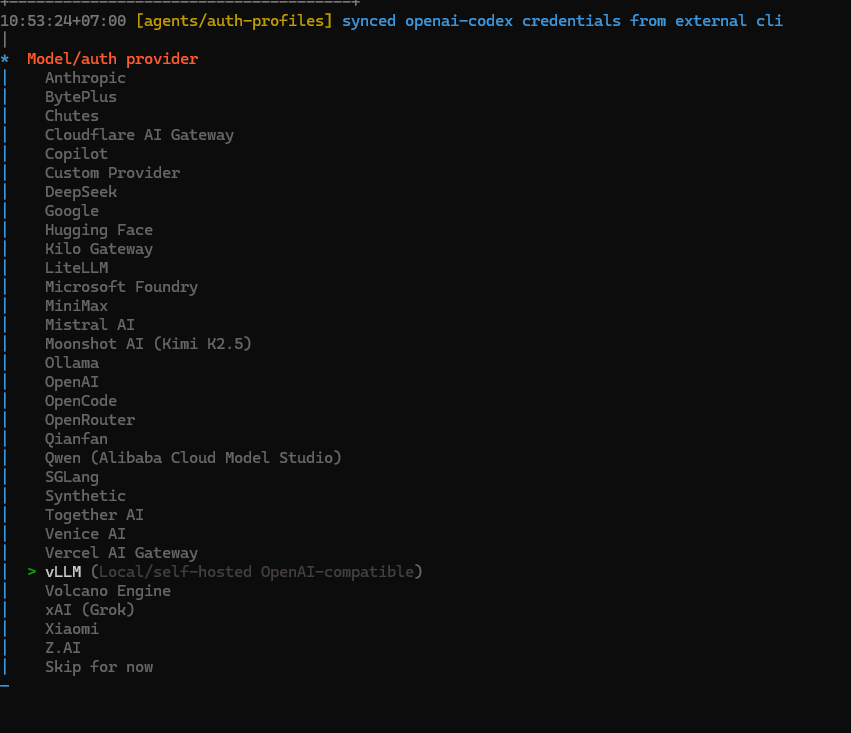
Step 2: Choose Model/auth provider
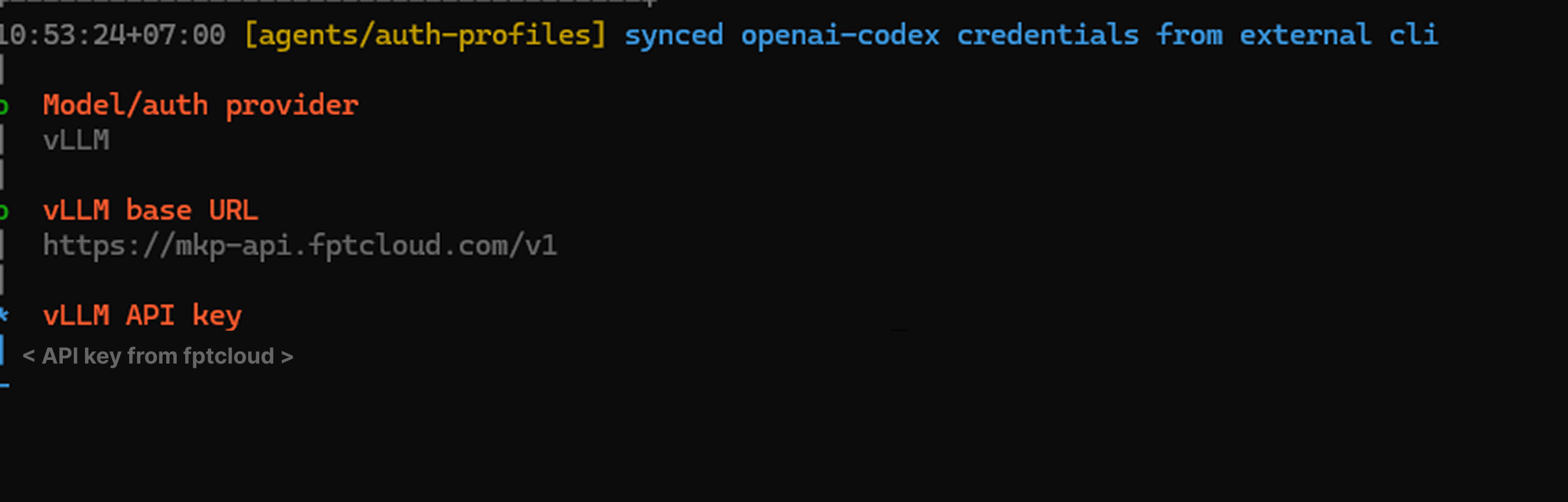
 Step 3: Enter FPT Marketplace API endpoint and Key
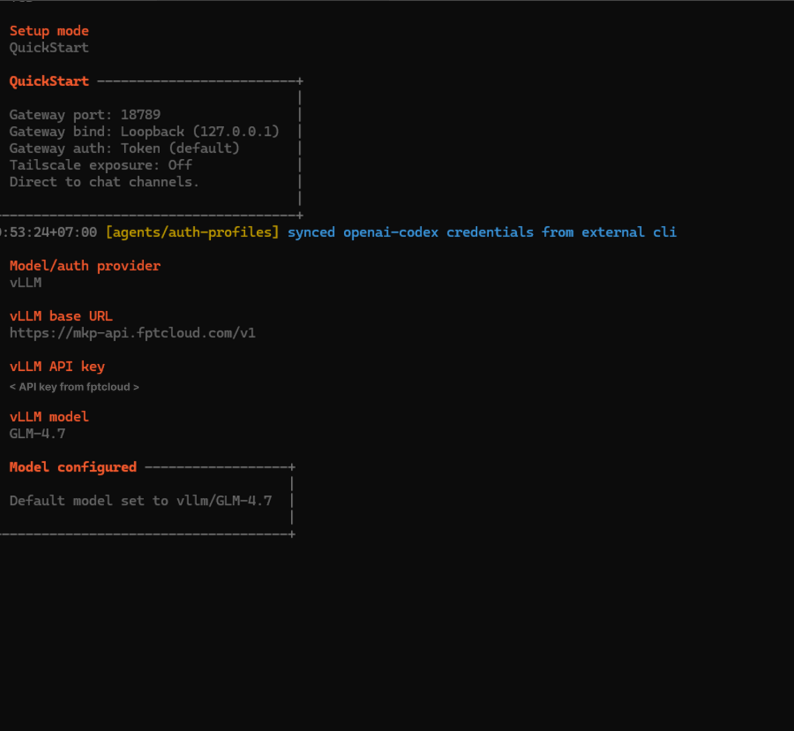
 Step 4: Default Model
Environment note
If the Gateway runs as a daemon (launchd / systemd), make sure FPT_API_KEY is available to that process. The easiest way is to keep it in ~/.openclaw/.env — OpenClaw loads this file automatically on startup.
Security
OpenClaw runs on your machine and calls external APIs — here’s what you need to know to stay secure.
1. API key storage
Never hardcode your API key in config files or source code. Always use environment variables or the .env file that OpenClaw manages: If you suspect your key has been exposed, rotate it immediately at marketplace.fptcloud.com. OpenClaw is an autonomous agent — it reads web pages, files, messages, and executes actions. This makes it a target for prompt injection attacks, where malicious content in the environment tries to hijack the agent’s behavior. Best practices: All requests from OpenClaw to FPT AI Inference are transmitted over HTTPS/TLS. No plaintext API calls. Your prompts and responses are encrypted in transit. FPT AI Inference has built-in rate limiting and abuse protection. A misconfigured or looping agent won’t silently drain your credit. Consider setting a budget cap: Monitor your usage in real-time at marketplace.fptcloud.com/my-account?tab=my-usage. Why FPT AI Inference + OpenClaw? Supported models Full model list: marketplace.fptcloud.com/ Use cases OpenClaw powered by FPT AI Inference works great for: Check out the OpenClaw Showcase at openclaw.ai/showcase for real-world examples. The bottom line You don’t have to choose between performance and security. FPT AI Inference gives you frontier open-source models with built-in rate limiting and HTTPS encryption. OpenClaw turns them into a full-featured agent that lives on your machine. Start free: marketplace.fptcloud.com/?free-trial GitHub PR Description Add FPT AI Inference as supported provider What this PR adds Why FPT AI Inference FPT AI Inference is an OpenAI-compatible inference API with data centers in Vietnam and Japan, giving OpenClaw users access to frontier open-source models: Security notes included in doc This PR includes a dedicated Security section aligned with OpenClaw’s existing security-first positioning: OpenClaw has invested significantly in security (34 security commits in the last release). This doc reflects that priority and helps FPT AI Inference users adopt the same standard. Testing Links FPT AI Inference: marketplace.fptcloud.com Starter Plan ($100 free): marketplace.fptcloud.com/ Security best practices: docs.openclaw.ai/security # Good — stored in ~/.openclaw/.env (not committed to git) </span>
FPT_API_KEY=fpt_xxxxxxxxxxxx
# Bad — hardcoded in config
"apiKey": "fpt_xxxxxxxxxxxx" // ❌ don't do this2. Prompt injection awareness
3. Network security
Base URL: https://mkp-api.fptcloud.com
Protocol: HTTPS (TLS 1.2+)
4. Rate limiting & runaway protection
{
agents: {
defaults: {
// Hard cap per session
maxTokensPerSession: 100000,
},
},
}
Model
Context
Best for
GLM-4.7
128K
General purpose — good starting model
meta-llama/Llama-4-Scout-17B-16E-Instruct
128K
Fast, reliable agent tasks
meta-llama/Llama-4-Maverick-17B-128E-Instruct
1M
Long context, complex tasks
Qwen/Qwen3-32B
128K
Tool calling, structured output
deepseek-ai/DeepSeek-V3
64K
Coding, analysis
deepseek-ai/DeepSeek-R1
64K
Step-by-step reasoning
Field
Value
Provider
FPT AI Inference
Base URL
https://mkp-api.fptcloud.com
Auth flag
–auth-choice fpt-api-key
API compatibility
OpenAI-compatible