GPU notebooks become valuable where most successful initiatives begin with repeated experimentation, including testing datasets, adjusting models, validating outputs, and refining workflows until results are production-ready. They combine the convenience of interactive notebooks with accelerated GPU compute, allowing teams to train models faster, process larger workloads, and iterate more efficiently. With FPT AI Factory’s on how to deploy, organizations can access managed GPU notebook environments built for enterprise AI development, reducing the time and complexity required to launch internal AI projects.
1. What are GPU notebooks and why do they matter for AI development?
GPU notebooks are interactive notebook environments, often based on Jupyter Notebook or JupyterLab, that run on GPU-enabled infrastructure. Instead of relying only on CPUs, these environments use Graphics Processing Units to accelerate workloads involving parallel computations.
This matters because many modern AI tasks require large numbers of repeated mathematical operations. Deep learning models, image recognition systems, and natural language processing pipelines all benefit significantly from GPU acceleration.
In practice, GPU notebooks help teams:
- Train machine learning models in less time
- Process large datasets more efficiently
- Test multiple experiments in a single day
- Visualize outputs while models are running
- Build and debug workflows interactively
Beyond performance, they improve productivity. Users can write code, run cells, inspect outputs, and modify experiments instantly. That faster feedback loop often leads to better models and shorter project timelines.
2. Why are organizations moving from local machines to cloud GPU notebooks?
Many AI teams start on local laptops or internal workstations. While that may be enough for lightweight exploration, these environments often become limiting once projects scale. Common challenges include:
- Long training times on CPU devices
- Limited RAM or storage capacity
- Difficulty sharing environments across teams
- Inconsistent dependencies between users
- Expensive GPU hardware purchases
- Maintenance burden for internal IT teams
Cloud GPU notebooks solve these issues by giving users on-demand access to scalable infrastructure. Instead of depending on one machine, teams can launch environments sized for each workload.
This model also supports collaboration more effectively. Multiple users can work from standardized notebook environments with shared storage, approved libraries, and controlled permissions. For growing AI teams, this creates a more reliable development workflow than fragmented local setups.
3. What should an enterprise-ready GPU notebook platform include?
A high-quality GPU notebook platform should deliver more than just raw compute power. Enterprises need an environment that supports productivity, security, and long-term operational control. The most important components usually include:
| Capability | Why It Matters |
| GPU Compute Options | Supports different workloads and budgets |
| Notebook Interface | Enables interactive coding and testing |
| Persistent Storage | Retains notebooks, datasets, and outputs |
| Security Controls | Protects users, data, and models |
| Monitoring Tools | Tracks usage and performance |
| Scalable Resources | Allows growth without rebuilding systems |
| Prebuilt Environments | Reduces setup time for users |
Without these layers, teams often lose time fixing infrastructure issues instead of focusing on AI delivery. A mature notebook environment should help users start quickly while still giving technical leaders visibility into cost, governance, and performance.
4. How do GPU notebooks improve AI experimentation?
Experimentation is one of the most resource-intensive parts of the AI lifecycle. Before a model reaches production, teams may test many combinations of data, architecture, parameters, and evaluation methods.
GPU notebooks improve this process because they shorten the gap between idea and result. Users can:
- Adjust hyperparameters and rerun training quickly
- Compare multiple models in the same session
- Review charts and metrics instantly
- Debug pipelines interactively
- Document experiments alongside code
- Share results with internal stakeholders
This faster iteration cycle is especially valuable in deep learning, where even small changes may require retraining. When experiments complete faster, teams can test more ideas and make better decisions within the same timeline.
5. How to deploy GPU notebooks with FPT AI Factory?
FPT AI Factory helps organizations simplify GPU notebook deployment by providing infrastructure designed specifically for AI workloads. Instead of assembling separate compute, storage, networking, and tooling layers, businesses can launch a more complete environment from the start.
- Step 1: Create GPU VM
Create a GPU VM with H100 configuration using the recommended template (16 CPUs, 192 GB RAM, 80 GB GPU RAM). Network configuration: assign a public IP, open notebook ports, and configure access permissions via Security Group.
During deployment, networking should be configured carefully to ensure both usability and security. Assign a public IP address if remote access is required, open only the necessary notebook-related ports, and manage inbound traffic through Security Groups or firewall rules. Access permissions should be restricted to authorized users or trusted IP ranges whenever possible.
- Step 2: Environment Setup
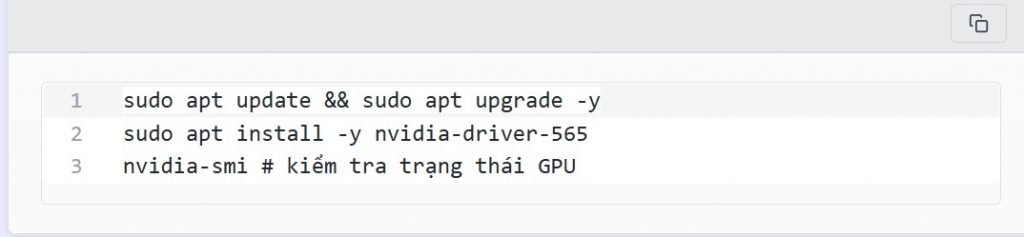
Once the GPU VM is running, the next step is to prepare the operating environment so it can support containerized AI workloads. Start by updating the operating system packages to ensure the latest security patches and software dependencies are installed.
Update the system and install the GPU driver:
- Step 3: Launch Jupyter Notebook Container
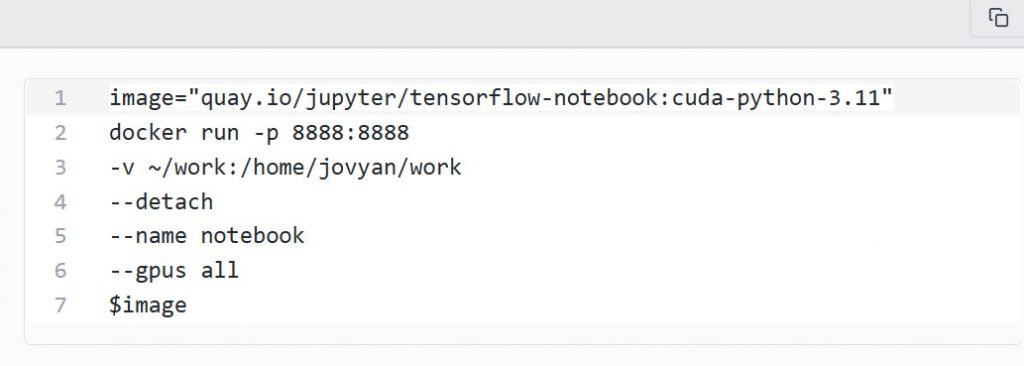
After the environment is prepared, the next step is to start a notebook container. Using containers is recommended because it simplifies dependency management and allows teams to use prebuilt AI environments instead of manually installing frameworks on the VM.
- Step 4: Retrieve Access Token
Once the container is running, Jupyter Notebook generates a secure access token that must be used for the first login. This token prevents unauthorized users from opening the notebook interface without authentication.
- Step 5: Access Notebook via SSH Tunnel
Instead of exposing the notebook service directly to the public internet, a more secure method is to connect through an SSH tunnel. This approach keeps the notebook port private while still allowing browser-based access from a local machine.
Use the following SSH command to forward local port 13888 to the notebook service running on port 8888 inside the VM. If your environment uses a jump server, the -J option can route traffic through that intermediate host.
This reduces setup time and allows technical teams to focus on model development rather than infrastructure management. For enterprises running multiple AI initiatives simultaneously, centralized notebook environments can also improve consistency across departments.
6. Which workloads are best suited for GPU notebooks?
GPU notebooks are ideal for tasks that require interactive development with accelerated performance. They are especially useful when teams need immediate feedback rather than long batch processing cycles. Common use cases include:
- Machine Learning Prototyping: Teams can build baseline models, compare approaches, and validate business value before investing in full production systems.
- Computer Vision: Image classification, object detection, OCR, and segmentation workloads often benefit greatly from GPU acceleration.
- Natural Language Processing: Notebook environments are commonly used for embeddings, prompt testing, fine-tuning smaller models, and retrieval workflows.
- Analytics at Scale: Some data processing and analytics workloads can run faster with GPU-backed environments, especially when datasets become larger.
- Internal Training and R&D: GPU notebooks are also valuable for education, internal innovation programs, and hands-on experimentation across teams.
7. Why choose FPT AI Factory for long-term AI growth?
Many businesses begin with one AI pilot project, but long-term success requires repeatable infrastructure. As teams grow, they need environments that are scalable, secure, and easier to operate across multiple use cases.
FPT AI Factory supports this transition by helping organizations build on infrastructure tailored for AI workloads rather than generic compute environments. For companies moving from experimentation to execution, that operational readiness can become a significant advantage.
AI Notebook from FPT AI Factory offers a centralized platform that creates better consistency across users and teams by standardizing tools, dependencies, and working environments, which helps reduce operational friction and onboarding time. Together, these advantages create a stronger foundation for enterprise AI expansion, enabling organizations to scale projects more efficiently and support long-term innovation
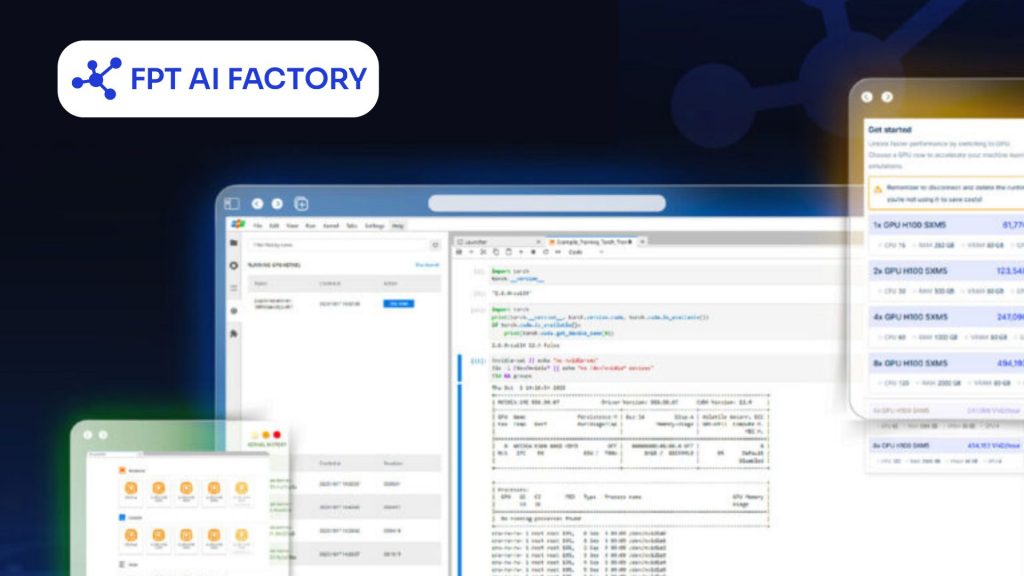
FPT AI Factory offers an AI Notebook with scalable features
GPU notebooks have become an essential tool for modern AI teams because they combine interactive development with accelerated compute performance. They help organizations experiment faster, improve model quality, and shorten the path from concept to production.
With FPT AI Factory, businesses can deploy scalable notebook environments, streamline GPU access, and build a stronger foundation for sustainable enterprise AI growth. New users get $100 in instant credits upon login to start exploring right away. For enterprise-grade scaling or bespoke solutions, please reach out via the contact form for a tailored consultation with the FPT AI Factory team.
Contact Information:
- Hotline: 1900 638 399
- Email: support@fptcloud.com